Tutorial: Getting Goodreads Reviews to Show up on Kobobooks (simplified)
A while back I posted a tutorial for accomplishing this feat, and it helped a lot of writers. Since then, I’ve learned of a simplified method that is fast and avoids having to create a new edition of your book on Goodreads.
Instead of creating a new Goodreads edition for your Kobobook, we’ll modify an existing edition of your ebook on Goodreads. Most people seem to add their books to Goodreads using their Amazon ASIN numbers, therefore this tutorial will use that edition.
If you want to keep your Amazon ebook edition separate on Goodreads for some reason, then follow the long-form tutorial.
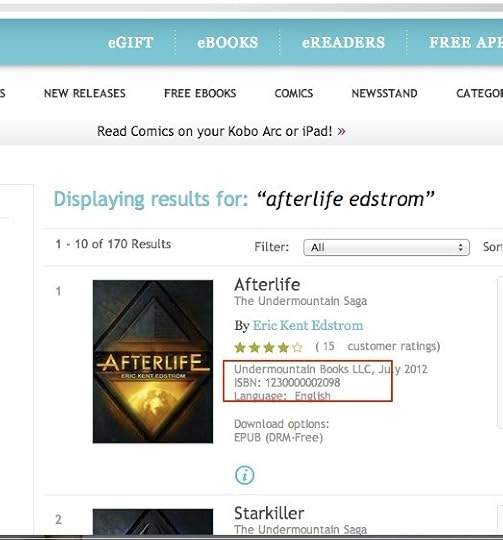
1) Go to Kobobooks.com and get the ISBN that Kobo assigned to your ebook. See the red rectangle in the image below.
Next, let’s go over to Goodreads and find your book. In this case I’m looking for the edition that uses Amazon’s ASIN number. I’ve highlighted what the ASIN looks like.
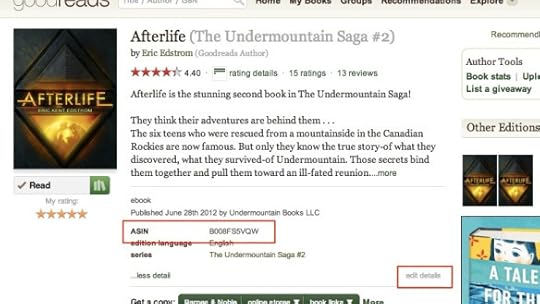
If you click “Edit Details”, you’ll get the screen below.
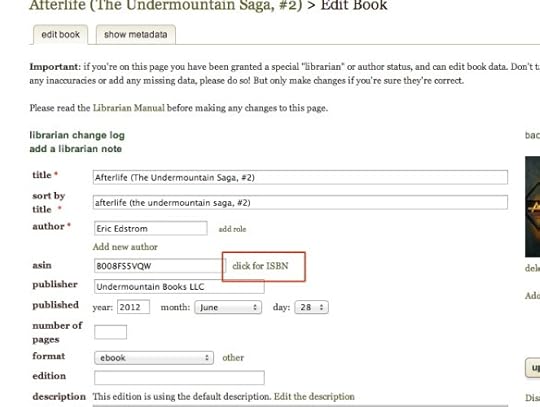
See where the ASIN is? And next to is is “click for ISBN”. Click that and the ASIN field will disappear and two ISBN fields will take its place.
Put the Kobo assigned ISBN number in the ISNB 13 field.
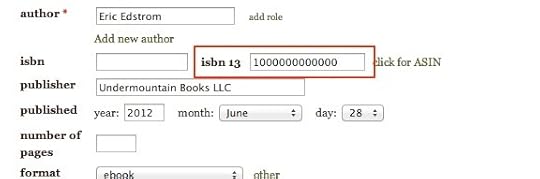
Save your changes and then go to Kobobooks and see if your Goodreads reviews are showing up. When I did it, they showed up immediately, but others have had to wait. Your star ratings might not populate over on Kobo right away either, but they should fill in eventually.
I hope this tutorial was helpful! If you have any questions or suggestions to improve this tutorial, please leave a comment.