Oracle Golden Gate Performance: Parallel Process Groups

For the "Classic" Replicat, there is just one process applying changes. But if the source system is doing lots of DML, this single process can easily be overwhelmed. This is especially true if the source database is a RAC system, and thereby can make changes at a huge rate.
Here's the ProblemFor example, on a large RAC system where I work, one of the replicated tables has about 25 million changes applied per hour. The single Replicat process can manage only 6 million changes per hour. As one would expect, we experienced several hours of lag time. It's not a question of the transactions running too slow--they are taking less than 1 ms. The problem is that there is only 1 process.
To solve this problem, we modify GoldenGate configuration and create additional Replicat process groups. In our case, the changes were happening about 4x faster than we could process them, so we modified our setup to have a total of 4 Replicats.
Update the Parameter FilesWith multiple Replicat processes, the work will be evenly split. This is achieved via the @Range function. In each parameter file, we add this Range parameter to the Map line:
@Range (Group#, #of Groups)
So, our original Replicat will contain @Range(1,4), and the other (new) Replicat parameter files will contain
@Range(2,4), @Range(3,4), and @Range(4,4)Checking the Final Configuration
Here is what our setup looked like with 4 Replicat process groups:
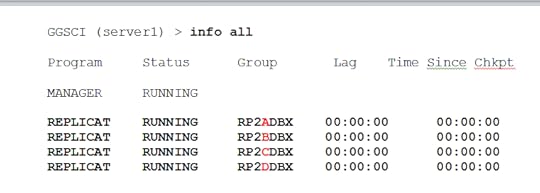
The Result
After we added the extra Replicat process groups, our ability to process transactions went up as expected. This is a good way to solve a performance bottleneck, but you must exercise great care in changing the parameter files.
Oracle GoldenGate 12c Implementer's Guide
$59.97
By John P Jeffries
Snappy Interviews: 100 Questions to ask Oracle DBAs
By Christopher Lawson