
Frances Caballo's Blog: 10 Twitter Tips Writers Need to Know, page 35
August 25, 2017
Indie Author Weekly Update – August 25, 2017

Today’s Indie Author Weekly Update includes posts from Jane Friedman, David Baer, Hugh Howey, Social Media Examiner, and the Alliance of Independent Authors. Topics range from Facebook to email marketing to tools for writers.
The eclipse is over and summer is nearing its end. What are your goals for the fall? Whatever they might be, I with you the best with your writing.
23 Powerful Ways To Connect With Your Audience on SocialMedia from David Baer: “Perhaps you’ve suffered from thinking “Who cares what I had for breakfast?” – or maybe you’ve just wanted to retain a sense of privacy and not share the small details of your life with the world.”
Writing Insights Part One: Becoming a Writer from Hugh Howey: “I started writing my first novel when I was twelve years old. I was thirty-three when I completed my first rough draft. That’s twenty years of wanting to do something and not knowing how. Twenty years of failure and frustrations and giving up. A big part of the problem is that I didn’t know what I didn’t know. I didn’t know which questions to ask, much less who might have the answers.”
How to Set Up a Creative Facebook Cover Video from Social Media Examiner: “When users visit your page, your Facebook cover photo is one of the first things they’ll notice. For new visitors, your cover photo can help represent your brand and portray your story in just a few seconds. It only makes sense that a short video can accomplish this better than a still photo.”
Best Tools of the Self-Publishing Trade: Running An Author Business from Alliance of Independent Authors: “What tool is indispensable when it comes to running your author business? Jay Artale consulted with ALLi members to find out the writing and self-publishing tools they couldn’t do without. Here’s her roundup of the software, tools, and services they use and recommend.”
MailChimp Alternatives for Authors from Jane Friedman: “When authors ask me for marketing advice, one of my first questions for them is: “Do you have a mailing list?” Too often, the author will say no. So my first piece of advice tends to be: Sign up to MailChimp and set up your mailing list.”
5 Ways to Use Facebook Pinned Posts to Hook Fans from Chris Syme: “Facebook pinned posts are the most underused piece of real estate on your Facebook page. They have the ability to entice people to walk in your door. But let’s start with why. It’s all about the numbers.
Quote of the Week

 Author of this blog: Frances Caballo is an author and social media strategist and manager for writers. She’s a regular speaker at the San Francisco Writers Conference. In addition, she’s a contributing writer at TheBookDesigner.com, and blogger and Social Media Expert for BookWorks. She’s written several social media books including the 2nd edition of Social Media Just for Writers and The Author’s Guide to Goodreads. Her focus is on helping authors surmount the barriers that keep them from flourishing online, building their platform, finding new readers, and selling more books. Her clients include authors of every genre and writers’ conferences. Not sure how you’re doing online? Sign up for my free email course.
Practical tips for marketing your books on the social web

Get a free copy of Avoid Social Media Time Suck from Smashwords!
SaveSave
SaveSave
SaveSave
SaveSave
SaveSave
The post Indie Author Weekly Update – August 25, 2017 appeared first on Social Media Just for Writers.


August 21, 2017
Amazon Book Marketing Tips with Dave Chesson
I recently interviewed Dave Chesson of Kindlepreneur.com as part of the Conversations with Frances series. Dave was lively, funny, down-to-earth, and incredibly informative. He may understand Amazon better than Amazon itself. If you want to learn how to make your books rank higher on Amazon, listen to this interview and be sure to visit his website.
Book Marketing with Dave Chesson
Amazon Kindle Book Description Generator – This tool is available on his website for free! Use this tool to create beautiful descriptions without knowing how to use html. Enter Book Description Generator in Google to find it or go to Kindlepreneur.com.
Kindle Calculator – This tool can tell you how well a book is doing on Amazon. It also tells you how many books per day the author is selling so that you know whether the author is making money and whether the subject matter is worthwhile to write about. Maybe there are a lot of books on that topic but the authors aren’t making a lot of money vs. another topic where authors are making a lot of money. Now you know if there’s a market on Amazon for the book you’re thinking about writing. Dave said: use it for good. Use it to determine how a niche is doing.
Amazon ads – Dave is a big fan of Amazon Marketing Services. People go to Amazon for books and they’ll see your ad when they are buying a book. Facebook ads are wonderful but we don’t go to Facebook to look for a book. We go to Amazon to look for books. On Amazon, someone may have a hankering for a sci-fi military book and there is his ad for a sci-fi military book. AMS gives the author the ability to make it so the right market will see your book. That doesn’t mean you will get the sale. They will put the book in front of people. If people don’t click on your ad, either your cover isn’t enticing or the title isn’t right. If they do click but don’t buy, usually the problem is the book description. So AMS indicates where in the funnel of your sales process there ‘s a problem.
Dave created a free course on Amazon advertising for authors.
Back Book Blurb – use this search term to learn how to write a book description.
One tip when writing a book description – Spend 80% of your time writing the first sentence. That first sentence is the hook. Think about an engaging, reaffirming, curiosity-driving first sentence.
What factors are important for ranking high on Amazon? There are two kinds or rankings: category ranking and keyword ranking. Category ranking is where you’re trying to be a best seller in a particular category. With keyword ranking, Amazon presents a list of keywords (its search engine is called A9) and Amazon tries to figure out which book you want to buy. A9 tries to figure out which books should be at the top and the bottom. No-name authors can do well because they can be discovered every day on Amazon. Know which things you want your book to show up for and then know which things will help you to show up on the top. Books that show up on the top get 27% of the clicks. If you are No. 2, you’ll get only 13% of the clicks. If you’re No. 4, you get one-fourth of the traffic that No. 1 gets. How do you get Amazon to move you up to No. 1? Amazon’s algorithm is about 1 thing: to make Amazon the most sales. So the conversion rate determines who is No. 1. Tip: Instead of giving people the link to your book, give them the keywords to find your book.
What are the top elements of book marketing? Having a plan. Marketing should begin when you decide to write a book. They day you say I need to write this book is the day you need to start marketing it. Keyword research is one of the first things you need to do.
New authors need to do the research to make sure there is a market for their books.
Short-term as a new author: write to the market. Long-term as an author: build your collection, build your email list
The way to get fiction readers to sign up for your email is to write that first book with the intention of having a prelude or back story, which you’ll provide for free to your email list.
Facebook ads are a wonderful platform for fiction authors.
Email lists and platform are very important. He can’t stress the email list enough. Drive reader relationships to the next level by writing good emails.
Author bios are important to cultivating relationships and building your brand.
Articles to find based on these keywords via Google:
Back book blurb
Kindle keywords
Fiction keywords or fiction kindle keywords
Book Description Generator
Author of this blog: Frances Caballo is an author and social media strategist and manager for writers. She’s a regular speaker at the San Francisco Writers Conference. In addition, she’s a contributing writer at TheBookDesigner.com, and blogger and Social Media Expert for BookWorks. She’s written several social media books including the 2nd edition of Social Media Just for Writers and The Author’s Guide to Goodreads. Her focus is on helping authors surmount the barriers that keep them from flourishing online, building their platform, finding new readers, and selling more books. Her clients include authors of every genre and writers’ conferences. Not sure how you’re doing online? Sign up for my free email course.
Practical tips for marketing your books on the social web
Save time online with Avoid Social Media time Suck!
The post Amazon Book Marketing Tips with Dave Chesson appeared first on Social Media Just for Writers.
August 18, 2017
Indie Author Weekly Update – August 18, 2017

Today’s installment of the Indie Author Weekly Update includes posts on websites, discoverability, productivity, and SEO. I hope you enjoy the posts and the practical information below.
As the month inches to a close and can feel as though summer is slipping through our fingers. Where I live, at least, warm weather can surprise us in September or October and that’s what I’m hoping for. Let summer last as long as possible!
Indie Author Updates
Discoverability: Go Wide by Joel Friedlander: “We often talk about the absolute necessity of making our books discoverable to readers. I started writing about discoverability as a key to success in online bookstores in 2011. But what does it really mean? This question most often leads to a discussion about book metadata, a field all indie authors come to understand, if only when they go to upload their book files to a retailer and are faced with a long form to fill out.”
Online Author Etiquette: 12 Laws of the Amazon Jungle from Anne R. Allen: “After I wrote my post last month on cyberbullying in the publishing community, a lot of people asked if there’s any way to avoid these online terrorists. I wrote a post on the subject back in 2013, soon after my nightmare encounter with the Goodreads Mean Girls, who attacked me with everything from one-star “review” swarms to death threats that included pictures of my house.”
6 Common Sense Steps to Secure a WordPress Website from Jane Friedman: “I almost was that next victim. In 2012 I was targeted by a botnet that attacked WordPress sites. I never lost control of my site, but I did spend quite a few hours fighting them off. I had to learn the hard way that securing a site before you encounter a problem can prevent a lot of panic, but you don’t have to make my mistake.”
11 Top Tools To Monitor Your Social Media Presence In 2017 from Adam Connell at Blogging Wizard: “Been blogging for a while and not making any real impact? Even though you have the best of intentions, you seem to have no eyes on your blog, no subscribers, and very few social media followers. Starting a blog and growing your blog are two different things. When starting a blog you have to find your niche, research hosting plans, figure out WordPress, create content and finally get your theme and website up and running. But, then the next thing is getting people to your blog.”
The definitive guide to SEO for authors by Nathan Bransford: “What if there was a way to virtually guarantee your book hits all the bestseller lists without being a “big name” author or buying your way onto the lists? Sound impossible? People have done it. And here’s the secret… You need to build an AUDIENCE of people ready to pre-order your book. It’s the exact strategy that Tim Ferriss used to become a four-time New York Times best seller. In this article (NB note: written by SEO expert Michael Tesalona) we’ll break down exactly how it’s done. Spoiler alert: you’ll need to get very good at blogging and SEO.”
4 Social Media Productivity Tips for Authors by Frances Caballo from TheBookDesigner.com: “Every writer’s dream is to publish a book that soars in popularity and sells oodles of copies. And perhaps every writer’s nightmare is learning how to market a book and then doing the marketing. What’s a writer to do? It’s like the chicken and the egg quandary – which came first? Well, in the world of publishing, the marketing starts before the book is finished. The idea for the book comes first, followed by the simultaneous acts of marketing and writing, and finally the book appears on virtual shelves, followed by even more marketing.”
Quote of the Week

Author of this blog: Frances Caballo is an author and social media strategist and manager for writers. She’s a regular speaker at the San Francisco Writers Conference. In addition, she’s a contributing writer at TheBookDesigner.com, and blogger and Social Media Expert for BookWorks. She’s written several social media books including the 2nd edition of Social Media Just for Writers and The Author’s Guide to Goodreads. Her focus is on helping authors surmount the barriers that keep them from flourishing online, building their platform, finding new readers, and selling more books. Her clients include authors of every genre and writers’ conferences. Not sure how you’re doing online? Sign up for my free email course.
Practical tips for marketing your books on the social web
Save time with Avoid Social Media time Suck!
The post Indie Author Weekly Update – August 18, 2017 appeared first on Social Media Just for Writers.
August 14, 2017
Two Questions I Ask Every Writer
 Whenever I first talk with a writer who’s considering hiring me, I always ask the same questions:
Would you tell me about your book?
Who are your readers?
I always enjoy hearing about an authors’ books. There’s such a wide range of creative endeavors. Books vary in subject matter from science fiction to nonfiction to women’s fiction. The diversity is luscious.
After hearing about their books, I want writers to tell me for whom they are writing. Is it the young adult crowd, or primarily women, or other psychoanalysts?
Too often, my second question stumps authors. Sometimes they say, “Well, everyone can enjoy my book.” Or they simply admit that they wrote the book without any thought to an audience.
Creativity vs. Marketing
Don’t get me wrong; it’s perfectly fine to lose yourself in the creative endeavor of writing a book without giving a single thought to your prospective audience.
When I started my novel 17 years ago (no, I haven’t finished it), I didn’t give any thought to my reader audience. I too was lost in character development, plot, and keeping historical facts accurate.
But at some point, an author needs to turn his or her perspective away from pen and paper – or keyboard and monitor – and start to think about who your readership might be.
To say that your book is for “everyone” because “everyone” can enjoy your story is, well, unrealistic.
Not everyone enjoys books intended for the young adult audience. And despite the popularity of romance novels, I prefer to read literature, historical fiction stories, and thrillers.
So one person can like several genres, but you have to find people who will read your genre and specifically your book.

Pew Research Center
Depending on how long you’ve been reading this blog, you know that I tend to rely on the Pew Research Center’s studies on social media use for demographic information. And I use that demographic information to help me determine where authors should spend their time online. You’ll find the latest study results here.
This is their main graph, which shows Facebook’s dominance among social platforms.
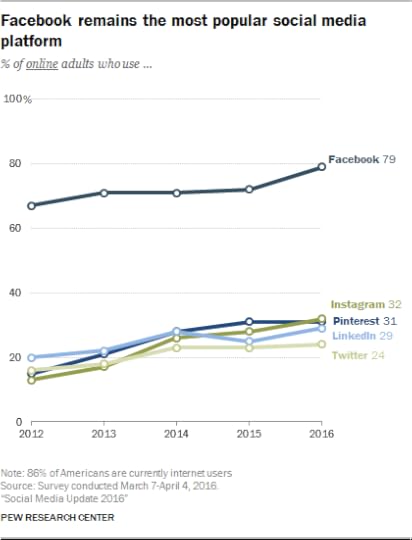
When you dial down into this report, you’ll see that on some platforms, women, and Millenials dominate while on others men and minorities comprise the majority of users.
I encourage you to look at these numbers carefully. I’m a big proponent of being efficient with time. You’re a writer, so you want to spend as much time writing as possible, right? Then use these numbers to determine which social media networks you need to focus on and which you can let go of.
You don’t want to waste your precious time networking on platforms where your readers don’t hang out. No, you want to conserve your energy for your writing and post and socialize on those sights where you’ll find your readers, colleagues, and prospective readers.
So as you write your book, take a break now and then to think about how you’ll market your book because after all the time you devote to writing, you’ll want your endeavor to be profitable.
Determine who your audience is and which social media networks you need to be on. Then start posting and socializing and meeting colleagues and prospective readers and book bloggers.
At the same time, build a website and consider blogging. Taking care of all of these steps while you’re still writing will help you hit the ground running when you finally publish your book.
Author of this blog: Frances Caballo is an author and social media strategist and manager for writers. She’s a regular speaker at the San Francisco Writers Conference. In addition, she’s a contributing writer at TheBookDesigner.com, and blogger and Social Media Expert for BookWorks. She’s written several social media books including the 2nd edition of Social Media Just for Writers and The Author’s Guide to Goodreads. Her focus is on helping authors surmount the barriers that keep them from flourishing online, building their platform, finding new readers, and selling more books. Her clients include authors of every genre and writers’ conferences. Not sure how you’re doing online? Sign up for my free email course.
Practical tips for marketing your books on the social web
Save even more time with Avoid Social Media time Suck!
The post Two Questions I Ask Every Writer appeared first on Social Media Just for Writers.
August 11, 2017
Indie Author Weekly Update – August 11, 2017

Each week in the Indie Author Weekly Update I try to vary the sources of information I bring you. New this week are Dave Chesson and his guest blogger Paul Kilpatrick. Be sure you don’t miss Reedsy’s list of the best book review blogs. And of course, Jane Friedman’s insights are also such a treat.
Can you feel summer coming to a close? I hope you enjoy the days that remain.
Indie Author Updates
Best Book Review Blogs of 2017 by Reedsy: “Discover the best book review blogs in your preferred genre. From general fiction to YA paranormal romance, our search bar connects you to a vetted catalog of active book blogs and thoughtful, quality book reviewers.”
10 Reasons to Start an Author Blog: And Why It’s Easier than You Think from Anne R. Allen: “Some people have been saying blogging is dead for a while now. But for authors, it’s anything but. On a recent list of the most overrated marketing strategies, blogging was close to the bottom. Only 6% of marketers thought it was overrated. (12% found email marketing overrated.) It’s true that it’s harder to get a readership now than it was a few years ago because of stiff competition, but blogging is still a valuable use of a writer’s time.”
3 Blogging Tools to Improve Your Content Quality from Social Media Examiner: “Want to publish more polished blog posts? Looking for free or low-budget tools to help? In this article, you’ll discover three blogging tools that will help you catch typos and improve readability of your blog posts.”
What Belongs on an Author Website Homepage? 4 Key Elements by Jane Friedman: “Whether you’re an emerging author or one that is well-established, it can be challenging to figure out what belongs on your website’s homepage and what to say about yourself on the front door to your online presence.”
How To Use Beta Readers To Launch Your Book from Dave Chesson and by Paul Kilpatrick: “There’s a way that you, as an author, can quickly build a promotional team that will not only help improve your book, but improve your book launch as well, and that’s called a book beta team. What is a beta team? It’s when you let a pre-approved group of people read your mostly-finished book to discover issues that are revealed during the course of normal reading.”
Quote of the Week

Author of this blog: Frances Caballo is an author and social media strategist and manager for writers. She’s a regular speaker at the San Francisco Writers Conference. In addition, she’s a contributing writer at TheBookDesigner.com, and blogger and Social Media Expert for BookWorks. She’s written several social media books including the 2nd edition of Social Media Just for Writers and The Author’s Guide to Goodreads. Her focus is on helping authors surmount the barriers that keep them from flourishing online, building their platform, finding new readers, and selling more books. Her clients include authors of every genre and writers’ conferences. Not sure how you’re doing online? Sign up for my free email course.
Practical tips for marketing your books on the social web
Get a free copy of Avoid Social Media Time Suck from Smashwords!
The post Indie Author Weekly Update – August 11, 2017 appeared first on Social Media Just for Writers.
August 7, 2017
How I Accumulated 38,000 Twitter Followers
 I remember when I joined Twitter six years ago. Within the first day, I had four followers, and I recall running out of my office and into the kitchen so I could tell my husband that four people were following me. “Me!” I said.
I was stoked.
I didn’t know back then that to gain followers you had to follow people, so I did nothing, aside from posting a few tweets every day.
Don’t Be a Twit
Then I did the worst thing possible. (I made other mistakes in those days but, hey, I was still learning.) I signed up for an application like TrueTwit. It might even have been TrueTwit I just can’t recall right now. Basically, the application “verifies” that someone who follows you isn’t a bot or a spammer by making new followers click a link. If they don’t click the link, you can’t follow them back, assuming they’re worth following.
If someone locks down their account, preventing people from following, it’s their fault for being overly cautious. The result? Their account doesn’t grow. They are virtually turning their back to Twitter’s social experience and the opportunity to socialize with their readers and meet new readers as well as meet new colleagues.
When I used the application, I obviously didn’t know better. After a year or two, I might have had 100 followers. Then I read a radical suggestion. Someone recommended that anyone who used an app like TrueTwit should dump it immediately and start following 50 people a day.
“So that’s why my account hasn’t been growing,” I said to myself. I immediately disengaged from TrueTwit and started following my target demographic, authors.
By the end of the year, I gained about 5,000 followers, and my account grew from there to its present state of 38,000 followers.
So my first bit of advice is don’t use TrueTwit or any application that’s similar to it and if you want to have followers, you need to follow people. Actively start to follow 50 people a day. Starting now.
Unfollow Inactive Twitter Accounts
Not everyone you follow will follow you back. So after giving people a week or so to follow you back, you’ll need to unfollow them. Just say adios to them.
To unfollow these Twitter users, you’ll need to use an application such as Tweepi or ManageFlitter. I’ve used both apps, and I look them both. ManageFlitter also keeps track of inactive accounts (I believe Tweepi does too) – those people who followed you but then stopped tweeting. I unfollow those accounts as well because I don’t want to tweet to inactive accounts.
ManageFlitter has quite a few awesome features. For example, it identifies bots and spam accounts, I profiled all of its features in a how-to post three years ago. The instructions and screenshots haven’t changed, so I recommend that you visit it here.
Pay Attention to Trending Hashtags
Every day I take a look at trending hashtags. Sure, sometimes they’ll be about sports and other times about politics, but today (8/2/17) James Baldwin was trending because it was his birthday and if he were still alive, he would have been 93.

James Baldwin is one of my favorite authors. (If you haven’t read Another Country, look for it at your favorite library or bookstore. It’s a treasure.) Seeing his name as a trending hashtag, well, you can imagine my excitement. I posted memes on Twitter and my two Facebook accounts.
My real point here is that you never know what you’ll find in trending hashtags. If you check them every day, you’ll no doubt find hashtags relating to writing, publishing, and reading. Friday reads often trends on Twitter as does NaNoWriMo in November.
Watching trending hashtags and then posting about them can help widen your circle of contacts and followers.
Be Sociable
My last tip is to be sociable.
As I’ve said many times, the essence of social media is to be social and sociable. So ask and answer questions. Say thank you. And be open to meeting new people.
What are your favorite Twitter tips?
Author of this blog: Frances Caballo is an author and social media strategist and manager for writers. She’s a regular speaker at the San Francisco Writers Conference. In addition, she’s a contributing writer at TheBookDesigner.com, and blogger and Social Media Expert for BookWorks. She’s written several social media books including the 2nd edition of Social Media Just for Writers and The Author’s Guide to Goodreads. Her focus is on helping authors surmount the barriers that keep them from flourishing online, building their platform, finding new readers, and selling more books. Her clients include authors of every genre and writers’ conferences. Not sure how you’re doing online? Sign up for my free email course.
Practical tips for marketing your books on the social web

Join Dave Chesson of Kindlepreneur on Wednesday, August 9 at 11 am PST as we discuss Amazon and the best book marketing strategies.
The post How I Accumulated 38,000 Twitter Followers appeared first on Social Media Just for Writers.
August 4, 2017
Indie Author Weekly Update – August 4, 2017

The focus for this week’s Indie Author Weekly Update is on social media networks. You’ll find tips about Facebook Groups, Snapchat and YouTube. I hope you like this week’s selection.
Indie Author Updates
What is Facebook Stories and how does it work? from Pocket Lint: “Facebook could jumpstart its Snapchat clone by letting social media stars and public figures post Stories publicly. When Facebook Stories launched globally in March, you could only share to all your friends or a subset of them. Now if you allow public followers, you can post your Story publicly so anyone can watch.”
Why You Should Market to Grow Your Author Platform–Not to Sell Books by Matt Aird from TheBookDesigner.com: “As authors, we’re responsible for spending our advertising dollars and marketing time in the most efficient ways possible. We don’t have five- or six-figure advertising budgets, or a team of people working around the clock. We need to get maximum impact from every single dollar and minute we invest. What most authors might not consider however, is that there are two ways we can advertise. We can advertise to sell books now. Or, we can market to build an Author Platform.”
Marketing tools for any self-published book by Paul Jarvis: “The advice you see on blogs telling you how to get people to buy your book is all pretty much awful. Guaranteed in 5 easy steps! This isn’t because of bad intentions or even some sort of trickery, it’s just that there’s no one-size-fits-all solution to generating sales for your book. You can achieve success—however you define success—by doing practically anything that goes with or even against current advice online for self-published book marketing. The “self” in self-publishing means you’ve got the reins.”
What’s Changing in Facebook Groups by Kristen Oliphant: “If you’ve been around for a while, you KNOW how important Facebook groups are to me! I wrote a post for Jane Friedman about using Facebook pages vs Facebook groups and have been steadily growing my Create If Writing Facebook group since I started the podcast in 2015. But things are always changing on the internet and some HUGE Facebook groups updates are taking place in 2017 that we need to discuss. Like my reach dropping in my own group as it did on my Facebook page.”
How YouTube Helps Your Social Media Marketing from from Sabrina Ricci: “It has become more convenient today to give people a lasting impression about you on social media through the different online platforms–that is, depending on what you are into. Facebook is not the only one that offers the opportunity for Internet marketing. Using another platform like YouTube, for instance, can become a helpful business strategy to generate online traffic.”
18 Hidden Snapchat Hacks & Features You’ll Wish You Knew About Sooner from HubSpot: “Snapchat, the one-to-one messaging app with more than 160 million daily active users, has earned a reputation for fast growth and innovation. But despite its success, it isn’t the most user-friendly app I’ve ever played around with. Many of its best features are buried so deep in the app that a lot of people don’t even know they exist. In July 2017, Snapchat added even more features in their release of a new version, and some of these features have totally reshaped how people use the app in the first place.”
The Complete Guide to Facebook Groups: How to Create a Group, Build a Community and Increase Your Organic Reach from Buffer: “Facebook has recently launched Groups for Pages, enabling the 70 million+ Pages on Facebook to create their own unique communities and feeds. This update provides new ways for brands to boost engagement and could go some way to countering the decline in organic reach Facebook Page owners have been experiencing for the past few years. More than 1 billion people around the world use Groups. And more than 100 million people see Groups as the most important part of their experience on Facebook. Facebook Groups are the place to connect with other like-minded people and are becoming increasingly important for brands and businesses aiming to cultivate a community.”
Quote of the Week

Author of this blog: Frances Caballo is an author and social media strategist and manager for writers. She’s a regular speaker at the San Francisco Writers Conference. In addition, she’s a contributing writer at TheBookDesigner.com, and blogger and Social Media Expert for BookWorks. She’s written several social media books including the 2nd edition of Social Media Just for Writers and The Author’s Guide to Goodreads. Her focus is on helping authors surmount the barriers that keep them from flourishing online, building their platform, finding new readers, and selling more books. Her clients include authors of every genre and writers’ conferences. Not sure how you’re doing online? Sign up for my free email course.
Practical tips for marketing your books on the social web
Join Dave Chesson of Kindlepreneur on Wednesday, August 9 at 11 am PST as we discuss Amazon and the best book marketing strategies.
The post Indie Author Weekly Update – August 4, 2017 appeared first on Social Media Just for Writers.
July 31, 2017
Have You Seen These Social Media Changes? Part II
 Last week I wrote about several social media changes, namely to Facebook and Twitter. Today I continue the discussion.
Let’s start the discussion with Twitter Moments.
Changes to Twitter
Initially a feature for news organizations, Twitter Moments are now available for everyone to use.
This is how to get started:
Go to your Moments tab, located between Home and Notifications on the taskbar. (Look for the lightning symbol.) Give your Moment a title by clicking Title your Moment. Then add a description, and upload an image to set the cover. Then, select some tweets you’ve sent, liked, or retweeted. Once you’ve completed your moment, click Publish in the top left-hand corner. (Note: Be sure to crop your photos right on Twitter for mobile navigation.)

I created a simple moment that includes a tweet about book patches, the Hay Festival in Segovia, Spain, news about the Pulitzer Prize winning The Underground Railroad (read it and loved it!), and two more tweets.

Once you create your moment, send your tweet.

This is how your new moment will appear on your profile.

Have you noticed that when you reply to someone on Twitter, that person’s username is no longer counted in the number of characters used? That’s right. Just click the thought cloud, which replaces the arrow, and type.

Direct Messages on Twitter
There are new features to direct messages on Twitter as well. First, you don’t need to have a mutually follow each other in order to send someone a DM. Anyone you don’t follow can send you a DM if you’ve opted to receive DMs from anyone or you previously sent that user a DM.
Also, you have the option to mute direct messages from people with whom you’re not connected and report them as inappropriate. Just tap the area next to the direct message and two icons will appear, the option to mute and the option to delete.

Once you opt to mute a DM, Twitter will ask you whether it’s spam or abusive. Select an option, if you’d like, and click Next.

Twitter will ask you again if you want to report the user as having spammed you. From now on that user won’t be able to contact you unless you message them first. Twitter will also give you the option to block the account.

By the way, to send a direct message, go to Messages and click New Message. Then type the username of the person you want to contact.
Pinterest now offers desktop notifications. If you’re an avid Pinterest user, you might enjoy this option. Just go to Settings and click Chrome browser notifications.
To access the Help Center, click the question mark in the lower right-hand corner of the page.

To add an image or create an add, now check the red and white plus sign on the top taskbar.

Have you noticed that you can no longer Like an image? You can only save an image to a pinboard, send it to a friend, or post it online.
What’s new on Instagram is the ability to save your Instagram Live segments. To go live on Instagram, tap on your story profile photo. You’ll see a plus sign next to it. Then enable your camera and allow access to your microphone.

Your next options will be to select from creating live footage that disappears after the broadcast ends; a photo or video that disappears in 24 hours; or a boomerang, a time-lapse video created from a burst of images.

Once you end your broadcast, tap on End in the top-right corner. Then from the pop-up screen, choose End Live Video. Next, you’ll see the number of views of your video and have the option to share your video for the next 24 hours. When you tap Share, the video will upload to replay on your profile. You’re done!
LinkedIn has completed revamped its site. Your avatar is now in the middle of the top section instead of to the left. Your description appears directly below your avatar. Directly beneath that top box is your summary.

Skills and endorsements look completely different. Instead of a long list of skills, LinkedIn will list the top three.
 Publications now appears in the Accomplishments section.

This post concludes my two-part series on changes in social media. What new changes would you like me to profile in a future post?
Author of this blog: Frances Caballo is an author and social media strategist and manager for writers. She’s a regular speaker at the San Francisco Writers Conference. In addition, she’s a contributing writer at TheBookDesigner.com, and blogger and Social Media Expert for BookWorks. She’s written several social media books including the 2nd edition of Social Media Just for Writers and The Author’s Guide to Goodreads. Her focus is on helping authors surmount the barriers that keep them from flourishing online, building their platform, finding new readers, and selling more books. Her clients include authors of every genre and writers’ conferences. Not sure how you’re doing online? Sign up for my free email course.
Practical tips for marketing your books on the social web
Get a free copy of Avoid Social Media Time Suck from Smashwords!
The post Have You Seen These Social Media Changes? Part II appeared first on Social Media Just for Writers.
July 28, 2017
Indie Author Weekly Update – July 28, 2017

This week’s Indie Author Update includes posts from Chris Well, Penny Sansevieri, Buffer, Social Media Examiner, Book Riot, and Authority Pub. Topics range from email lists to using Facebook as a substitute for a book club to Amazon ads. The topics are diverse this week.
Meanwhile, I hope you’re enjoying the summer and finding pockets of inspiration wherever you are.
18 Experts: Why Every Author Needs an Email by Chris Well: “Despite all the tools available for promoting your books and building your author presence online, it would be a mistake to discount the value of a healthy email list. Building a list of email subscribers allows you to engage with your readers, drive new book sales, and insure your author platform against inevitable changes in search engines and social networks. Don’t believe me? Here are 18 influencers–including authors, bloggers, podcasters, and other online teachers–who explain why you need an email list.”The Ideal Facebook Cover Photo Size And How To Make Yours Stand Out (Including 12 Excellent Examples) by Buffer: “The Facebook cover photo. It feels like it should be so easy to pick one, and yet finding the perfect image feels super hard at the same time. You only get one; one photo, one shot to make a good impression, one chance to convey a distinct feeling, so what should it be?”
Will Facebook Become the Ultimate Online Book Club? from Book Riot: “I’ve noticed a trend that I’m not sure I like. Many friends are spending more time on Facebook and less elsewhere on the internet. If they jump out of Facebook it’s because someone shared a promising link.”
Instagram Live Replays: What Marketers Need to Know from Social Media Examiner: “Are you using live video on Instagram? Wondering how to save Instagram live videos so followers can replay them later? In this article, you’ll discover how to get an extra 24 hours of view time for your live videos with Instagram Live video replays.”
40 Self-Publishing Resources, Tools, and Assets To Accelerate Success from Authority Pub: “The business of writing, designing, editing, publishing, marketing, and selling your books requires the kindness of strangers — or at least a little help from your online friends who offer various products, services, and insights to help you stay focused, motivated, and up-to-speed on the ever-changing self-publishing landscape.”
Leveraging Amazon’s Ad System by Penny Sansevieri: “Many of you have probably seen (and maybe even tried) Amazon’s ad system, via their Amazon Marketing Services (AMS). I’ve heard from a few authors they’ve tried it, albeit it not successfully. Ads, whether Google, Facebook, Twitter, or AMS, follow a general rule (which we’ll cover in this piece) and then there’s Amazon’s own, special spin, which we’ll discuss as well. So let’s dig in.”
Quote of the Week

Author of this blog: Frances Caballo is an author and social media strategist and manager for writers. She’s a regular speaker at the San Francisco Writers Conference. In addition, she’s a contributing writer at TheBookDesigner.com, and blogger and Social Media Expert for BookWorks. She’s written several social media books including the 2nd edition of Social Media Just for Writers and The Author’s Guide to Goodreads. Her focus is on helping authors surmount the barriers that keep them from flourishing online, building their platform, finding new readers, and selling more books. Her clients include authors of every genre and writers’ conferences. Not sure how you’re doing online? Sign up for my free email course.
Practical tips for marketing your books on the social web
Get a free copy of Avoid Social Media Time Suck from Smashwords!
The post Indie Author Weekly Update – July 28, 2017 appeared first on Social Media Just for Writers.
July 24, 2017
Have you seen these changes on Facebook and Twitter?
 Social media is always evolving. It changes, retracts, expands, and moves on.
The only constant about social media is that it never stays the same. New features are added and redesigns occur. Keep reading to find out what’s new on Facebook and Twitter.
Remember when Facebook didn’t have a timeline? Instead it had five small images across what it now known as a timeline and small avatar off to the left. Before that, Facebook was known as Thefacebook and other than the brand color, the early version of Facebook is virtually unrecognizable.

A lot can happen in 13 years and when we look at what Facebook looks like today, the differences are amazing.
Set Up Your Shop on Facebook
There are some features on Facebook as well that I want to point out. First, did you know that you can set up a shopping portal on your Facebook page? Just select Shop from the column on the left then click continue from the popup that appears. Note: Unless you use shopify, it’s best to redirect readers with a link to Amazon or other online retailers.

Preferred Audience Options
Here’s another change: Did you notice how the status update box has expanded to include a preferred audience option? Available only on pages, audience optimization, according to Facebook, “is an organic targeting tool to help publishers reach and engage with their audience on Facebook.”
There are three features to preference audience options.
You can add tags to describe your readers’ interests.
You can limit the visibility of your content to specific demographics.
You can add interest tags.
When you click on preferred audiences, you’ll see that you can easily add audiences you prefer and audience restrictions. Once you finish, click save.

Facebook has made certain features super easy to access by adding a colorful array of icons below the status update box.
Just click an image to access event creation, notes, advertising, etc.
Outgoing Personal Messages
Another change is the option to have an outgoing message available when someone private messages you and you don’t have your phone or computer nearby. Just go to settings and then messaging and scroll down. Just type your outgoing message and click save.

Revised Status Updates
On your Facebook profile, the status update box has a range of options.

First, let’s look at the row of colors from which you can select to create a simple text image. Click a color, type your message, and publish.
Here’s a text image I created right on Facebook. This is Facebook’s first foray into graphics.

By clicking or tapping the happy face icon, you’ll have access to a host of emojis you can use.

You can also tag friends, add a sticker, add an image or video, check in to a venue, or edit the date of your post.

Changes on Twitter
Twitter has had a few changes as well. Have you noticed that the Notifications tab is more streamlined and it’s easier to determine when you’ve been retweeted? How? The green retweet icon appears next to a user’s name.

In addition to muting certain people, you can also now mute notifications from people. In my case, I’ve muted anyone who uses the default egghead.

Mute Words and Phrases on Twitter
Do certain words or phrases bother you? You can now mute words in addition to people. Just go to your settings and click Notifications. Just click “Mute specific words” from the above screenshot. When you click on Mute specific words you’ll see a popup. Just click Got it.

Then click Add to mute specific words or phrases.

Type the word or phrase you wish to mute and click add. Be sure to note how long you want the word or phrases muted.
There are more changes that I’ve noticed but I’ll have to review those next week!
Author of this blog: Frances Caballo is an author and social media strategist and manager for writers. She’s a regular speaker at the San Francisco Writers Conference. In addition, she’s a contributing writer at TheBookDesigner.com, and blogger and Social Media Expert for BookWorks. She’s written several social media books including the 2nd edition of Social Media Just for Writers and The Author’s Guide to Goodreads. Her focus is on helping authors surmount the barriers that keep them from flourishing online, building their platform, finding new readers, and selling more books. Her clients include authors of every genre and writers’ conferences. Not sure how you’re doing online? Sign up for my free email course.
Practical tips for marketing your books on the social web
Get a free copy of Avoid Social Media Time Suck from Smashwords!
The post Have you seen these changes on Facebook and Twitter? appeared first on Social Media Just for Writers.
10 Twitter Tips Writers Need to Know

- Frances Caballo's profile
- 274 followers

