Clarissa Draper's Blog, page 8
February 25, 2013
Stare at Art to Help Descriptive Writing

Recently, when I was in NYC, I went to The Metropolitan Museum of Art. Because I didn't have enough time to examine each exhibit, I bought the guide book. Inside the book is many of the artifacts, painting, and art from the museum that I can study at length and at my leisure.
Staring or studying art is a smart practice for writers.
Why?
It can really enhance our description.
How?

Take this Lannuier card table from the year 1817.
Study the table - notice the texture. Does it feel smooth under your hand? Hard? Run your mind's hand over the intricate detail of the angel, the legs, the ornamentation. What color would you say it is?
How do you think it smells? Like furniture polish? Like wood? Like old wood?
Does that table conjure up any memories? Did your grandparents own one? What would you place on the table? Would you crochet a doily for the top? Would flowers go well on top? What about another ornament?
What character would own that table? What would that character say if you left a glass of water on it without a coaster?
Write down your thoughts, feelings and insights about the object.
By taking time out of your day to study objects, to use your imagination, and to write it down, your creativity and ability to describe will increase.
Do this everyday and see what happens.


February 21, 2013
The Gunman in Black
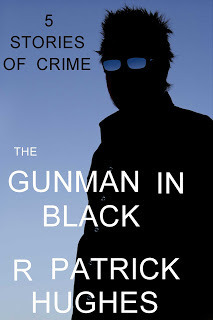
Our friend and fellow blogger R. Patrick Hughes has a new book out. The Gunman In Black contains five short crime stories that will leave you haunted. Not because of any magical power but because his stories deal with crime, all too real crime.
A gunman in a mall.
An abused boy takes action.
A wife's revenge.
At only $1.99, pick it up today.
By the way, Richard, I saw the last page. I'm touched, thank you.
Patrick Hughes blog: here.

February 18, 2013
5 Effects of Sleep Deprivation on the Writer

v1ctory_1s_m1ne / Foter.com / CC BY-NC
Although most people think that writers don't work much, that we just sit with wine and words pour out of us, we know this is not the case.
In fact, in this modern age, not only do writers have to write, they have to take care of families and homes and their own book publicity.
What do we give up to get all this done? Sleep. And this often leads to sleep deprivation.
What are the effects of sleep deprivation?
(1) We can't handle stress - everything feels like work. Writing deadlines, that used to come and go with ease, will often cause panic. Finishing a blog post or keeping up with our blog roll can feel overwhelming.
(2) Our concentration and memory suffer - we can't focus. We can stare at a blank Word document and not know what we're going to write. We can't even remember when we left off the day before because without proper REM, our memories don't form well.
(3) Social media & book publicity suffers - without sleep, we're less friendly. Negative reviews cause us to leave nasty comments. We don't feel happy when others succeed.
(4) We get fat - when we're tired, we want to eat for energy. Because writers spend a great deal of time sitting, we have a greater risk of becoming over-weight or even obese.
(5) Creativity suffers - research suggests that sleep deprivation may have a particular effect on cognitive processes that rely on our experience of emotions. Writers rely on their creativity and so need sleep.
Need help with getting to or staying asleep? Try these tips for shutting off your brain before bedtime.
Source: Psychcentral.com

February 11, 2013
Writer's Guide To Gimp #2 - Fundamental Techniques

This is the second monthly post in a year-long project of mine to learn Gimp--a GNU Image Manipulation Program.
#2 - Fundamental Techniques
Today we are going to be looking at various tools with which to draw, paint, fill in and erase. If you have GIMP open, you will notice the tools below.

Click to Enlarge
Let's see what they do...
(1) If you haven't done so already, create a new image layer (ctrl+n). Now, select the pencil tool (it looks like a pencil). You can see from the photos below, there are a lot of options available to draw with. We will examine some of the more interesting features.


(2) Let's examine the features. We'll examine some of the brushes, the opacity and the angle.

(3) In the above photo I am playing around with the opacity. Obviously the darker lines mean the opacity is higher and the lighter, lower.

(4) In the above photo I am playing around with the angles. Play around with them and move the pencil tips to the right or left.

This is just me fooling around with various types of pencil!
The paintbrush tool has similar options to the pencil tool and so it works in a similar way. You can play around with it and paint to your delight.
The eraser tool is obvious. You erase what you don't like.
Note: the eraser can take more than you may want to erase. A tip is to zoom in with the magnifying glass tool in the left column.
The airbrush tool works in the same way the pencil and paintbrush work. However, like a real airbrush, when you pause on the screen holding the mouse, the airbrush keeps spraying and the line gets darker.
How to use the Paths Tool:

To see a fantastic tutorial on how to use the paths tool, go here to gimptutorials.com
How to draw a straight line: http://docs.gimp.org/en_GB/gimp-using-simpleobjects.html
How to make shapes: http://docs.gimp.org/en_GB/gimp-using-rectangular.html
Have fun playing around with GIMP!
Previous Lessons:
#1 - Installing Gimp
Coming Up:
#3 - Image Reflections on Glass
#4 - Adding Glow to Images
#5 - Creating Icons/Buttons for Web/Blogs
#6 - Design in Text
#7 - Underwater
#8 - Font Effects Part 1
#9 - Font Effects Part 2
#10 - Font Effects Part 3
#11 - Blending Two Images
#12 - The Poirot Effect
Sources:
The Artist's Guide to Gimp
http://www.gimpology.com
http://gimpedtutorials.com/
http://gimpmagazine.org/

February 6, 2013
IWSG: Dealing With Panic
It’s time for another edition of The Insecure Writer’s Support Group, hosted by Ninja Captain, Alex J. Cavanaugh.
For the past two months, I've had visitors staying at my house. And while I love having my friends and family visit, it does hamper my writing and social media time. I miss personal deadlines. I see others publish books and promote while I feel left behind.
So, I panic!
I would like to say I have my life together enough to deal with setbacks and interruptions but I don't.
How do you sneak writing time into your life?

February 5, 2013
HOW TO PUBLISH AND PROMOTE YOUR BOOK NOW!

Publishing and promoting made simple!
Have you always dreamed of publishing a book but didn’t know where to begin? This book walks you through the steps of identifying markets, budgeting, building an online presence, and generating publicity. Get the whole story on:
· Traditional publishing
· Self-publishing
· Print and e-book setup, formatting, and distribution
· Finding your target audience
· Generating reviews and media interest
· Networking and developing an online presence
· Promotional materials and appearances
Uncover your ideal publishing path and numerous marketing options before you begin. Writing is your dream. Give it the best chance for success!
Available February 5, 2012
Publishing/Marketing, 214 pages, Dancing Lemur Press LLC
$14.95 Trade paperback ISBN 978-0-9827139-5-2
$4.99 Ebook ISBN 978-0-9827139-9-0
Barnes and Noble - http://www.barnesandnoble.com/w/how-to-publish-and-promote-your-book-now-l-diane-wolfe/1113516811
Amazon - http://www.amazon.com/How-Publish-Promote-Your-Book/dp/0982713959/ref=sr_1_1?s=books&ie=UTF8&qid=1359139094&sr=1-1&keywords=9780982713952
Amazon Kindle - http://www.amazon.com/Publish-Promote-Your-Book-ebook/dp/B00B8X5WEM/ref=sr_1_8?s=books&ie=UTF8&qid=1359715649&sr=1-8
“She gives an unbiased take on the advantages and disadvantages of traditional publishing and self-publishing and publishing paths that combine the two… It's the perfect book for those who want an overview to begin the decision-making process.”
- Carolyn Howard-Johnson, author of the multi award-winning series of how-to books for writershttp://howtodoitfrugally.com/
“A must-read for writers planning on self-publishing or any writer who wants the ultimate how-to on promoting. Tons of links, advice, and how-to, whether you're going for print or e-publication.”
- Helen Ginger, author of Angel Sometimes http://helenginger.com/
My sites-
Blog - Spunk On A Stick’s Tips - http://circleoffriendsbooks.blogspot.com/
Website - Spunk On A Stick - http://www.spunkonastick.net/
Twitter - https://twitter.com/SpunkOnAStick
Facebook - https://www.facebook.com/l.diane.wolfe
Short Bio-
Known as “Spunk On A Stick,” Wolfe is a member of the National Speakers Association and a motivational speaker. She’s conducted seminars on book publishing and promoting for five years and assisted writers through several author services. Her other titles include “Overcoming Obstacles With SPUNK!” which ties her goal-setting and leadership seminar’s information together, and a YA series, “The Circle of Friends.” Wolfe travels extensively for media interviews and speaking engagements, maintains a dozen websites & blogs, and contributes to several other sites and newsletters.
L. Diane Wolfe "Spunk On A Stick"
Professional Speaker & Author
www.spunkonastick.net
www.circleoffriendsbooks.blogspot.com

January 31, 2013
Come Join Our Book Club Discussion!
 Another month has gone by. If you haven't joined my book club, come sign up now. We read an English mystery selection or two every month. Or, maybe you don't want to join a book club, perhaps you have read the selection of the month and want to chime in. Either way, stop on by!
 This month (January) we read...
 and
and

Join us for some coffee, tea, and some lively discussion!
~~The Goodreads Fallout discussion page is here!
~~The Goodreads The Devil's Staircase discussion page is here!
~~The Club Page is Here!

January 25, 2013
Some great posts this week:
I've been collecting links to a few wonderful posts I've seen this week.
From Elizabeth Spann Craig -- Blogging for Writers
This post discusses a question going around the blogs recently: Does blogging help book sales? And it also discusses some other drawbacks to posting all the time.
From Charmaine Clancy -- Why You Don't Want to be the Perfect Writer
Some encouraging advice.
What posts have you liked this week?
From Elizabeth Spann Craig -- Blogging for Writers
This post discusses a question going around the blogs recently: Does blogging help book sales? And it also discusses some other drawbacks to posting all the time.
From Charmaine Clancy -- Why You Don't Want to be the Perfect Writer
Some encouraging advice.
What posts have you liked this week?
January 14, 2013
Writer's Guide To Gimp #1 - Installing Gimp
This is the first monthly post in a year-long project of mine to learn Gimp--a GNU Image Manipulation Program. Why am I learning gimp?? Because it's an interesting tool that can help me create book covers, or character locations. And it's fun to learn new things.
Installing Gimp (click image to enlarge)
Step one: Go to www.gimp.org and press the download button...

Step two: Select the option you want to download and press the link...


Step three: Follow the instructions...
Step four: After it installs, the program should look like this...

Coming Up:
#2 - Fundamental Techniques
#3 - Image Reflections on Glass
#4 - Adding Glow to Images
#5 - Creating Icons/Buttons for Web/Blogs
#6 - Design in Text
#7 - Underwater
#8 - Font Effects Part 1
#9 - Font Effects Part 2
#10 - Font Effects Part 3
#11 - Blending Two Images
#12 - The Poirot Effect
Sources:
The Artist's Guide to Gimp
http://www.gimpology.com
http://gimpedtutorials.com/
http://gimpmagazine.org/

January 7, 2013
Solomon's Compass Cover Reveal
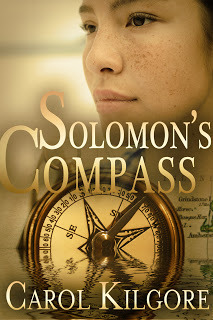
First of all, let me just say, I LOVE THIS COVER! Carol is really proud of it and she should be, it's amazing! I can't wait to read the book.
Book Blurb:
Taylor is in Rock Harbor, Texas, on a quest to unearth her uncle’s treasure—a journey far
outside the realm of her real life. There’s one glitch. Taylor's certain the buried treasure was all
in Uncle Randy's dementia-riddled mind. Now he’s dead.
Former SEAL Jake Solomon is in Rock Harbor under false pretenses to protect Taylor from the
fate that befell her uncle and the other members of a tight circle of Coast Guardsmen called the
Compass Points who served together on Point boats in Vietnam.
Jake is definitely not supposed to become involved with Taylor. That was his first mistake.
Taylor is attracted to Jake as well, but she refuses to wait for him to locate the killer when she
knows her plan will force her uncle’s murderer into action.
But the killer's actions are just what Jake is afraid of.
Carol Kilgore:
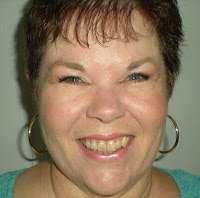 Carol Kilgore has always had stories and characters in her head, but she didn’t know she should write
them down until about a dozen years ago. Once she started, she couldn’t stop.
Her first published short story won the Derringer Award for Best Short-Short Mystery. She continued to
write short fiction for a few years and also enjoyed a small success as a freelancer before giving it all up
for her true love—novels.
Carol writes a blend of mystery, suspense, and romance she calls Crime Fiction with a Kiss. Always at least one crime; always a love story. Solomon’s Compass is her second published novel.
As the wife of a Coast Guard officer, Carol has lived in locations across the U.S. She and her husband
now live in a San Antonio suburb and share their home and patio with two active herding dogs that keep
them free from all danger, real or imagined.
You can find Carol here:
website . blog . facebook . twitter . goodreads


Book Blurb:
Taylor is in Rock Harbor, Texas, on a quest to unearth her uncle’s treasure—a journey far
outside the realm of her real life. There’s one glitch. Taylor's certain the buried treasure was all
in Uncle Randy's dementia-riddled mind. Now he’s dead.
Former SEAL Jake Solomon is in Rock Harbor under false pretenses to protect Taylor from the
fate that befell her uncle and the other members of a tight circle of Coast Guardsmen called the
Compass Points who served together on Point boats in Vietnam.
Jake is definitely not supposed to become involved with Taylor. That was his first mistake.
Taylor is attracted to Jake as well, but she refuses to wait for him to locate the killer when she
knows her plan will force her uncle’s murderer into action.
But the killer's actions are just what Jake is afraid of.
Carol Kilgore:
.jpg) Carol Kilgore has always had stories and characters in her head, but she didn’t know she should write
Carol Kilgore has always had stories and characters in her head, but she didn’t know she should writethem down until about a dozen years ago. Once she started, she couldn’t stop.
Her first published short story won the Derringer Award for Best Short-Short Mystery. She continued to
write short fiction for a few years and also enjoyed a small success as a freelancer before giving it all up
for her true love—novels.
Carol writes a blend of mystery, suspense, and romance she calls Crime Fiction with a Kiss. Always at least one crime; always a love story. Solomon’s Compass is her second published novel.
As the wife of a Coast Guard officer, Carol has lived in locations across the U.S. She and her husband
now live in a San Antonio suburb and share their home and patio with two active herding dogs that keep
them free from all danger, real or imagined.
You can find Carol here:
website . blog . facebook . twitter . goodreads