Michael Hyatt's Blog, page 67
March 13, 2017
The Secret Productivity Advantage of Workday Breaks
Plus 3 Ways to Put It to Work for You
We all know that sitting for long periods of time isn’t good for our bodies. Standing boosts our energy and our mood. That’s why I use and recommend a standup desk.

But there’s more to it than more time on your feet. It’s also important to get those feet moving. Our bodies just aren’t designed to sit for hours on end, hunkered over a keyboard.
Taking a Break
I’m intentional about staying hydrated during the day. At the risk of TMI, that means frequent bio breaks. I have a restroom next to my office, but I use the excuse to take ten or fifteen minutes away from what I’m doing.
My office is out back, so I go to the house and see what Gail is up to. I play with our dog. And I get another glass of water.
The truth is—we all need to periodically step away. We skip breaks in the name of “getting more done,” but when we don’t break from our work, our productivity suffers. We lose focus. We start making small mistakes and even forget things altogether.
Our bodies have a natural ebb-and-flow response to stress that allows us to work hard and then relax and recover. The problem comes when we chronically trigger those responses. We become all flow and no ebb, and you can only cheat the system so long before it becomes counterproductive.
The problem is that it can be challenging to step away when we’re neck-deep in our tasks.
How to Trigger a Break
You know how it works. We get started on a task and sometimes realize hours later that we haven’t moved away from our desk even once. Even though we had every intention of taking a break, we look at the clock and realize that another day has passed and we never paused.
Thankfully, we know this about ourselves and can take measures to ensure we take breaks. Besides drinking a lot of water, here are three ways to trigger a break and pull away.
Schedule break time. As I often say, what gets scheduled gets done. Breaks are important enough to deserve a slot on your calendar. To make this more effective, establish an Activation Trigger that connects the time slot to a specific break activity, such as going for a walk outdoors.
Use an app. To avoid the pitfall of losing track of time and neglecting your breaks, consider using an app. The Apple Watch works well. So do apps like TimeOut. TimeOut allows you to set your own break reminders that suit your schedule right on your desktop. The design aesthetic is pleasant, and the reminder overlays the screen. The breaks are just long enough for a recharge but not so distracting that you lose your flow. Some alternative apps to try include Stand Up! and Breaktime.
Establish the habit. If you practice workday breaks long enough, you’ll develop the habit. But you can intentionally engineer a habit. Acknowledge the negative effects of not changing. Decide what you want instead. And replace your old habits with new behaviors.
Breaks aren’t just a good idea. They are necessary for our health and success. They are not “time off” from what’s important. They are what’s important.
“
Workday breaks aren’t just a good idea. They are necessary for our health and success.
—MICHAEL HYATT

Question: How often do you take workday breaks? You can leave a comment by clicking here.






March 11, 2017


March 10, 2017
Why FOMO Keeps Us from Being Productive
5 Steps for Choosing the Right Opportunities
The fear of missing out isn’t worth much, but FOMO costs us a lot. That’s especially true when it comes to our productivity. It’s like a powerful undertow, invisible on the surface of our work, which can pull us away in the current.

Right after I left as CEO of Thomas Nelson Publishers, an online periodical approached me about serving on their advisory board. I was busy building a revenue portfolio, and the role seemed like a good fit. Plus, it would garner me a lot of free exposure, which I figured would help the rest of my business.
Not so much.
Dead-End Opportunities
First, I had to hound the team for payment. I spent hours every month trying to collect. And that nebulous opportunity for greater exposure never really materialized. After a few months, I was done. We parted ways, and I was no further ahead for all the wasted time and effort.
Another time a tech company offered me stock options for board involvement. I had friends with similar arrangements who raked in the cash when their companies sold. The product seemed excellent, and the board was filled with topnotch people.
But despite my initial impression, it was a bad fit for me. It gobbled up tons of time, kept me from other more important projects, and ended up going nowhere.
The problem in both cases was that I let FOMO drive my yes, rather than what was truly best for my business. Maybe you can identify.
The Fear Motive
This is a recurring struggle for me. Someone has an opportunity, and I feel like I’m going to miss something if I don’t jump on it. It’s important to remember what Steve Jobs said:
People think focus means saying yes to the thing you’ve got to focus on. But that’s not what it means at all. It means saying no to the hundred other good ideas that there are. You have to pick carefully. I’m actually as proud of the things we haven’t done as the things I have done. Innovation is saying no to 1,000 things.
That’s true for success in most of life. But fear can turn it inside out. Suddenly success looks like saying yes to 1,000 things. And if we don’t, we worry we’ll fail.
This is why we’re so deathly afraid of passing up an invitation. We sweat missing an opportunity so we say yes to every one that comes along:
to new clients because we fear missing out on income opportunities.
to your boss because we fear missing out on praise or leadership.
to new training because we fear missing out on learning a new skill.
to lunch invites because we fear missing out on key networking.
FOMO is also why we don’t close the office door, turn off push notifications, or exit Facebook. We’re so busy saying yes to the vague possibility that something is more valuable than our work that we never get around to actually working on what matters.
A Bad Gamble
Our schedules tell the tragic story—no boundaries, no focus, no clarity. Like that undertow, we’re dragged through the week by external offers and requests that may never pan out.
And deep down, we know.
Time is fixed. Until physicists figure out something better, we’re free to use 168 hours a week, no more. That means every yes is a tradeoff.
So when we pencil in another chance for improved income, status, or relational equity, we do it at the expense of focused time for high-leverage projects and margin for rejuvenation and our most important relationships.
Focus and margin are proven. New opportunities are a gamble. And the more of them we commit to, the less likely our fractured focus can even make good on any of them.
Thankfully, there’s a way out.
5 Steps to Overcome FOMO
To keep FOMO from killing my productivity, I follow these five steps:
Set strong, specific goals. Clarity is key. If your priorities are clear, you can play your game instead of everyone else’s. Goals filter incoming invitations. Does the opportunity help you achieve your goal? Great. If not, see ya.
Know the high-leverage tasks needed to hit those goals. There’s only so many hours in a day. Once you chunk down your goals into tasks, you give them priority on your schedule.
Recognize the tradeoffs. When you feel like saying yes, count the cost. Ask, “What am I giving up to say yes to this, and is that worth it? Will it benefit me more than my clearly articulated, preexisting goals?” Probably not, if you’re honest.
Become a no ninja. Remember, an opportunity with a yes attached is an obligation. Too many obligations is an obstacle. Give yourself permission to turn something down today. The more you do it, the more confident you’ll become.
Cultivate a mindset of abundance. FOMO thrives on scarcity. “An opportunity like this will probably never come along again,” you might rationalize, “so I have to say ‘yes’ now.” But, no you don’t. As a mentor once told me, there’s always another deal. I’ve never seen him proved wrong.
“
An opportunity with a yes attached is an obligation. Too many obligations is an obstacle.
—MICHAEL HYATT
If we operate with focus from a place of abundance, filtering out opportunities becomes simple. The question is whether you’re confident enough in your goals to pass on all the distractions.
Question: What’s one opportunity you wished you had never said yes to? You can leave a comment by clicking here.


March 8, 2017
Are You Committing One of The 7 Deadly Sins of Productivity?
My Free Webinar Will Help You Overcome Them and Get Things Done
There’s a lot of bad productivity advice that’s widely practiced. Because the nature of our work changes so much, you may not even be able to spot some of the time-wasters hiding in your schedule right now.
They’re secretly a routine part of your schedule… even worse, they’re behaviors that you think are making you MORE productive, but they’re actually doing the opposite.
Ready to overcome the 7 Deadly Sins of Productivity and finally make time for what matters most? Sign up for my free new webinar and discover what’s holding you back and how to get better results right away. Click here to register. There are multiple time slots to accommodate your schedule.
Next week, March 13-17, I’m hosting a free new webinar you don’t want to miss. In fact, if you’re a busy entrepreneur or executive, you can’t afford to.
The 7 Deadly Sins of Productivity: The Hidden Habits Undermining Your Performance (And How to Change Them) not only identifies the pitfalls that are slowing us down; it also reveals what to do to finally make the progress you want on your most important projects.
Claim your seat in this exclusive webinar and you’ll discover:
The #1 way to ensure that you’ll have a highly productive day
How to finish projects FASTER — without sacrificing quality
How to get rid of 80% of your to-do list (and start getting things DONE)
The quickest way to clear your mind and immediately reduce stress
When to totally ignore your email (and increase your contributions at the same time)
When to say no to digital solutions that could actually kill your efficiency
We can’t afford to keep making these mistakes. There’s too much on the line: our relationships, our health, not to mention our personal success.
Which of these 7 sins is slowing you down? Register for my new webinar, find out, and discover what to do instead. It’s free, but the available slots are limited.
If my previous webinars are any indication, spaces will go quickly. We normally max out, so register while you can.
As entrepreneurs and executives, our worlds are too competitive to miss a chance to up our own game. Overcoming these 7 deadly sins will not only free us to focus on what matters most in our professional and personal lives, it can also give us a critical edge in the marketplace.
Ready to overcome the 7 Deadly Sins of Productivity and finally make time for what matters most? Sign up for my free new webinar and discover what’s holding you back and how to get better results right away. Click here to register. There are multiple time slots to accommodate your schedule.


March 6, 2017
What Most People Get Wrong About Inbox Zero
And How to Keep It from Making Your Email Problems Worse
Email is indispensable. But it can feel like a necessary evil for a lot of us. Our inboxes are flooded with information and requests from customers, clients, coworkers, friends, and family. Not to mention all the spam, BACN, and random junk.

I’ve seen inboxes with tens of thousands of emails—hundreds, even thousands unread. People feel like they’re buried, behind, and can never catch up.
Digging Out
For a fresh start I recommend a combination of email bankruptcy and inbox zero. Go offline and archive everything in your inbox except the last twenty messages.
Next, process those so your inbox is empty. Whew! Back to sanity.
But not really.
Buried Again
When you go back online, the email will start trickling back in, and pretty soon you’ll be deluged.
It’s like when my grandkids are playing in the sand at the beach. They get their shovels and pails and start digging. But as soon as they move sand out of the pit, more cascades down. To make progress, they have to shovel more out than falls back in.
It’s the same with email.
We not only have to focus on processing email, we also need to deal with what’s coming in. A lot of people declare email bankruptcy, and then three weeks later they’re back in trouble.
3 Simple Questions
Before you commit to inbox zero, I recommend you first eliminate, automate, or delegate to limit the influx of new email. You can do this by asking three questions.
Do I need to receive this email? I bet you receive hundreds of messages a week you don’t need or want. You can eliminate a lot of these upfront by using a service like Unroll.me.
Unroll.me lists all of your existing subscriptions and lets you unsubscribe with a click. Then you can roll up the rest in a digest and have that delivered whenever it suits you best.
I’ve used this service for a few years. Subscription creep is real. Every now and then I do a purge. Just the other day I unsubscribed from 176.
Do I need to process this email? Just because you’ve decided you want to receive an email doesn’t mean you need to use your time and intelligence to process it. You can automate that function using a paid app like SaneBox.
SaneBox works behind the scenes to automatically sort your inbox and filter what’s important based on your past activity. It offers a daily summary of your activity so you can process your latest unimportant emails, upcoming reminders, and more—all at one time.
SaneBox works on almost every email system and has three different pricing tiers so it works for almost any budget. They also offer SaneBlackHole, which scratches the same itch Unroll.me does.
Do I personally need to answer this email? Now that you’ve eliminated and automated, the next step is to delegate. For any emails important enough to require human intelligence, why not get some outside help?
I’m a long-time advocate of virtual assistants and recommend BELAY, formerly eaHelp. Busy leaders can get access to highly trained virtual EA’s for as little as five hours a week with BELAY. If you schedule time to process email, you can hire a virtual assistant for as little as an hour a day (5 hours a week) to process your inbox first. (If you hire them through BELAY, they’ll sign an NDA, so don’t worry about confidentiality.)
For power delegators, I recommend creating a private email address you share with fewer than ten people—like your boss, direct reports, spouse, and kids.
From there, let your VA take over your existing email and only forward you the items he or she can’t answer. Ask your VA to get your public email address to inbox zero at the start of the day and at the end of the day.
I do this with my assistant and now receive less than ten emails per day to my private email address. It takes a little time set this up, but it is a complete game-changer and well worth the investment.
Don’t Get Buried Again
Before you declare email bankruptcy and commit to inbox zero, you need to ask and answer these three questions:
Do I need to receive this email?
Do I need to process this email?
Do I personally need to answer this email?
There are other apps and services than I’ve mentioned here, but whatever solution you choose, the goal is to eliminate, automate, and delegate everything you can so you don’t get buried again.
“
Just because you’ve received an email, doesn’t mean you need to use your time to process it.
—MICHAEL HYATT
Question: What’s your biggest email struggle? You can leave a comment by clicking here.


March 4, 2017


Join us for the first interview on The Michael Hyatt show [Announcement]

Join us for the first interview on The Michael Hyatt show
I am SO excited to share with you something I’ve been dreaming up for a long time.
This coming Monday, March 6th at 7:00 pm CST, I am launching my very first LIVE episode of The Michael Hyatt Show. Each week, I will be interviewing some of my favorite thought leaders and emerging voices on personal development, productivity, and leadership. My goal is to help you win at work, succeed at life, and lead with confidence.
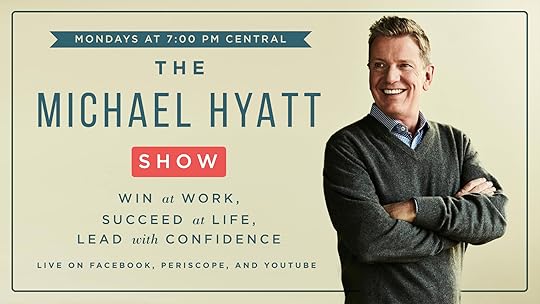
The show will be happening live every Monday at 7:00 pm CST and will be simulcast to Facebook, Youtube, and Periscope.
This week, I’ll be interviewing my very first guest and good friend Andy Andrews about his new book, The Little Things.
Click here to sign up for a reminder on Facebook. See you then!


March 3, 2017
Three Evernote Alternatives and How They Stack Up
My Take on Apple Notes, Microsoft OneNote, and Bear
I’ve been using Evernote almost a decade now. The program was still in private beta when I started. Since 2008, it’s become my digital brain.
In the past, I used binders or file cabinets to store project papers, research, contracts, even paper-napkin brainstorms. Now all that goes in Evernote. Organization, retrieval, and sharing are easy. And the more I use it, the more useful it becomes.
Whether for personal or professional use, I’ve been almost entirely paperless for years now. But Evernote is imperfect. And for me every application is on a permanent job interview.
Anyone who knows me knows I love experimenting. I’m always tinkering. And even though Evernote is key part of my business workflow, I don’t want to rule out other solutions.
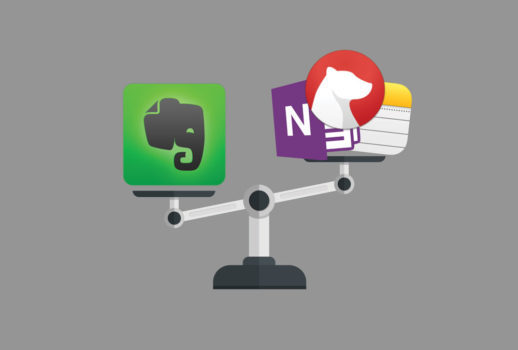
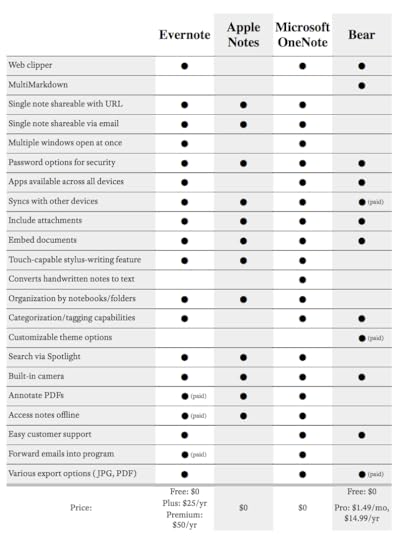
I’ve tried several competitors. I even organized my notes and papers in Google Docs for a while. Based on everything I’ve seen and tried so far, I’d say right now there are three primary alternatives to Evernote: Apple Notes, Microsoft OneNote, and the newcomer: Bear. Here’s how they stack up.
Apple Notes
Apple Notes is the default note-taking app included on all Apple devices. Those who love it, love it for its simplicity. Equipped with very few bells and whistles, it’s simply a space to create, store, and organize notes.
It’s totally free, syncs well among Apple devices, and was upgraded last year to include a few extra perks. These include easy share features and a built-in camera, as well as the ability to include images, link out to maps/webpages, and doodle. It offers a simple folder structure for organization.
But overall capability is slim. Apple Notes is the bare bones of note-taking apps, and it’s only available for Apple devices. There’s no web-clipper, no tagging, no fancy formatting, no security—all of which Evernote offers. And there’s also no real way to interact with the developers to communicate problems or improvements.
Still, for Mac loyalists who want nothing but the basics, this might be your go-to.
Microsoft OneNote
Microsoft OneNote relies on skeuomorphic design. For the majority of its features, it tries to replicate the attributes of a physical notebook. It almost feels like a digital whiteboard. Apple has moved away from skeuomorphic design with their products.
OneNote works across all platforms but works best on a Windows desktop (not a plus for Apple fans like me). Features such as password protection, attachment capabilities, notebook organization, and a basic web-clipper are all free. Users can insert audio and video files, search with Spotlight, and access notebooks without a data connection—a rarity among free apps.
Its downfall—besides the skeumorphic limitations and higher PC performance—is that it’s really more of a digital notebook than a digital-filing system. Evernote beats it out in terms of expansive web-clipping capability and general depth of organizational hierarchy.
It’s also rough sailing if you’re trying to shift to OneNote from Evernote. When I imported my Evernote notes into OneNote, they were a complete and utter mess. Who’s got time for that?
Bear
Bear is one of the newest note-taking apps on the market, and I’ve played with it for the last several weeks. It strikes a strong balance between design simplicity and its many features. There’s a web-clipper, expansive formatting options, beautiful built-in themes and typography, and multimarkdown capabilities. That’s a plus for me—and something Evernote still doesn’t support.
It has great organizational and tagging features that allow for a straightforward filing hierarchy system to be constructed pretty organically. With sync options across multiple devices, easy search and attachment capabilities, and a very reasonable upgrade package, Bear is definitely promising. I’d probably migrate there if Evernote stopped developing tomorrow.
Bear has two big red flags for me:
You can’t create a note-specific URL, so sharing a single document with my team is almost impossible. In Evernote, you can grab a public link, share the URL, and anybody with that link can read the note.
You can only have one window open at a time within the app. That’s a serious hindrance to my productivity. I often work back and forth between multiple notes.
For those two reasons alone, I’ll stick with Evernote for now.
The Future of Evernote
Evernote is one of those rare apps I can’t quite seem to outgrow. I am always finding new uses for it. I continue to look at competitors because I want to stay current on what’s available. But so far I’ve not found anything that can replace Evernote.
“
I love experimenting. For me, every tool or application is on a permanent job interview.
—MICHAEL HYATT
Evernote does have drawbacks. I mentioned its lack of support for multimarkdown already. I was very excited to see Evernote updated their mobile app. But the desktop app is overdue for an overhaul, especially a redesign that captures the elegance of the new mobile experience.
I’ve heard that’s in the works—and I’m eagerly awaiting to see what’s next.
Question: What’s your experience with Evernote or one of the alternative solutions on the market? You can leave a comment by clicking here.


March 1, 2017
Take My Free Personal Productivity Self-Assessment
Discover Your Productivity Score and How to Improve It
How productive are you? I wanted a way to help people answer that question, so a while back I designed a productivity self-assessment. I’m excited to report that more than 12,000 people have already used it!

If you want directions to a desired destination, you need at least two pieces of information: the end point and the start point. Apps like Waze or Google Maps make it easy because they automatically know our current location. But when it comes to your productivity, how do you know where you really stand?
Click Here to Take My Free Assessment!
If you’re a high-achiever, chances are good you haven’t slowed down enough to focus on the question. Maybe you feel like you’re drowning. Or maybe you feel like you excel at keeping all the plates spinning but wish you could slow down.
Regardless, getting clarity about your current position is critical for becoming more productive.
My free Free to Focus Personal Productivity Assessment answers the question for you. Better, it not only pinpoints your current location, it also reveals specific areas for improvement.
By taking the Free to Focus Personal Productivity Assessment you will discover:
9 key categories of personal productivity and where you’re currently succeeding or struggling.
The present reality about your tasks, schedule, workload, and personal margin.
The specific areas you can optimize your efforts for success.
The Free to Focus Personal Productivity Assessment is free. It’s online and mobile friendly so you can take it on any device. And you can complete it in as little as ten minutes.
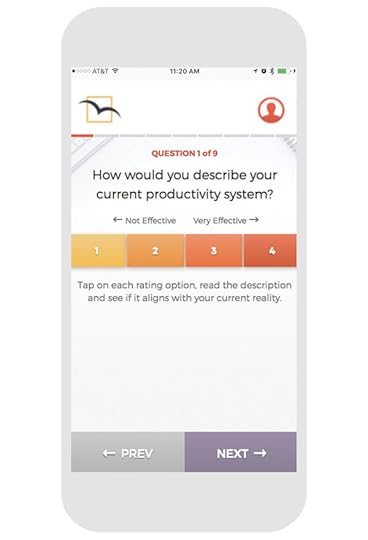
Best of all, when you’re done you’ll get a productivity score and score-specific report. You’ll also receive actionable tips and tricks to increase your score and become more productive.
Once you get clear on next steps, you’ll be able to chart your improvement by comparing your scores and achieving a new personal best.
Identifying our current location is key to getting where we want to go. And the Free to Focus Personal Productivity Assessment not only dials in your point of departure, it also points the way forward.
Click Here to Take My Free Assessment!



February 27, 2017
How to Defuse the Worry Bomb and Stay Productive
Tony Robbins’ New Book Kicks Fear to the Curb and Empowers Us to Act
I read a story last week about workplace productivity in decline after the election. Employees are struggling to stay focused on their work. Why?

Anxiety. The American Psychological Association conducts regular polls to track stress levels and causes. The most recent poll found a majority of us are worried about the future of the country.
This post isn’t about politics. It’s about productivity.
When we’re anxious and stressed, we become vigilant. When it comes to current events, that means checking the news and social media constantly. But instead of allaying our fears, we find more information to feed our anxiety.
The good news is that you don’t have to get trapped in this vicious distraction cycle. One way to keep anxiety from sabotaging your work is to defuse the worry bomb.
I used to be a news junkie. Nowadays I never watch TV news, and I only read online news about once a week. Why? Instead of keeping me informed, I find the news media distorts my perspective and creates false worries.
Financial media is especially prone to this. It seems like whatever’s happening in the economy, somebody will find reason for panic.
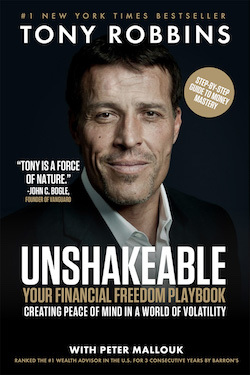
That’s why I was excited to see Tony Robbins’ new book, Unshakeable. The subtitle gets right to the heart of the issue: “Creating Peace of Mind in a World of Volatility.”
One of Tony’s key messages is that possessing long-term perspective frees us from uncertainty and worry. He offers several facts about the market that let us focus on what positive action. I’ll mention three of them here:
The stock market corrects every year on average. News comes with a negativity bias. So when the market dips, the pundits stoke the fear. But, looking at the historical trends, Tony says,
Corrections are just a routine part of the game. … Historically, the average correction has lasted only 54 days—less than two months! In other words, most corrections are over almost before you know it. Not that scary, right?
Only two in every ten corrections turns into a bear market.
Negative predictions are mostly wrong. Market doomsayers “are clever and articulate, and their arguments are often compelling,” says Tony. “But they thrive by scaring the living daylights out of you—and they’ve been wrong again and again and again.”
To drive the point home, he lists 33 failed predictions. “The common pattern is they’re all predicting that the market will go down when it’s actually going up.”
The market always rebounds. And when it does, it gains. “Every single bear market in US history has been followed by a bull market,” says Tony, “without exception.” The trend is toward greater worth and wealth, not less.
What does this mean in practical terms? It means that you and I should always remember that the long-term trajectory is likely to be good, even when the short-term news is dismal and the market is getting smacked.
 We can control not only the news we consume, but also the perspective we bring to it. And if we keep the long view in mind, there’s far less to worry about. That means we can confidently tune out most of the drama and get back to the things that matter most.
Unshakeable is a concentrated dose of financial perspective. The book releases tomorrow. Order now and you can get additional bonus resources worth over $200 totally free. Tony is one of the most compelling communicators I’ve ever encountered, and Unshakeable is a book you don’t want to miss.
“
Take the long view. Tune out the drama and get back to the things that matter most.
—MICHAEL HYATT
Question: What would your life look like if you were able to dial down the drama and stay focused on the work that matters most? You can leave a comment by clicking here.