Brian Meert's Blog, page 28
October 23, 2023
What Is an Interstitial Ad?
An interstitial ad is a full-screen advertisement that covers the interface of an app or website, typically displayed during transitions such as between game levels or while a page is loading.
2. How Do Interstitial Ads Work?Understanding the inner workings of interstitial ads is crucial for effective implementation. Here’s a simplified breakdown of how they operate:
Triggered Events: Interstitial ads are designed to appear at specific points during a user’s interaction with an app or website. These trigger points can be defined by the app developer or website owner.Full-Screen Display: When triggered, interstitial ads take over the entire screen. They are full-screen ads that cover the interface, ensuring maximum visibility and attention from the user.Timing and Placement: One of the best practices for interstitial ads is to place them at natural pauses or transitions in the user’s experience. This minimizes the intrusion and enhances user experience.User Interaction: Users can typically close the ad by tapping on a designated area or button. This provides control and ensures that users don’t feel forced to engage with the ad.Ad Format Variety: Interstitial ads come in various formats, including static ads, video interstitials, playable interstitials, and more. App developers can choose the format that aligns best with their content and audience.Tracking and Metrics: To measure the effectiveness of interstitial ads, various metrics are tracked, such as click-through rates (CTR), impressions, and conversion rates. This data helps advertisers refine their campaigns.Integration with Ad Networks: Ad networks play a crucial role in delivering interstitial ads to the right audience. Implementing interstitial ads involves integrating with these networks and following their guidelines.Interstitial ads work by strategically displaying full-screen advertisements at opportune moments during a user’s interaction with an app or website. Their effectiveness relies on timing, placement, and user-friendly design, ensuring a balance between engaging users and respecting their experience.
3. Why Use Interstitial Ads Over Other Ad Formats?When discussing digital marketing strategies, interstitial ads stand out in the crowded world of online advertising. But what makes them so effective?
Visibility: Interstitials are full-screen ads. Unlike banner ads or pop-up ads, they cover the entire interface. This ensures the user’s attention is solely on the ad content.User Experience: Mobile app developers aim to provide a seamless user experience. Interstitial ads, when placed at natural pauses or transitions, can be less intrusive than other ad formats. It’s essential, though, to provide an easy way for users to close the ad if they wish.
Versatility: The interstitial ad format offers variety. From static ads to video interstitials, app developers can choose the type of interstitial that best fits their app’s design and audience. Android full-screen ads and iOS variants give flexibility across devices.
Revenue Potential: The prominence of these ads often results in higher ad revenue. They offer a notable advantage over other popular ad formats. For instance, one interstitial ad can generate more revenue than many banner ads shown over a longer duration.
Engagement: With playable interstitial or engaging video content, users might not just view but also interact. This interaction can lead to better ad recall and, potentially, higher conversion rates.
Efficient Integration: Most ad networks support interstitial advertising. Implementing interstitial ads within a mobile app has become streamlined. Following best practices ensures ads appear without hampering the overall ad experience.
Clear Metrics: It’s easy to measure how interstitial ads work. With clear metrics on display rate, tap rate, and frequency, marketers can adjust their ad campaign for maximum effectiveness.
In the evolving landscape of mobile advertising, interstitials offer undeniable benefits. While they’re just one type of ad, their ability to seamlessly integrate and effectively engage makes them a top choice for many app developers.
4. Which Ad Networks Offer Interstitial Advertising?Ad networks have spotted the potential in interstitial advertising. These ads are full-screen, instantly capturing user attention. Given their design, they often outperform other popular mobile ad formats. Here’s a peek into some major players:
Google AdMob: Tops the list. This platform’s strength lies in its vast reach across mobile devices. It’s known to seamlessly integrate interstitial ads. And it’s a champion for ads that cover the interface without being overly intrusive.Facebook Audience Network: Tap on the ad, and often you’ll find it’s powered by Facebook. They’ve mastered showing ads that appear immediately, holding the viewer’s gaze. Their ad unit offers video interstitial ads, display ads, and playable ads. Perfect examples of interstitial advertising in action.
Unity Ads: For the gaming world, Unity is a behemoth. Their specialty? Playable ads and video interstitials. Gamers see one interstitial ad per gaming session, sometimes after every two levels. They strike a balance, ensuring ads at natural pauses, which increases user engagement.
InMobi: It’s vast, it’s global, and it’s versatile. Ads can be a great boon for publishers here. InMobi prides itself on providing an array of ad formats, but their interstitials, especially on iOS and Android full-screen ads, are noteworthy.
Chartboost: A haven for app developers. While many ads flood users, Chartboost ensures frequency of interstitial ads is just right. Their ads also stand out, especially when compared to other ad formats.
Vungle: Known for its dynamic ad formats. From display ads that cover the interface to those that pop up instantly, Vungle knows ads and how to use them for maximum impact.
The world of interstitials is vast. These networks highlight how ads, when designed following rules and best practices, can offer a stellar user experience while boosting ad revenue. They are the bridge between ad offer and effective ad placement.
5. What Are the Different Types of Interstitial Ads?Interstitials have taken the ad world by storm. They’re everywhere! Why? Interstitial ads work best when blended seamlessly into content. Here’s a dive into their many faces:
Video Interstitials: High on impact. These are full-screen video ads that typically play between content. The revenue with interstitial ads like these? Often higher than their static counterparts.Mobile Interstitials: Designed for the smartphone era. They pop up on your mobile device, making the most of the screen. Android and iOS both have their unique full-screen ads, optimizing user experience.
Playable Ads: Interactive and engaging. Players can try out a game’s snippet. Often, you’ll see one interstitial ad per hour in gaming apps, maintaining a balance with the frequency of interstitial ads.
Static Display Interstitials: The OGs. These are image-based ads often used in apps. Simple, yet effective. They might show an interstitial ad after every two content segments.
Banner to Full-Screen Ads: They start small. Like banner ads, yet they expand to full-screen when tapped. A blend of ads and banner ads, you could say.
Exit Ads: A last call to action. When users aim to close an app, these appear. That interstitial ad exit button? Crucial. No one likes feeling trapped.
Data-Driven Interstitials: Tailored for the user. Ads in your app that use data insights to target? That’s them. These ads are often used to enhance user engagement.
Different strokes for different folks. Whether you’re looking at an example of interstitial advertising or considering which to use, it’s clear: these ads can be a great asset. Remember, the key is in the balance and design.
6. How Can Interstitial Video Ads Enhance User Engagement?When it comes to captivating your audience, interstitial video ads pack a punch. Here’s why they stand out:
Full-Screen Immersion: Interstitial video ads are full-screen ads that cover the entire interface. They immerse users in a brand’s message, leaving no room for distractions.Visual Impact: Video content is inherently engaging. With interstitial video, you can convey your message through sight and sound, creating a lasting impact on users.
User-Friendly: These ads often appear at natural pauses in apps, ensuring they don’t disrupt the user experience. They strike a balance between ads at natural pauses and intrusive advertising.
Versatility: Interstitial video ads come in various formats. From short clips to longer narratives, you can tailor them to your campaign’s needs.
Higher Recall: Users are more likely to remember video content than static images or text. This boosts ad recall, which is essential for successful campaigns.
User Interaction: Some interstitial video ads may allow users to interact, providing an engaging experience. For example, playable interstitials offer a taste of a mobile game.
Better Conversion: Engaged users are more likely to convert. Whether it’s signing up, making a purchase, or downloading an app, interstitial video ads increase the chances of action.
Tracking Metrics: You can measure the effectiveness of interstitial video ads with clear metrics like view-through rate (VTR) and click-through rate (CTR).
In a world where attention spans are shorter than ever, interstitial video ads capture and retain user interest effectively. By understanding their unique benefits, you can make the most of this engaging ad format.
7. Are Mobile Interstitial Ads More Effective Than Other Mobile Ad Types?Mobile advertising is a dynamic field, and interstitial ads have emerged as a dominant player. Let’s explore why they often outshine other mobile ad types:
Full-Screen Dominance: Interstitial ads are full-screen ads that cover the entire mobile device interface. This fullscreen approach immediately captures the user’s attention, ensuring your message doesn’t go unnoticed.Optimized for Mobile Apps: In today’s app-driven world, interstitial ads are designed with mobile apps in mind. They seamlessly integrate with app content, appearing at natural pauses or transitions.
Balanced User Experience: Unlike some other ad types that can be intrusive, interstitial ads strike a balance. They aim to enhance, not disrupt, the user experience, which is critical for user retention.
Versatile Formats: From static display ads to engaging video interstitials and interactive playable interstitials, they come in various formats, catering to diverse advertising needs.
Higher Engagement: Users tend to interact more with interstitial ads due to their immersive nature. This increased engagement can lead to better ad performance and higher conversion rates.
Clear Metrics: Measuring the effectiveness of mobile interstitial ads is straightforward. Metrics like click-through rate (CTR), view-through rate (VTR), and conversion rate provide valuable insights for optimization.
Targeted Placement: Placing interstitial ads within mobile apps, especially at natural pauses, ensures that they are seen by a captive audience, making them highly effective.
While no ad type is one-size-fits-all, mobile interstitial ads have shown their mettle in the mobile advertising landscape. Their ability to balance user experience with high engagement rates makes them a strong contender for marketers looking to make an impact in the mobile app ecosystem.


Mastering Amazon Kindle Direct Publishing: Things You Should Know
Do you know how Amazon Kindle direct publishing works?
Amazon Kindle Direct Publishing (KDP) has revolutionized self-publishing. It is a user-friendly platform that allows writers to easily bring their works to the digital shelves.
In this article, we will talk about Amazon Kindle Direct Publishing and how it works.
What Is Amazon Kindle Direct Publishing?

Amazon Kindle Direct Publishing (KDP) allows authors to self-publish books in digital format, primarily for the Kindle e-reader. With KDP, you can easily turn your written work into eBooks and make them available for sale on Amazon’s Kindle Store. It’s a free and user-friendly service that empowers authors to take control of the publishing process.
How Amazon KDP Works?Amazon KDP provides a range of tools and resources to help you format and design your eBooks, set your pricing, and reach a global audience. Authors earn royalties on their sales.
KDP offers both e-book and paperback publishing options, making it a versatile choice for writers of all kinds. Whether you’re a seasoned novelist or a first-time writer, Amazon Kindle Direct Publishing offers an accessible path to sharing your stories with readers worldwide.
How To Sign Up for Amazon KDP and Publish Your Book

The following are the steps you can follow to sign up for an Amazon KDP account:
1. Go to Kindle Direct Publishing and sign in with your Amazon account. You should learn how to make an Amazon account if you don’t have one.
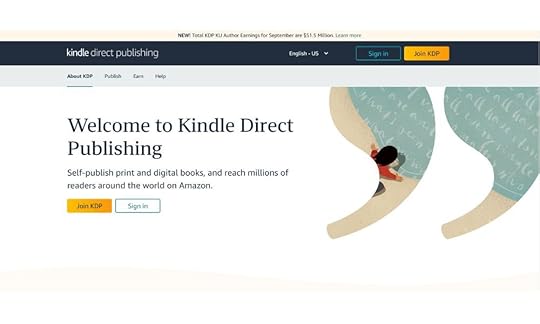
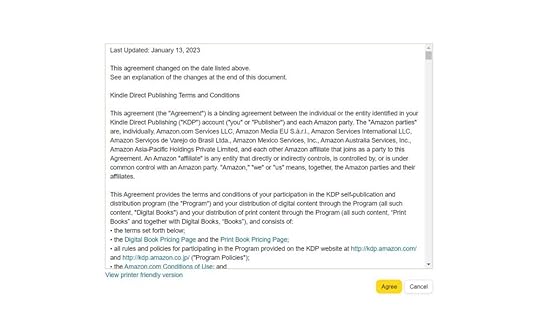
2. Once successfully logged into your account, accept the terms and conditions.
3. Tap +Create on the “Create a new title or series” tab.
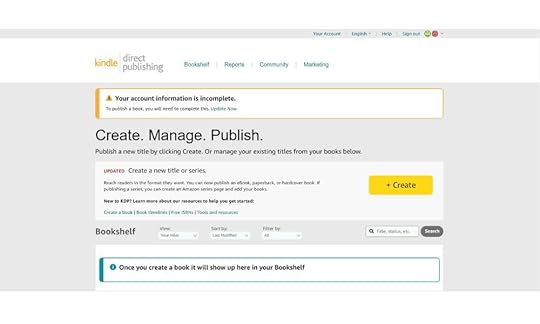
4. Select the option you want to create.

5. Choose your book’s language.

6. Enter your book’s title and subtitle.

7. Add the book’s edition number, author, and contributors.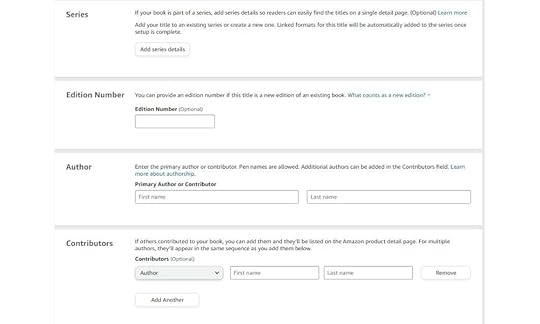
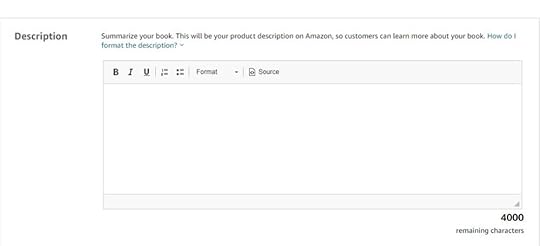
8. Describe your book.
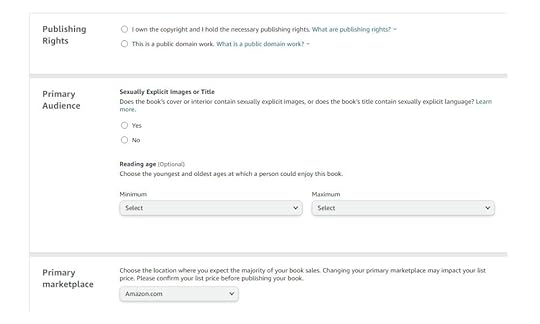
9. Select publishing rights, audience, and primary marketplace.
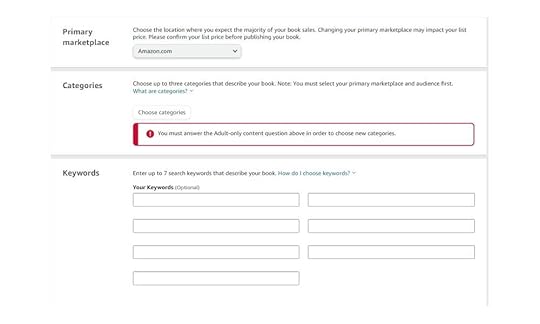
10. Choose a category that best describes your book. Then, enter a maximum of 7 keywords associated with your book.
11. Signify if you want your book to be in preorder or if it is readily available for release.

12. Tap “Save and Continue.”

13. Upload your eBook manuscript.

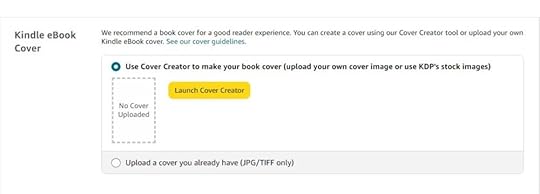
14. Add your cover.
15. Signify if you added AI-generated content or not. Then, preview your eBook.
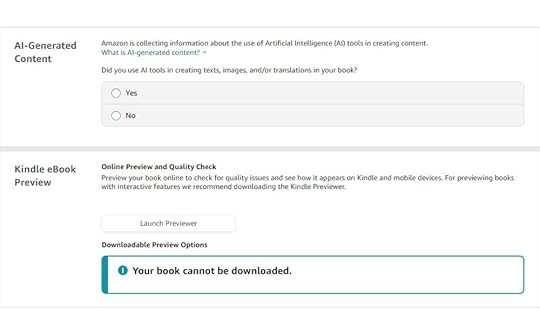
16. Add eBook ISBN, if applicable.
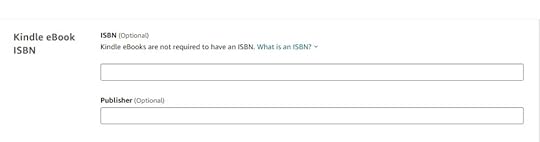
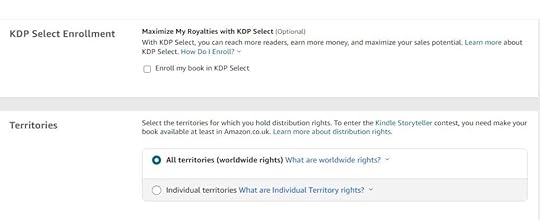
17. Choose whether you want to enroll your book in KDP Select or not. Then, choose which territories you want to hold distribution rights.
18. Select your royalty plan.
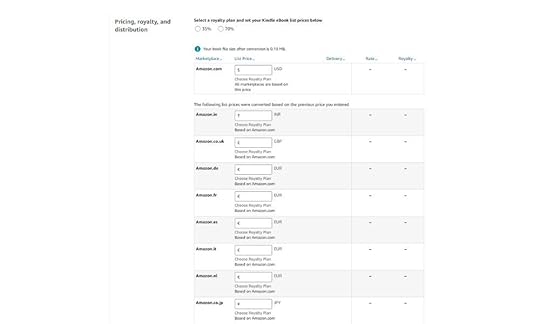
19. Accept Terms and Conditions. Be advised that it will take your eBook 72 hours to be available for purchase.

20. Tap “Publish Your Kindle eBook.”


Discover how to Amazon Kindle Direct Publishing works:
1. Preparing your manuscript.Prepare your manuscript carefully. Your manuscript should be in a compatible format, preferably in a .MOBI, .EPUB, or .DOCX file. Likewise, it is important to thoroughly edit and proofread your manuscript to ensure it contains no errors. You may also consider hiring a professional editor to help you with the work.
2. Create an eBook cover.The cover is the first thing your readers will see when inspecting your eBook. Hence, you must design a catchy one to attract your readers’ attention. You have various options for designing a good cover. You can hire a professional graphic artist to design one for you or use platforms like Canva and Photoshop to make covers on your own.
3. Uploading eBook.Once you’ve devised your desired cover and completed your manuscript, you may upload it to your KDP account. Make sure that it is formatted properly. Likewise, it should be free from errors. Moreover, if you use images or elements that are not your own, you must have the rights, permissions, or licenses to use them.
4. Pricing, royalties, and rights.As the author, you can set the price for your eBook. The right price usually depends on genre, book length, and marketing strategy. To set a price that your readers would like, consider the perceived value of your book, the competition in the genre, and your readers’ willingness to pay. As for the Amazon KDP royalties, you have the freedom to choose between two options: 35% and 70%.
5. Book promotion and marketing.After making your book available on the platform, you should promote your eBook to build its visibility and attract readers. You can also use marketing tools and seek the help of a digital advertising agency to reach a larger audience. Using sites like Facebook, Twitter, and Instagram to share book teasers and updates can also help create a buzz surrounding your book.
Additionally, consider joining Goodreads to interact more with readers and participate in their discussions. You can also run eBook giveaways to encourage people to read your eBook.
6. Dealing with reviews and feedbackReviews and feedback are vital on Amazon KDP. Hence, it would help if you approached reviews with an accepting and open mind. Readers’ thoughts could be different from one another, and their thoughts can help you improve your writing.
Thank readers who leave positive reviews. Doing so will help build a positive relationship with them. However, if you come across reviews that may be disheartening, use them as an aid to help you grow as a writer.
Final Thoughts on “Amazon Kindle Direct Publishing”Amazon Kindle Direct Publishing is a game-changer for authors seeking to self-publish their work. Its simple and intuitive platform allows you to reach a global audience and turn your creative ideas into digital reality. So, why wait?
Frequently Asked QuestionsCan I have my Amazon KDP eBook published as a paperback?Authors can publish their work exclusively as a Kindle eBook or a print book through Amazon’s paperback book publishing services.
What is Kindle Create?Kindle Create is a formatting and eBook publishing tool provided by Amazon. It is designed to make the process of formatting and preparing eBooks more accessible.
What is Kindle Unlimited?Kindle Unlimited is a subscription service that provides readers access to the vast library of eBooks available in the Amazon Kindle store.
Related ArticlesHow To Sell on Amazon Without Money
Did you know that you can sell on Amazon without money?
It may sound too good, but Amazon offers entrepreneurs great opportunities to sell on its platform, even without capital. Whether you want to kickstart your selling career or need a side hustle, you can sell on Amazon without money.
This blog post is your ultimate guide to exploring selling on Amazon with no upfront investment.
What You Can Do To Sell on Amazon Without MoneyThere are several things you can do to sell on Amazon without money. They include:
1. Selling used items. Source: Canva
One of the easiest ways to sell on Amazon without money is to sell used items. Scout your house for items that are still okay to use and have them listed as preowned items on Amazon. This allows you to sell on Amazon without investing much money and lessen clutter in your home.
Note that your used items must be in good condition, as buyers look for this in products. You should also clean and prepare your items. Finally, it is important that you properly describe the condition of each item on your listing. This makes it easier for buyers to decide whether to buy your product.
2. Make your products. Source: Canva
Another thing you can do to make money on Amazon is to make your own products. You can use materials you already have to produce something new to sell. It can be in the form of handicrafts, decorations, and more.
You can also create new products from recycled materials. Upcycling involves repurposing items to give them new life. It can be done in crafts or fashion. For instance, you can create custom fashion pieces by altering your old clothes. It can be a great way to make money from what is already considered junk. If you intend to make your products, you can begin with small production runs to minimize initial costs.
3. Sell digital products. Source: Canva
Some digital products you can sell include e-books, art pieces, music, software, courses, photos, and templates. These products can be made on a computer, without you having to spend anything as long as you already have the equipment.
You can develop a portfolio of your work to show your skills and expertise. Then, you can put up your services on Amazon by creating your service listings. Then, ensure you deliver your services on time and ensure quality work to gain more clients. As you start earning money from your Amazon gig, you can reinvest the profits in your business. You must also continue learning and improving your skills to stay on your game.
How To Create a Free Amazon Seller AccountIf you are looking to sell on Amazon without money, you should be pleased to know that you can get an Amazon seller account free. Here are steps you can follow to create a free Amazon Seller account:
Go to the Amazon registration page.Enter your name, email, mobile phone number, and password.Fill out your business details.Verify your identity.Select your seller account type.Enter your billing details.Set up your two-step verification.Read and accept the terms.Start selling on your new Amazon Seller account.How To List a Product On AmazonThe following are the steps you can follow to list products on Amazon:
Select a title: Your title should have a maximum of 200 characters. Also, the first letter of every word should be capitalized.Add images: Add high-quality images to make your products more appealing to new audiences. Using 500×500 or 1000×1000 pixels can be a good option.Set up variations: You should also set up the product varieties available. This includes colors, sizes, scents, and more.Use bullet points: It is crucial to highlight the product’s key features by adding short and descriptive sentences.Provide description: Crafting a compelling product description is important to draw in customers who will buy the product.How To Fulfill Orders on AmazonIt is worth noting that there are two ways of fulfilling orders on Amazon: Fulfillment by Merchant (FBM) and Fulfillment by Amazon (FBA). The latter is the best option if you have the budget to subscribe to it. However, the former will be the best option to sell on the platform without spending much.
The following are the two options you have to fulfill Amazon orders:
Fulfillment by MerchantFulfillment by Merchant (FBM) means that you, the merchant, will be the one to fulfill orders. This includes the packing and shipping of the products sold. To do this, it is important that you prepare your products, as well as the packaging materials you will need. Then, carefully pack the products according to Amazon’s packaging guidelines.
Once set, choose your preferred shipping carrier, purchase the shipping label, and print them. Once the product is shipped, you must update the order status on Amazon. You also have to provide the customer with the tracking information.
Fulfillment by AmazonFulfillment by Amazon (FBA) is the fulfillment service where Amazon is the one that stores, packs, and shops products to the customers. All sellers need to do is send the orders to the FBA warehouse, and Amazon handles the rest of the process moving forward.
To use FBA, prepare your products and create an FBA shipping plan. Then, follow the instructions provided by the platform to ship your products to the assigned fulfillment center.
Fulfillment by Amazon reduces the workload of sellers. However, you should look after your inventory levels to prevent products from going out of stock. It is also important to note that FBA is not for free. The cost for FBA may vary, starting at $3.22 for items under one pound and going up to over $6.10 for items over two pounds.
Final Thoughts on “How To Sell on Amazon Without Money”Selling on Amazon without money is not only possible but also an exciting opportunity for those with limited resources. With determination, resourcefulness, and a willingness to learn, you can navigate the Amazon marketplace and start your business without a hefty upfront investment. Embrace the strategies we’ve discussed, and you’ll be well on your way to achieving your e-commerce dreams.
Looking for ways to improve your sales on Amazon? Contact the best Amazon advertising agency!
Frequently Asked QuestionsIs it cheaper to use an individual seller account?Many aspiring Amazon sellers begin their journey with limited capital by opting for an individual seller account. This type of account does not require the upfront costs of a professional seller account.
Can I continue growing my Amazon store with a limited budget?You can grow your Amazon store step by step. This will allow you to reinvest profits to expand your product catalog.
What is an Amazon FBA business?In Amazon FBA, the seller lets Amazon store, pack, and ship the products to customers when they make an order.
Related ArticlesWhat is Average Revenue Per User (ARPU)?
ARPU, or Average Revenue Per User, is a financial metric that represents the average revenue generated from each user or customer of a business over a specific period.
2. How do you Calculate ARPU?ARPU, an acronym for “average revenue per user,” gauges how much revenue each user or subscriber brings to a business within a set timeframe. This metric is pivotal in industries reliant on subscription models or user-centric revenue streams.
To calculate ARPU:
ARPU = Total Revenue / Active User Base
So, if a platform pulls in a monthly revenue of $1 million from 500,000 active users, the ARPU stands at $2.
Total revenue encompasses all income sources, like monthly subscriptions or ad revenue. Meanwhile, the active user base signifies users genuinely engaging with a service, not just dormant accounts.
A high ARPU indicates that each user contributes a substantial amount to the company’s total revenue. This could result from premium pricing, effective upselling, or offering value-rich services that command higher subscriptions. On the contrary, a dwindling ARPU amidst a growing user base might signal an influx of low-paying or free users.
In this way, ARPU provides a snapshot of a company’s revenue generation efficiency per user, helping businesses strategize for better profitability.
3. Why is ARPU Important? Reveals Revenue Generation Capability: ARPU, which stands for average revenue per user, quantifies the revenue each active user contributes. High ARPU suggests that users significantly contribute to the company’s total revenue. Conversely, a low ARPU might indicate missed opportunities or a need to diversify revenue streams. Gauges Pricing Strategy Effectiveness: A rising ARPU often shows that users find value in a product, leading them to spend more. It can reflect a successful upselling or premium pricing strategy, where the average customer spends more over time. Offers Insight into User Behavior: By tracking the average amount of revenue a user spends on a monthly basis, businesses can gauge user engagement and loyalty. If users consistently generate revenue, it implies they see value in the service or product. Facilitates Financial Forecasting: ARPU allows businesses to predict future revenue. With a steady ARPU figure and growing user base, companies can anticipate revenue growth. On the flip side, if ARPU is trending downward, it could be a warning sign. Enhances Business Decisions: Knowing the ARPU helps in allocating resources. For instance, if a certain product drives the most revenue per user, it might be worth investing more in its development or marketing. Assists in Benchmarking: Comparing a company’s ARPU with industry averages can offer insights. A higher ARPU than competitors might mean better market positioning, whereas a lower ARPU could signal the need for strategy reassessment. Vital for Investor Relations: Investors often use ARPU to evaluate a company’s revenue generation capability and growth. A steadily increasing ARPU can make a business more appealing to potential investors. Influences Product Development: If a feature or product results in a higher average revenue per unit, it signals its demand. Businesses can then prioritize its further enhancement. Highlights Market Potential: When a company expands into new markets, the ARPU can be calculated for those specific regions. If the ARPU is high in a new region, it might indicate higher market potential there. Serves as a Launchpad for LTV: ARPU and LTV (Lifetime Value) often go hand in hand. A strong ARPU indicates a potential for a high LTV, suggesting that the average user will generate significant revenue over their lifetime with the company.ARPU isn’t just a figure; it’s a mirror reflecting a company’s health, potential, and the effectiveness of its strategies. Whether you’re looking to raise your ARPU, calculate it on a monthly basis, or simply understand its nuances, recognizing its importance is the first step.
4. What Makes a Good ARPU?ARPU, or average revenue per user, offers a snapshot into how much revenue each active user generates for a business. It’s calculated simply: divide the total revenue by the user base. For subscription-based models, especially monthly subscriptions, it’s paramount. A high ARPU suggests each user contributes significantly to the company’s total revenue. Factors like the amount of revenue from each user, monthly recurring revenue, and growth patterns play into it. For instance, if a streaming platform’s ARPU jumps after introducing a new tier, it shows users see value. Whereas a declining ARPU might indicate users opting for basic or free tiers. Analyzing ARPU over time provides insights. It’s not just about a figure; it’s about evaluating company’s revenue streams and user value. To determine a good ARPU, one must consider industry benchmarks, user spending habits, and overall revenue growth trends.
5. How Can You Increase Your ARPU?Elevating ARPU, or average revenue per user, boosts a business’s financial health. So, how do you optimize this metric?
Here’s a crisp breakdown:
Tiered Pricing: Introduce multiple subscription tiers, enticing users to opt for higher-priced plans that offer more value.Exclusive Features: Provide exclusive functionalities or benefits to your paying users, incentivizing more users to upgrade.Diversify Revenue Streams: Besides subscriptions, think of alternate avenues. Maybe in-app purchases or affiliate partnerships.Referral Programs: Reward users for bringing in new subscribers. It’s a win-win, increasing both user base and revenue.Analyze and Iterate: Regularly calculate ARPU. Study the trends. If there’s an uptick in the monthly revenue intake, find out what caused it and replicate.Engage with Users: Understand what your active user wants. Surveys or feedback sessions can reveal much about user preferences and willingness to spend.Increasing your ARPU isn’t about one big change. It’s about consistent, data-driven strategies that enhance the value you provide and the revenue you generate.
6. How to Use ARPU in Business Decisions?ARPU stands for average revenue per user, a key metric. It’s more than just a number. It’s insight. But how can businesses tap into its potential?
Snapshot of Financial Health: ARPU measures the average revenue generated by each user. A rising ARPU means each user contributes more to overall revenue. Whereas a declining one could signal issues.Pricing Strategy Tuning: The ARPU formula allows for quick evaluations. If the total revenue divided by the total number of users results in a low figure, maybe it’s time to re-evaluate pricing.Resource Allocation: High ARPU in one revenue stream but low in another? This insight can guide where to invest resources for growth.Predicting Growth: Annual revenue spikes? Track ARPU trending over months. It might reveal if this is sustainable growth or just a seasonal bump.User Engagement Insights: Average monthly ARPU dropping? Maybe users aren’t seeing value. Time for a product or service revamp.Tailored Marketing: Know your average revenue per paying user. Tailor marketing strategies to boost this segment. They’re already invested, maybe they’d be open to upsells?Operational Costs Review: If ARPU is low and cost per user is high, a business could be running at a loss. Time to scrutinize operational costs.Product Development Guide: ARPU data reveals which product tiers or features users are willing to pay more for. This can guide product development.Investor Relations Boost: A consistently strong ARPU showcases revenue generation capability and growth, making businesses attractive to investors.Using ARPU in decision-making is strategic. It’s not about chasing a higher number. It’s about understanding its fluctuations, diving into its components, and crafting strategies to drive sustainable business growth.
7. FAQS About Average Revenue Per User1. What industries commonly use ARPU for revenue generation analysis?Industries like telecommunication, streaming services, and gaming frequently calculate ARPU to gauge how much revenue each active user brings.
2. Does ARPU include non-paying users when calculating the total revenue generated?Yes, traditional ARPU divides the total revenue by the total number of users, both paying and non-paying. If businesses focus only on paying users, they often refer to ARPPU.
3. How does ARPU differ from the average revenue per paying user (ARPPU)?ARPU provides a broader view, including all users, while ARPPU zooms in on the revenue from paying users.
4. How can businesses increase their ARPU over time?Through strategic upselling, enhancing user experience, or introducing premium features, companies can drive a higher average revenue per unit from their customer base.
5. How is the ARPU formula used in assessing monthly revenue patterns?Companies, especially in tech, evaluate monthly ARPU fluctuations against product launches, marketing campaigns, or market changes to gain insights.
6. Can ARPU guide revenue growth and strategy decisions?Absolutely. Understanding ARPU and its trends can help businesses forecast revenue streams and devise strategies for sustained growth.
The 8 Best TikTok Filters in 2023
What is the best TikTok filter?
TikTok filters can transform your videos from ordinary to extraordinary. However, it can be tricky to find the best filter as there are several options.
To make things easier, this blog post will explore the best TikTok filters in 2023.
What Are TikTok Filters? Source: Canva
TikTok filters are special effects and enhancements you can apply to your videos on the app. These filters are like virtual magic tools that can transform your clips and add a touch of creativity.
Here’s a breakdown of what TikTok filters can do:
Beauty filters: These filters can smooth your skin, enhance your features, and make you look more polished. They’re great for beauty and makeup-related content.Augmented Reality (AR) filters: AR filters can turn you into animals or characters or even change your surroundings. They’re fun and often used in various challenges.Color filters: These filters alter the colors and tones in your video, creating different moods and atmospheres. They’re perfect for setting the right vibe.Time effects: These filters can speed up, slow down, or reverse your video, allowing for creative time manipulation in your content.Special effects: You can find filters that add effects like fireworks, confetti, and more to make your videos visually exciting.Face filters: These filters add funny or quirky elements to your face, like oversized glasses, bunny ears, or animated expressions.Transition filters: Transition filters can make your video smoothly change from one scene to another, adding a professional touch to your content.Read more: How to do transitions on TikTok.
Top TikTok Filters in 2023Here are the eight most popular TikTok filters you should try:
1. G6 preset filter.The brew filter, or the G6 filter on TikTok, is ideal for users who want a retro vintage vibe on their video content. This filter gives a warm glow to your TikTok videos and is a popular choice for creators.
Thanks to its bright, colorful, and nostalgic feel, it also falls in the food category. Most food bloggers use this TikTok filter to add more depth and color to their content.
2. Anime filter.Do you want to see yourself as an anime character? This amazing filter feature on TikTok will make that happen. Pick from any effects available on TikTok, such as anime effects, anime eyes, or anime cartoon eyes.
3. Green screen effect.The green screen filter on TikTok allows you to replace the background of your video with any image or video you choose. It works by providing a green background for your video or photo and replacing it with the selected background. This filter is perfect for creating unique and creative videos, as it allows you to transport yourself to different places or use fun.
4. Time warp scan effect.This blue line trend on TikTok has been popular among users. The time warp effect is similar to panorama photo effects, where it distorts any images on the screen once the blue line moves.
Many challenges and TikTok filter trends went viral with this filter effect. One of the viral trends that used feature is the #TimBurton challenge.
5. Beauty filter.This filter gives TikTok users a movie star look. You can improve your appearance in an instant with it. Beauty filters can be used automatically to make up your skin tone, improve blemishes, and ensure you look perfectly beautiful on screen.
6. Bling filter effect.You may have noticed the bling filter effect on your “For you” page lately. It gives and imitates the flash effects of a shine bright like a diamond. It is a popular TikTok filter for business accounts because it has a dazzling and shimmering effect on products.
7. Trio filters and effects.The Trio effect on TikTok enables users to create two clones of themselves. It is one of the top choices for those participating in TikTok dance challenges. Trio provides a perfect illusion for dance TikTok videos, where users seem to be dancing in a group. Look for a pink icon with three images if you want to use this TikTok filter.
8. Inverted filterThe inverted filter on TikTok is a creative effect that flips your video. Most users use it with the front camera to mimic how they appear to others. This filter adds a unique twist to your videos and can be used for fun and engaging content.
How To Use TikTok Filters and Effects Source: TikTok
If you want to use popular TikTok filters and effects on your video content, follow these steps:
Open your TikTok appTap the “+” (plus sign) button at the middle bottom of your screenSelect the “effects” icon at the lower-left corner of TikTokThen tap the specific filters and effects you want to use.Start recording your TikTok video by pressing the record button at the middle-bottom part of your phone screen.Final ThoughtsTikTok filters are the creative tools you need to make your content unforgettable. With a vast array of filters at your disposal, there’s no limit to the uniqueness and style you can add to your videos. We have explored the best options to help you find the best TikTok filter.
Are you considering running ads on TikTok? Contact the best TikTok ad agency!
Frequently Asked QuestionsWhat are the other filters and effects available on TikTok?Here are the four more filters and effects you might want to try on TikTok:
fantasy filterV1Trisection 2Double screen effectCan I use the 0.5 effect on TikTok?Yes, press or create a new video, then pinch your screen on the rear camera to 0.5.
What is the shortest TikTok video on the platform?The minimum video length on TikTok is three seconds.
Related ArticlesSelling on TikTok: Everything You Need To Know
Preparing for Amazon Prime Day: Things You Should Know
Are you preparing for Amazon Prime Day?
Amazon Prime Day is a day full of opportunities where Amazon sellers can maximize sales. Prime Day sales surpass regular sales figures, thanks to the heightened interest from both loyal members and other online shoppers.
If you are an Amazon seller, read this article to know what should be on your checklist when preparing for Amazon Prime Day.
1. Assess Your Inventory Source: Canva
Ensure that your stocks are enough to cater to the possible increase in product demand. If you run out of products during the surge, it will result in lost sales and dissatisfied customers. So, it is essential that you monitor your inventory.
Additionally, you can use Amazon’s inventory planning tools to determine how much inventory you need. Likewise, ensure that you are counting the right items. Check the counts against your inventory management system’s records to see if they are consistent.
2. Optimize Your Product Listings Source: Canva
You should ensure that your product listings are accurate and updated. Optimized listings will give your products higher chances of appearing in search results on eCommerce platforms like Amazon. Likewise, clear and detailed product listings help give a better shopping experience for customers. Shoppers are more likely to purchase when they can easily find the necessary information.
To optimize your listings, you should use the right keywords, high-quality images, and detailed descriptions. You should also set your prices competitively and highlight the special offers. Furthermore, encourage your customers to leave reviews and give positive feedback.
3. Set Your Pricing Source: Canva
Competitive prices will help your products stand out on Amazon’s platform. You can take things further by offering discounts and promotions for your products. This is an effective strategy for attracting Prime Day shoppers.
To effectively set your pricing, you should calculate the total cost of producing or acquiring your product. You can also get an idea of the right pricing strategy by checking your competitors’ prices.
4. Choose the Fulfillment Method Source: Canva
Choose a fulfillment method that works best for you. If you fulfill orders yourself, ensure you are fully equipped to handle a surge of volume on sales. However, if you opted for Fulfillment by Amazon, check your stocks to see if restocking is needed.
If your customers are in multiple regions, you should use a fulfillment method that will help you reach them efficiently. Go for the option that offers faster shipping. This is crucial for meeting your customers’ expectations.
5. Advertise Source: Canva
Don’t go into Prime Day without investing in advertising. If you already advertise on Amazon, consider increasing your budget on Prime Day to improve your product’s visibility.
However, you need to understand your target audience’s demographics, interests and needs to get Amazon advertising. This will allow you to set your ad to resonate with them. If you aren’t a professional advertiser, consider hiring an Amazon advertising agency.
6. Monitor Your Competitors Source: Canva
It is also important for you to monitor your competitors and see what they are doing. You can also check their pricing strategies and promotions to adjust accordingly.
Follow your competitors on social media platforms. Check their content, engagement, and how they handle inquiries from customers. Likewise, consider using competitor analysis tools and services to gain insights into their online presence and strategies.
7. Use Social Media Source: Canva
Social media can do a lot for you and your business. Use social media to promote your upcoming Prime Day deals to generate a lot of buzz. This will direct more traffic to your Amazon store.
Additionally, it is best to focus more on the platforms where your target audience is the most active. Popular options include Facebook, Instagram, Twitter, and TikTok.
8. Prepare Customer Service Source: Canva
The last thing you want to do on Prime Day is to deliver poor customer service. As the event approaches, you should fine-tune your customer service strategies to cater to the expected surge in shoppers.
You can also encourage your customers to share their experiences with your products on social media. Then, repost and share user-generated content to build trust around your products and brand.
9. Test Your Website and Amazon Store Source: Canva
Lastly, check your website and Amazon store to ensure all is well. Start by ensuring all your platforms are optimized for mobile devices. You should also ensure all the links and buttons are functional to avoid problems on Prime Day.
Additionally, Prime Day often brings a surge in online traffic. Hence, testing your website helps ensure it can handle the heightened load without crashing. A faulty website on Prime Day can lead to a loss in sales and bad customer experience.
Final ThoughtsPreparing for Amazon Prime Day is a strategic move that can significantly boost your sales and visibility on the platform. By following the tips and steps outlined in this blog post, you’ll be well-equipped to make the most of this retail event.
Frequently Asked QuestionsWhat are Cyber Monday Sales?Cyber Monday Sales refer to a shopping event on the Monday following Thanksgiving in the US. It is considered one of the busiest online shopping days of the year.
What is the Prime fall deal event this 2023?The Fall Deal Event is a sale for Amazon Prime Members on October 10-11, 2023. This two-day event gives Prime members early access to holiday deals.
When is the Amazon Prime Day 2023?Amazon Prime Day 2023 was from Tuesday, 11th of July 2023, to Wednesday, 12th of July 2023.
Related ArticlesWhat is Emulated Devices
An emulated device is a virtual replica of a physical hardware device, allowing developers and testers to simulate and test software or applications in a controlled, digital environment.
2. What is the Purpose of Emulating Devices in Software Development and Testing?Emulated devices serve as a bridge between imagination and reality. They allow developers to test how software or an application would function on a variety of hardware platforms without having the physical device on hand. This is especially useful given the plethora of devices available today, ranging from smartphones to tablets, wearables to IoT devices. Emulation ensures software compatibility, functional reliability, and a consistent user experience across platforms.
3. How Do Emulated Devices Differ from Physical Devices?While emulated devices mimic the behavior of physical ones, there are distinctions. Physical devices provide firsthand experience, capturing the nuances of real-world performance, battery consumption, and potential hardware-software conflicts. Emulated devices, however, offer a controlled environment for preliminary testing, reducing the logistical challenges of acquiring and maintaining multiple physical devices.
4. What are Some Common Use Cases for Emulated Devices in Web Development?Web developers often employ emulated devices to check website responsiveness, layout compatibility, and overall functionality across different screen sizes and resolutions. This ensures that websites render correctly whether accessed from a desktop, tablet, smartphone, or any other device.
5. Are There Any Limitations to Using Emulated Devices?Though convenient, emulated devices might not perfectly replicate the intricacies of physical devices. They can miss out on device-specific issues, hardware-software interplay, or even certain sensor-based functionalities. It’s imperative to complement emulation with real-device testing for comprehensive coverage.
6. Which Software Tools Offer Emulated Testing Capabilities?Several platforms, such as Android Studio, Xcode, and BrowserStack, offer emulation capabilities. These tools enable testing across numerous device configurations, helping developers address potential challenges preemptively.
7. What are the Advantages of Using Emulated Devices for Cross-Browser Testing?Emulated devices excel in cross-browser testing, allowing developers to simulate how websites appear and function on different browsers. This is crucial given the subtle differences in how browsers render web pages, ensuring a seamless user experience irrespective of the browser choice.
8. How Do Emulated Devices Contribute to Responsive Web Design Testing?Emulation plays a pivotal role in testing responsive designs. By simulating various screen sizes, resolutions, and orientations, developers can ensure that the design dynamically adjusts and provides optimal viewing across devices.
9. What are the Best Practices for Selecting Emulated Devices Based on Specific Testing Needs?When choosing emulated devices, it’s crucial to consider market share, target audience preferences, and emerging tech trends. For instance, if targeting a younger demographic, prioritizing the latest smartphone models might be beneficial.
10. What Should You Consider When Choosing Emulated Devices for Mobile App Development?Beyond the aforementioned best practices, mobile app developers should also factor in operating systems, potential device-specific features, and native app behavior to ensure the app functions seamlessly across the spectrum of devices.
11. How Can Businesses Benefit from Incorporating Emulated Devices into Their Quality Assurance Processes?For businesses, emulated devices streamline the quality assurance process, enabling cost savings and quicker time-to-market. They reduce the need for extensive physical device libraries, offer rapid prototyping, and ensure product resilience in a fragmented device ecosystem.
12. FAQs on Emulated Devices:1: What’s the primary difference between an emulator and a simulator?While both are used for testing, an emulator mimics the software and hardware of the target device. A simulator, on the other hand, replicates only the software environment.
2: Can emulated devices test real-world network conditions?While they can simulate some network conditions, for genuine real-world network testing, you’d need specialized tools or actual devices in those specific conditions.
3: Are emulated devices used only in mobile app testing?No. While commonly associated with mobile apps, emulated devices are also used for testing desktop software, firmware, and even IoT device applications.
4: How time-consuming is it to set up an emulated device for testing?Setting up is generally quick. However, the exact time can vary based on the platform and the specific configurations needed.
5: Can emulated devices run all types of apps, including those with heavy graphics?While they can run many apps, emulated devices might not handle graphics-intensive applications as smoothly as real hardware. In such cases, real-device testing is recommended.
6: Are there costs associated with using emulated devices?While some emulators are free, especially those provided with SDKs like Android Studio, others, especially cloud-based testing platforms, might have associated costs.
What is Return on Ad Spend (ROAS)?
ROAS (Return on Ad Spend) is the revenue generated from each dollar spent on advertising.
Why is Return on Ad Spend (ROAS) an important business metric?In a world saturated with marketing campaigns, ads, and countless platforms, businesses have a challenge. How to ensure every dollar spent on advertising fetches a return? Enter ROAS. It’s not just a metric. It’s an emblem of marketing prowess.
1. Driving Profitable GrowthROAS is the heartbeat of profit. It’s the amount of revenue a business garners for every dollar spent on advertising. For instance, a ROAS of 3 means that for every dollar you invest, you receive $3 back. When advertising efforts achieve a high ROAS, it’s clear evidence of a campaign’s effectiveness. These are the campaigns that bolster the bottom line, enhancing the profit margin.
2. Informing Strategic DecisionsA good ROAS provides more than just numbers. It offers insights. Consider the difference between ROAS and ROI (Return on Investment). While ROI looks at the return on overall investment, ROAS zones in on return from specific ad campaigns. This granularity helps businesses optimize their advertising spend. If one ad performs exceptionally well on Google Ads, it guides future strategies.
3. Efficient Resource AllocationNot every advertising campaign is born equal. Some drain resources without significant returns. Tracking ROAS across various campaigns illuminates which ones truly deliver. Businesses can then channel more funds to high-performing campaigns and reduce advertising costs elsewhere. It’s about getting more bang for the buck.
4. Enhancing Campaign EffectivenessImagine an ecommerce business running an ad campaign. They notice a low ROAS on one ad platform but a skyrocketing one on another. This disparity isn’t just data. It’s a nudge, a call to action. It suggests re-evaluating campaign strategies, perhaps tweaking the ad content or targeting.
5. Building Brand ConfidenceA consistently high ROAS signals that the advertising campaign aligns with what the audience wants. It builds brand confidence. Customers resonate with the message, leading to higher sales. It’s not just about the dollar spent; it’s about the narrative that dollar crafts.
6. Fostering Long-Term SustainabilityShort bursts of profit are fine. But sustainability? That’s gold. ROAS isn’t merely a snapshot; it’s a movie. By measuring ROAS over time, businesses can forecast trends, anticipate shifts, and lay foundations for enduring success. Dive into ROAS today, and you’re setting the stage for a brighter tomorrow.
7. Competitive Advantage through InsightsEvery business craves an edge, a sliver of advantage in a competitive market. ROAS offers that. By using ROAS to gauge the return on advertising, brands can uncover gaps in the market, refine their advertising efforts, and stay ahead of the curve. Don’t just measure ROAS; harness its power. Let it guide you to greener pastures.
Calculating ROAS, or Return on Ad Spend, is a straightforward yet pivotal process for businesses. It’s the compass that directs your advertising journey. Let’s break it down.
Formula for ROAS Calculation:To find your ROAS, you’ll use a simple formula:
ROAS = (Revenue from Ad Campaign / Cost of Ad Campaign)
In essence, it’s about dividing the revenue generated by a specific advertising campaign by the cost incurred for that campaign. The result is a clear number that reveals how efficiently your advertising dollars are performing.
Example:Let’s say you run an online shoe store and invest $500 in a Google Ads campaign promoting your new collection. As a result of this campaign, you generate $2,000 in sales. To calculate your ROAS for this campaign:
ROAS = ($2,000 (Revenue) / $500 (Cost)) = 4
Your ROAS for this specific campaign is 4. This means that for every dollar spent on this Google Ads campaign, you earned $4 in return. In other words, your advertising investment was profitable, and your marketing efforts were successful in generating revenue. This insight can guide your future advertising decisions and resource allocation.
What is a good ROAS for businesses?When it comes to assessing the performance of your advertising campaigns, Return on Ad Spend (ROAS) takes center stage. It’s the compass guiding your marketing investments. But what constitutes a “good” ROAS for businesses? Let’s unravel this essential metric.
Industry Benchmarks and How They Vary:Understanding ROAS starts with context. Different industries have their own benchmarks for what’s considered good. For instance, a ROAS of 3 might be remarkable in one industry but below par in another.
Consider the ecommerce business. It often aims for a ROAS of at least 400%, meaning for every dollar spent on advertising, it reaps $4 in return. On the other hand, a service-based business might consider a ROAS of 200% as stellar. So, industry norms play a pivotal role in defining what’s “good.”
Factors that Influence What Can be Considered a “Good” ROAS:ROAS isn’t a one-size-fits-all metric. It’s a chameleon, adapting to the unique circumstances of each business. Several factors influence what can be deemed a good ROAS:
Profit Margin: Businesses with higher profit margins can aim for a higher ROAS because they have more room for advertising costs.Cost Per Click (CPC): The cost of each click on your ads can affect ROAS. Lower CPCs can lead to a more favorable ROAS.Marketing Campaign Goals: Consider the objective of your campaign. Is it brand awareness or direct sales? The goal can influence your ROAS expectations.Advertising Efforts: The strategies and channels you use impact ROAS. Effective targeting and ad content can boost ROAS significantly.Customer Lifetime Value (CLV): If your business focuses on long-term customer relationships, a lower initial ROAS may be acceptable if it leads to higher CLV.Competitive Landscape: The level of competition in your industry can affect ROAS. A highly competitive field might require a higher ROAS to stand out.A “good” ROAS isn’t set in stone. It’s a dynamic metric shaped by industry, business goals, and various external factors. The key is to use ROAS as a tool for evaluating the effectiveness of your advertising campaigns and adjusting your strategies accordingly. Remember, ROAS isn’t just a number; it’s a reflection of your marketing prowess in the context of your unique business landscape.
How does ROAS differ from ROI (Return on Investment)?Understanding the distinction between Return on Ad Spend (ROAS) and Return on Investment (ROI) is essential in navigating the advertising landscape effectively.
Explanation of ROI:ROI, or Return on Investment, is a broader financial metric that assesses the profitability of an entire investment, not just advertising. It considers all costs and returns associated with a particular investment, campaign, or business initiative. The formula for ROI is:
ROI = (Net Profit / Cost of Investment) x 100
ROI takes into account not only the revenue generated but also all expenses related to the investment, including operating costs, taxes, and overhead.
Key Differences Between ROAS and ROI:Now, let’s dissect the critical distinctions between ROAS and ROI:
1. Scope of Measurement:ROAS specifically measures the performance and profitability of advertising campaigns. It focuses on the revenue generated relative to advertising costs. ROI is a broader metric that encompasses all aspects of an investment, including operational costs, taxes, and other expenses.
2. Timing of Measurement:ROAS typically provides a more immediate view of the effectiveness of advertising efforts because it assesses the return on ad spend for a specific campaign. ROI can be measured over a more extended period and is often used to evaluate the overall financial performance of a business or investment over time.
3. Cost Consideration:ROAS looks at advertising costs as the primary expense and calculates returns solely related to these costs. ROI factors in all costs associated with an investment, providing a more comprehensive view of profitability.
4. Use Cases:ROAS is commonly used by marketers to evaluate the success of advertising campaigns and make real-time adjustments to optimize ad spend. ROI is utilized by businesses and investors to assess the overall financial health and efficiency of investments, including advertising but also encompassing other business activities.
While both ROAS and ROI are vital metrics, they serve distinct purposes. ROAS offers a focused view of advertising campaign performance, while ROI provides a broader financial perspective on investment profitability. Depending on your goals and the scope of your analysis, you may use one or both metrics to make informed decisions and drive financial success.
How can businesses optimize and improve their ROAS?Unlocking the potential of Return on Ad Spend (ROAS) isn’t just a wish; it’s a strategic journey. Let’s delve into the roadmap to elevating your ROAS and ensuring better profitability.
Strategies to Increase ROAS for Better Profitability:Laser-Sharp Targeting: Precision is power. Define your target audience with pinpoint accuracy. Know who they are, what they want, and where to find them. This focused approach reduces ad spend wastage and boosts ROAS.Compelling Ad Copy: Craft ad copy that grabs attention, resonates with your audience, and compels action. Use persuasive language and highlight benefits. A well-crafted message can significantly impact click-through rates and conversions.Landing Page Optimization: Your ad might be impeccable, but if the landing page disappoints, your efforts crumble. Ensure your landing page is user-friendly, loads quickly, and aligns seamlessly with the ad’s promise.A/B Testing: Don’t rely on guesswork; test, refine, and repeat. A/B testing allows you to compare different ad elements, such as headlines, images, and calls to action. It’s a data-driven approach to uncover what works best.Budget Allocation: Allocate your budget wisely. Focus on campaigns and platforms that consistently deliver a high ROAS. Trim spending on underperforming areas.Quality Score Improvement: In platforms like Google Ads, Quality Score matters. Enhance ad relevance, landing page quality, and click-through rates to boost your Quality Score, which can lead to lower costs and higher ROAS.Remarketing: Don’t lose potential customers who showed interest but didn’t convert. Implement remarketing campaigns to re-engage and nurture leads, increasing the chances of conversion.Ad Scheduling: Timing matters. Analyze when your audience is most active and schedule ads accordingly. This can improve engagement and conversion rates.Ad Extensions: Use ad extensions to provide additional information and options to users. They can enhance the visibility and appeal of your ads.Continuous Monitoring: ROAS isn’t a set-it-and-forget-it metric. Regularly monitor campaign performance, adjust strategies, and stay vigilant for changes in the competitive landscape.Customer Lifetime Value (CLV): Consider the long-term value of a customer. A slightly lower initial ROAS can be acceptable if it leads to loyal, high-value customers over time.Competitor Analysis: Keep an eye on your competitors. Analyze their strategies and learn from their successes and failures.Optimizing ROAS is a dynamic process that involves a blend of data-driven analysis, creativity, and strategic decision-making. By implementing these strategies and continuously refining your approach, you can elevate your ROAS and, ultimately, achieve better profitability in your advertising campaigns.
What role does Google Ads play in achieving a target ROAS?In the dynamic world of digital advertising, Google Ads emerges as a pivotal player, wielding a significant influence on businesses striving to achieve their target Return on Ad Spend (ROAS). Let’s unravel the essential role that Google Ads plays in this pursuit.
Google Ads, formerly known as Google AdWords, is Google’s powerful advertising platform that allows businesses to display ads on Google’s search engine and partner websites. It’s a colossal digital advertising ecosystem with global reach and diverse ad formats.
Features and Tools in Google Ads that Help Businesses Achieve Their Desired ROAS:Keyword Targeting: Google Ads empowers businesses to select specific keywords related to their products or services. Advertisers bid on these keywords, and when users search for them, relevant ads are displayed. This precise targeting ensures that ads reach potential customers with a high likelihood of converting.Ad Extensions: Google Ads offers a range of ad extensions that enhance the visibility and appeal of ads. These extensions include additional information such as location, phone number, site links, and more. They provide valuable context to users and can improve click-through rates.Quality Score: Google uses a metric called Quality Score to assess the relevance and quality of ads, keywords, and landing pages. Higher Quality Scores can lead to lower costs per click (CPC) and better ad placements, ultimately contributing to a more favorable ROAS.Conversion Tracking: Google Ads provides robust conversion tracking tools that allow businesses to measure the effectiveness of their ad campaigns. This data is invaluable in optimizing ad spend and ROAS.Smart Bidding Strategies: Google Ads offers automated bidding strategies powered by machine learning. These strategies, such as Target ROAS (tROAS) or Target CPA (tCPA), enable businesses to set specific ROAS or cost-per-acquisition goals and let Google’s algorithms adjust bids in real-time to meet those targets.A/B Testing: Advertisers can conduct A/B tests in Google Ads to compare the performance of different ad variations, headlines, descriptions, and more. This data-driven approach helps optimize ad content for better ROAS.Audience Targeting: Google Ads allows businesses to target audiences based on demographics, interests, behavior, and more. This granular targeting ensures that ads are shown to the most relevant audiences, increasing the chances of conversions.Remarketing: Google Ads enables businesses to re-engage users who have previously interacted with their website or app. Remarketing campaigns can have a higher ROAS as they target an already engaged audience.Google Ads is a robust platform with various features and tools that businesses can leverage to achieve their target ROAS. By harnessing its capabilities for precise targeting, ad optimization, and data-driven decision-making, businesses can navigate the digital advertising landscape effectively and maximize the return on their advertising investment.
In what scenarios might ROAS not be the best metric to rely on?While Return on Ad Spend (ROAS) is a valuable metric for evaluating the effectiveness of advertising campaigns, there are situations and scenarios where it may not provide the most accurate or comprehensive insights. Let’s explore when ROAS might not be the best metric to rely on:
1. Brand Awareness Campaigns:Scenario: In brand awareness campaigns, the primary goal is to introduce a brand to a new audience or reinforce its presence among existing customers. These campaigns are often focused on exposure rather than immediate conversions.Why ROAS May Not Be Ideal: ROAS emphasizes immediate returns on ad spend, which may not align with the objectives of brand awareness campaigns. Measuring success in these cases should consider other metrics like impressions, reach, and brand lift.2. Long Sales Cycle Industries:Scenario: Industries with lengthy sales cycles, such as real estate or high-end luxury products, often require multiple touchpoints and nurturing before a conversion occurs.Why ROAS May Not Be Ideal: ROAS may not accurately reflect the value of initial ad interactions in these industries. Evaluating the entire customer journey and considering metrics like lead generation and customer lifetime value may be more appropriate.3. Seasonal or Cyclical Businesses:Scenario: Businesses with seasonal fluctuations or cyclical demand patterns may experience variations in ROAS throughout the year.Why ROAS May Not Be Ideal: Depending solely on ROAS can lead to misleading conclusions during off-peak seasons. It’s essential to account for seasonality and assess long-term trends rather than relying on short-term ROAS fluctuations.4. Multichannel Marketing:Scenario: Many businesses employ multiple advertising channels, such as social media, email marketing, and search advertising, to reach their audience.Why ROAS May Not Be Ideal: ROAS for each channel might not provide a holistic view of the overall marketing strategy’s effectiveness. Consider using a metric like Marketing Return on Investment (MROI) to analyze the combined impact of all channels.5. New Product Launches:Scenario: Launching a new product often involves educating the market and building initial awareness, which may not result in immediate sales.Why ROAS May Not Be Ideal: Expecting high ROAS from a new product launch may lead to premature judgments. Instead, focus on metrics related to product adoption and user engagement initially.6. Limited Data Availability:Scenario: In some cases, businesses may have limited access to accurate data for calculating ROAS, making it unreliable.Why ROAS May Not Be Ideal: In the absence of robust data, relying on ROAS can be misleading. It’s crucial to improve data collection and consider alternative metrics until reliable data becomes available.How To Contact Amazon Seller Support
Do you know how to contact Amazon seller support?
From account issues to listing problems, you can face several challenges as an Amazon seller. Fortunately, Amazon seller support is always there to help.
This blog post will explain the process of contacting Amazon seller support.
What Is the Amazon Seller Support? Source: Canva
Amazon seller support is a dedicated customer service platform provided by Amazon to assist sellers. Seller support helps Amazon sellers with various aspects of their business, such as account management, product listings, and order-related issues. It offers support through multiple channels, including phone, email, and chat. This makes it convenient for sellers to get assistance in their preferred way.
Read more: How to resolve Amazon account suspension.
Contacting the Amazon Seller Support Team Source: Canva
The following are the steps you can take to contact the Amazon Seller Support Team:
Log into your Amazon account.Click “Help” found on the upper-right corner of the page.Once clicked, you will be routed to Amazon’s Help page.Select the issue that you need help with. If the issue that you are dealing with is not included, you can elaborate more on the box where you can describe your issue. When done, select “Continue.”Once you select “Continue,” you will be routed again to the page where you can select a category that fits your issue.Provide your details on the contact form. You have the option to either give your email or phone number. This will make it easier for Amazon to get to you in response to the issue or concern you need help with.Contacting Seller Support Through the Seller Central Technical Support Page. Source: Canva
If you can’t reach the Amazon seller support team using the above process, use the Seller Central Technical Support Page. To use it, you will have to select a topic based on the issue you may be experiencing. Then, fill in your business name and email with which you want them to use to respond to your query. Then, place your question or comment.
Once you complete the necessary information, you will be asked to type in the characters you see in the image. Then, select “Send Message” to submit.
Final Thoughts on “How To Contact Amazon Seller Support”You don’t have to fix your problems alone. Amazon seller support is a reliable partner for your online selling business. Reach out to the team to ensure your concerns are addressed promptly.
Are you looking to boost your product’s visibility on Amazon? Contact the best Amazon advertising agency!
Frequently Asked QuestionsIs contacting Amazon seller support free?Contacting Amazon seller support is free. However, you should be aware of any charges associated with the phone call you may make with the support team.
Is the Seller Central login required for you to contact Amazon seller support?Yes, a Seller Central login is required to contact Amazon Seller Support.
How long does it take to receive a response from Seller Support?Response times vary based on the contact method and the inquiries received. Amazon aims to respond promptly, but response times may range from a few hours to days.
Related ArticlesAmazon Influencer Storefront Examples