Brian Meert's Blog, page 24
November 2, 2023
The Ultimate Amazon Fresh Guide: Everything You Should Know
Looking for the best Amazon Fresh guide?
Amazon Fresh is one of the biggest grocery delivery services today. It has eliminated the need to battle crowded grocery store aisles and long checkout lines.
This article will give you a deeper understanding of Amazon Fresh, its benefits, and how to join the program as a seller.
What Is Amazon Fresh? Source: Canva
Amazon Fresh is a grocery delivery and pickup service offered by Amazon. Customers can order various fresh and grocery products online and have them delivered or prepared for pickup at an Amazon Fresh location. It is the product of Amazon’s attempts to make online grocery shopping more convenient. However, it is only available to Amazon Prime subscribers.
How Does It Work?To use Amazon Fresh, you must verify that the service is available in your location. You can do this by entering your Amazon account and zip code. Remember that you must be an Amazon Prime subscriber to use this service.
After that, you can start adding items to your cart like you would on Amazon.com. Amazon shoppers will process your orders within your preferred 2-hour delivery window. You may receive your order the same day or the day after, depending on timing.
Additionally, you can have Amazon deliver your groceries to your doorstep or pick them up yourself from a pickup station. You can also decide if you want your delivery to be attended or unattended. With the former, someone needs to be physically available to receive the order. However, for the latter, the order is delivered in special bags to keep the items fresh.
What Can I Buy on Amazon Fresh?

Source: Canva.
Amazon Fresh offers a variety of perishable products that include:
Fruits and vegetablesMeat and seafoodDairy, eggs, and cheeseDeli and prepared foodsFrozen foodsBeer, wine, and spiritsHousehold itemsSpecial Features and BenefitsUsing your Amazon account, you can access the Amazon app to streamline your grocery shopping experience. The following are the special features and benefits that come with Amazon Fresh:
Wide selection of products: Amazon Fresh gives a vast selection of grocery items. It offers produce, meat, dairy, pantry items, and household goods. Amazon Fresh makes it easier for customers to look for the items they want to buy in one place. With this, the platform aims to increase customer satisfaction since shoppers are likelier to find the items they need.Fast delivery: Amazon Fresh offers fast and reliable delivery. It helps ensure that customers can get their groceries quickly. Amazon has a top-notch logistics network. This includes using advanced technologies such as robotics and automation that streamline the process from order placement to delivery.Freshness Guarantee: Amazon Fresh ensures that customers receive high-quality and fresh products. The platform has quality control measures in place to inspect and select fresh products with the best quality. They also work with trusted suppliers and have the best quality standards that their products must meet before being included in an Amazon Fresh order.Easy returns and refunds: Customers can initiate returns or request refunds for any issues with their orders. It includes damaged or unsatisfactory items. Amazon has a strong consumer-centric philosophy that extends to Amazon Fresh. They provide customer satisfaction and aim to make the shopping experience as hassle-free as possible.Specialty food categories: Amazon Fresh often includes specialty food categories like organic or gluten-free. It caters to a wide range of dietary preferences and needs.Quality brands: Amazon Fresh offers quality brands. In the grocery industry, the competition is fierce, and customers often have strong brand preferences for certain products. Hence, by offering quality brands, Amazon Fresh competes well with traditional grocery stores and other online grocery delivery services.How Much Does Amazon Fresh Cost?You can use Amazon Fresh for free if you have an Amazon Prime subscription. The subscription costs $14.99 monthly or $139 annually. However, delivery isn’t free. You will pay a delivery fee of $9.95 if your order is below $50, $6.95 if it is between $50 to $100, and $3.95 if it’s between $100 to $150.
How To Sell on Amazon Fresh

Source: Canva.
Amazon Fresh has transitioned into an invitation-only program for third-party sellers since 2018. To sell on Amazon Fresh, Amazon must invite you, and the requirements and availability may vary depending on your location and the specific products you offer.
Numerous sellers have noticed that the majority of brands available at Whole Foods meet Amazon Fresh’s eligibility standards. This might be due to Amazon’s ownership of Whole Foods. If you’re a well-established grocery brand with a strong customer base and impressive sales record, you’re more likely to receive an invitation to join the Amazon Fresh program.
Sometimes, sellers receive invitations by applying and providing essential documents, such as proof of being a genuine wholesaler, distributor, or manufacturer.
Final Thoughts on Amazon Fresh GuideIn this Amazon Fresh guide, we’ve explored the convenience and possibilities that come with this grocery delivery service. From fresh produce to pantry staples, Amazon Fresh has made our lives easier and more efficient. So, whether you’re a busy professional or just someone who values your time, Amazon Fresh is your go-to solution for hassle-free grocery shopping.
Are you eager to improve your products’s visibility on Amazon? Consult the best Amazon advertising agency!
Frequently Asked QuestionsWhich is better: going to the Amazon Fresh store or buying from Amazon Fresh online?It depends on your personal preferences, needs, and situation. Shopping in a physical store provides a hands-on experience and lets you see the products directly. Meanwhile, online shopping can be more time-efficient, especially for busy individuals.
What is the return policy for Amazon Fresh?Amazon Fresh has a customer-friendly return policy. If you receive damaged or unsatisfactory items, you can request a return and receive a refund or replacement.
How do I track my Amazon Fresh delivery?You can track your Amazon Fresh delivery through the Amazon website or app. Once your order is dispatched, you will receive notifications and updates on the delivery status.
Related ArticlesHow to Add Products on Amazon Seller Central


What Is a Hyperlink?
A hyperlink, often simply referred to as a “link,” is a reference or navigation element in a document or web page that allows readers to jump to another location in the same document, to a different document, or an entirely different website. Typically activated by a click of a mouse, hyperlinks are usually highlighted or distinguished from standard text by being underlined and/or colored. In electronic literature, the presence of hyperlinks allows for nonlinear navigation and reading, thereby redefining traditional narrative structures.
2. What is the Basic HTML Syntax for Creating a Hyperlink?Ah, the magic of the world wide web, where hyperlinks linking trillions of elements make navigation a breeze. Ever wondered about the basic html behind this marvel?
Understand the Basics:At its core, a hyperlink is a shortcut. It’s a pointer, allowing us to jump from one web page, perhaps a home page, to another document or even an email message on the vast expanse of the internet.
The cornerstone is the HTML link. The syntax? Simple. Use the hyperlink function in the following manner:
Here, “URL” is the uniform resource locator you want to link to. It specifies the destination, be it another html document, an image, or even an email address.
The “Link Text” is the display text, often underlined. It beckons users, tempting a click. It can be as basic as “here’s an example” or as descriptive as you like.
Aesthetics Matter:When hovered over, the cursor changes from an arrow to a hand symbol. This appearance of a hyperlink can be further jazzed up using CSS for added flair. Want to make the link open a new tab in a web browser? Just add target=”_blank” after your URL.
The beauty of hyperlinks lies not just in their usability but in their sheer simplicity. Yet, behind that simplicity lies the intricate web that holds the entirety of the internet together. Explore, play around, and create your own links!
3. What is the Difference Between URLs and Hyperlinks?Ah, the digital dance of the World Wide Web! Here, every click, every hover, tells a story. But let’s dissect two of its protagonists: URLs and hyperlinks.
URLs Explained:In the vast expanse of the internet, every file or web page needs an address. Enter the URL (Uniform Resource Locator). It’s like your home’s address but for a web page or an asset on the internet. Simple, right?
Hyperlinks – The Digital Conduits:Picture hyperlinks as doorways, clickable portals that transport you from one location on the web to another. Want to visit a website’s home page? Click a hyperlink. Want to send an email? Another hyperlink awaits!
Diving Deeper:Syntax and Format:The URL is the precise address you’d type into your web browser. A hyperlink, though? It uses the basic HTML link structure to make URLs clickable, transforming them into link text. For instance: This is a hyperlink.
Visual Indicators:Hyperlinks can change the appearance of the cursor, typically turning it from an arrow to a hand. They might be underlined and may have a distinct format.
Functions and Types:While a URL is a mere string specifying an online location, hyperlinks can range from external links (taking you to a different domain) to internal bookmarks within an HTML document. Some even open a new tab or send an email.
The magic of hyperlinks allows you to jump from a Word document to a PowerPoint presentation, from a CSS-styled home page to a bookmarked segment within. While both URLs and hyperlinks are intertwined in the dance of the internet, remembering their distinctions helps in the choreography. So next time you click a link, spare a thought for its intricate workings!
4. How Can You Use an Image as a Hyperlink?Delving into the world wide web’s craftwork, have you ever felt the magic when your cursor changes from an arrow to a pointer, as you hover over an image? The surprise that unfolds is often a doorway to another document or a web page. But how does that magic happen? Here’s the emotional depth of that technical dance:
The Basic Foundation:HTML & CSS:Behind every clickable image lies the interplay of HTML and CSS. These languages shape our digital tapestry, turning images into portals.
Step-by-Step Process:Choose Your Image:Before weaving the magic, specify the image you wish to use as your link.
Know Your Target:Want to link to an external site? Or maybe just a bookmark on your current page? Determine your link target.
HTML Syntax:Here’s an example: [image error]. The tag creates a hyperlink, while the [image error] tag within it embeds the image.
CSS Touch:To change the appearance of a hyperlink, sprinkle some CSS. Want no underline? Use text-decoration: none;. For hover effects, the :hover pseudo-class will be your best friend.
Test!:Once set, click the image link. If all goes well, your web browser should whisk you away!
Remember, in the vast universe of the internet, hyperlinks allow us to hop from one domain to another, creating shortcuts that simplify our journey. Whether it’s a word document or a powerpoint, the humble hyperlink ensures usability and connectivity. Using an image? It’s just a colorful twist to this intricate dance!
5. What Happens When You Click a Hyperlink?Ever marveled at the power of a simple hyperlink on a web page? Each is a shortcut to vast realms of the World Wide Web. When you hover over it, the cursor changes from an arrow to a pointer, hinting at the journey to come. But where might this journey lead?
Email Links:Clicking these, typically formatted with the “mailto:” syntax, prompts your device to open an email message. You might see an “e-mail address” pre-filled, urging you to communicate directly. Quite handy, isn’t it?
Whether it’s a Word document, PowerPoint, or another type of file, these hyperlinks allow for a seamless transition. Imagine reading an article and wanting a deeper dive. A click later, you’re engrossed in a detailed report.
This is where the true wonder lies. From the home page of a cherished blog to a bookmarked document fragment, hyperlinks serve as gateways. Some might open in the same web browser tab, while others respect your reading flow and choose a new tab. The destination is dictated by the specified URL. The usability here is crucial; after all, the web’s foundation lies in these hyperlinks linking trillions of corners.
And let’s not forget image links, another fascinating feature of the web. Instead of traditional “link text,” an image becomes clickable, leading to specified URLs or even sending an email. It’s all about enhancing user experience, ensuring each click resonates with purpose.
So, the next time your pointer hovers over a hyperlink, remember: it’s more than just an underline or a format; it’s a promise of discovery.
6. How to Change the Appearance of a Hyperlink?In the expansive canvas of the web, hyperlinks serve as bridges. But how do you artistically alter these bridge’s aesthetics?
Let’s embark on this fleeting yet insightful journey.
Decipher the Basics:Hypertext Markup Language:The soul of any web link. It’s the fundamental element within which we’ll paint our masterpiece.
Protocol and Domain:Known as a link, this duo forms the backbone of every hyperlink.
The Practical Magic:Edit Hyperlink:Dive into the ‘hyperlink dialog box’ or ‘insert hyperlink dialog’ depending on your software. Here, you can tweak the link’s essence.
Use the Hyperlink Function:Type the address of your target document. For specifics, refer to cell references or specific cells—e.g., A1 in Excel.
CSS & Formatting:To revamp the appearance, play with the ‘formatting of hyperlinks’. Whether you want to create an external link that feels different or ensure your anchor text glows when hovered upon, CSS is your wand.
User Experience Significance:Hyperlinks aren’t mere digital bridges; they’re part of the larger user experience tapestry. When a link points to a new realm or changes on hover, it’s a subtle nudge, a whisper saying, “Go to another realm.” Such tiny changes bolster search engines’ efficiency and enhance the user’s journey, turning a simple web link into an adventure portal.
While hyperlinks might seem minute, altering their appearance is like garnishing a dish. It adds flavor, beckons intrigue, and, above all, satiates the digital wanderlust in each one of us.
7. What are the Different Types of Hyperlinks Used on the Web?Hyperlinks are essential tools in the digital landscape. Let’s break down their types and purposes:
Foundation of Hyperlinks:Hypertext Markup Language (HTML):
The basic structure on which web links are built.
Protocol and Domain:These specify the primary address of the link, guiding browsers to the right location on the web.
Variety of Hyperlinks:External Link:
Directs users to a different domain. For instance, when reading an article, you might encounter a hyperlink leading you to a source on another website.
Internal Link:Operates within the same website. Clicking this might navigate you to another section or article on the same site.
Anchor Text and Document References:Within the ‘hyperlink dialog box’, users can set links to reference specific sections of a webpage or document. This is often used in large articles or FAQs to jump to specific information.
Making the Right Choice:Why choose one hyperlink over another? It’s about the user experience. If you’re referencing another source, an external link is best. For navigating within your content, use internal or anchor links. Proper hyperlink usage ensures users can navigate efficiently, and search engines can index content effectively.
Remember, hyperlinks are more than just clickable text; they structure the web, connecting various pieces of content and enhancing user navigation.
What Is a Stock Keeping Unit (SKU)?
A stock keeping unit (SKU) is a unique alphanumeric code assigned to a specific item in inventory, allowing for precise tracking, identification, and differentiation of products within a retailer’s range or a warehouse’s inventory. SKUs are essential for inventory management, facilitating processes such as ordering, stocking, and sales reporting, ensuring each product variant, even if similar, can be accounted for and monitored independently.
2. How do SKUs differ from UPCs (universal product codes)?SKUs are unique alphanumeric codes exclusive to retailers, designed to monitor individual inventory items and manage stock, often detailing specific product characteristics through a mix of letters and numbers. In contrast, UPCs, standing for Universal Product Codes, are standardized barcodes used universally, ensuring each product has a consistent identifier across various retail platforms.
Creation & Use:SKU:Retailers create skus based on various factors, often tailored to their inventory management system. SKUs are crucial in sku management, especially in online stores where similar items, like purple ugg boots in the bailey bow style, might have different sku numbers based on slight variations.
UPC:It’s a standard, universal product identifier, and its creation follows a specific process. UPCs are printed on product labels and used universally by all retailers, making it a consistent method to track inventory and sales across the market.
Scope:SKU:Unique to your business. It helps in keeping track of specific product details, and skus are unique, meaning two different items won’t share the same SKU even in the same online store.
UPC:Universal across all retailers. It offers a broader scope, ensuring product fulfillment centers, online retailers, and physical retail stores are on the same page regarding a product’s identification.
Why Both?Why juggle two codes? Simple. SKU’s cater to a retailer’s internal needs – inventory levels, sales tracking, and more. UPCs, on the other hand, ensure a consistent product identity worldwide, simplifying processes like global distribution or sales analysis based on a product’s universal code.
So, if SKU is the detailed story a business tells about a product, UPC is its universally recognized title. Knowing both? Best practice in the retail arena.
3. Why are SKUs used in a warehouse and online store environment?SKUs play a pivotal role in the inventory management system. In the warehouse landscape, every product, whether it’s purple ugg boots or a high-tech gadget, is assigned a unique sku number. This ensures efficient tracking, management of stock levels, and smooth product fulfillment centers’ operations.
Inventory Management:
SKUs, which stand for Stock Keeping Units, facilitate a streamlined inventory management system. By assigning every product its unique sku number, warehouses can efficiently track stock levels and manage their inventory.
Efficient Tracking:
With countless products in a warehouse, from purple ugg boots to the latest electronics, having a specific SKU for each item ensures that products are easily located and accounted for.
Alert Systems:
If a particular item, like the bailey bow style boots, goes out of stock, its assigned SKU can trigger a reorder point, ensuring continuous availability.
Online Shopping Precision:
For online retailers, SKUs ensure that when a customer searches for a product, they find the exact variant they desire. A search for “ugg boots in the bailey design” will yield precise results thanks to SKU differentiation.
Clear Sales Snapshot:
SKU numbers used in online stores offer a comprehensive view of inventory and sales, making it easier to analyze business performance and plan for future demands.
Enhanced Customer Experience:
Differentiating between similar items using unique SKUs ensures customers find exactly what they’re looking for, reducing potential confusion and increasing satisfaction.
Business Growth: A robust and meaningful SKU system not only aids in operational efficiency but also paves the way for businesses to scale and grow by providing insights into product performance and customer preferences.
SKUs, barcodes, and UPCs. Sounds complex? It’s simpler than you think!
SKUs:
Short for Stock Keeping Unit, SKUs are unique to a retailer, assisting businesses in maintaining inventory levels. Think of it like this: a retailer might label purple ugg boots as “Ugg-Purp-01”. This is their internal identifier, making it simpler to manage stock and assess sales.
Barcodes:
These are those zebra-like lines you see printed on product labels, acting as a visual representation of the UPC or SKU. When scanned, a barcode provides swift access to product information and price. So, when you’re at a retail store and they scan your bailey bow style boots, they’re reading its barcode.
Universal Product Codes (UPCs):
These are standard, ensuring every product gets a unique code, irrespective of where it’s sold. This means that a specific model of ugg boots will have the same UPC at different retail locations, but its SKU might vary from one store to the next.
Imagine buying boots online. The online store uses the SKU to manage its inventory and sales. But the barcode, reflecting the UPC, helps the store’s POS system process your purchase. Together, they ensure efficient sales, stock management, and product identification, making shopping a breeze!
5. How do you create a SKU for your products?Crafting SKUs isn’t just about slapping numbers and letters together. It’s an art, one that, when executed right, streamlines inventory levels and tracks products effectively. Dive in to decode the SKU puzzle.
Understanding the Basics: A SKU, or Stock-Keeping Unit, stands for each specific product’s unique code. Unlike a model number, which is often generic, a SKU is unique to your business. So, if you sell purple boots, instead of just labeling them “Boots-01”, you might opt for “PurpBoot-01” to distinguish them further.Best Practice: Think of the SKU as your product’s fingerprint. It should be descriptive yet concise. Incorporate essential product characteristics while avoiding vague references. Remember, the best SKU is one that balances detail with simplicity. So, if you sell a pair of leather boots in size 8, consider a SKU like “LthrBoot-8”.
Tools to Help: While the ‘come up with a SKU’ process can be manual, several free barcode generators and SKU system tools simplify the task. They ensure each SKU is unique, aiding retailers to keep track of inventory effectively.
Remember the Importance: Never underestimate the power of the SKU. Online store operations, POS system efficiency, and inventory and sales tracking rely heavily on it. Every time a product goes out of stock or has a spike in sales, the SKU numbers used become invaluable data points.
Considering growth? Tailor-made SKUs, aligned with best practices, help grow your business. They provide insights about sales because customers often search products based on SKU information. Optimize, simplify, and thrive!
What Is Advertising Based Video on Demand (AVOD)?
AVOD, or “Advertising-Based Video On Demand,” is a digital streaming service where users can access and watch video content for free, but are presented with advertisements during the viewing experience, generating revenue for the platform and content creators.
2. AVOD, SVOD, TVOD: What Are They and How Do They Compare?Advertising Based Video On Demand (AVOD) is a streaming service that lets users watch video content for free. Instead of a monthly subscription fee like SVOD (Subscription Video On Demand) or pay-per-view costs of TVOD (Transactional Video On Demand), users watch ads. This ad-supported model offers content for free to the viewer while generating advertising revenue for the platform.
The DifferencesAVOD provides content for free, punctuated by video ads. SVOD services like Amazon Prime Video and Hulu operate on a subscription-based model. Users pay a monthly subscription to access content. TVOD, on the other hand, lets viewers pay for what they watch. It’s akin to the online video renting.
Pros of AVODBenefits of AVOD are manifold. Content creators gain from advertising revenue. Advertisers get their message to a broad audience. Users enjoy premium video content without shelling out a subscription fee. Additionally, with server-side ad insertion, the user experience remains seamless. Ads are directly inserted into the video stream, ensuring that the viewing experience is uninterrupted.
AVOD’s PopularityThe rise of AVOD platforms like Hulu has marked a significant shift in the OTT landscape. Premium Video On Demand services have seen a surge, especially with the growth in AVOD models. Fast channels and AVOD have transformed video delivery, making online video content more accessible.
Choosing the right video platform is essential. While SVOD offers a vast library for a fee, and TVOD provides pay-per-view, AVOD remains a favorite for many. It merges the benefits of free content with the potential for content creators to earn through video advertising.
3. Understanding the OTT Landscape: Where Does AVOD Fit In?OTT, or “Over The Top”, represents a new frontier in video content delivery. With OTT, content is streamed directly over the internet, bypassing traditional distribution methods. Amazon Prime Video, Hulu, and other streaming video services have soared in popularity, paving the way for diverse monetization models.
AVOD’s Niche in OTTAdvertising Based Video On Demand (AVOD) is gaining ground in this OTT era. Unlike SVOD, where a monthly subscription fee is charged, or TVOD that relies on pay-per-view, AVOD provides content for free. It’s ad-supported. Advertisers benefit by reaching an extensive audience, and users access premium video content without a subscription fee.
The Symbiosis with Other PlatformsAVOD platforms, like Hulu, coexist harmoniously alongside subscription-based platforms like Amazon Prime Video. While SVOD charges users, AVOD relies on advertising revenue. This dual model gives viewers choices: watch ads and consume content for free or pay a subscription fee for an ad-free viewing experience.
The Technology BehindServer-side ad insertion plays a pivotal role in AVOD. It ensures a seamless user experience by embedding video ads directly into the video stream. This innovation not only benefits content creators but enhances the viewer’s experience.
Why AVOD is the Talk of the TownThe rise of AVOD can’t be ignored. Its growth is evident. The reasons? AVOD offers free content, a boon for viewers. Content creators gain from advertising-based revenue models. Advertisers find a platform to showcase their products. A win-win for all.
AVOD has carved a significant niche. Whether choosing the right video platform as a consumer or launching an AVOD platform as a business, understanding its place in the OTT world is crucial.
4. The Mechanics of AVOD: How Does AVOD Work?Advertising Based Video On Demand (AVOD) stands out in the digital realm. Think Hulu. Think free content with a catch: ads. It’s a monetization model powered by advertising revenue.
The Art of MonetizationContent creators partner with advertisers. They serve video ads, seamlessly embedded into streams using server-side ad insertion. Users watch ads, and in turn, enjoy premium video without any subscription fee. It’s an online video revolution where ad-supported content reigns.
The Role of AdvertisersAdvertisers are the lifeline of AVOD. Platforms such as Hulu and Amazon Prime Video offer ad-supported options, connecting brands with large audiences. Ad revenue flows in, making content for free possible. Every video ad watched plays into the advertising-based revenue model, supporting both the platform and content creator.
Distinguishing AVOD from SVOD and TVODSVOD, like Netflix, charges a monthly subscription. TVOD, on the other hand, is pay-per-view. AVOD? Completely different. No fees. Users simply watch ads, ensuring a unique viewing experience. The rise of AVOD signals a shift in streaming video services, as more users opt for free content over subscription-based or transactional models.
Benefits and GrowthThe benefits of AVOD are clear. For users, premium video on demand without monthly commitments. For advertisers, a platform to showcase products. The growth in AVOD is undeniable. The reasons? Users get to choose the right video content without barriers, and advertisers reach wider audiences.
AVOD, with its unique video monetization strategy, is reshaping the OTT landscape. It’s a blend of popular video content, innovative ad delivery, and a revenue model that promises sustainability and growth.
5. Choosing the Right Video Platform: SVOD vs. AVOD?Advertising Based Video On Demand (AVOD) delivers free content. Users watch ads; they get premium video on demand. It’s a direct result of the advertising-based revenue model. You’ve seen it: popular video platforms like Hulu. Then there’s Subscription Video On Demand (SVOD). Think Netflix. Users pay. They get online video, uninterrupted.
The Pull of AVODAVOD is rising. Fast channels and AVOD platforms sprout everywhere. The reasons? The benefits of AVOD are vast:
Ad-based video: Users love free. Watch some ads; enjoy your show. Simple.Video Advertising: For brands, it’s a goldmine. Directly into the video goes their message. Server-side ad insertion ensures seamless blending.Growth in AVOD: More people choose AVOD. Streaming video services are booming. The stats back it up.SVOD’s Shine
Not a fan of ads? SVOD’s your game. Pay a fee, get uninterrupted content. It’s premium video on demand, no strings.
Making Your PickConsider your audience. Do they prefer ad-supported content or uninterrupted streams? Evaluate video delivery needs. If launching an AVOD platform, be ready. The tech, the ads, the content – all must align.
Want to choose the right video platform? Understand your goals, gauge your audience, and dive in.
What Is the Attribution Window?
An attribution window is a specified timeframe during which a marketer or advertiser tracks and credits a user’s actions, such as clicks or views, to a conversion event. This window helps determine which marketing touchpoints contributed to a conversion, aiding in campaign optimization and understanding the customer journey.
2. Why Is the Attribution Window Important for Marketers and Advertisers?Navigating the complex realm of marketing, the attribution window emerges as an indispensable tool, shaping how campaigns are assessed and refined. It offers clarity on user interactions and campaign influence, from immediate actions to behaviors over extended periods. Let’s explore its multifaceted importance.
Clarity in Conversion Journey: An attribution window provides a defined period of time within which marketers can trace a user’s click or impression to a specific conversion event. This window illuminates the touchpoints that influenced the user to take action.Optimization of Advertising Campaigns: Knowing how different attribution windows impact conversion can help advertisers optimize their ad campaigns. Whether it’s a 1-day window for immediate conversion or a 30-day window to capture longer customer journeys, marketers can make informed decisions.
Insights into Effective Touchpoints: The attribution window helps in distinguishing which advertising campaigns or display ads led to a view-through or click-through attribution. This understanding can refine future marketing efforts.
Flexibility in Settings: Platforms like Facebook Ads Manager and Google Ads allow marketers to set different attribution windows for each type of ad campaign. Whether it’s a short attribution window for an app install or a longer attribution window for making a purchase, marketers can customize based on objectives.
Improved ROI Measurement: By understanding the concept of attribution windows and how they vary (from a shorter window to a 30-day window), advertisers can better measure the ROI of their marketing efforts.
Enhanced Decision-Making: Different ad networks offer different default attribution settings. Being aware of these and choosing the right attribution window for a particular campaign or type of conversion ensures better decision-making.
Understanding Multi-Touch Attribution: Marketers often use multiple types of attribution windows to measure a campaign’s efficacy, helping them understand the importance of each touchpoint.
3. What Are the Different Types of Attribution Windows?
Attribution windows refer to the specific time periods during which credit is assigned to various marketing channels or touchpoints for driving conversions or customer actions. Different types of attribution windows are used to analyze and measure the effectiveness of marketing efforts in different ways. Here are some common types of attribution windows:
Last Click Attribution: In this model, all the credit for a conversion is given to the last touchpoint or marketing channel that the customer interacted with before making a purchase or taking the desired action. This type of attribution window is straightforward but may not accurately represent the customer’s complete journey.First Click Attribution: First click attribution assigns all the credit for a conversion to the first touchpoint or marketing channel that initially brought the customer into the conversion funnel. It is useful for understanding how customers initially discover a product or service.
Linear Attribution: In linear attribution, equal credit is distributed across all touchpoints or marketing channels that a customer interacts with throughout their journey. This model assumes that each touchpoint contributes equally to the conversion.
Time Decay Attribution: Time decay attribution gives more credit to touchpoints that are closer in time to the conversion event and less credit to those further in the past. It acknowledges that more recent interactions are often more influential in the decision-making process.
Position-Based Attribution (U-Shaped Attribution): This model assigns credit based on the position of a touchpoint within the customer journey. Typically, it gives more credit to the first and last touchpoints (e.g., 40% each) and distributes the remaining 20% among the middle touchpoints. This approach acknowledges both initial awareness and the final push that led to conversion.
Custom Attribution Models: Many businesses create custom attribution models that align with their specific goals and customer behavior. These models can combine elements from various attribution windows to create a more nuanced understanding of marketing effectiveness.
Data-Driven Attribution: Data-driven attribution uses statistical algorithms and machine learning to assign credit to different touchpoints based on their actual impact on conversions. It’s a more advanced and dynamic approach that considers the unique contribution of each touchpoint.
Algorithmic Attribution: Algorithmic attribution models use complex algorithms to determine the credit distribution for each touchpoint. These models can be customized to reflect the specific behavior of customers and the marketing channels involved.
Full-Path Attribution: Full-path attribution looks at the entire customer journey from start to finish and assigns credit to all touchpoints encountered along the way. This approach provides a comprehensive view of the customer’s interactions.
4. How to Set the Right Attribution Window for Your Campaign?
In the intricate web of digital marketing, finding the perfect attribution window is akin to navigating a maze, but it’s a maze worth mastering. It’s the art of striking a balance between capturing all relevant touchpoints and not overstaying your welcome in the user’s journey. So, let’s unravel the mystery of selecting the right attribution window for your campaign.
Understanding Your Objectives: Begin by clarifying your campaign goals. Are you aiming for quick conversions, or is your product one that requires a longer decision-making process? Knowing your objectives is the cornerstone of attribution window selection.Know Your Audience: Different audiences behave differently. Take into account your target demographic’s browsing habits. Do they tend to convert swiftly, or do they need time to mull over their choices?
Product or Service Type: The nature of your product or service plays a crucial role. For impulse-buy items, a shorter attribution window might be apt, while for high-investment products, consider longer windows.
Industry Insights: Industry norms can offer guidance. Research what attribution windows competitors or similar businesses in your industry are using, but always be open to differentiation.
Testing and Iteration: Don’t hesitate to experiment. Start with a window that aligns with your initial assumptions, but be prepared to adjust based on real-world results. The beauty of digital marketing is its adaptability.
Analytical Tools: Leverage analytics platforms and attribution models that align with your chosen window. These tools can provide invaluable insights into the effectiveness of your campaigns.
There’s no one-size-fits-all answer when it comes to attribution windows. It’s a dynamic process that requires continuous evaluation and adjustment. Your journey to the right attribution window is a quest for the perfect balance between capturing conversions and respecting your audience’s decision-making pace.
5. How Do Attribution Windows in Facebook Differ from Those in Google?When it comes to the dynamic world of digital advertising, understanding the nuances of attribution windows in platforms like Facebook and Google can make all the difference. Let’s embark on a journey of discovery, unraveling the unique attributes of attribution windows in these two digital giants.
Google’s Versatility: Google Ads offers a degree of versatility in attribution settings. Advertisers can choose from various attribution models, including first-click, last-click, linear, and time-decay attribution. This flexibility empowers marketers to align their attribution window with their specific campaign objectives.Facebook’s Integrated Approach: Facebook, on the other hand, tends to favor a more integrated approach. It attributes conversions to the last ad click within a 28-day window, which can provide valuable insights into the immediate impact of ads.
Time Sensitivity: Google’s attribution windows can be customized to reflect a specific time frame, from as short as 1 day to as long as 90 days. This adaptability is particularly beneficial for campaigns with varying consumer decision cycles.
Cross-Device Tracking: Both platforms grapple with the challenge of cross-device tracking. Facebook employs a combination of click and view attribution for cross-device conversions, while Google has its Cross-Device Conversion tracking to bridge the gap.
Ad Formats: The type of ad formats used on each platform can influence attribution. Facebook’s focus on visual content and social engagement may lead to different attribution dynamics compared to Google’s search-centric approach.
Audience Behavior: Understanding how users engage with ads on each platform is essential. Facebook users might be more inclined to engage with ads socially, while Google users often have more explicit intent.
By delving into the unique characteristics of attribution windows on Facebook and Google, marketers can tailor their strategies to maximize the impact of their campaigns on each platform. It’s a journey of discovery, where every insight gained brings you one step closer to advertising success.
6. FAQs About Attribution WindowsQ: Where can you adjust the attribution window in the manage ads dashboard?A: You can adjust the attribution window settings in platforms like Facebook Ads Manager or Google Ads to customize the window based on your campaign objectives.
Q: How to change Facebook attribution window?A: You can change the attribution window settings on Facebook by accessing the settings within the platform.
Q: What happens if I change my attribution window on Facebook?A: Changing your attribution window on Facebook can impact how conversions are attributed to different touchpoints. Be aware that it may affect your campaign analysis.
Q: How long is the attribution window for Facebook ads?A: The length of the attribution window for Facebook ads can vary depending on your settings. It can range from a short window, like 1 day, to a longer window, such as 30 days.
Q: What is the best attribution window?A: The best attribution window depends on your specific campaign goals and the behavior of your target audience. There is no one-size-fits-all answer, and it often requires experimentation.
Q: How long should an attribution window be?A: The ideal length of an attribution window varies based on factors such as your industry, product type, and customer behavior. It’s essential to choose a window that aligns with your campaign objectives.
What is a vast tag?
A VAST tag is a digital video ad serving template in XML format that provides a standardized structure for publishers and advertisers to serve, track, and measure video advertisements across various online platforms. VAST stands for “Video Ad Serving Template” and is established by the Interactive Advertising Bureau (IAB) to streamline the process of video ad delivery.
2. What are the benefits of VAST tags?In digital advertising, the VAST tag, an XML-based script, optimizes the display of video ads across different platforms. Generated by ad servers, this third-party tag acts as a template for video ad delivery. It guides video players on ad presentation. Advertisers can use various VAST-compatible servers, like Google Ad Manager, for this purpose and employ tools such as the VAST tag validator for optimization and error-checking.
Simplicity and Integration: The VAST tag is a relatively straightforward system, allowing advertisers and publishers to easily serve video ads on a diverse range of media players.Versatility: With iterations from VAST 1.0 to VAST 4.0, the protocol has evolved, ensuring better adaptability with video player developers and ad networks.Efficiency: VAST tags eliminate the need for multiple tag types, streamlining the ad delivery process. The tag contains all necessary information for the ad’s display.Enhanced Compatibility: VAST compatible video players ensure seamless integration of third-party video ads, maximizing reach and efficiency.Precise Testing and Validation: Advertisers can validate and test their VAST tags using specific tools, such as the VAST validator, ensuring the tags provide accurate and optimal results.While the human touch adds intricacy and emotional depth to the content, tools like VAST, alongside the video player, bring efficiency and precision to the digital advertising realm. As spending in video advertising grows, understanding and optimizing the use of VAST tags are essential for both advertisers and publishers.
3. How do you create a VAST tag?In the ever-evolving domain of digital marketing, the VAST tag emerges as a critical tool. This tag, essentially a script, streamlines the display of video ads across an array of video players and ad servers. While human writing thrives on emotional depth and contextual nuance, tools like VAST tags provide the algorithmic precision required in today’s ad tech world.
Account Setup: Begin by setting up a Google Ad Manager account, one of the most renowned platforms that supports VAST.Determine Your Media: Ascertain the media file and video format you wish to advertise. This ensures the video is compatible with various media players.Ad Creative & Type: Choose your ad creative and specify the tag type. VAST 4.0, for instance, offers advanced tag options over its predecessors like VAST 2.0 and VAST 3.0.Tag Generation Tools: Use tools like the VAST tag generator or even generate VAST tags manually if you have the expertise.Validation: Before deploying, test your vast tags using a VAST tag validator or the IAB’s vast tag validator to ensure there are no vast errors.Integration with Video Players: Ensure your video player understands VAST. Most modern video player developers have made their platforms VAST compatible.Serve Video Ads: Once the VAST tag is created and validated, serve video ads on the desired platforms. The VAST protocol, alongside the video player, will handle the display of video ads, ensuring advertisers and publishers have a seamless experience.Monitor & Optimize: Continuously monitor tag results. Refine based on feedback and ensure every VAST tag operates optimally.Remember, VAST tags are XML-based scripts that instruct the video player on how and when to showcase an ad. As spending in video advertising grows, understanding how to create, validate, and optimize these tags becomes paramount for both advertisers and publishers.
4. Why is it important to validate VAST tags?Creating a VAST tag, or “Video Ad Serving Template,” is an essential step in the realm of video advertising. It’s the bridge that allows advertisers and publishers to seamlessly display video ads across various platforms and devices. Whether you’re a novice venturing into digital marketing or a seasoned player wanting to optimize your campaigns, understanding the process of generating a VAST tag is crucial. Here’s a step-by-step guide to help you navigate this terrain.
Platform Selection: Begin by logging into your Google Ad Manager account. Known for its vast array of tools, it’s the go-to for many advertisers and publishers.Media Selection: Choose the media file you wish to advertise. Ensure it’s in a suitable video format that’s accepted by popular media players.Ad Design & Configuration: Craft your ad creative and ascertain the tag type. With the introduction of VAST 4.0, there are more sophisticated tag options compared to VAST 2.0 or VAST 3.0.Tag Generation: Utilize a vast tag generator or, if you’re skilled, create a VAST tag manually.Validation & Testing: Before rollout, it’s pivotal to test their vast tags. Utilize tools such as the VAST tag validator or the reputable IAB’s vast tag validator to spot and fix any vast errors.Integration & Compatibility: Verify that your selected video player understands vast. Most video player developers today ensure their offerings are VAST compatible.Deployment & Monitoring: Once validated, serve your video ads. Keep an eye on tag results, ensuring each VAST tag operates correctly, optimizing the display of video ads.5. What do we mean by VAST XML and VAST URL?the VAST tag ensures seamless video ad displays across different platforms. The VAST XML details the structure and instructions for the ad, while the VAST URL is the link pointing to this XML content. When a video player fetches the VAST URL, it retrieves the ad data from the XML, allowing for the appropriate display of ads. Tools like Google Ad Manager assist advertisers in generating these tags, while validators ensure their functionality. This interplay between VAST XML and URL is pivotal in streamlining video advertising and enhancing user experience.
6. What are the key elements of a VAST tag?The VAST tag, pivotal in modern video advertising, ensures the display of video ads across varied platforms harmoniously. These tags, essentially XML-based scripts, contain several elements, each playing a crucial role.
Media File: This represents the actual video format of the ad, ensuring compatibility with various media players. Different formats ensure ads are viewable on diverse devices.Tag Type: Specifies whether the VAST tag is a script, redirect, or another kind of tag. This determines how the video player interprets and processes the ad content.Ad Creative: The core visual, auditory, or textual content that viewers interact with. It’s the substance of the advertising message, tailored to captivate the audience.VAST Versions (1.0, 2.0, 3.0, 4.0): Over time, the VAST protocol has evolved, offering more features and addressing past limitations. Each version brings advancements in functionality and compatibility.Ad Network & Third-Party Video Ad: These indicate from which ad network or third-party the video ad originates. They help in tracking and attributing ad performance.Tag Options & Advanced Tag Options: These provide flexibility in how ads are displayed, be it in sequence, randomly, or based on user behavior.VAST Redirect: Allows the video player to fetch the ad from a different server, useful for advertisers using multiple ad servers.VAST Validator & Tag Validator: Tools to test their vast tags, ensuring they function correctly across video players and ad servers. Errors detected can be corrected before the ad goes live.Each element within a VAST tag contributes to the precise serving, tracking, and optimization of video ads. With platforms like Google Ad Manager assisting in creating vast tags, and the continuous advancements in VAST versions, the video advertising landscape is poised for even more refined and effective campaigns.
7. What is the difference between an ad tag and a VAST ad tag?General Ad Tags vs. VAST Tags: Ad tags and VAST ad tags, while related, serve different purposes in the digital advertising landscape. An ad tag is a script provided by an ad server to display ads on websites. Conversely, a VAST tag is designed exclusively for video players and ad servers.
The Role of VAST Protocol: The VAST protocol, introduced with VAST 1.0 and its subsequent versions, ensured standardized communication between video players and ad servers. Video player developers must ensure their players understand VAST for effective ad displays.
Contents of a VAST Tag: With vast transfers of data, the VAST tag contains essential information about the video ad. It provides details on where to fetch the media file, which video format to use, and how to track the display of video ads.
Generating VAST Tags: Ad servers like the google ad manager account simplify the process for advertisers and publishers to generate vast tags. The specificity of the VAST tag lies in its compatibility with third-party video ads and its structured instructions to the video player.
Validation of Tags: While both ad tags and VAST ad tags can be validated, tools like the iab’s vast tag validator are designed to test VAST tags specifically, ensuring they align with industry standards.
How to Make TikTok Reports on Inappropriate Content: A Simple Guide
Would you like to create and manage TikTok reports?
TikTok is a fun and creative platform where users share a wide range of content; however, you might find inappropriate content. Such content could be displaying abusive behavior or violating TikTok community guidelines. In such cases, it’s essential to know how to report such content to help maintain a safe environment for all TikTok users.
This blog post will walk you through the process for reporting accounts that violate TikTok’s community rules.
Step 1: Identify Inappropriate Content

Source: Pixabay
Before reporting TikTok content, ensure it violates TikTok’s community guidelines. Offensive content can include hate speech, bullying, harassment, graphic violence, nudity, racist videos, or any content that makes you uncomfortable or unsafe. Trust your judgment; it’s better to report the content if in doubt.
Step 2: Locate the ContentYou can find the specific content you’d like to report in your TikTok feed. Or you can tap the three dots on the top right corner of your profile to report a video or comment you reacted to. It could be a video, comment, or user profile. Once you’ve identified the content, you can proceed with the reporting process.
Step 3: Access Reporting OptionsFollow the steps below to report videos or comments:

After selecting “Report,” TikTok will present a list of reporting reasons. Choose the option that best describes the nature of the inappropriate content, such as “Harassment or Bullying,” “Hate Speech,” “Violence,” and more.
Step 6: Provide additional information.Depending on the selected reporting reason, TikTok may ask you to provide additional details to help them understand the issue better. Be as specific as possible to aid in the investigation.
Step 7: Submit Your ReportOnce you’ve selected the reporting reason and provided any necessary details, tap the “Submit” or “Send” button. Tapping this button will have your report to TikTok for review.
Step 8: Block or Hide Content (optional)In the meantime, you can take control of your TikTok experience by blocking or hiding the entire account of the TikTok user who posted the offensive content. Doing this can prevent you from seeing their content in the future.
ConclusionReporting inappropriate content on TikTok is a straightforward process and an essential step in helping to maintain a safe and enjoyable community for all TikTok users. Following the steps outlined in this guide, you can ensure TikTok remains a fun and creative platform. Also, you can help remove content that goes against the TikTok community guidelines. Remember to use this reporting feature responsibly and only for genuine cases of inappropriate content.
Contact the leading TikTok advertising agency for a successful ad campaign.
Frequently Asked QuestionsWhat should I include while reporting a TikTok video?Be specific about the issue while reporting a TikTok video. Describe the indecent content, why it is inappropriate, and provide any relevant information that can help TikTok handle the issue.
Will I get updates on the action after reporting the content on TikTok?TikTok may need specific updates on the action taken in response to your report.
Can I block or hide content from users who post indecent content?Yes, you can take control of your TikTok experience by blocking or hiding users who post indecent content.
Related ArticlesNovember 1, 2023
All There is to Know About Amazon Vendor Central Pricing: A Beginner’s Guide
Would you like to learn about Amazon Vendor Central pricing?
Amazon Vendor Central offers numerous advantages, but pricing can be complex. If you are an Amazon seller looking to partner with Amazon through their Vendor Central program, understanding the Amazon Vendor Central pricing structure is crucial.
This beginner-friendly guide will break down everything about Amazon Vendor Central, making navigating the world’s largest online marketplace easy.
What Is Amazon Vendor Central?

Source: Unsplash
Amazon Vendor Central is an online platform where businesses can sell their products to Amazon in bulk. In this direct partnership, companies supply their products to Amazon. Then Amazon takes care of sales, shipping, and customer service. It’s invitation-only and different from Seller Central, which is for third-party sellers.
Amazon Vendor Central PricingAs a seller using Vendor Central, Amazon buys products from you, the vendor, and it might initially seem like you won’t pay for any costs. But that’s not the case because Amazon will charge you certain fees eventually.
Amazon charges you when it offers you the following services in Vendor Central:
Amazon Marketing Services campaignsStock forwardingAmazon Media Group campaignsAmazon’s Premium Vendor ServicesAmazon’s internal supportAccount support fees for higher salesKey Elements of Amazon Vendor CentralThe following are the key elements of Amazon Vendor Central:
1. Wholesale pricing.At the heart of Amazon Vendor Central pricing is wholesale pricing. As an Amazon vendor, you will sell your products to Amazon in bulk, often at a discounted price. This wholesale price is what Amazon pays you for your products. It is essential to calculate this price carefully, as it directly impacts your profitability.
2. Negotiation and terms.Before selling on the Amazon Vendor Central platform, you should negotiate the wholesale price with Amazon. This flexible negotiation process allows you to strike a deal that works for both parties. Also, these negotiations will involve payment terms, which detail when and how Amazon will pay you.
3. Promotional pricing.Amazon frequently runs promotions and discounts on its platform. As an Amazon vendor, you may need to offer promotional pricing. These promotional pricing can be in the form of deals, discounts, or special offers. Amazon often uses these promotions to boost sales and attract more customers, so it’s essential to factor this into your pricing strategy.
4. Shipping costs.Shipping fees are another critical pricing component of Amazon’s premium vendor services. You will handle your products’ shipping to Amazon’s fulfillment centers. These costs can vary based on factors like the weight and size of your products and the distance they need to be shipped.
5. Chargebacks and deductions.Amazon can impose chargebacks and deductions for various reasons, such as damaged products, late shipments, or labeling issues. These deductions can eat into your profits, so it’s essential to maintain high-quality standards and meet Amazon’s requirements to minimize these costs.
6. Fees and commissions.Amazon charges fees and commissions for using its platform. These fees can include fulfillment, subscription, and referral fees. Understand and factor these costs into your pricing to ensure you avoid ending up with unexpected expenses.
7. Competitive analysis.It is essential to monitor your competitors to set the right prices. Amazon’s dynamic marketplace means that prices can change quickly. Staying competitive may involve adjusting your pricing to meet market demands while maintaining profitability.
8. Data analysis.You can track your sales, returns, and pricing performance using data analytics tools. Analyzing this data can help you fine-tune your pricing strategy over time to optimize your profitability.
Does Amazon Vendor Central Include Taxes or Additional Fees?Yes, Amazon Vendor Central may include taxes and additional fees. The specific taxes and fees can vary depending on the type of products you sell and the services you use. Understanding and planning for these costs is essential when doing business on Vendor Central. Doing this helps you price your products effectively and maintain profitability. Review Amazon’s terms and policies for the most up-to-date information on taxes and fees related to your Vendor Central account.
Amazon Vendor Central VS Amazon Seller Central

Source: Unsplash
Amazon offers two primary ways businesses sell their products on its platform: Amazon Vendor Central and Amazon Seller Central. While both can help you reach millions of customers, they differ. Below, we will compare Amazon Vendor Central and Amazon Seller Central to help you decide which suits your business needs best.
Amazon Vendor Central.Amazon Vendor Central is an exclusive club where Amazon invites your business to sell directly to them. The following are some key points about Amazon Vendor Central:
Amazon buys your products.In Vendor Central, Amazon becomes your customer. You sell your products in bulk to Amazon, which handles listing, shipping, and customer service.
You need an invitation.To join Vendor Central, Amazon needs to invite you. They select businesses they want to partner with, often favoring larger brands with established products.
Less pricing control.In Vendor Central, you have less control over your product’s sale price. Amazon may set the price, and you only need to negotiate terms with them.
Chargebacks and deductions.Amazon can impose chargebacks and deductions for damaged products or late shipments. You must meet Amazon’s high standards.
Amazon Seller Central.Amazon Seller Central is more about setting up shop in a public online marketplace. Below are some key points about Amazon Seller Central:
Anyone can join.Amazon Seller Central is open to anyone. You can list and sell your products directly to Amazon customers and are responsible for shipping and customer service.
More pricing control.In Seller Central, you have more control over your product’s pricing. You can set the price, and you can use various pricing strategies.
No invitation is needed.You don’t need an invitation to start selling in Seller Central. You can sign up and start selling right away.
Flexible fulfillment options.You can choose whether to fulfill orders yourself (Fulfillment by Merchant) or let Amazon handle customer service and shipping via FBA (Fulfillment by Amazon).
How to Choose The Right One for YouChoosing between Amazon Vendor Central and Amazon Seller Central depends on your business goals and resources.
Amazon Vendor Central.You can use Amazon Vendor Central if you have an invitation from Amazon.Choose Amazon Vendor Central if you are a brand with established products.Opt for Amazon Vendor Central if you are comfortable with less pricing control.Amazon Seller Central.Choose Amazon Seller Central if you are starting or have a small business.Use Amazon Seller Central if you want more control over your product’s pricing.You can use Amazon Seller Central if you prefer a more open marketplace approach.Why Does Amazon Lower Product Pricing in Vendor Central?Amazon sometimes lowers prices against seller wishes in Vendor Central for several reasons, and it’s important to understand why:
1. Competitive pricing.Amazon constantly aims to offer customers the best deals. They might lower prices to stay competitive with other sellers or market changes, even if it affects your profit margins.
2. Buy Box strategies.Amazon’s algorithms may adjust prices to optimize the chances of winning the Buy Box, the “Add to Cart” button on product pages. A lower price can increase the likelihood of winning the Buy Box, which leads to more sales.
3. Customer satisfaction.Amazon prioritizes customer satisfaction. They might lower prices if a product has negative reviews, as a lower price can make unhappy customers more forgiving.
4. Promotional campaigns.Amazon often runs promotions and deals. They may temporarily lower prices for products included in these campaigns to attract more buyers.
5. Inventory management.Amazon might reduce prices for certain products to reduce surplus inventory or improve turnover.
8. Dynamic algorithms.Amazon uses complex pricing algorithms that automatically adjust prices based on competitor pricing, demand, and historical sales data.
Why Does Amazon Increase Product Pricing in Vendor Central?Amazon may increase pricing against seller wishes in Vendor Central for several reasons:
1. Optimizing profit.Amazon’s primary goal is to maximize its profit. If they believe they can sell a product for a higher price, they may increase it, even if it goes against your preferred pricing.
2. Market demand.Amazon tracks market demand and customer behavior. If they see strong demand for a product, they may raise the price to take advantage of this.
3. Competitor pricing.If competitors are selling similar products at higher prices, Amazon may adjust your product’s price upward to match or exceed those prices.
4. Buy Box strategies.Winning the Buy Box is vital for sellers. Amazon may raise prices to increase your chances of winning this, as it typically goes to the seller with the most competitive price.
ConclusionIn conclusion, Amazon Vendor Central may initially seem complex, but you can navigate it successfully with the right understanding and approach. Start by negotiating a competitive wholesale price and consider the impact of promotional pricing, shipping costs, chargebacks, and Amazon’s fees. By mastering the pricing fundamentals discussed above, you’ll be well on your way to success as an Amazon Vendor Central seller.
Are you planning an advertisement campaign on Amazon? Contact the best Amazon advertisement agency.
Frequently Asked QuestionsWhat is Amazon Vendor Central, and how does pricing work there?Amazon Vendor Central is a platform where businesses sell products to Amazon in bulk. Pricing involves negotiating wholesale prices, which Amazon pays vendors for their products.
Can I control the prices of my products on Amazon Vendor Central?In Vendor Central, you have less control over product pricing. Amazon may set prices based on various factors, and negotiations play a role in determining the final price.
What fees are associated with Amazon Vendor Central, and how do they affect pricing?Fees on Vendor Central include shipping, handling, and promotional costs. These fees can impact your pricing strategy and profitability, so it’s essential to account for them.
Related BlogsDo You Need an LLC to Sell on Amazon?
October 31, 2023
What Impact Will a Cookieless Future Have on Digital Marketing?

The winds of change are blowing in the digital marketing frontier. Sheriffs at the biggest tech companies are laying down the law. We are heading to a cookieless future, so no more third-party cookies will be allowed for online marketing.
Privacy-concerned heavyweights have spoken. Cookies are being crumbled. Targeted advertising without baking consent leaves a bad taste. This impending cookieless future spells uncertainty for the advertising industry. Marketers and advertisers who use cookies to lasso customers seem to be at a crossroads. But the stampede towards a post-cookie era can’t be stopped. In this article, we’ll discuss how cookies became an endangered species. You’ll get tips on new ways to reach target customers and do personalized marketing minus cookies. Even after the cookie crumbles, your business can still thrive!Let’s explore a digital marketing world where third-party cookies will no longer be a part of your marketing strategies.
The Future of Cookies
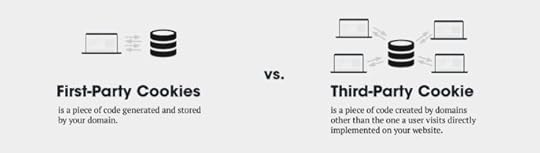
Let’s start by reviewing what cookies actually are. Basically, cookies are small text files that sites place on your device to collect data about your online activity.
They’ve been the backbone of online advertising and marketing for decades.
Ever seen ads for shoes following your browsing history? Cookies at work! Marketers rely on third-party cookies from platforms like Google to target and analyze ads based on your web surfing.
For a while, this cookie-free-for-all flew under the radar. But attitudes are shifting. Growing privacy concerns, especially in Europe, put cookies under scrutiny. Landmark regulations like GDPR gave users more control over their data.
Now, the pendulum is swinging away from unfettered cookie tracking:
Google plans to phase out third-party cookies in Chrome by 2024. A massive blow for advertisers and marketers!Browsers like Safari and Firefox already restrict cookies. The walls are closing in.Regulations like CCPA and upcoming US policies add consent requirements around data collection.It’s the end of an era. The unregulated cookie potluck is winding down. So what’s next for digital marketing?
While third-party cookies are crumbling, first-party cookies baked from your sites will still enable visitor tracking. But targeting capabilities will diminish.
Source: makeitbloom.com
The path forward requires adopting new tools and strategies ahead of the post-cookie era. Relying on doomed legacy methods is not a winning play. We’ll explore promising options shortly on this page.
The key is balancing privacy and functionality. Digital marketing can evolve past its cookie addiction while still delivering value. But mindsets and methods must change.
The Evolution of Cookies Till 2022Cookies have been key for digital marketing since the 1990s. Early on, cookies enabled handy tools like shopping carts, logins, and personalization. They gave websites memory.
Marketers soon saw other uses for cookie data. Third-party cookies from platforms like Google allow tracking of people across sites. This powered targeted ads.
With data on user actions, marketers optimized ad spending. The online ad business boomed thanks to cookie tracking.
But unchecked cookie use raised privacy issues. Users didn’t know how much they were being tracked. Laws like GDPR pushed back.
By 2022, attitudes toward cookies shifted. Browsers like Firefox blocked them. Google said it would stop supporting them. Cookies were losing steam.
Cookies enabled key features but overlooked transparency. The next era must balance utility and privacy better.
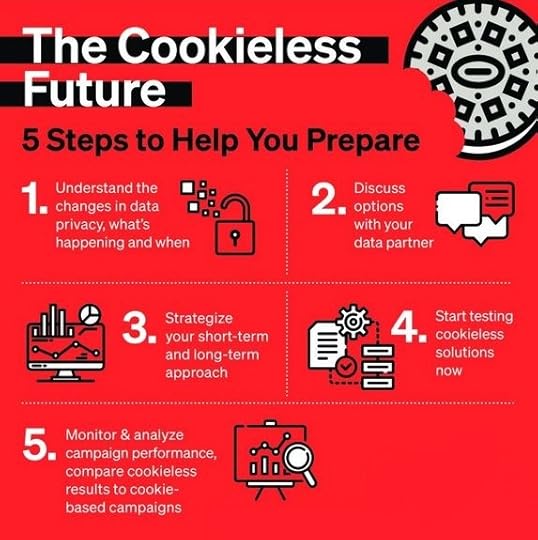
The Phases of the Cookieless TransitionPhase 1: Critical Preparations (2022 – 2023)
Businesses and marketers take immediate action to prepare for the end of third-party cookies.Stakeholders investigate alternative identifiers that align with privacy requirements.Phase 2: Adapting Strategy (2023 – 2024)
Site owners, businesses, and marketers adjust their marketing approach for diminished third-party cookie capabilities.This includes leveraging first-party data and contextual strategies to the fullest extent.Phase 3: A New Paradigm (2024 and beyond)
Third-party cookies are fully retired.Cookie alternatives should now be fully implemented.Digital advertising strategies fully adapted to the cookieless environment.
Source: dstillery.com
The timeline remains fluid, but marketers must start immediate preparations. As the digital marketing landscape goes cookieless, opportunities await those ready to evolve.
Impact of a Cookieless Future in the Online Advertising IndustryBrace yourself, my friend – the cookieless future is coming like a privacy-primed meteor! While it brings opportunities for marketers and advertisers, adaptation won’t be easy.
Third-party cookies have always been of immense benefit to marketers and businesses. They enable conveniences like targeted ads and analytics. But that convenience came at the hidden cost of user privacy.
Companies quietly tracked all sorts of browsing behaviors and interests behind the scenes.
Regulations like GDPR shone a light on this opaque data free-for-all. Rightfully so – consumers want more transparency and control. The pendulum is swinging back towards privacy.
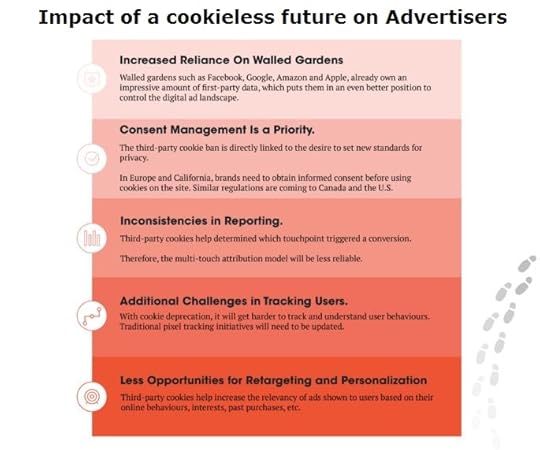
For digital marketing teams, this cookie crackdown means:
Limited ability to track user behavior across sites with third-party cookies. Less targeting and personalization data.Potential declines in ad performance as targeting blunts. More waste from broad blasting.Reliance on methods like fingerprinting and device IDs to try reclaiming some user tracking. More consent procedures are needed.But there are upsides too!
Opportunity to forge real relationships with engaged first-party audiences without covert tracking.Motivation to get creative with smarter contextual strategies vs. blind behavioral targeting.Reason to build legit loyalty and trust through value vs. manipulative persuasion.The cookieless future requires a mindset shift from tracking to transparency. From coercion to consent. From manipulation to meaning.
It won’t be easy to ditch old tracking cookies. But the marketing that emerges could be something much better – for both consumers and businesses. That’s a little idealistic, but positive change often breeds innovation.
The Dilemma of Advertisers in a Cookieless WorldThis cookie conundrum leaves many advertisers scratching their heads. How do you precisely target, track campaigns, and personalize without third-party cookies? Plenty of fears are swirling around, but marketers need to find new ways to succeed in a cookieless world.
It’s like suddenly Google Maps goes away, and you have to navigate unfamiliar streets with only vague directions. You can’t simply ask every passerby for personal details to guide your ads, either. You need a new playbook.
Alternatives and opportunities exist to fill the cookie void. But adaptation will be an iterative process with missteps. Refocusing marketing around transparent value and consent over covert surveillance is the right path.
Let cookies crumble – the most impactful marketing connects people without trickery. You’ll learn some great alternative solutions in the next few sections of this article.
Navigating Legal and Compliance IssuesNew privacy rules come with the cookieless future. Laws like the European Union’s General Data Protection Regulation (GDPR) and the California Consumer Privacy Act (CCPA) spotlighted how unrestricted cookies caused issues. They are giving control back to users over their data. For email marketing, this means tighter signup procedures to ensure consent. No more buying or renting random email addresses – quality over quantity. Tools that make user data anonymous allow overall reporting without tracking individuals. Metrics can inform strategy without monitoring people in marketing campaigns. When merging data, transparency and consent reduce privacy worries. You need to explain plainly how the data improves the experience. Review legal papers like privacy policies to ensure they reflect actual practices. Avoid hiding behind complex text – be clear. While compliance adds steps, it also builds trust. By showing the value of data, people gladly grant access. Legitimate interest goes both ways. The cookieless future has hurdles but also opportunities. Privacy-focused digital marketing strategies that respect people foster creativity and care.Consumer Perspectives on a Future Without CookiesHow do regular people feel about the cookieless future in advertising and marketing? Turns out many welcome it, even if it means fewer targeted ads. In a 2021 Deloitte survey, 66% of surveyed consumers expressed concern regarding how their personal data is used by companies they engage with online.
 People get tradeoffs – cookies enable handy tools like logins and shopping carts. But distrust happens when tracking is hidden without consent. While covert cookies brought targeting convenience, people like value from visible engagement. Many approve of mutually beneficial, consensual data use. The cookieless future is a chance to reset consumer relationships. A reset that is built on trust and transparency, not hidden surveillance. With permission, data creates shared value. Adapting digital marketing without cookies may be bumpy. But earning consumer trust fosters loyalty beyond transactions. Experience matters more than exploitation.
 People understand the need for relevant ads and marketing. Doing it together ethically beats manipulating people secretly. Perspective brings optimism for a future without cookies in the digital advertising ecosystem.Solutions That Could Help Marketers in Place of Third-Party Cookies
Source: ey.com
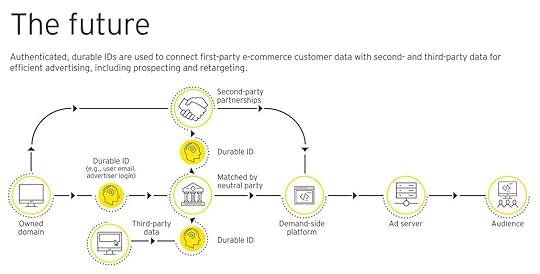
While losing third-party cookies deals a blow, innovative solutions offer hope for cookieless digital marketing done right. Here are some solutions that marketers and advertisers could deploy to move away from third-party cookies.
Contextual advertising places ads based on real-time page content, not past user actions. More relevant placements, less transparency issues. Dedicated platforms like TripleLift or Sharethrough excel in this regard.
Consent-based data sharing allows consumers to actively opt-in and get explicit permission to use their data. This provides legitimate value. Platforms like SourcePoint and Cookiebot enable consent flows.
Cohort modeling leverages first-party data to group users based on behaviors. You can target Lookalike Audiences on platforms using your existing high-value groups.
User identifiers like hashed emails help maintain continuity and track actions without personally identifiable data (PID). But transparency remains critical to avoid suspicion.
Customer relationship management (CRM) platforms become more vital to unifying first-party data and identity management. Integrations with marketing automation optimize flows.
Data clean rooms allow secure analysis of aggregated information between brands without sharing underlying data. They enable broader insights minus third-party data risks.
Identity resolution services stitch together disparate first-party data fragments into cohesive profiles while maintaining security. This solution improves targeting.
Marketers must get creative and embrace new opportunities like these to adapt. While third-party cookies provided past convenience, future tools can enable ethical digital marketing done right – and earn consumer trust.
Content and SEO Implications in a Digital Landscape Without CookiesThe imminent demise of third-party cookies also impacts content and SEO strategy. Let’s look at some key implications.
Content is key without cookies
Content becomes even more important to attract engaged visitors without cookies. Great stories and experiences bring people in based on quality alone.
Use data on your own users to make content they like. Try different formats like videos or podcasts. Focus on two-way community engagement, not one-way promotion.
SEO without cookies
Solid SEO basics like fast speed, good mobile experience, and quality content-matching keywords still work.
Review Google Analytics to see and improve organic traffic. Study visitor click patterns to find popular entry pages to optimize.
Content personalization and SEO
Balance personalization to serve tailored experiences while keeping core pages accessible for SEO.
Use AI and machine learning to analyze first-party data. Understand individual interests. Then, customize content accordingly.
Having compelling, search-friendly experiences beats targeting tricks. There’s hope for a cookieless future built on genuine value and visitor engagement.
Brands That Are Successfully Adapting to a Cookieless World
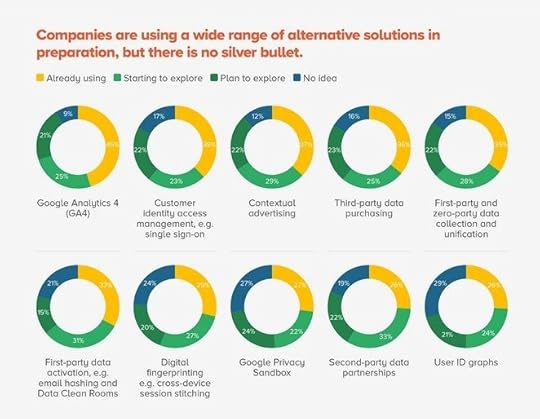
New York Times The publisher keeps readers happy without cookies. It uses data from registered users to suggest personalized articles and pages. Apple Despite strong privacy rules, Apple is growing its services business. They thrive using compelling bundled offers, CRM messaging, and content/recommendations based on purchase history. Privacy preserves the company’s premium brand status. Nike Nike moved from targeted ads to interest and context-based ads. Its ads became more relevant and efficient. Focusing less on individuals protected the sportswear brand. Workout app signups stayed strong. TikTok TikTok grew huge thanks to fun and creative short videos matched to engaged young users – not cookies. Data shows overall user patterns. Netflix Netflix uses powerful recommendation algorithms based on individual watching behaviors. This keeps people watching movies for long hours. Contextual cues enhance the experience while protecting privacy. Key TakeawaysFirst-party data strategies still allow personalization and segmentation while protecting privacy. Context signals drive relevant ads without tracking. Great content and communities are more important than targeting. ConclusionAs digital marketing changes, it’s key to stay updated on big shifts like cookies going away. While third-party cookies provided easy targeting, privacy issues meant they had to evolve. Welcome to a cookieless future!
Marketers must now focus on transparent strategies that offer real value to customers in a digital marketing world without cookies. We’ve highlighted some innovative strategies in this article.
But making this customer-focused future happen takes more than ideas – it requires flawless execution. This is where working with pros pays off. And where AdvertiseMint comes in. At AdvertiseMint, we understand what a cookieless marketing world means for businesses. And how to craft advertising solutions that match what your consumers want. Our social media paid ads services can drive real results for your business as digital marketing advances. With AdvertiseMint as your ads ally, your business can thrive in this constantly changing marketing industry.
An effective paid ads campaign is what you need to scale your business. Our ads experts can help you with that.Want to learn more? Click this link to book your FREE Facebook ads consultation now!
Unleash Your Inner Entrepreneur: Become an Amazon Individual Seller
Do you want to become an Amazon individual seller?
Becoming an individual seller on Amazon is a good way to turn your passion for selling into a profitable venture. Whether you want to declutter your closet or launch a small business, this platform offers a user-friendly gateway to success.
This blog post will walk you through the essential steps, tips, and tricks to kickstart your journey as an Amazon individual seller.
Amazon Selling Plans: Individual vs. Professional Source: Canva
By creating a seller account, you can start selling a wide range of products on the Amazon platform. Individual and professional sellers play a significant role in the Amazon business ecosystem. The following are the two seller account types:
1. Individual seller.If you want to test the waters and sell on Amazon, starting as an individual seller is a good idea. An individual seller operates with an Amazon Individual Seller account. Individual sellers don’t pay a monthly subscription fee. Instead, they are charged a per-item fee for every item sold within the platform. They can also access basic features for listing and selling products on Amazon. However, they do not have access to some advanced tools and analytics.
2. Professional seller.A professional seller on Amazon makes use of a professional seller account. Amazon encourages sellers who plan to sell in large quantities to opt for a professional selling plan. Professional sellers pay a monthly subscription fee instead of a per-item fee for every product sold. This subscription grants them access to several benefits.
Professional sellers can list an unlimited number of products. They also have access to various advanced tools and features that can help grow their Amazon business. Many Amazon sellers go for professional seller accounts because they offer advanced features and benefits for businesses.
Who Is an Amazon Individual Seller Account Right for?An Amazon individual seller account suits anyone selling less than 40 products monthly. The per-item fee ensures that sellers only pay for their occasional sales. You should get an individual seller account if you fall into any of these categories:
Casual sellers: If you want to sell items occasionally, like used books or personal items, this account suits your needs.Hobbyists: Whether you craft, collect, or have a small side hustle, this account lets you share your passion with buyers.Newbies: If you’re new to e-commerce and want a low-risk entry, an individual account is a great starting point.Low-volume sellers: If you plan to sell fewer than 40 items monthly, you can save on fees with this type of account.Testing the waters: It’s an excellent choice if you’re unsure about long-term commitment and want to experiment with selling online.Remember, it’s easy to upgrade to a professional account as your business grows!
What Do You Need to Get an Amazon Individual Seller Account?Here are the requirements for creating an Amazon individual seller account:
Personal information: Your name, address, and phone number.Email address: A valid email address that you can access regularly.Bank account: You’ll need an account where Amazon can deposit your earnings. This should be a bank account in the country you plan to sell.Tax information: Your tax identification information, including your Social Security Number (SSN) in the United States or an equivalent in your country. You may also need to provide business tax ID information if applicable.Payment method: You’ll need a credit card for verification purposes.How To Create an Amazon Individual Seller Account Source: Canva
The following are the steps on how to create an Amazon Seller Account:
Go to Amazon Seller Central.Sign up and input your name, email, and password.Place business and seller information.Choose your preferred selling plan.Provide your bank and tax details.Read and accept the Seller agreement.Create your Amazon account.Receive and click the confirmation email.How To Create Product ListingsThe following are the steps you have to follow to create product listings:
Login to Amazon Seller Center.Go to the “Catalog” section in your Seller Central Dashboard.Choose “Add a Product” from the menu. If your product is not on Amazon, click “I’m adding a new product.”Next, pick your product category. It will help determine where your product will be listed. Hence, it is important to be precise.How Much Does Being an Individual Seller Cost?The individual selling plan costs relatively less compared to the professional seller account. It only charges as low as $0.99 per item sold. However, you will also have to pay for the referral fees, which are a percentage of the selling price and vary according to the product category. Likewise, you will have to pay FBA fees if you use Fulfilment by Amazon.
Tips on How To Become a Successful Individual Seller Source: Canva
The following are some tips on how to become a successful individual seller:
Pick the right niche: You should research different product categories and niches to know which has less competition yet more demand. Choosing a niche with a high demand increases your chances of getting more sales. Hence, it would help if you researched popular niches and their profitability.Source quality products: Find suppliers or manufacturers known for their good record and reputation in the business. Investing in product quality is an important step towards becoming a successful individual seller on Amazon. Optimize product listings: You should create a high-quality product listing using clear and detailed descriptions and high-resolution images. Doing so heightens the likelihood of your content appearing in Amazon search results. Competitive pricing: You should price your products competitively. Competitive prices are more attractive to customers. Take the time to research similar products on the platform and adjust your prices accordingly.Provide excellent customer service: You should respond to concerns and queries as soon as possible. Every response should be made professionally. By answering customer’s issues promptly, you can maintain positive feedback and ensure their satisfaction.Fulfill orders efficiently: You should choose a reliable order fulfillment method. Make sure that the option you will opt for should have timely shipping and delivery.Request and encourage reviews: Whenever possible, politely ask your satisfied customers to leave reviews for your products. Customer reviews assure potential buyers that your products are of good quality. Hence, a higher number of reviews enhances your product and seller credibility.Final Thoughts on “How To Become an Amazon Individual Seller”Becoming an Amazon individual seller opens the door to countless possibilities. With the right strategies and dedication, you can transform your dreams of online entrepreneurship into reality. So, take the leap and embark on this e-commerce adventure.
Are you seeking ways to boost your products’ visibility on Amazon? Contact the top Amazon advertising agency today!
Frequently Asked QuestionsCan I switch from an individual to a professional seller account later?Yes, you can upgrade to a professional seller account at any time.
What resources are available to help individual sellers succeed on Amazon?Amazon offers education materials, seller support, and a community forum where sellers can ask questions and share their experiences.
What is the Amazon selling partner support for?If you have any questions or issues, contact selling partner support to get assistance with your professional account.
Related Articles