Left, Right, Left … Write. Do-it-yourself structural editing.
 What I love about writing crime mysteries is the constant interplay between the left and the right hemispheres of my brain. The trick is to make them work together.
The left brain gathers data, information and facts. For my current work in progress, I’m juggling three topics of which I have almost no knowledge. The greyhound racing industry, tattooists, and euthanasia. Hopefully, my left-brain research has come up with enough material to convince readers otherwise.
The right brain then takes all those facts and a large dose of imagination to come up with a cast of characters and the bones of a compelling story.
Character-driven is my preferred method of writing. For me it is important to know your characters as well as you know yourself. What they look like, how they live, what they like and don’t like, what makes them tick.
The best way of getting to know a character is to let him or her write their own story. This is great fun. It’s like being in an online chat room, except you are the only one who is there. The only drawback is that the story can get out of hand. Before you know it, you’re down a dry gully with no way back. Quite literally, you’ve lost the plot.
Re-enter the left brain.
Here’s today’s tip for ironing out a wayward storyline. Use your left brain and a left-brain tool. What could be more left-brain than Microsoft Excel?
Here are the steps:
1. Read and summarise the existing manuscript without line editing. This is the hard part, but it is essential. Most likely you’ll need to do some rewriting afterwards and your perfectly-crafted paragraphs may need to be trimmed.
2. Break your existing chapters into scenes. A scene is a sequence of action that moves the story forward. It isn’t a scene if you can’t pinpoint what happened, where it happened, when it happened, and who was there at the time.
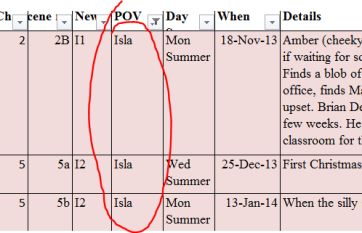
3. Put your scenes into a spreadsheet. Label your columns like this:
Chapter Number; Scene Number: Point of View (POV); Day/Season; Date; Details.
Once you’ve set it all out in the spreadsheet, you can use the magic of Excel to manipulate the columns. For example, turn on the data filter to view each character arc, check the timeline or the sequencing of the chapters. In the example above, I’ve filtered for POV and selected the character Isla.
4. When you’re happy with the rejigged outline, copy into a fresh Word document. Put one line of the spreadsheet at the top of each chapter. Then copy and paste the original manuscript into your new framework.
So there you are … ready to write in a structure that works.