How I Fired Shared Hosting and Went to the Cloud.
The tl;dr : My host was slow. Support was great, but they were slow. So I switched to another faster company. They were slow too. Theme? Optimized. Images? Smushed. So I wondered should I buy a better hosting plan? Then I saw Google/Amazon/Microsoft all had cloud services. Could I move my WordPress site there?
Yes, I could.
The Problem
My site ran pretty well when it was a quick book posting, or a short sample. But then I started adding more images, more features, a better layout. And the site got sloooooow. I did the usuals, a Webpagetest, GTmetrix, read all the guides, but still, sloooooow. Must be my host right?
I wasn’t too sure. I mean, all I had were a few dozen images, a WordPress theme, some text. Could it be that bad?
So I started checking the waterfall table on GTmetrix. One time my site would load in under a second, the next it would take 20 seconds.
What the hell?
At this point I was sure it was the theme. I had Avada, a very popular theme, but one that looked bloated. I used the P3 Plugin tester to see if I had a crappy plugin, but still, it looked good.
So I went to the default theme. Same result. Slow. Then not slow. Then slow.
Solution, or not?
So I shitcanned that host. I had a bottom tier hosting plan that was about up. Call it $8 a month or so.
The next host was mid tier, reputable, and from the unbiased reviews I read, decent.
A side note, unbiased reviews on webhosts are hard to find. Everyone has affiliate pages, and buy this now, and go here’s. Hard to trust marketing.
I slid everything over without too much fuss. The transition was painless, easy, crisp. I didn’t dig into code, command lines, nothing. Just a few simple clicks.
Almost immediately it was the same thing. In fact now it was worse. The load times were erratic.
I changed everything. The theme went away. I stripped all the plugins. I went to a very simple style, optimized all of my images, reduced the clutter. It was as lean as I could make it.
And it didn’t make any difference.
Now I’m not a web page optimization expert. But I could tell something was shitty here. So I ended up making some basic HTML pages and tested using those. Same thing.
The Options
I could buy a better tier of shared hosting. Did I need this? This blog gets like 20 people a day tops. This isn’t exactly theChive.
Would another shared host be better? Maybe. But I didn’t like my options. I’d been burned twice.
I’d known about Amazon AWS service for awhile, but that was always stuff for big business and developers, right? Google had just made the news by really pushing this too. And Microsoft was in the ring as well. I decided to check on it. It had to be easy to setup, easy to maintain, but most of all fast and reliable. Oh, and about the same price as I’m paying now.
Amazon AWSEC2
Hosting a WordPress Blog on Amazon EC2
Woah. Command lines. This isn’t cPanel or some shared host. I found a company that would set it up as a package, Bitnami, but I didn’t want another middle man. So how was the price?

A little more than I’d hoped for.
Google Cloud – Deploy WordPress
Huh. Just a button.
Now I did find another guide that was similar to Amazon’s. Lots of command line. But I left that one alone.
So I figured I’d give this a try. Setup a test site, copy my stuff over, evaluate.
But what about price?
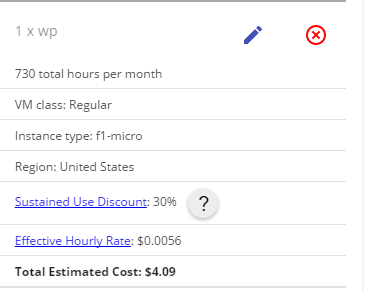
$4! I can’t even buy a decent beer at the brewpub for $4.
And in about 10 minutes I was up and running. Another hour and I had my theme set up, my export loaded, and all of my images going in. It took me awhile to get the FTP setup, and I only had to use the command line once. (It wasn’t that bad.)
But what about speed?
Page Load : 1.9 seconds. Repeatedly. Day in, day out. And this is on a page with a lot of photos.
First response is really great too, 254 milliseconds. The variation is what I like best. It’s very stable.
I also swapped my domain over to Google Domains too. I wanted everything under one roof (server).
A few caveats. I’m comfortable hitting guides, FAQ’s, stackexchange, for answers. If it doesn’t work I don’t need much technical support. This might not be the best for someone who has no experience setting up a server. But I’d easily pay someone $50 to setup the nitty-gritty details for me.
So why would you still use shared hosting? Pretty much only if you need to help to set it up and run it. Support is the only reason. I doubt this Google plan has any meaningful support. If something goes South, I’ll likely be on my own.
But I doubt it will, how often do Google’s servers go down? And it’s not like I’m running a monster site. For what I need it’ll work great.
The Future
Most people won’t swap hosts. Why would you? I never thought of it until I had issues. But soon Google/Amazon are going to catch on and start making this even easier. Once it’s easier then people like GoDaddy are at a disadvantage, simply because of the economy of scale. They may be big, but not Google big.
Or someone like your Grandma will put her site on Squarespace, or something like it, built onto Google’s cloud platform and no one will be the wiser. The days of visiting some shady affiliate website that adds no value other than funnelling you to a buy-it-now button are coming to a close.
Step by Step
Coming soon I’ll show exactly how I transfer it all over.
The post How I Fired Shared Hosting and Went to the Cloud. appeared first on Casey Calouette.