Remind Group Texting App Now Has a Chat Feature
 When I presented on mobile devices, specifically cell phones, in the classroom, I was often asked about two group texting apps, Cel.ly and Remind. Along with a name change, Remind, formerly Remind HQ and Remind 101, now has an added feature. You can chat one on one with one of the members in the group(s) in the app.
Group texting apps let you send messages to a group of a people. Several services do not allow those the receivers to respond back to the messenger but Remind just started that feature. I learned of this feature addition late last week and was reminded (no pun intended) again of it during a webinar today.
This is great if you need a response back from someone, or all members of your group. Most teachers have a Remind group for their homeroom or each class period if they teach more than one class. They may also have one for parents, grade level/team colleagues or an entire faculty. Group texting apps are so helpful when sending out reminders of all kinds regardless of the audience and size of the group.
Students or potential members text a number and phrase to join the group keeping all phone numbers hidden from all parties. This protects your phone number and prevents parents or students from calling you for petty things or all hours of the night. 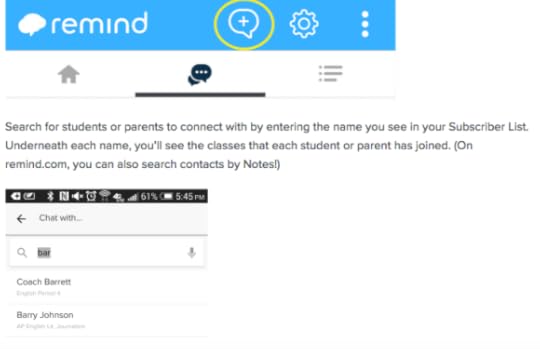
To use the new feature, click the chat icon and then select who you would like to send the message to and it will go to only that person. They can respond first and you respond back and again, all phone numbers are kept private unless you share then with one another so you can know who you are communicating with by name. Go to