Eye Strain Reducing Editing for Writers – #amediting #amwriting
The amount of time we spend hunched over computers, tablet devices and ebook readers isn’t good for our eyes, necks, shoulders or wrists, but it’s essential. I have noticed a steady increase in the number of migraine sufferers I have met, who are writers. I am wondering if this is an occupational hazard, rather than an accident.
In writing and editing the first drafts of The Dragon Tree, while trying to cope with my frequent migraines, I stumbled across a few tips which may also help you, whether electronic screens give you headaches or not. These methods have given me much more writing time.
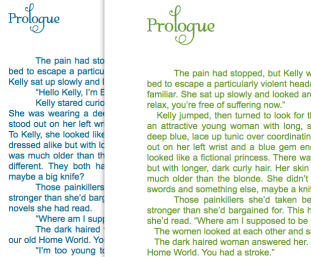
The biggest problem is the harsh contrast between black text and a white page. Of course, turning down screen brightness helps, but that is not enough. I found that a soft green or a blue text colour, was much easier on my vision. Also, changing colours between drafts gave my brain a shock. I was able to pick up many hidden errors, such as ‘or’ not ‘of’, ‘become’ not ‘became’… all those things that the spell checker misses. For more information on tricking your brain into helping you edit efficiently, see this post: The Best Kept Editing Secret.
The examples shown here are deliberately fuzzy as this is my WIP, but you can see how the colours affect your own eyes. When you are staring at text for hours, a simple select all and font colour change can help you enormously.
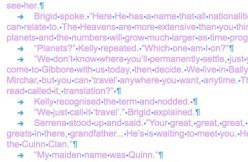 I got to a point where I had messed up my formatting with so many edits, that I needed to turn on the dreaded show all characters. I have always found this savage on my sight. I needed just the markers, not text and on experimenting, found that changing the text colour so the contrast was high, made the character marks pop out. One less headache… yes!
Another hint I picked up from a web site was to never edit with justified text. The extra spaces between the words make proof reading impossibly hard. Double spacing is critical for proof reading, or you wind up reading one sentence on top of the other! For a great post on the difference between proofreading and editing, please visit the Writers in the Storm blog.
For ease, I began writing on my iPad, as I was able to get hold of a word processor app with a darker background. It helped, but the sheer number of spelling mistakes generated lost me masses of time in needless correction. This is all the space I had to work with and it drove me crazy. Most tablet word processors are similar, so in the end, I abandoned their use, except on the worst days.
Update: thanks to Patricia de Hemricourt ( @epublishabook) for sending me to this post on Computer Vision Syndrome. It’s exceptionally helpful.
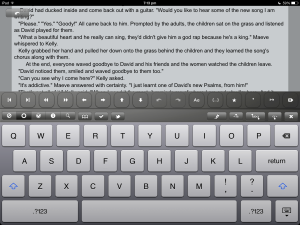
Textkraft EN is available through iTunes.


This work, created and Copyright Cate Russell-Cole 2014 is licensed under a Creative Commons Attribution-NonCommercial-NoDerivatives 4.0 International License.
Filed under: Editing Tagged: author, books, challenge, discovery, editing, eye strain, fiction, Indie publishing, migraine, novel, problem solving, stress management, writer, writing