
Dust Your Computer? Spring Cleaning I forgot
 Heather says:
The next time you are at the store and snicker when you see the canned air -remember The Lorax ?- grab a can anyway.
Why?
Because it’s time to clean out your computer.
I never remember to do this until my computer decides to throw a tantrum, which it did yesterday, twice, in a meeting. /facepalm
I’m just glad it was with my team and not when I was trying to act all super professional and impress a client. I think that may have caused me a minor meltdown of my own.
How do you dust a computer?
If you have a desktop with a tower unit you can use the soft brush attachment on your vacuum to suck the dust off of the cover. In fact, you should do this every time you vacuum. This will help prevent SOME but definitely not all dust from entering the unit.
If you have pets this is especially important as pet hair and dander are drawn to your computer like moths to a flame.
Why?
Static electricity is the devil .
.
You’ve probably noticed anywhere you have a tangle of cords you also have more dust than anywhere else right? The electrons providing all that wonderful electricity love to build a negative charge. This negative charge attracts positively charged dust particles. These dust particles are very social and work together, inside of your computer to create a colony of dust bunnies whose main hobby is knitting your heat sink a cozy little sweater.
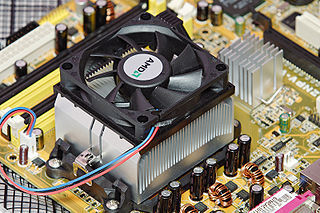 Insulated heat sinks are a bad, bad thing. They can’t allow your computer to cool and this can lead to serious and potentially expensive damage
Static electricity is also why you use compressed air and not your vacuum to clean out the inside of your computer. You don’t want to create a spark near your exposed circuitry.
If it has been a while since you’ve cleaned your computer, take it outside and don’t forget that can of air. Just trust me on this, please? Carefully take the cover off of your tower unit or laptop.
Now take a peek inside, sigh heavily, and use your compressed air and serve up the dust bunny eviction. Pay special attention to the area around the fans and try not to jostle any cords or touch any of the circuitry.
Once you’ve blown out all the dust, replace the cover carefully, take it back inside, and reconnect the cords.
Try to get in the habit of doing this every six months, unless you have multiple pets which means you get to do it MORE.
Now, be honest, when was the last time you’ve dusted the inside of your computer?

Copyright Home-Ec101.com 2007-2014


 Related ArticlesBrand New Printable Chore Chart for 2014How to Clean a Bath Mat After a Toilet OverflowDry Wall Dust and Other Fun Construction Clean Up


Heather Solos's Blog

- Heather Solos's profile
- 12 followers

