Workspace and Code lines

We organize work in Code Lines and Workspaces. They are different in that Code Lines are more about temporal changes, and Workspaces about a space to work, but in terms of how you think about Trunk Based Development, they have a bit in common.
Code lineA code line is an isolated, diverging stream of code. A code line can be:
The Main Line
Code in a Developer or CI Workspace
If the Main Line has the latest code, creating a code line or branch off the Main Line and making changes means work isn’t integrated immediately. That’s not necessarily a bad thing. A separate work stream isolates those working on the branch from disruptions caused by work elsewhere and isolates the Main Line from disruptions caused by incomplete work. But that isolation also means parallel, potentially conflicting work is in progress and will need to be integrated. This isolation can improve flow in the short term, but if it lasts too long, it can cause problems when you try to integrate changes later. The key is to minimize the time work remains unintegrated.
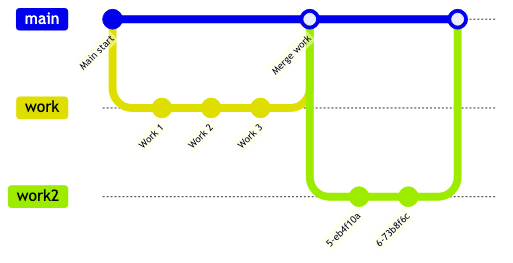
Branch LifetimeIt’s easier to think of a branch as ending once it is integrated into the Main Line. This is true even if you don’t delete the original branch. For example, the first diagram illustrates a workflow where you delete a branch after merging and create a new one (perhaps with the same name, or a different one) for the next work step.
The next diagram shows a workflow where, after you merge, you integrate main back into your existing branch, then do more work, which you integrate later.
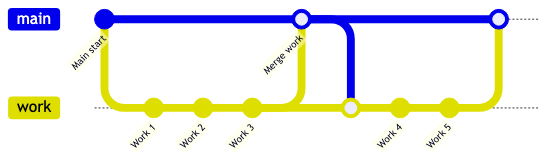
In either case, we can think of the workflow as including 2 work branches, with the second starting after the merge to main; the key idea being that a code line represents a parallel stream of work, with changes that have not been integrated. Either way, you end up with two logical work branches.
While a Code Line is often associated with a branch in an SCM Repository, any of the following are effectively Code Lines:
A Branch in your Git Repository is a Code Line
A Local branch that you don’t push, but keep locally to facilitate your workflow
Code in a local workspace
WorkspaceA Workspace is where code gets written, built, and tested; in effect, where you make changes. While we think of a Code Line as primarily about changes over time, we often think of a Workspace as the place where we make those changes. A Developer Workspace plays an important role in consistency between development work and Continuous Integration results, but for this discussion we’ll focus on the impact of the time it takes to make changes in the workspace while other work is going on.
A workspace can be:
A directory on your development machine where you’ve checked out code from your version management system
A directory in a CI System where code is checked out to build.
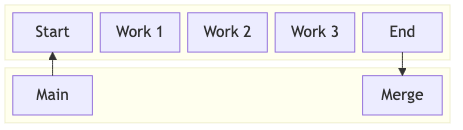
A workspace is a parallel work stream, whether or not it is backed by a branch in a local repository or a branch in your SCM system, as the next diagram shows. Other developers don’t have access to your work, and if the workspace isn’t backed by a published branch, they can’t even examine it. This usually isn’t an issue if you integrate changes quickly.
In many cases, it’s useful to back up your workspace with an SCM branch, whether local or in a shared repository. A local branch lets you checkpoint work and quickly revert after a wrong turn. Sharing the branch in a repository enables:
Sharing your work for feedback.
The ability to leverage your CI infrastructure for automated checks before you merge.
The only downside of sharing a branch (aside from some easy-to-automate mechanical steps) is when the shared branch is part of a slow Pull Request Review process. But that’s a conscious decision (though some teams make it by default) rather than something intrinsic to a shared branch. A Pull Request can be a fast, simple feedback tool that can ease the transition to Trunk Based Development.
Code in a local workspace may not seem like a code line, but it has all the downsides of a branch with none of the advantages.
SummaryWorkspaces and Code Lines are useful concepts when thinking about how day-to-day software development works. Workspaces are primarily about space and things to enable you to get work done, but also have a time element to consider, regardless of how you use branches.