Setting Up Ollama and Running DeepSeek R1 Locally for a Powerful Retrieval-Augmented Generation…
The advancement of Large Language Models (LLMs) has necessitated the need for efficient Retrieval-Augmented Generation (RAG) systems to enhance factual accuracy and context awareness. This article explores the setup of Ollama and DeepSeek R1 locally to develop a powerful RAG system. By leveraging local computation, the approach ensures privacy, customization, and optimized performance. The article provides a step-by-step guide on installing Ollama, configuring DeepSeek R1, and integrating them with a RAG pipeline.
 Introduction
Large Language Models (LLMs) such as GPT-4 have demonstrated remarkable capabilities in natural language understanding and generation. However, their reliance on pre-trained knowledge can lead to outdated or hallucinated responses. Retrieval-Augmented Generation (RAG) addresses this limitation by incorporating an external knowledge retrieval mechanism. Ollama, an efficient model runner, enables local execution of such models, ensuring privacy and performance optimization. This article details the setup of Ollama and DeepSeek R1 for a fully functional RAG system.
RAGRAG is an AI technique that retrieves external data (e.g., PDFs, databases) and augments the LLM’s response. Why use it? Improves accuracy and reduces hallucinations by referencing actual documents. Example: AI-powered PDF Q&A system that fetches relevant document content before generating answers.
Understanding Ollama and DeepSeek R1Ollama: A tool that facilitates running LLMs on local machines, providing an easy-to-use interface for deploying open-source models.
DeepSeek R1: A powerful open-source language model optimized for retrieval-augmented workflows. It supports efficient tokenization and fast inference speeds, making it suitable for RAG-based applications.
Installation and SetupTo set up Ollama, follow these steps:Download and Install: Ollama can be installed from Ollama’s official website.
Verify Installation:
ollama --versionRun a Test Model:
ollama run llama2Setting Up DeepSeek R1Download DeepSeek R1 model:
ollama pull deepseek-ai/deepseek-r1Run DeepSeek R1 locally:
ollama run deepseek-ai/deepseek-r1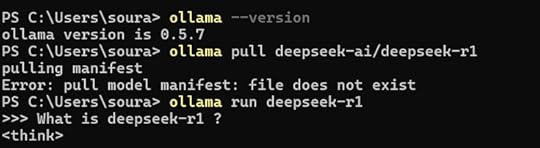
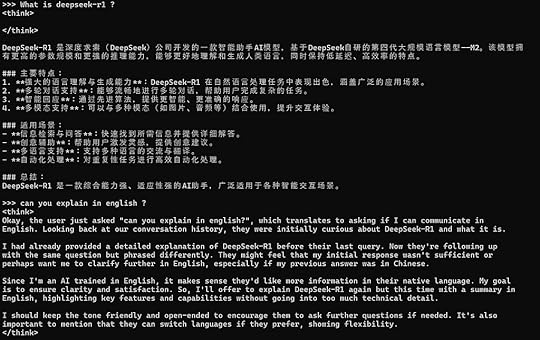
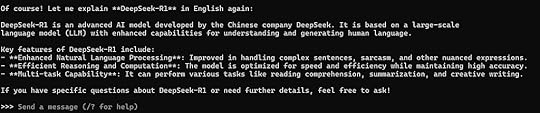 Ollama is a framework for running large language models (LLMs) locally on your machine. It lets you download, run, and interact with AI models without needing cloud-based APIs.LangChain is a Python/JS framework for building AI-powered applications by integrating LLMs with data sources, APIs, and memory. Why use it? It helps connect LLMs to real-world applications like chatbots, document processing, and RAG.DeepSeek R1
DeepSeek R1 is an open-source AI model optimized for reasoning, problem-solving, and factual retrieval. Why use it? Strong logical capabilities, great for RAG applications, and can be run locally with Ollama.
How They Work Together?
Ollama runs DeepSeek R1 locally.
LangChain connects the AI model to external data.
RAG enhances responses by retrieving relevant information.
DeepSeek R1 generates high-quality answers.
Example Use Case: A Q&A system that allows users to upload a PDF and ask questions about it, powered by DeepSeek R1 + RAG + LangChain on Ollama.
Setting Up a RAG System Using StreamlitNow that you have DeepSeek R1 running, let’s integrate it into a retrieval-augmented generation (RAG) system using Streamlit.
PrerequisitesBefore running the RAG system, make sure you have:
Python installed
Conda environment (Recommended for package management)
Required Python packagesInstall Below Packagespip install -U langchain langchain-community
pip install streamlit
pip install pdfplumber
pip install semantic-chunkers
pip install open-text-embeddings
pip install faiss
pip install ollama
pip install prompt-template
pip install langchain
pip install langchain_experimental
pip install sentence-transformers
pip install faiss-cpuRunning the RAG System
Create a new project directory
mkdir rag-system && cd rag-systemCreate a Python script ( app.py)
import streamlit as stfrom langchain_community.document_loaders import PDFPlumberLoader
from langchain_experimental.text_splitter import SemanticChunker
from langchain_community.embeddings import HuggingFaceEmbeddings
from langchain_community.vectorstores import FAISS
from langchain_community.llms import Ollama
from langchain.prompts import PromptTemplate
from langchain.chains.llm import LLMChain
from langchain.chains.combine_documents.stuff import StuffDocumentsChain
from langchain.chains import RetrievalQA
# Streamlit UI
st.title("📄 RAG System with DeepSeek R1 & Ollama")
uploaded_file = st.file_uploader("Upload your PDF file here", type="pdf")
if uploaded_file:
with open("temp.pdf", "wb") as f:
f.write(uploaded_file.getvalue())
loader = PDFPlumberLoader("temp.pdf")
docs = loader.load()
text_splitter = SemanticChunker(HuggingFaceEmbeddings())
documents = text_splitter.split_documents(docs)
embedder = HuggingFaceEmbeddings()
vector = FAISS.from_documents(documents, embedder)
retriever = vector.as_retriever(search_type="similarity", search_kwargs={"k": 3})
llm = Ollama(model="deepseek-r1:1.5b")
prompt = """
Use the following context to answer the question.
Context: {context}
Question: {question}
Answer:"""
QA_PROMPT = PromptTemplate.from_template(prompt)
llm_chain = LLMChain(llm=llm, prompt=QA_PROMPT)
combine_documents_chain = StuffDocumentsChain(llm_chain=llm_chain, document_variable_name="context")
qa = RetrievalQA(combine_documents_chain=combine_documents_chain, retriever=retriever)
user_input = st.text_input("Ask a question about your document:")
if user_input:
response = qa(user_input)["result"]
st.write("**Response:**")
st.write(response)Running the Appstreamlit run app.py
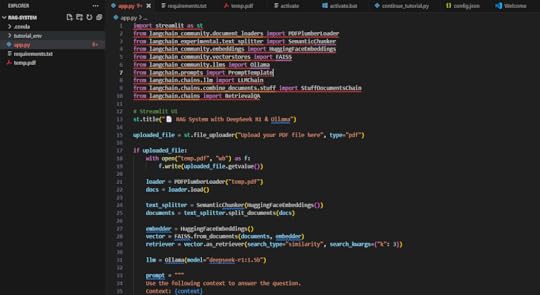 Project ViewOnce the script is ready, start your Streamlit app:

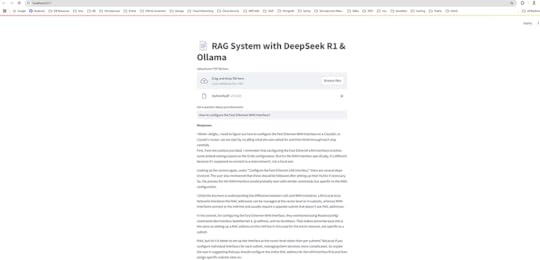
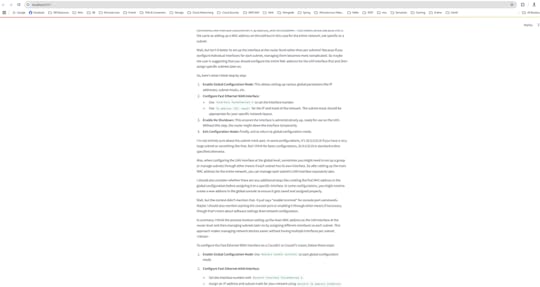
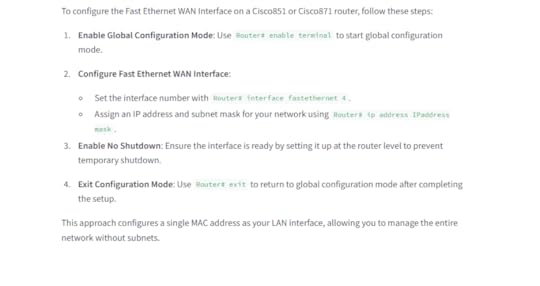
Upload A PDF so that retrieves external data (e.g., PDFs) and augments the LLM’s response. I have upload the pdf which has network dataset, and asked the question to configure the Fast Ethernet WAN Interface.
 Conclusion
Setting up Ollama and running DeepSeek R1 locally offers a robust foundation for RAG systems. The approach ensures enhanced privacy, lower latency, and high customization potential. By leveraging optimized retrieval and response generation, enterprises and researchers can deploy powerful AI solutions on local infrastructure.
[image error]Setting Up Ollama and Running DeepSeek R1 Locally for a Powerful Retrieval-Augmented Generation… was originally published in DXSYS on Medium, where people are continuing the conversation by highlighting and responding to this story.