How to Save Money on Google Play Books
Do you read on Google Play? Did you know that you can read an entire series for less than the cost of each book at full price if the author has enabled bundling?
It’s true.
Many authors, yours truly included, place our series out on Google Play and then create what the site calls promotion bundles.
For example, for my Jensen City Heroes series, you can get Arson FREE, buy Thirst at regular price of $3.99 and then get Darkness and Amp 20% off the regular price.
Step 1: Find the book on Google Play. I’m taking you to book 1, Arson. (Note: Don’t press the get for free option!)
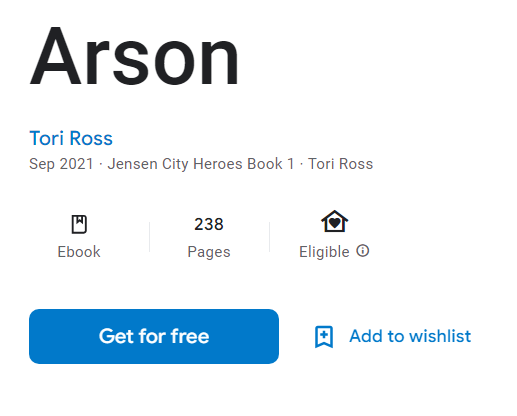
Maybe you’ve already read it somewhere else and you know you want to read the entire series. Seriously, I know it’s tempting but DON’T press the “Get for free” button!
Step 2: Scroll down the page a little to the section to build a series bundle and click that “Build” button.
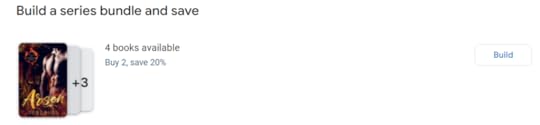
Step 3: You’ll be able to click the books in the series you want to read. You’ll need to buy Thirst at the full price, but the last two books will be discounted at the rate the author set for the promotion. Click the circles for the books you want to include in the bundle.
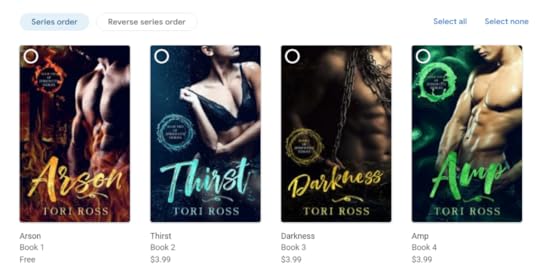
Step 4: Watch the price populate on the right side of the screen. In the example below, I’ve bundled all four books. (I’m in the US, so please note the pricing is in USD.)
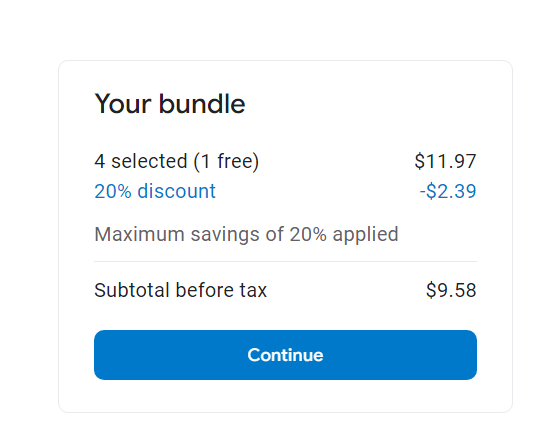
Step 5: Click Continue to finish the purchase.
That’s it! Easy peesy, lemon squeezy! Again, many authors do this for series, so make sure you scroll down to see if there’s a bundle for your favorite series.
Happy reading!