Angular Elements
In this lesson we’re going to transform an Angular component into an Angular Element and we would dynamically insert it into the HTML by using the innerHTML property of a DOM element.

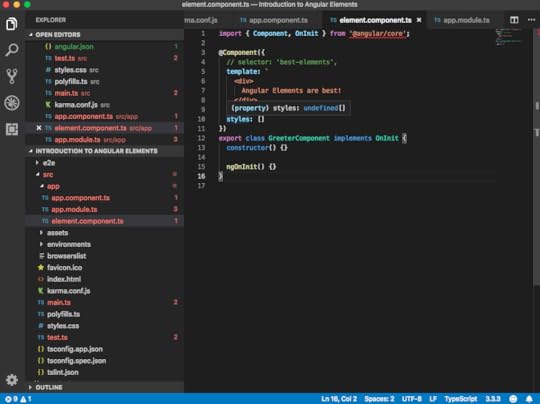
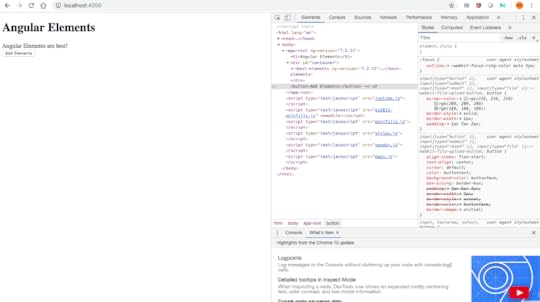
we have a simple greeter component which does nothing else than printing out, “Angular Elements are best!” I then reference this one here in my app component, as you can see here, by using the best-elements tag. That’s why we see here in our browser “Angular Elements are best!” printed out.
element.component.ts
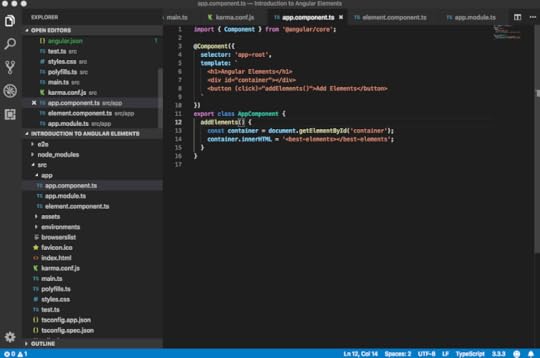
app.component.ts
Assume we want to insert this tag in a much more dynamic fashion. Let’s create here a simple container, which is nothing else than a div. Let’s also create a button. Whenever I click that button, I want to insert that best element tag. Let’s create here a method, addElements(), inside our app component.
Here, we simulate that dynamic insertion by simply leveraging some browser APIs. I am having here an instance of my container by using the document.getElementById. On that container, I am using the innerHTML. I’m inserting here my best-elements tag.
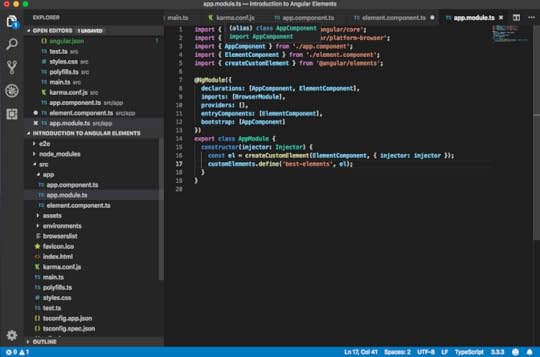
app.module.ts
Let’s see how to leverage Angular Elements to achieve just that. First of all, we need to install the Angular Elements. We can do that by the ng add command.
Once the installation is done, we can go to the package.json and inspect what has been inserted by the Angular add command. Here, we see the Angular Elements library, which has been added to our package.json. You might have different versions here, depending on the Angular version you are currently using. Also inserted here a document-register-element polyfill.
In the constructor of our app module, we create here an element. Then we import the createCustomElement function from the Angular Elements package we just installed. Now, we can directly use that below here.
Make sure ElementComponent is added in declarations and entryComponents.
@NgModule({
declarations: [AppComponent, ElementComponent],
imports: [BrowserModule],
providers: [],
entryComponents: [ElementComponent],
bootstrap: [AppComponent]
})
export class AppModule {
constructor(injector: Injector) {
const el = createCustomElement(ElementComponent, { injector: injector });
customElements.define(‘best-elements’, el);
}
}
We pass here the type of our element component, as well as we have to give it the injector which it will use internally for resolving the dependencies via the dependencies injector. In order to be able to pass it in, we need to also get it here in our constructor. We can say something like “injector = injector.” We auto-import that here from angular/core. We can just pass it along like this.
 Conclusion
One can look the code from here, This enables us to write re-usable Angular components & widgets which we can use inside React, Vue, Preact or even with vanilla JS apps. The Angular Elements will blend in every framework.
Code available on GitHub!