
A little geeky problem-solving
Sometimes, when the world news is too much to handle, I take refuge in geeky things. Science and technology are constantly delivering up good stories and/or cool things to learn. And sometimes, it’s the tiny things that make me happiest.
Here is a story of a tiny thing I learned. But first, the problem I was trying to solve…
As an author, I am constantly copying and pasting blocks of text from my writing program (Scrivener, long may it reign) into an email to send to a beta reader. The problem is that my book text does not contain spaces between paragraphs, but in an email, the lack of spaces can get confusing. So in the bad old days, I’d copy and paste the text block, then go through paragraph by paragraph to hit Return and insert a blank line after each one. Painful.
Later, I automated this with a custom service in my menubar that searched the text and replaced one carriage return with two. It worked, but required quite a few clicks and maneuverings to get what I wanted.
Yesterday I had the bright idea of using Typinator to make this easier. This powerful little app is a text expander in which abbreviations are instantly expanded into words, pictures, snippets of text, URLs — whatever you can think up. For instance, I write my email address by simply typing “oe” (short for Oregon Expat).
Typinator also uses Regex — a type of programming that could easily accomplish what my previous service did. All I needed was the exact command string.
I’d like to say that I quickly figured it out, but the truth is that I studied Regex tutorials for about two hours, then studied the Typinator Help documentation, and then threw my hands in the air and emailed the developer.
He emailed back within hours. The solution was dead simple:
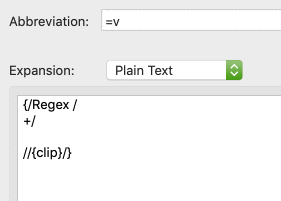
This takes the contents of the clipboard, searches it for single carriage returns after text (i.e. the search excludes blank lines), replaces them with double carriage returns, and then pastes the result.
So now my workflow consists of copying the text, placing my cursor in the email, and typing “=v.” (Easy to remember since the keyboard shortcut for pasting is Command+V.)
Magic. This is why I love tech.


