Have you ever done this?

I'm very anal about backing up my writing. It's in several places in case a hard disk fails.
USB Drives, Online storage, two different hard drives.
Well, the other day I was working on a story, and on the read through I realized — it's not the right version.
Only…I didn't know where the right version lived, and I'd already made a bunch of changes to the one I was working on.
Ack.
I found the right version — saved in the wrong place — and thought about combining the two.
Easier said than done, when you have to find the comma you took out, or added somewhere in a 50k novel.
I went and dug around for an easy way to compare the two documents so I could combine them.
I use Word 2010. And those clever clogs at Microsoft were way ahead of me. Apparently I'm not the only person who screws up.
There is an option to compare two documents — even with different file names — and show the result in a third, with track changes enabled so you can accept/reject the changes as you go.
It's in the "Review" tab.

From there, you get an option to Compare.

Then you can choose your documents.
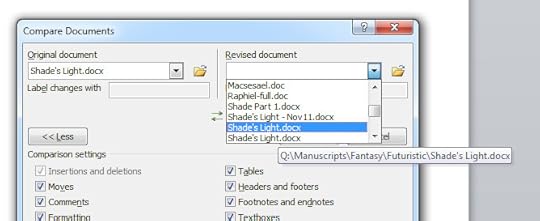
There are a lot of options in that screen, tick what you need. There is also an option to show the changes in a third document — I urge you to use that option. It makes life a lot easier.
So there, if you're ever in a pickle because you stuffed up an edit, that's a great way to see what's changed if you don't use track changes while you write. (I don't.)
Hope it helps!