Pixel Plane Technical - X Plane Setups
For the X Plane fans out there, I thought I'd share a bit of my setup for my recent coast-to-coast Pixel Plane project. A few basics:
My computer is a 2016 13" MacBook Pro with 240 GB SSD hard drive, 2 Ghz i5, 8 GB memory, and integrated Intel Iris 540 graphics with 1536 MB. Surprisingly, this runs X Plane moderately well, as you can tell from the screenshots. My graphics settings are: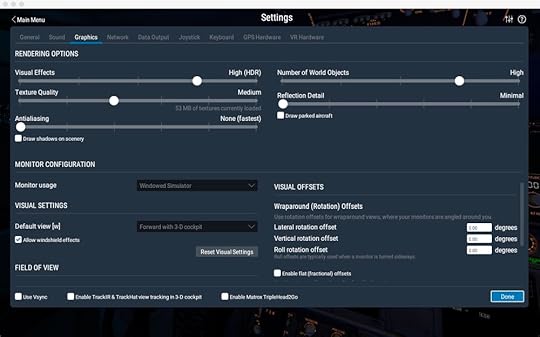
Texture Quality = High was fine for default aircraft, but many of the payware aircraft come with 4 k textures, which would overload my graphic chip's measly memory. The difference between High and Medium was normal and single digit frame rates.
On the most part, I ran vanilla X Plane. Here's the small list of tweaks:
I downloaded satellite photos from Bing using Ortho4XP. By far, the biggest improvement you can do for X Plane is to use ortho photos. These use up a lot fo disk space, though, so in my case I'd download a set for the next three airports and delete the previous set. With a little editing of the config file you can set Ortho4XP to download higher resolution photos in the vicinity of each airport.
MisterX's free KSFO and KLAX airports, available from the X Plane forumsMisterX's Airport Environment HD, HD Forests, and SierraPappaYankee's 4K Moon texturesTrixsta's Better Lights.txt modification - changes the colors of city lighting to a mix of white and orange, which looks much more realisticSimheaven's VFR Landmarks - adds wind turbines and other structures.My airplane was JustFlight's Warrior II. I modified the livery to have custom tail numbers (for those following my stories, they're Lucky Cricket's numbers from Titan's Shadow. I used X Plane's Plane Maker tool to change the tail number for the model, so X Plane ATC would call me by it.WorldTraffic3, which I ended up with mixed feelings about. It did add thousands of flights in the air, which you could see on its radar display. In game, usually you would only encounter those flights immediately over airports. Since most flights were commercial jets, even if you were at the same place and time as one, often they were twenty-thousand feet above you and non-visible. On the ground at airports, however, it was fun seeing the steady line of jets taxi and take off.
For flight planning, I used SkyVector.
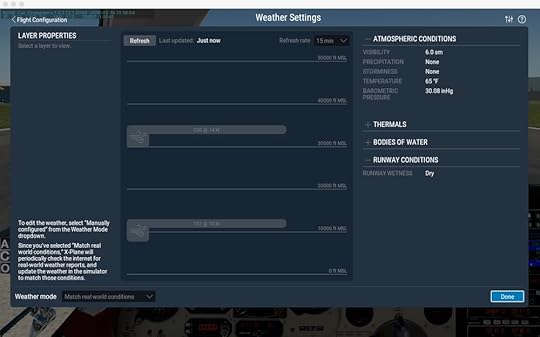
I enabled X Plane's real-world weather, which downloaded the weather every fifteen-minutes for wherever I was flying. I liked this - clouds would roll in, fog would develop, and winds would change over the course of a flight. You could see storms and fly around them. Its only downside is that it could be abrupt. You'd hit the fifteen-minute mark, get a data download, and suddenly clouds would appear around you with wind gusts. In reality you would have seen those clouds and not entered them in the first place. It did make me cut some flights short and find local airports to set down in until weather improved, which I liked.
The few times I used X Plane's built-in ATC were disappointing, because it tried to murder me. It's oblivious to terrain and other aircraft, steering you in mountains. On approach to Albuquerque it kept telling me to descend two-thousand feet below surface level, causing me finally to turn it off. I did like that it was easy to use, though, and had real voices, including other aircraft's comm chatter. It's main function is more of a talking GPS, though. Using it for an IFR flight where ground visibility is limited would be disasterous.
I'm looking forward to trying real ATC via human networks (most likely Pilot's Edge). Flying into LAX with no ATC just felt weird.
One piece of equipment I didn't use (because I'm too cheap to buy it) is TrackIR, which gives your cockpit a VR-like experience by tracking your head and moving the cockpit view to suit. But, as I try to do pattern work and learn more about flying, I find I really need to move my head and look around. Pressing function keys to look ninety-degrees left is clunky. I'll probably get a TrackIR unit at some point.
That's it - hope this helps if you're considering your own virtual adventure.