How to Write Posts in Different Languages on Your Facebook Page
 January 25, 2018
Anna Hubbel
Publish a @Facebook post in more than one language to reach your relevant audience. #facebookhowto
Click To Tweet

Broaden your audience reach by publishing a Facebook post in more than one language. This ensures that your posts are seen in the language most relevant to your diverse audience.
Step 1: Go to “Settings” at the top of your page.

Step 2: In the “General” tab, select “Post in Multiple Languages.”
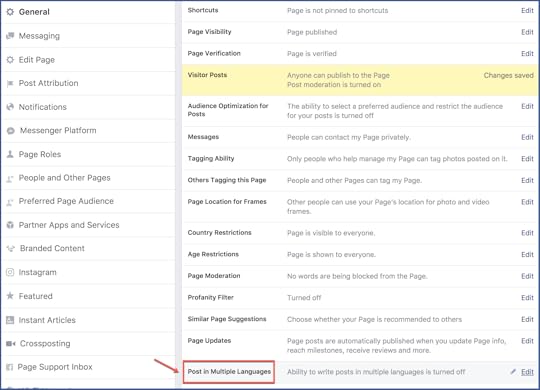
Step 3: Check the box next to “Allow people who manage this page to write posts in multiple languages.” Save your changes.

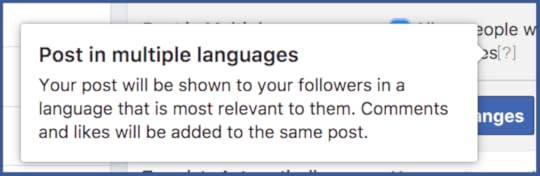
Create a Post in More Than One Language
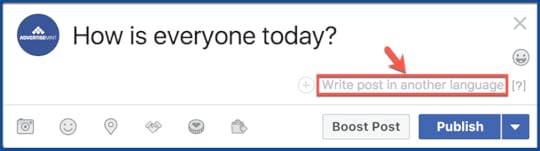
Step 1: Write a post on your timeline and click “Write post in another language.”
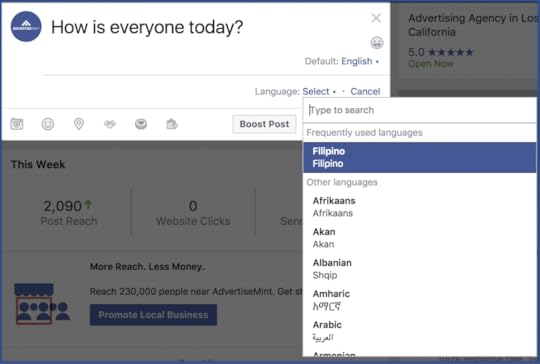
Step 2: Type in the language you want to use in the dropdown menu.
To keep your page the focus of your users’ attention, learn how to turn off similar page suggestions on your facebook page.
The post How to Write Posts in Different Languages on Your Facebook Page appeared first on AdvertiseMint.