Mia Villano's Blog, page 38
February 1, 2022
WordPress.com Has a New Home on YouTube
The promise of the internet is nearly as big as the internet itself. With endless knowledge at your fingertips and electrifying inspiration everywhere you look, there’s no reason you shouldn’t be able to build your own website — your own way.
Today, that became easier. We’re thrilled to announce the brand-new WordPress.com YouTube channel.
Whether you’re just starting out or are the seasoned pro your friends turn to, this channel is here to support all your website-building needs. Our step-by-step tutorials will have you up and running in 10 minutes — turning frustration into celebration. Follow along, find the answers you need, and become the authority in your own experience.
And we’re not stopping at education and support. Above all, this channel will showcase you. Nothing speaks louder than our users’ success stories, and we want to share them all.
From first-time bloggers to ecommerce wizards, we’re going to bring them together to share their stories. What better way to learn than from each other?
With more than 15 years powering the open web, we’re here to support your journey: your successes, your learning experiences, and your fabulous ideas coming to life. Wherever you are on that path, we’ve got you covered.
Join us on YouTubeYou won’t want to miss the educational content and community highlights coming to the channel. 


January 27, 2022
Buy Paid Plugins Directly on WordPress.com
For users on our Business and eCommerce Plans, plugins are a critical part of the WordPress.com experience. We’re always looking for ways to simplify the process of discovering and installing powerful WordPress plugins.
As a result, we’re now making it possible to purchase certain plugins directly on the WordPress.com plugin page. Not only that, but WordPress.com will offer monthly and annual plugin pricing which provides site owners more flexibility.

Initially, you can purchase six of our most popular WooCommerce plugins on the WordPress.com plugins page.
WooCommerce Subscriptions — Allow customers to subscribe to your products or services and pay on a weekly, monthly or annual basis. WooCommerce Bookings — Allow customers to book appointments, make reservations or rent equipment without leaving your site. WooCommerce Table Rate Shipping — Advanced, flexible shipping. Define multiple shipping rates based on location, price, weight, shipping class or item count. WooCommerce AutomateWoo — Powerful marketing automation for WooCommerce. AutomateWoo has the tools you need to grow your store and make more money. WooCommerce Shipment Tracking — Add shipment tracking information to your orders. WooCommerce Xero — Save time with automated sync between WooCommerce and your Xero account.Purchasing a plugin via the new WordPress.com interface is simple. On the plugins page, click on one of the paid plugin cards to be redirected to a detailed product listing page. When you’re ready, click the purchase button in the top right of the product listing page. Your purchase won’t be final until you confirm your payment method and details on the following page. The plugin will be installed automatically.

This announcement is just the start — look for more paid plugins and other exciting updates over the coming months. Let us know in the comments below what plugins you would like to see available for purchase directly on WordPress.com.
Stay tuned and click here to begin exploring plugins now!
As a reminder, all plugins (free or paid) are currently only available to customers with a WordPress.com Business or eCommerce Plan. If you’re interested in purchasing or upgrading to an annual Business Plan, click here for a 25% discount off your first year.
Promo code: PLUGINSBLOG25
January 21, 2022
Connect With Your Audience: Integrate Social Media With Your WordPress.com Website
Integrating your social media presence with your WordPress.com website has never been easier. We offer many options and tools that are available on all plans, at no additional cost. Whether you want to auto-share your website posts to a social media platform, display your social media posts on your website, provide links to your various accounts, or encourage your website visitors to share your content, we’ve got what you need to connect with your audience.
Posting to Social Media
All WordPress.com plans include Publicize, a feature that lets you automate posting to Facebook, Twitter, LinkedIn, and Tumblr. When you set up and configure these social media accounts to your site, every new post you publish will automatically post to the platforms you’ve selected. This is a great way to repurpose your website content on your social channels, reach your audience where they already are, and drive traffic to your site.

It’s important to note that Publicize cannot push posts to Instagram since Instagram doesn’t allow auto-posting from third-party services. However, if you’re on the Business plan or ecommerce plan, then you could consider using a third-party automation tool such as Buffer or Hootsuite, both of which can be connected to your WordPress.com site using plugins. There may be other tools that offer this feature as well, though you’ll want to research their limitations and plans to learn more.*
*Please note that third-party tools and plugins are outside the scope of WordPress.com support.
Social Media Feeds on Your Site
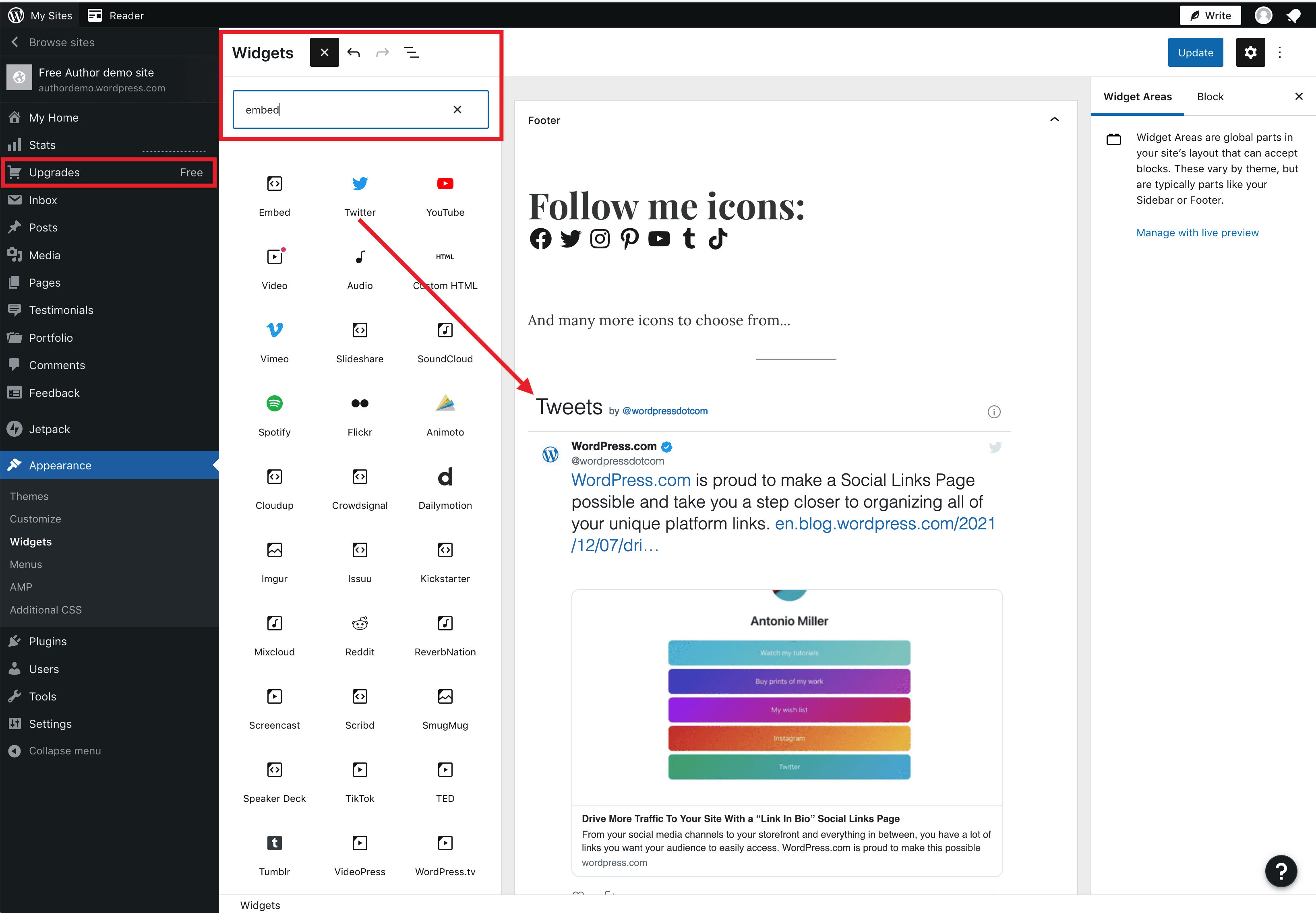
Another option that WordPress.com offers is displaying your social media platforms on your website. You can add widgets, blocks, or feeds to your WordPress.com site to display posts from your social media accounts in real-time. This can help you stay connected with your audience when they’re taking a break from social media, but still checking your site.
WordPress.com offers built-in features for displaying your social media feeds from Instagram, Facebook, Twitter, Pinterest, and TikTok, to name a few. We also provide a number of support documents to help walk you through the options for these embedding features.
Social Media Menus
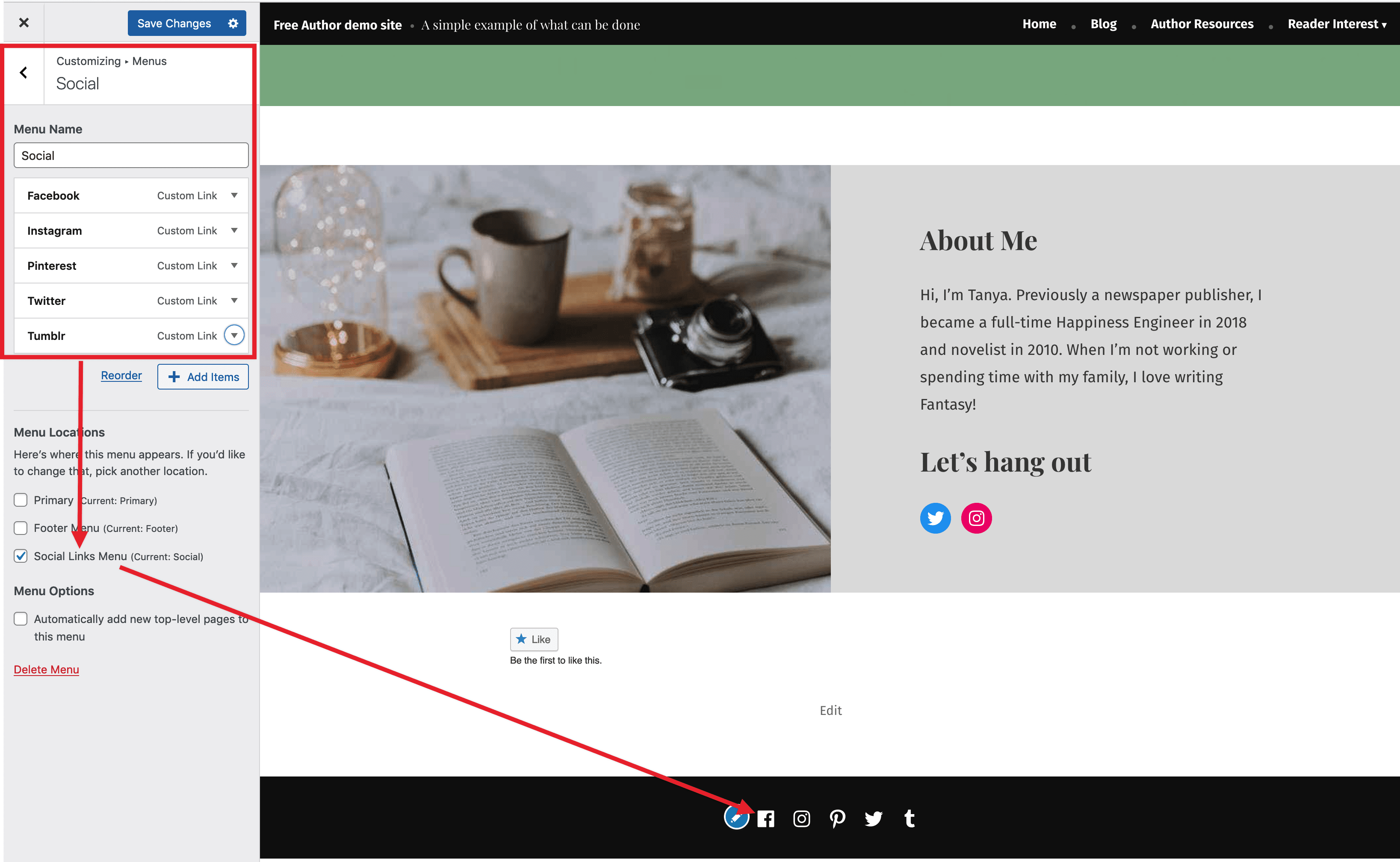
You can also strengthen the cross-connection between your website and your social media platforms with the addition of social media menus. Many WordPress.com themes offer a dedicated Social Menu that allows you to connect your site to various social media platforms and display their respective icons on your site.
If your theme doesn’t offer this menu option, you can still create social media-style menus using our Social Icons Block. This ensures that your audience knows how to easily find you on your preferred social media platforms.
Social Sharing
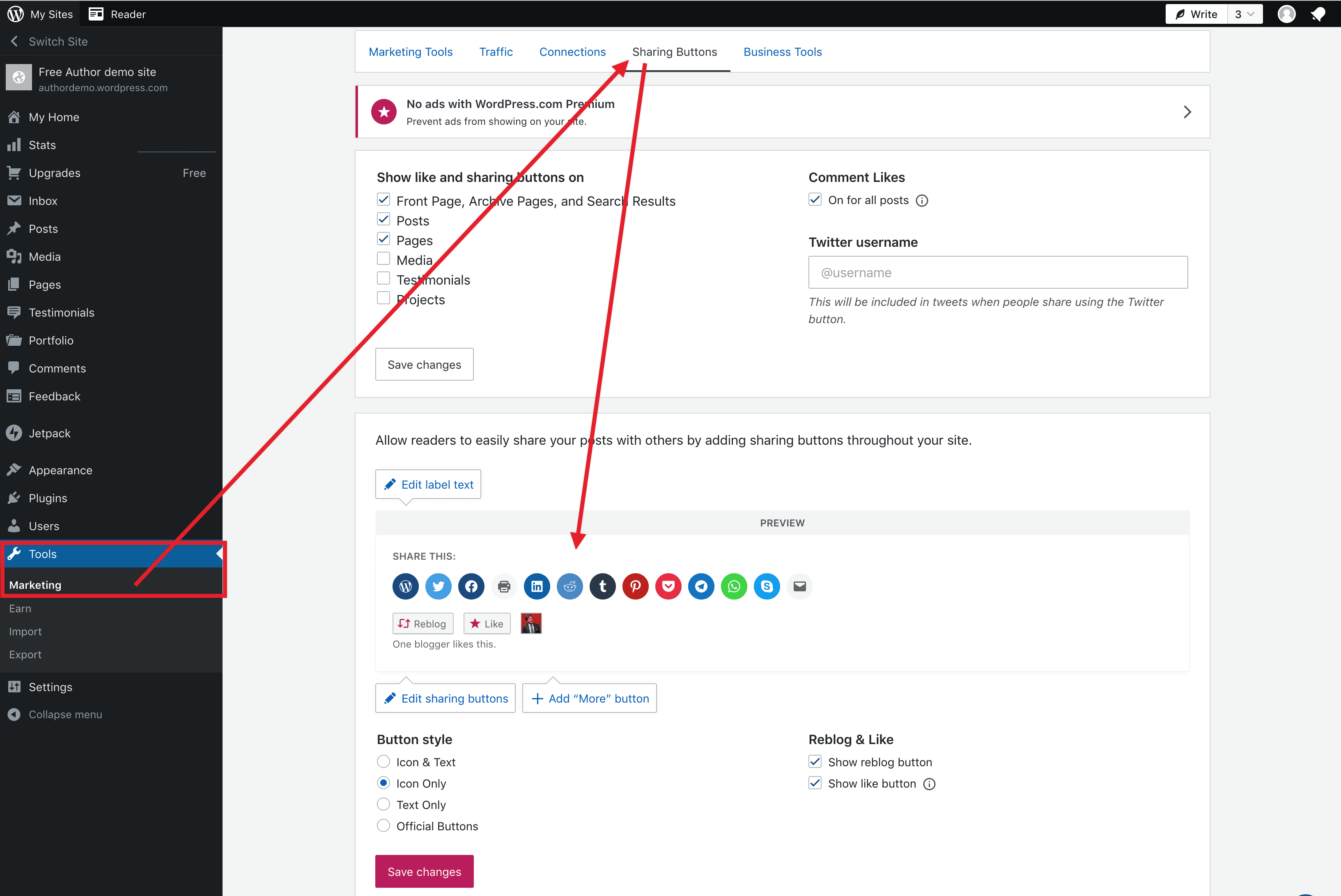
Last but not least, don’t forget to enlist your visitors to share the love from your website to their social accounts by setting up WordPress.com’s Social Sharing option.
This feature allows you to choose which social platforms you want to encourage your visitors to spread the word by providing a Share button on every piece of content you publish. Nothing connects your audience more than the ability to share.
WordPress.com provides you with multiple built-in tools to make your website the centralized hub for connecting and integrating with your social media platforms—at no additional cost—so you can connect to your audience smoothly and seamlessly, all while driving traffic to your WordPress.com website.
WordPress.com will be hosting a live special topic webinar on Tuesday, February 22, 2022 at 19:00 UTC. Join our WordPress experts to learn all of the essential tips to integrate social media with your website and how to add Link in Bio pages to your website. Register for free today!
January 17, 2022
Get Early Access to Full Site Editing!
A big change is coming to WordPress to make it easier than ever to create websites called Full-Site Editing. You can be one of the first to try it exclusively on WordPress.com, before it gets merged into core open source WordPress with the upcoming release of WordPress version 5.9.
What is Full Site Editing?If you caught the State of the Word or follow along with news on WordPress.org, you may have heard about “Full Site Editing”, a set of new features that will allow you to edit all parts of your site. This collection of powerful new features empowers WordPress users to easily create and customize their entire websites without needing to know how to code.
Some highlights of Full Site Editing include:
Point and click edits in all parts of your site, including headers, footers, and sidebars!Drag and drop blocks to design beautiful and complex navigation menu bars.Edit items like your header, page content, and footer all in one place. You’ll no longer need to jump out of your page editor to make changes in the Customizer! Everything is available to edit right where you already are.Use all the power of blocks, reusable blocks, and pre-designed block patterns to design every part of your site.If you’ve struggled to make your entire WordPress website look just the way you wanted in the past, we encourage you to give it another try. Full Site Editing may be exactly what you’ve needed.
What’s Available Right Now?The WordPress.com team is excited to announce that we’re now offering early access to Full Site Editing (Beta) for all new sites created by our existing English-speaking users! If this describes you, then you don’t have to wait.
Eager to give it a try? Just spin up a new site from your dashboard.
If FSE is not yet available to you, don’t worry. Stay tuned for more updates as the rollout continues for both existing sites and new users.
Want to know more about Full Site Editing Beta? Check out this free Full Site Editing course created by the WordPress.org team to help you get started!
January 7, 2022
Get Started with new webinars
Launching a website or learning how to monetize your online store can be overwhelming. But we are here to help you along the way. We are hosting free webinars to help get you on track and answer any questions you have. We cover different topics and will soon have new ones. Make sure to bookmark the Webinars page for upcoming webinars. In the meantime, check out our January webinars.
The timezones are in UTC but you can click the time to see it in your own timezone.
Getting Started Mondays1900 UTCTuesdays1000 UTCWednesdays0600 UTCThursdays1900 UTCFridays1600 UTC Making Money Mondays – hours alternate weekly0600 UTC and 1600 UTC Blogging Tuesdays – hours alternate weekly0600 UTC and 1600 UTCEvery other Wednesday at1400 UTC WooCommerce 101 Thursdays 1600 UTC Spanish Webinars Every other Wednesday 1400 UTCGet the specific dates and registration forms at https://wordpress.com/webinars/
Who’s Invited: New WordPress.com users and anyone interested in learning more about WordPress.com’s website capabilities.
Our WordPress.com customer service team, we call them Happiness Engineers, are experts in helping new users get up and running on their new websites. Across each week of webinars, we’ll cover questions about the basics of setting up your website, handling simple and recurring payments, blogging best practices, and adding in eCommerce capabilities. Come with questions as you’ll be able to make them during the live webinar.
Everyone is welcome, even if you already have a site set up. We know you’re busy, so if you can’t make the live event, you’ll be able to watch a recording of the webinar on our YouTube channel.
Live attendance is limited, so be sure to register early. We look forward to seeing you on the webinar!
December 27, 2021
WP Courses Helps Launch Creators Into The New Year!
As we approach the new year, we like to encourage our team, our friends, and our customers to look back and celebrate all we were able to accomplish. While this year has had its challenges, we kept creating, connecting, and growing.
We launched WP Courses almost exactly a year ago with our “Blogging for Beginners” course. With all of the excitement around the course, our team was eager to connect with and help more creators so we quickly followed with “Podcasting for Beginners.” With these courses, we’ve been able to connect with a wide range of creators who cover anything and everything from dementia to folk music. What has been more exciting and rewarding for our team is being able to help them grow. The engaged members in our course communities have been able to grow their audience, expand their content, and even monetize their site — getting paid to do what they love!
It’s fair to say we’re addicted to helping creators grow and we don’t plan on slowing down anytime soon. We were thrilled to see over 13,000 learners sign up for our free blogging course when we launched it just last month and you can count on us to keep that momentum going into 2022!
As a way to help you build up some momentum of your own, we’re running a sale starting today and going through 1/8/2022. You can use the promo code “Time2Launch” to take 25% off of your purchase at checkout.
 Engage with a community of peers and learn from their experiences, solicit feedback, and make lasting connections. Join regular workshops and office hours with our experts to help get unstuck or learn new skills. Access to tons of content to help you work through everything from initial set up to growing your audience. Quarterly meetups, exclusive offers, and more! Stop waiting and start growing now!
Everything you need to launch and grow your idea in 2022. Just use “Time2Launch” for 25% off at checkout.
Let’s do this!December 16, 2021
New Year, New Success with Bloganuary
In a few short days, you’ll surely be asked: What are your New Year’s resolutions for 2022? If starting a blogging habit is one of them, we’re here to help! At WordPress.com, we’re trying something new for 2022. Instead of individual New Year’s resolutions, we’ll be focusing on a shared goal we can accomplish together.
Say Hello to BloganuaryWe’re running a month-long blogging challenge in January and we invite you to join us! Each day, you’ll receive a new writing prompt to inspire you to publish a post on your blog. There is no right or wrong way to respond to the prompts. Take this opportunity to exercise your creativity and have fun. Maybe you’ll choose to respond with a story, a drawing, a poem, a photo, a comic strip, a recipe, or even a playlist. Anything goes!
By participating in Bloganuary, you’ll join bloggers around the world in the shared goal of creating and/or solidifying a strong blogging habit. You’ll get access to the Bloganuary community site where you can meet and get to know others working toward similar goals. You can share tips, learn from others, reach a new audience for your blog, and make some new blogging friends.
Here’s a badge you can add to your blog to show others what you’re doing and encourage them to join in the fun.

Join the Bloganuary challenge, stay motivated, and start the new year off on the write track! Click the button to learn more and sign up using your WordPress.com account.
Learn MoreIf you’d prefer to journal privately instead of blog publicly, check out the Day One app:
iOSMacAndroidDecember 15, 2021
Live from New York … It’s State of the Word!
Yesterday saw the return to a live State of the Word annual address, broadcast to the world from our new NoHo event space in New York City! Suited up and re-energized by a recent trip to Antarctica, Matt delivered his thoughts on the state of WordPress in 2021 and made some big announcements for 2022 and beyond. Check out some highlights below or watch the entire address!
WordPress 5.9 is Coming in JanuaryOriginally slated for December 2021, the release of WordPress 5.9 was delayed until January 25 so that full site editing – which allows for greater customization and simpler site building – could be fully realized prior to the 5.9 reveal. In other exciting news, Matt shared that version 6.0 would be coming later in the year and that 2022 could very well see a total of four new releases instead of the usual three. Watch this space!
2021 WordPress.org Highlights: News, Openverse, Pattern DirectoryThis year, WordPress.org saw the redesign of the News page, which was inspired aesthetically by the playfulness of jazz, as well as the launch of Openverse search engine (named before Facebook’s recent name shift, we swear!). The search engine allows users to easily find openly licensed photos for their sites. There are currently more than 600 million images available on the Openverse, and early 2022 will see the addition of audio files!
The Pattern Directory was also launched this year, where folks are able to copy and use any of its featured patterns to spice up their sites with little or no coding expertise. Starting with WordPress 5.9, users will also be able to add their own patterns to the directory, empowering them to help others create beautiful online content.
Hey, Hey, It’s the PolyglotsA sign of our ongoing commitment to global inclusivity, accessibility, and the democratization of the internet, 2021 saw a 76% increase in the language packs available as core WordPress plugins. We now have nearly 16,000 active translators in the community, which means that WordPress products can be translated into 71 different languages at release.
WordPress Powers 43% of the Internet (Actually 43.1%, But Who’s Counting?)The company saw significant growth in 2021, and WordPress software now powers more than 43% of the internet. This year also saw nearly 12% growth in both the number of available themes and total downloads (fresh downloads, not including updates).
It’s a Block (Theme) Party!At the end of 2020, there were only two or three fully customizable block themes available in the world. As the end of 2021 approaches, we now have 28 – a 1,000% increase! WordPress 5.8 added the ability to manage widgets in the block editor as well as a new Query Block and duotone filters, and next year will see the release of the appropriately titled Twenty Twenty-Two default block theme.
Have a Penny, Leave a Penny. Need a Penny, Take a Penny.The Five for the Future initiative, launched in 2014, continues to be a top priority. In exchange for all of the benefits that they’ve personally received through their work, Five for the Future asks members of the WordPress community to give 5% of their time back to the community however they see fit – reporting bugs, offering translations, developing plugins or themes, designing code, offering training, etc. – which, in effect, fertilizes the soil for continued future growth.
Watch the RecapIf you missed the event’s live stream, you can watch the full address below.
December 13, 2021
How to Watch State of the Word 2021
Join us tomorrow for State of the Word! This year taking place live from New York City, WordPress co-founder and Automattic CEO Matt Mullenweg will take a look back on the past year and share his thoughts on the latest industry trends and exciting WordPress news, including the highly anticipated January release of WordPress 5.9.
WordPress, the open source software you can use to create beautiful websites, blogs, or apps now powers over 43% of the web. The State of the Word is the annual update on the WordPress project’s progress, plans for the future, and the future of open source. This is your first look to see what new features will be added to the WordPress software, as the features will be on WordPress.com soon.
Those tuning in will also get to hear Matt’s take on a range of hot topics including the Openverse media search engine, Web3, and non-fungible tokens (NFTs). See below for details on how to watch live.
When:
Tuesday, December 14, at 5 pm ET (10 pm UTC)
Where:
Stream the event live at wordpress.org/news
The folks at wordpress.org have compiled a list of watch parties around the world. If you don’t see an event in your area listed below, check this page on Meetup.com to see if your local WordPress group is organizing one.
Matt’s address will be followed by a community Q&A.
Send questions in advance to ask-matt@wordcamp.org, or join the conversation live!
See you there!
December 7, 2021
Drive More Traffic To Your Site With a “Link In Bio” Social Links Page
From your social media channels to your storefront, your YouTube channel to your website and everything in between, you have a lot of links you want your audience or your customers to be able to access easily. Social media can be a powerful driver of traffic to your blog or website. This works best when links are displayed on an easy-to-navigate list by creating a Social Links Page. While other companies offer a similar service, did you know you can use your WordPress.com site to create a Social Links Page as well? It is not only simple to create, but requires no additional cost or tools. For social media sites that only allow you to include one link in your bio, such as Instagram and Twitter, consider building a Social Links Page on your WordPress.com site.
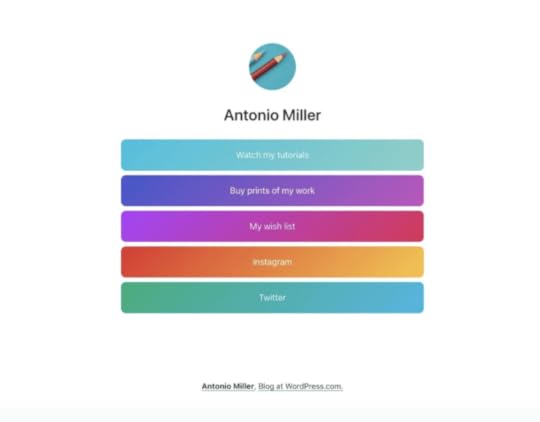
The benefits of using your WordPress.com site to create a Social Links Page include customization, analytics tracking, and more. But the best part is that you can create this special page without having to change themes. There are a couple of options for how you might want to approach this, so let’s break each of them down.
Link in Bio PageWith our “Link in Bio” Page Layouts or Block Patterns, a Linktree alternative is as simple as a few clicks.
When you create a New Page with our Block editor, you’re given a variety of Page Layouts to choose from that are divided up into sections. When you click the section for Link in Bio, you’ll see six pre-designed layouts to choose from.
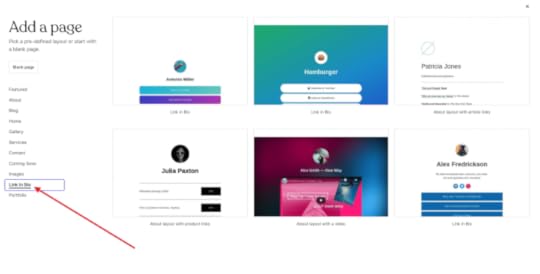
Click on one of these layouts and the blocks will be placed on the page for you. Once placed, you can edit the buttons as desired. You’ll also notice that there are a variety of options available in the settings sidebar on right, you can add additional buttons using the + sign, or duplicate existing buttons.
If you want to add a Link in Bio pattern of blocks to an existing page, you can insert a new block before the existing content and then add the block pattern you want to use with the options to edit the buttons as desired.
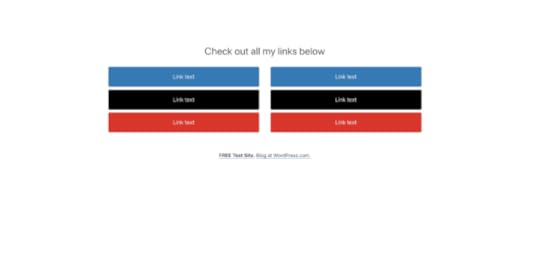
You could also start with a blank page and add buttons to stack vertically. You could even put them into a Column block, like the example below.
 Cover Block Panels
The Cover Block is another option to consider to enhance your Social Links Page. When Cover Blocks are stacked on top of each other, they will be seamless on the live site, meaning there won’t be any white space between them (unless you add some by adding a Spacer Block between them). With the Cover Block, there are endless possibilities of what you can do with images and overlays, in addition to a wide array of settings. Watch the video below to see one example.
By building a custom Social Links Page in your WordPress.com site, you have full control over the layout and design; this includes the simplicity or complexity of the look and how many links you want on the page.
This is a great option for driving traffic directly to your website and to specific pages within your site when your linking options are limited in social media. It can also be created on any WordPress.com plan, including the free plan, without needing any special add-ons.
The Link in Bio page layouts/block patterns and the Cover Block Panel options are both effective in adding a Social Links Page, which will ultimately help the user experience when navigating between your different platforms. The ability to add customization to your Social Links Page will also help you to relay your brand and personality to your users, while the analytics will all be readily available in the back end of your WordPress.com site, at no additional cost to the user. WordPress.com is very extensible, and creating a Social Links Page is simple for all users with no additional tools needed! All of this is possible on WordPress.com, and we are proud to take you a step closer to organizing all of your unique platforms in a seamless and reliable way.