Mia Villano's Blog, page 63
May 12, 2016
Coming Soon: New .Blog Domains for Websites
For more than a decade, the word “blog” has been synonymous with “your home on the web.” And since 2005, WordPress.com has been proud to help you create a unique space that is all yours.
Now we’re excited to announce a brand new way to create a unique identity for your website: .blog, a top-level domain extension that will let you create a customized name and web address for your site.
A name that’s all yours
Just like .com before it, .blog is clear and accessible, and it creates millions of fresh, new options for naming your blog. It’s the perfect place to build your home on the web.
The .blog domains are coming this year — sign up here to get notified when they become available. We’ll be offering them to all websites — you won’t need to have a WordPress or WordPress.com site to purchase one.
Why .blog?
For years, .com was the dominant choice for website names, but it’s become increasingly difficult to find a name. With a top-level domain like .blog, you can get a name that truly matches your identity. Plus, you’ll get all the same benefits with Google search results.
How .blog was born
Automattic — the parent company of WordPress.com — secured the rights to oversee and operate the sale and registration of .blog domains, a new and never-before available top-level domain. You’ll be able to purchase a .blog domain at WordPress.com or through our partner domain name registrars. And again, the .blog domain will be available to everyone, regardless of what kind of site you have or who hosts it.
Pricing
Domain registration prices are still being finalized, but they will be in the standard range for new top-level domains with some premium pricing for higher-value names. The domain names will become available through traditional timeframes such as “sunrise” (the period during which trademark owners can purchase domain names) and “landrush” (the time in which applications can be received prior to general availability).
Sign up to be notified when .blog arrives
We’re thrilled to bring .blog sites to the world, and we’ll share more details as they’re available. Sign up here to receive updates about .blog availability.
Filed under: Automattic, Domains, WordPress, WordPress.com



May 11, 2016
Two New WordPress.com Bloggers on ‘Diving into the Giant Pool of the Blogosphere’
Every day, people from across the globe start their own websites on WordPress.com to share everything from their latest thoughts on current events to family recipes passed down through several generations. Among this group are Grace and Georgie, who started their blog Attempting Vogue a few weeks ago to share their thoughts on a variety of topics, including fashion, beauty, and social politics. We wanted to know more about how Attempting Vogue got started on WordPress.com and what Grace and Georgie hope their blog will become. They were kind enough to provide us with some answers.
Can you start by introducing yourselves?
Grace: We’re both students in our second year of university. Georgie is studying theatre and performance at Warwick University, and I’m studying sociology at Newcastle University. We met in secondary school, and have stayed friends ever since. We don’t see each other as much as before, but we still keep in contact and catch up when we can. We both have a keen interest in fashion and beauty, as well as social issues such as gender, inequality, and racism.
How did you two come up with the idea for your blog, and when did you decide it was something you wanted to create?
Georgie: I’d been sitting on the idea for quite a while. I knew that I wanted to create some kind of blog, but I struggled to pin down a certain genre or “target readership.” Originally, I had planned on running a blog by myself, but Grace offered to help me out with the proofreading process so I suggested that we co-edit. This was when I became completely certain that this was something I really wanted to do — two heads are better than one after all! Together, we decided to keep the genre relatively broad and write about things that we find useful or interesting. With this approach, I believe we are likely to be continuously engaged with the blogging process, and this is a main priority for us.

The bloggers, Grace, on the left, and Georgie.
How did you decide on WordPress.com as the platform for your blog? Have you used it before for anything else?Grace: Well, we had a look around and tried a few different blogging websites. However, none of the websites we tested gave us the professional finish we wanted; a lot of the blog layouts were too simplistic, or slightly tacky. However, when we had a look at WordPress.com, all of the themes and layouts that were available looked really professional and easy to use. As this was our first time blogging, we wanted to make sure whatever site we picked was simple to use, but delivered the best quality finish. Compared to other websites, WordPress.com definitely delivered this.
WordPress.com has lots of themes to choose from. How did you to decide on the theme you’re using now, the Cubic theme?
Georgie: Attempting Vogue is largely focused on fashion and beauty, so aesthetics is important to us. The Cubic theme caught our eye as a sleek and professional layout that can be easily personalized with our own choice of featured images. It is also incredibly simple for visitors to navigate, another great bonus to this choice of theme.

Usually a blog is written by a single person, but the two of you are running Attempting Vogue together. Have you decided on how you want to run your site? Will you be trading off on posts, or writing them all together?
Grace: We’ve known each other for quite a while and share similar tastes and views, so we thought writing together would be fun. We co-wrote our initial introduction post, but agreed to individually write at least one post a week to deliver consistent and equal posts. Although we individually write posts, we are constantly helping each other create new ideas. We also proofread and add suggestions for improvements on each other’s work. I think this is probably the best way to approach our blog, as it ensures it is kept to the highest quality, and that every post — no matter who it is written by — has shared input from both of us, whilst maintaining our individuality.
In your intro post, you wrote that the two of you are “diving into the giant pool of the blogosphere.” How are you going out to let people know that your blog exists and to share your tips and opinions?
Georgie: Our current strategy is primarily through the use of our existing social media accounts such as Facebook, Twitter, and Instagram. So far we’ve had a tremendous amount of support from our family and friends — they’ve really helped out with sharing our posts! We are planning on creating social media accounts specifically for Attempting Vogue so we can focus the content on the blog, become more involved with blogging communities, and hopefully develop our online presence.
Have you set some goals for your blog? What is your hope for it?
Grace: We haven’t set any goals in particular. Our initial concern is just to get in the habit of writing and creating new content. We aren’t expecting lots of people to read our blog; we just want to write about things we find interesting. Our main hope is just to keep consistent and in a few months’ time to still be enjoying writing posts.
Has WordPress.com allowed you to do everything you wanted to do with your blog so far? If WordPress.com could help you with one thing, what would you like that to be?
Georgie: WordPress.com has been great. We chose it carefully for its rookie-proof functionality and impressive aesthetics. My favorite aspect of the site builder is the breadth of viewer statistics that are available to us. I love knowing what countries Attempting Vogue is being viewed in and which social media websites are leading audiences to our posts. Although Grace and I are working through the form of WordPress.com with trial and error, it would have perhaps been useful to have been provided with an initial tutorial. That being said, so far we have had a fantastic experience with WordPress.com!
Editor’s Note: If you want to learn more about getting started on WordPress.com, check out our “Blogging: Fundamentals” course from Blogging University.
* * *
It’s your turn! We’d like to hear from you: How did you get started on WordPress.com?
Filed under: Features


May 4, 2016
Four Tips From Seasoned Bloggers
Some of the best blogging advice we hear is from you. On Discover, we publish interviews and profiles of bloggers around the world, who also impart their own tips on how they’ve gotten the most out of WordPress.com. If you’ve missed these interviews, not to worry — we’ve compiled some of the best bits of blogging wisdom here.
Join communities that sustain your interests.
When you start to click around, follow blogs, and fill your Reader with posts to read, you’ll discover that WordPress.com is full of many smaller communities. For example, some participate in black and white photo challenges led by blogger Cee, while others join our multimedia Discover Challenges, hosted every Tuesday.

Novelist Claire Fuller credits two communities on WordPress.com for supporting and influencing her: Friday Fictioneers, a group of bloggers that writes a weekly 100-word story inspired by a photograph (hosted on the blog of Rochelle Wisoff-Fields), and The Prime Writers, a community of writers who published their first book after age 40.
But it’s the community that I love the most — so inspiring and supportive. They’ll give constructive criticism when I need it and encouragement when something hasn’t gone right. And these are people from all around the world, most of whom I have never met.
— Claire Fuller on Friday Fictioneers
Get started: Looking for a community like these, but not sure where to start? Learn about supportive blogging groups, or browse the events and challenges on The Daily Post, which are hosted by fellow bloggers and listed by topics — like books, gardening, and music. Or tap into communities through tags, like #weekendcoffeeshare, in your Reader. (You can search for any tag in the Reader — results will appear if someone, somewhere, has added that exact tag to one of their posts.)
Automatically share your posts with the world.
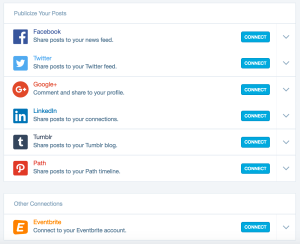
Many of you share your posts far and wide, like Depression Comix artist Clay Jonathan, who casts a wide social net. With Publicize, let us do the sharing for you and push your new posts to Facebook, Twitter, and other services.
“If you build it, they won’t necessarily come,” says parenting blogger Emily Austin, who writes about motherhood and life at The Waiting. In her Discover interview, she gives solid tips on growing your blog and making meaningful connections, from guest posting to cross-posting to getting the word out on social media.
While WordPress.com has a thriving community of bloggers who are engaged and encouraging, I wanted to write the one blog that people who don’t read blogs would read. And to do that, I had to put myself out there via social media. It took me a ridiculously long time to get my act together and set up a Facebook page for The Waiting, but once I did, I realized I was doing myself a disservice not to connect with my community outside the walls of the blog. I now focus on Facebook, Twitter, Pinterest, and Instagram. When it came time to interview for my job, I was able to show my organization that I know how to drive engagement and connect with both established and potential readers and customers.
Get started: To set up Publicize, go to My Site → Sharing. You’ll see a list of services we currently support: Facebook, Twitter, Google+, LinkedIn, Tumblr, Path, and Eventbrite. (If you like videos, follow along on this tutorial for connecting specifically to Facebook.) Click Connect next to a service and follow the steps to enable Publicize.
Organize your feeds with Reader lists.
In your Reader, you can keep up with the blogs you’ve followed in Followed Sites, our editors’ picks and features in Discover, and any tags you’ve followed under Tags.
You can also create Lists to organize your feed by topic or group, or create a blogroll of multiple lists, which is handy for people who read a lot, have varied interests, and love to share their recommendations. Ra, the writer and reader at Rarasaur, has built a following of loyal, engaged readers, as well as forged dear friendships offline, compiled in her Reader list, Blokin (short for “blog kin”).
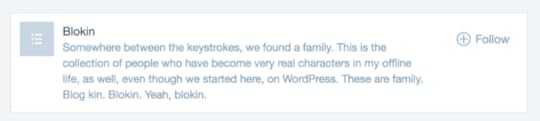
In a recent interview, Ra describes what moves her when browsing and reading new posts.
I am a reader of many things — fictional novels, nonfiction documentations, graphic novels, magazines, poetry, everything — but blogs have the ability to offer perspectives not found anywhere else. I seek that sparkle. . . .
I’ll read something I don’t understand, or something I don’t agree with, or something I would never want in my own life — but I will move on, quickly, if it’s something I can’t feel.
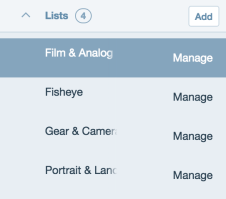
As Ra suggests, there’s so much to read out there, so take control of your Reader to ensure you see the stuff that matters to you. For example, you can follow popular tags like photography (or follow tags on specialized photography topics), but why not curate your own list of favorite photographers? Or, if you’re really into photography, build a blogroll of photography lists across topics and groups, from film and analog enthusiasts to portrait and landscape photographers around the world.
Get started: In your Reader, scroll down to the Lists section. Click on the down-arrow next to Lists and then click on Add, which will prompt you to name your list and take you to the edit page where you can can build your list.
Find a theme that allows your work to shine.
Your site is your online home: a place where you welcome visitors, old and new. Visually, your site should represent you and present your work in the best possible way.
For photographers, this is especially important. At food blog Infinite Belly, husband-and-wife team André and Adélaïde Zollinger use the free and minimal Libre theme, which keeps the focus on their images of culinary creations and picturesque French landscapes.
Strong visual storytellers, André and Adélaïde offer photoblogging advice:
See what formats work best for your blog depending on your design and theme. We used to take a lot of pictures in landscape format but discovered that single portrait formats work really well for us to display large photographs and show details.
Get started: Explore hundreds of themes to find a design that’s right for you. Go to My Site → Themes to browse the Theme Showcase, and filter by “free” or “premium” or click More to narrow your search with filters (type of site, feature, layout, etc.). As André and Adélaïde advise, experimentation is key: consider everything from the orientation of your featured images to the number of columns (one, two, multiple) in a theme.

At Discover, we profile writers, artists, and photographers doing great things on WordPress.com. Read the latest interviews and stories in our Features section.
Filed under: Better Blogging, Community, Discover


April 28, 2016
New Themes: Affinity and Shoreditch
I’m happy to introduce two new themes in our collection: Affinity and Shoreditch.
Affinity
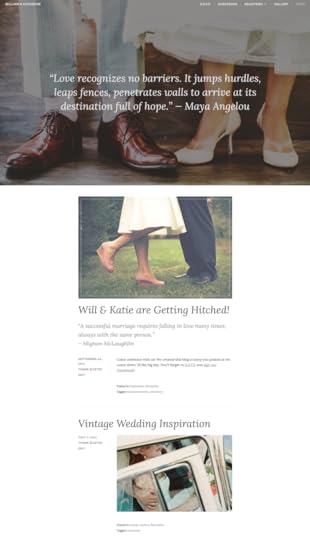
Affinity, designed by yours truly, is a classic one-page theme designed with weddings and family announcements in mind.
Collect everything you need for your big day on one easy-to-customize site — add an R.S.V.P. form, link to your favorite registries, or add stunning photos from the event itself. Keep your loved ones in the loop with a blog, and collect their messages and wishes for you in your guestbook.
However you use it, Affinity is an elegant solution for your wedding or family announcement.
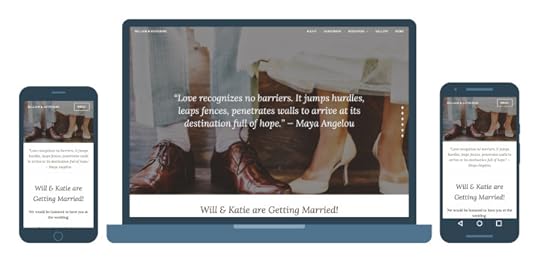
Give Affinity a spin in the Theme Showcase!
Shoreditch
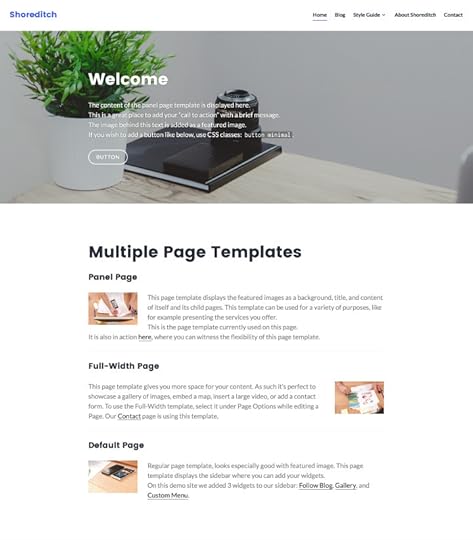
Shoreditch, designed and developed by Thomas Guillot, is a responsive, and multi-purpose theme. Packed with a Panel Page Template and a Full-Width Page Temple, Shoreditch is a perfect solution for a company’s online presence. Although its main purpose is business, Shoreditch looks great as a personal blog theme too, thanks to its flexibility and clean design.
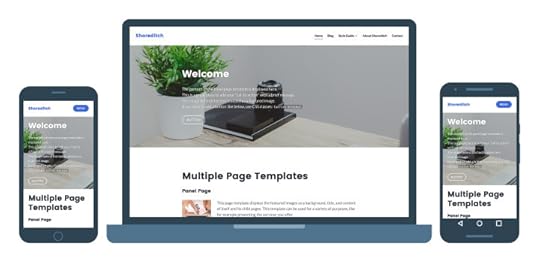
Read more about Shoreditch in the Theme Showcase.
Filed under: Themes


April 27, 2016
¿Habla Español? Love Helping Others? Apply to Work with Us!
Karen Arnold, Deborah Beckett, Erica Varlese, and Pam Kocke work on the Happiness Hiring team at Automattic. They hire new Happiness Engineers who support users on WordPress.com and Automattic products. In May and June, they’ll visit WordPress and WooCommerce events in Argentina, Spain, and Austria to meet local WordPress enthusiasts and encourage people to apply to work with us. Don’t be shy! Thinking about applying? We think you should.
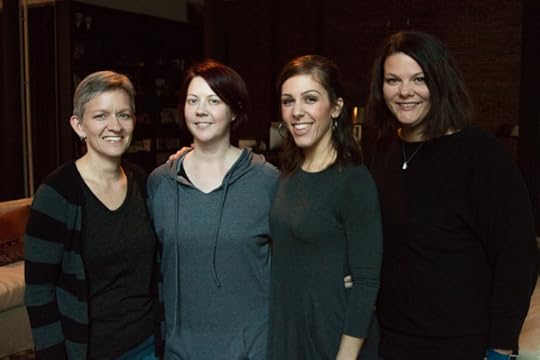
Karen, Deborah, Erica, and Pam will be in Argentina, Spain, and Austria in May and June to encourage Spanish-speaking people to apply to work with us at Automattic.
Where will you be and when?
We’ll be doing several events in Argentina, Spain, and Austria in May and June 2016. We’re particularly excited about visiting local WordPress communities and meetup groups and speaking at WordCamp Europe at the end of June.
If you’re in Argentina or Spain, come find us to chat at one of the events below:
Argentina (Buenos Aires, La Plata, Córdoba)
Monday, May 9th at 6:30pm
Buenos Aires WordPress meetup group
DaVinci (Buenos Aires)
Tuesday, May 10th at 6pm
WordPress Happy Hour and Networking
Sugar (Buenos Aires)
Wednesday, May 11th at 7pm
La Plata WordPress meetup group Globant (La Plata)
Thursday, May 12th at 6:30pm
Córdoba WordPress meetup group
TechPub (Córdoba)
Europe (Barcelona, Madrid, and Vienna)
Friday, June 17th
WooCommerce Barcelona meetup group Location and time TBD (Barcelona)
Saturday, June 18th at 11:30am
Barcelona WordPress meetup group
Mobile World Centre (Barcelona)
Tuesday, June 21st at 6:30pm
Madrid WordPress meetup group
Campus Madrid (Madrid)
Friday June 24th to Sunday, June 26th
WordCamp Europe
MuseumsQuartier (Vienna)
What’s the purpose of the trip?
Part of our mission to democratize publishing means making our tools and services accessible to people all over the world. While the entire Automattic family works remotely — which means we’re located all over the world — we still primarily provide support via English.
We want to help users in their first language. While there are many wonderful tools online to help with translation, nothing beats the feeling of opening a chat box for help and being greeted with someone who can help you in the language you speak every day. We’ve been able to provide localized support for our Brazilian Portuguese-speaking users, and we’d like to expand that to our Spanish-speaking users as well.
To localize support, we need Happiness Engineers that speak Spanish. Our goal with this trip is to meet and connect with the amazing, Spanish-speaking WordPress communities across the globe and, hopefully, entice a few folks to join the Automattic family.
What are you looking for in applicants?
Happiness Engineers are passionate about good support. It helps to have a working knowledge of WordPress, WooCommerce, Jetpack, and the family of Automattic products, but you can also increase your skills on the job.
We spend our days helping Automattic/WordPress.com customers who have a wide range of experience. In a single day, you can chat with someone who’s just starting their first blog to someone who’s been developing websites for a decade. Regardless of who you’re talking with, a successful Happiness Engineer is patient, has a good sense of humor, and is ready to take technical language and make it easy to understand.
We love to see applicants who already spend their time in the WordPress community or online support forums. While technical knowledge is important for success in this role, it’s the added touch of seeking out a way to provide cheerful, honest, personalized support that makes all the difference.
What’s the best way for applicants to get in touch with you?
For questions, feel free to comment on this post and we’d be glad to reply. Otherwise, you can apply for the position via the Work With Us page, following the steps listed at the bottom of the job description. See you soon!
Filed under: Community, Hiring, International


April 20, 2016
Three WordPressers Making a Splash
We love celebrating the achievements of those who use WordPress to share their talents with the world, so here are three recent success stories we thought you’d enjoy. If you’re thirsty for more in-depth profiles of WordPressers and their accomplishments, be sure to browse through our Discover features.
Modern love, modern families
Jerry Mahoney has been documenting the ups and downs of gay parenthood for years at his blog, Mommy Man (which also inspired a book by the same name). Last month he added another accolade to an already impressive list when his essay “Mom/Not Mom/Aunt” was featured on the New York Times’ Modern Love podcast, narrated by none other than Modern Family’s Jesse Tyler Ferguson:
I loved reading for the #ModernLovePodcast! nyti.ms/1WLJ2RT Thank you, @WhyJerryWhy, for the touching story. https://t.co/e9V0bvogX9
—
Jesse Tyler Ferguson (@jessetyler) March 24, 2016
While you’re at it, be sure to read Jerry’s recent — powerful — post, “Why I Put My Family on Display.”
Pushing a hallowed artform into the present
Harmony France is a Chicago-based theater actor who’s had enough of the body-shaming and narrow-minded casting decisions she’s been subjected to in her decade in the industry. So she took to her blog to express her frustration — and her hope for a better future for performers:
Theaters wonder how to stay relevant; how not to die off once their main audience literally dies off. This is how. We need to start casting in a way that looks like the world that we live in. Casting predominantly white and male is antiquated. It doesn’t fly anymore. If we don’t change with the times, we will become irrelevant. And worse, it’s UNCREATIVE in a CREATIVE art form. We have so many more types of stories to tell with so many more different types of people. Let’s do better.
The message of “Do Better” clearly resonated — the post went viral on Harmony’s blog as well as on the Huffington Post , and was written up around the web, from Mashable to the New York Times .
A book you’ll want to judge by its cover
If you’re like us, you may have wondered what Matthew Ramsay — the chef and food stylist behind PornBurger — has been up to. And why it’s been so long since he shared any new, extravagant, gravity-defying burger creations with the salivating masses.
Well, the answer is here:

Ramsay’s been hard at work on a new “cook-and-look” book, PornBurger: Hot Buns and Juicy Beefcakes, which is now available for pre-ordering (the official release date is May 17). That’s quite a bun-to-blog-to-book success story.
What achievements have you and your blog been celebrating lately? Leave a comment to let us know.
Filed under: Community, WordPress.com


April 15, 2016
Field Notes: CMS Africa Summit 2016
Automatticians, the people who build WordPress.com, participate in events and projects around the world every day. Periodically, they report back on the exciting things they do when not in front of a computer.
Today I share my experiences meeting and getting to know some of the most active members of the open source community in East Africa during the CMS Africa Summit, held in Kampala, Uganda, earlier this month. I was joined by my colleagues Job Thomas, Konstantin Obenland, Matty Cohen, Deborah Beckett, and Gareth Allison.
CMS Africa Summit, where Automattic was a title sponsor, celebrates not only WordPress but open source software in general. The two-day event featured a jam-packed agenda of workshops, breakout sessions, keynotes, and even a hackathon, all targeting the fast-growing community of developers, business owners, startup founders, and bloggers in East Africa. Speakers from around the continent (and beyond) shared their expertise on building a business based on open source software and contributing to the community, to name just two topics.
My colleagues and I offered workshops on launching an eCommerce site and using Jetpack to expand WordPress’ functionality. Job, Konstantin, and Gareth gave a joint keynote presentation on contributing to the WordPress project, while I offered tips on marketing a business both offline and online, based on my personal experiences running a successful startup for several years.






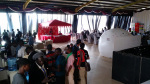

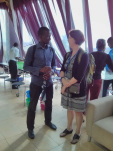
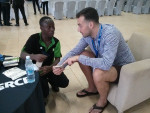

It was the most fun conference I’ve ever attended. How many tech events have you ever been to that included a giant “cash box,” a tattoo competition, or, inexplicably, an enormous, glowing white orb dotted with the iconic W logo? My favorite part of the entire event was running into a young attendee in the women’s bathroom — she was applying what appeared to be a couple dozen of the temporary WordPress tattoos we’d brought along as swag giveaways. None of us were surprised when we learned that she ultimately won the competition. Clearly, the love for WordPress (and WordPress swag) runs deep here.
What we took away from the event, however, were the astounding energy, drive, talent, and intelligence that we witnessed during those remarkable two days, and the thirst we observed for open source software and what it can do to transform communities. Africa’s technology sector is booming, and we’re excited to have met many of its most passionate and inspiring pioneers.
Filed under: Community, Events


October 18, 2015
Paris, The Ambassador and Me....part deux
Fabrice Arbidoux was the man of my dreams and I knew it the moment I laid eyes on him. He was powerful, gorgeous and insatiable in bed. He came into my life and changed it forever. I couldn’t get enough of him and I didn’t want to. He was my knight in shining amour and all mine.
My lack of self-esteem, fear of backlash and memories of a very difficult past relationship have me constantly doubting his love for me. I even let him go for a while. But, I couldn’t let him go. I needed him as much as I needed to breathe.
He risked it all for me without a blink of an eye. Was I worth it? He said I was. He showed me I was every day. I pray that it stays this good. But, I doubt it will. Nothing ever stays good.