Brian Meert's Blog, page 110
August 13, 2018
3 New Ways to Reach Hardcore Gamers Like Me
 August 13, 2018
Anna Hubbel

It takes a lot to get me to download a gaming app and play it on a regular basis. It takes even more to get me to make purchases within the app. But I know a good game when I see it, and when that rare moment does occur, I’m hardcore hooked.
Gaming marketers have a tough job reaching players like me. To change this, Facebook recently introduced three new ad solutions designed to easily overcome that challenge. The three solutions, created to reach players most likely to play and invest in your app, are
Playable ads
Retention optimization
Minimum return on ad spend (ROAS) bidding
Playable Ads
Playable ads, which you can use by choosing the app install objective, is the solution that appeals to me the most because it allows me to test a game before deciding whether I want to buy it. This removes the possibility of buyer’s remorse. When I pay for a game, I want a guarantee that I’ll enjoy it. Payable ads make that possible because I can try the game to see if it’s something I want to play again and again.
Playable ads help marketers drive higher-intent installs because gamers who tested the game are more likely to play after they’ve installed it. According to Facebook, game developer Bagelcode saw a 3.2 times improvement in return on ad spend for Android and a 1.4 times improvement for iOS after testing playable ads. Game developer Rovio also tested the ads and saw a 40 percent lower cost per paying user and a 70 percent lift in return on ad spend by day seven.
Retention Optimization

If you’re like me, you have very specific types of games that keep you engaged. For example, I tend to enjoy quiz show games and fantasy adventures. To help marketers reach players who are most likely to engage with their game, Facebook introduced its retention optimization solution, which delivers ads to the right audience, specifically, an audience that is most likely to play your game.
Currently, this new solution is being tested by Bitmango and Beijing Fotoable. Beijing Fotoable has already seen results, with a 30 percent higher return on ad spend as opposed to optimizing for installs.
“Facebook’s retention optimization solution has significantly improved our day 2 and day 7 retention rate,” Fotoable’s Chief Operating Officer Zijing Yan says in a Facebook Business article. “We saw a 30% better ROI compared to install optimization when looking at cost-per-day-7 retained user.”
From a gamer’s perspective, I like when a specific app speaks to my gaming preferences. If I see an ad for a quiz show or fantasy adventure game, I’m more likely to engage with it. Using retention optimization makes it possible for the developers of these games to deliver those ads to gamers like me.
If you have an ad-based revenue model, you are most likely to see results using retention optimization. Facebook will roll out retention optimization on Facebook, Instagram, and Audience Network later this year.
Minimum ROAS Bidding

If it’s difficult to get me to download a game, it’s even more challenging to get me to make in-app purchases. Therefore, some developers may find my business less valuable compared to other gamers who make more in-app purchases. According to Facebook, an AppsFlyer study of US gamers found an average spend of $20 on in-app purchases by day seven and up to $49.33 by day 90. When you find the right audience for your app, these gamers, who are willing to make in-app purchases, are the most valuable.
Previously, you may have been familiar with Facebook’s value optimization tool, which helps you identify gamers with high purchase intent. The new minimum ROAS bidding solution makes that tool more effective because it allows you to set a minimum spend to reach those valuable gamers. It also frees you from unnecessary costs when trying to engage with gamers unlikely to make in-app purchases.
“Being able to set a minimum ROAS is critical for us to ensure we’re spending each of our clients’ dollars efficiently towards users who drive the most value as defined by their business, without sacrificing upside performance,” Manuel Pacreau, Addict Mobile’s head of operations, says in the Facebook article.
Minimum ROAS bidding will roll out on Facebook, Instagram, and Audience Network in September.
Game On
Some gamers are up for trying any new game. Sometimes, they prefer games that offer rewards. Others, like me, are very particular about the games they enjoy. But in all cases, there’s something out there for everyone. If we fit your app’s demographic, it’s up to you to make sure we know about your game. Facebook’s new ad solutions will help you do that. However, that’s not to say we won’t give you a run for your money. We are gamers after all, which means we enjoy a challenge.
Bring it on!
Written by Anna Hubbel, staff writer at AdvertiseMint, Facebook ad agency
The post 3 New Ways to Reach Hardcore Gamers Like Me appeared first on AdvertiseMint.


How Facebook Improves Relationships between Customers and Local Businesses
 August 13, 2018
Anna Hubbel
How Facebook Improves Relationships between Customers and Local Businesses. #facebook #apps #localbusinesses
Click To Tweet

The Internet is a big competitive place for a small business. Fortunately, Facebook offers a way for small business owners to put their business out there and connect with potential customers in that vast, intimidating space. Whether it’s through an organic video post or an engaging ad, the platform makes it possible for small businesses to expand their reach and establish relationships with tech-savvy customers.
Although Facebook already connects more than 1.6 billion people to local businesses, the platform evidently determined that it could do more to help. Earlier this week, Facebook announced easier ways for you to connect your small business to potential customers. These updates will improve your ability to build a loyal customer base within the infinite audience that is the Internet.
Redesigned Pages for Mobile
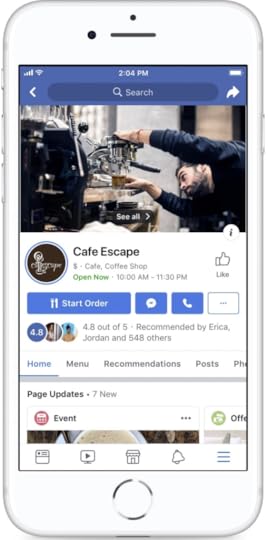
Facebook redesigned pages on mobile so customers can more easily communicate and engage with your local business. For example, if you have a page for your restaurant, customers can make a reservation from your page. Similarly, if you own a salon, visitors can book an appointment straight from your page on Facebook.
Additionally, the new design allows visitors to see Stories, recent photos, upcoming events, and offers on your page. With the new Stories element, you can share fun, behind-the-scenes content that is interesting to visitors, making your business more relatable. You can also make your business more relatable thanks to the recent photos feature. With the upcoming Events feature in the new design, you can increase the number of people attending your event. And of course, the new design highlights special offers you want to promote, which can help increase foot traffic to your brick-and-mortar store.
A user-friendly mobile design for a Facebook page is extremely instrumental in driving foot traffic to local businesses because most Facebook users access business pages through the app, whether they’re at home or on the go. The easier for customers to access information, the more likely they are to build a relationship with your business.
More Helpful Recommendations

Customers often visit business pages to read recommendations. Recognizing this fact, Facebook’s redesigned pages to make recommendations more prominent.
In addition to making recommendations easier to find so customers can review your business, the new design makes your business look more transparent. People trust the reviews of customers because they know they’re going to be honest about their experiences. With recommendations placed in a more prominent place, customers are determining that you aren’t afraid of what people say about your business. And unlike reviews, which contain both positive and negative opinions, recommendations only include praises. After all, no one makes a negative recommendation. People often recommend businesses they are pleased with.
Improving Events

Facebook’s Events feature increases in popularity, with 700 million users using it monthly to look for local activities. Facebook improved Events to help businesses and organizations encourage customers to attend local events. For example, customers can easily buy tickets to an event you’re hosting. Although Facebook is not a ticketing platform like Ticketmaster, according to Facebook, businesses sell twice as many tickets through the Events feature than through a website.
Events is a great way to connect with people in your community and to drive foot traffic to your brick-and-mortar store. If you own a dance club hosting a 90s-themed dance night, for example, sharing the event on Facebook helps spread the word and drive foot traffic to your location. If people have a good time at your event, they will likely return to your location in the future—they may even recommend your business to their Facebook friends.
Expanding the Job Application Tool
Employees play a significant role in making local businesses successful. Without them, your business can’t exist. After all, you can’t run a business on your own. You need people to whom you can delegate tasks. To help small local businesses grow, Facebook opened the Job Application Tool to a global audience, helping small businesses hire exceptional employees.
A “Local” Section
Gone are the days of Googling “places to eat near me.” Facebook now has a Local section people can use to find businesses, like yours, nearby. There’s also a standalone Facebook Local app for the same purpose. Users can browse places based on location, recommendations, or events friends are attending.
If you want to increase your foot traffic and appear higher in the Local section, you should focus on encouraging existing, happy customers to leave recommendations on your Facebook page. You should also consider hosting fun events to generate interest and acquire attendees who are likely to recommend your events to their friends.
Small Business Meets Big World
Don’t let the word “small” keep you from dreaming big. Over 80 million small businesses use Facebook’s free resources to connect and thrive in the vast world of the Internet. “Online” should not have a negative or unattainable connotation. In fact, most people who own a mobile device use it to find local businesses, and Facebook is continuously exploring new ways for small businesses like yours to succeed. It’s up to you to decide whether or not to use them.
Written by Anna Hubbel, staff writer at AdvertiseMint, Facebook advertising company
The post How Facebook Improves Relationships between Customers and Local Businesses appeared first on AdvertiseMint.
August 9, 2018
Use Facebook’s Info and Ads Feature to Improve Ad Campaigns
 August 9, 2018
Anna Hubbel
Use Facebook's Info and Ads Feature to Improve Ad Campaigns. #facebook #digitaladvertising #business
Click To Tweet
Facebook rolled out the new Info and Ads feature at the end of June to allow users to view all active ads businesses or a company for Facebook ads run across any Facebook-owned platform, including Instagram. Facebook created the feature to improve transparency across its services so users can better trust the platform and have positive experiences.
Transparency became Facebook’s priority after the news broke that Russian troll accounts distributed politically divisive ads during the 2016 US presidential election to provoke voters. As if this discovery didn’t cause enough concern, the public also learned that data firm Cambridge Analytica harvested personal information from over 80 million Facebook profiles through an app to deliver manipulated messages for the 2016 Trump campaign. To earn the people’s trust, Facebook has taken action in various ways, such as implementing stricter rules for advertisers and app developers. Additionally, the company introduced new tools, such as the Info and Ads feature.
If you own a business, you may be wary about the Info and Ads feature because the information about all of your Facebook ads is available for anyone to see. Users, even those you didn’t target for your ads, aren’t the only ones who can see your strategies. Rivals, too, will be able to identify your advertising patterns: the targeting, format, copies, and creatives you use. The secrets to your success will be available for all to see.
Before you toss in the towel, you should know that you can use the Info and Ads feature to your benefit. With this level of transparency, not only does Facebook become more trustworthy but also your business. Users feel more comfortable with your business knowing you have nothing to hide, knowing that your practices are ethical and within the bounds of Facebook’s advertising policies.
But there’s more. The Info and Ads feature can also provide significant insight you can use for marketing research and benchmarking. The feature appears in the left-hand sidebar menu of all Facebook pages. You can see the ads your competition is running across Facebook and Instagram to inform your own campaign. It doesn’t matter if you aren’t on your competition’s audience targeting list. Anyone can see the ads a business runs with the Info and Ads feature. By using it to inform your campaign, you can identify your competition’s offers and see where your competition fails and succeeds. Either instance helps you build a stronger campaign to give you an edge over your rivals.
How to Find the Info and Ads Tool
Step 1: Log into your Facebook account and navigate to the page of your competitor.
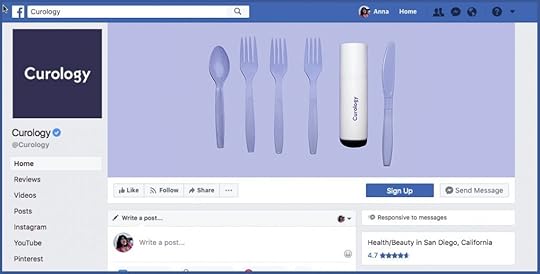
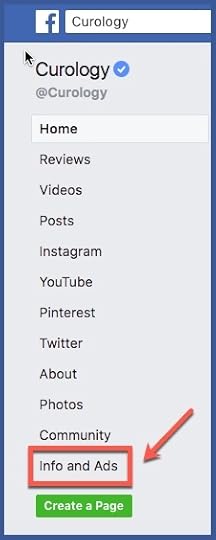
Step 2: Select “Info and Ads” at the bottom of the menu on the left of the page.
Step 3: Browse through the ads the page is actively running.
How to Use the Info and Ads Tool to Your Advantage
There are various elements you should look for with this valuable information at your fingertips. For example, you can keep an eye out for new products your competition teases in ads tested on a small audience. This allows you to see what they plan to eventually release to a larger audience. You can use this information to adjust your campaign promoting a rival product and distribute ads before or after your competitor.
You can also use Info and Ads to identify your competition’s key target locations. Depending on the type of campaign you’re running, for example, a campaign with a store visits objective, you need to target the right geographic audience to succeed. Take note of your competitor’s target locations and set your ads to target the same places. Your rival is likely targeting those areas because of past success.
Info and Ads can serve as an inspiration for new ad creative as well. Sometimes, we all get stuck in a rut when brainstorming for creative ideas. If your current creative isn’t making the cut, see what other businesses in your market are producing. It will give you ideas for your own campaign and allow you to see what you’re competing with.
Using Info and Ads, you can also see your competition’s offers, sales, and pricing. Users love a good deal. Make sure your competition isn’t offering something more tempting than yours. You can change the price of your products or services based on what you learn about rival offerings from the Info and Ads feature.
Finally, use Info and Ads to identify the ad formats your competition primarily uses. Facebook offers a variety of ad formats, such as Carousel ads, Canvas ads, and Dynamic ads. Some formats are more successful for promoting a certain product or service than others. For example, Carousel ads are best for showcasing a series of products whereas Canvas ads are better for demonstrating products in use. Sometimes it’s a challenge to determine which format will deliver the results you want. By researching the formats your rivals are using, you can see what works and what doesn’t before choosing the format to use for your own campaign.
Examples
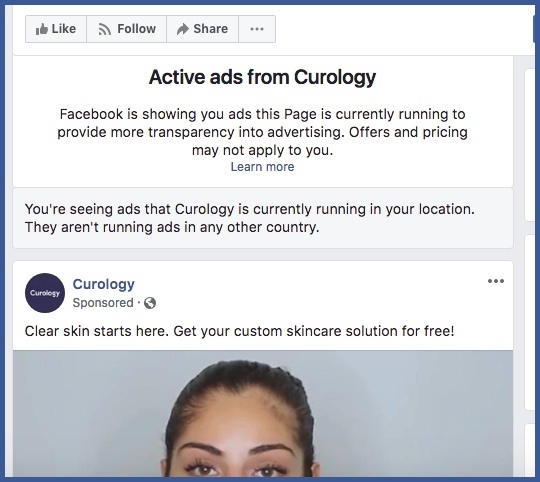
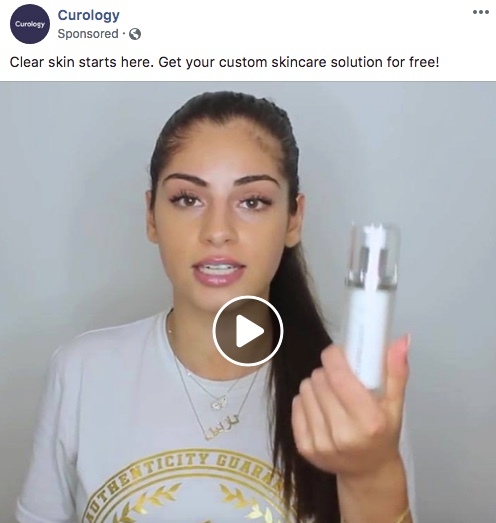
Navigating to Curology’s Info and Ads section, you can see the company primarily uses video ad formats to promote its skincare products. The videos typically offer testimonials or demonstrate the product in use. As a competitor, you might decide to make a video-focused campaign similar to that of Curology. You may also identify a shortcoming in Curology’s ads to give your campaign an edge up. For instance, Curology’s ads appear to primarily focus on women’s use of the product. You could make your campaign more inclusive of all genders.
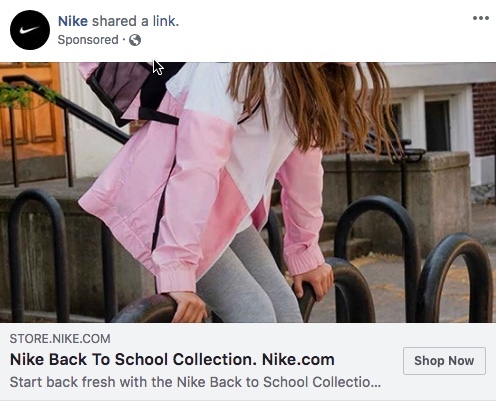
If you go to Nike’s Info and Ads section, you’ll notice that, in addition to video ads that showcase the company’s shoes, there are also various “Shop Now” ads that focus on the back-to-school season. If you’re a competing sportswear brand, you may use this insight to inform your own back-to-school campaign, trying different ad formats that could be more captivating than the ones Nike is producing.
Info and Ads Is a Friend, Not a Foe
Yes, Facebook introduced the Info and Ads feature to keep advertisers accountable and transparent on the platform. But you shouldn’t interpret it as a form of intimidation. Use it to both build trust with your audience and keep tabs on your competition. The result will be more polished campaigns that have the extra boost you need to rise above your rivals.
The post Use Facebook’s Info and Ads Feature to Improve Ad Campaigns appeared first on AdvertiseMint.
August 8, 2018
3 Effective Ways to Collect Leads Using a Mobile Lead Generation Strategy
Stefan Des

The mobile technology industry grows by leaps and bounds. By the second quarter of 2018, 51.89 percent of global internet traffic originated from mobile devices, such as smartphones and tablets.
The statistics get better. By the end of July 2018, Global population of internet users stands at 4.1 billion, 3.3 billion of which are social media users. The statistics show that your audience is on social media, but you may wonder how you can generate leads from mobile and social media platforms. Here, you will learn how to use three social media ads to generate more leads for your business.

1. Facebook Lead Ads
Facebook has a huge potential for lead generation. As of Q2 2018, Facebook monthly active users (MAUs) stand at 2.23 billion. Out of this population, 1.74 are mobile monthly active users (MAUs). Additionally, 53 percent (more than half) of United States residents severally use Facebook in a day. Of all the social media platforms, Facebook is the most preferred by marketers, according to research by Statista.
With Facebook’s popularity among users combined with its Lead Generation ad, you can easily collect inexpensive leads from Facebook’s platform. Here’s how the ad works: Facebook will show your ad, which you can create in Ads Manager using the lead generation objective, to users on their mobile devices. When users click on the ad, they will see a pre-filled form containing their information, such as name and email, acquired from their Facebook profiles. Users can instantly become leads by clicking the submit button, no extra steps necessary.

The benefits Facebook Lead ads provide are undeniable:
The user does not have to the fill information manually, increasing the user’s likelihood of finishing the form and converting.
All activity takes place on the Facebook platform—users won’t be redirected to a slow-loading website not optimized for mobile, increasing their likelihood of converting.
You can store your leads in Business Manager and download the CSV file when needed.
You can later use your leads for ad targeting.
2. Instant Articles CTA Units
Facebook’s Instant Articles is a mobile publishing platform that allows you to share your articles and blogs to Facebook users. Articles published through Instant Articles load 10 times faster than a normal mobile web article. They also receive 20 percent more clicks and a higher number of reads.
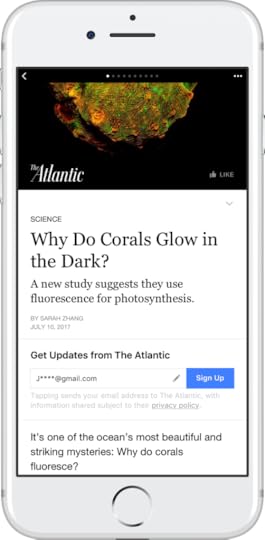
Other than creating a mobile-friendly article for Facebook users, you can also use the Instant Articles platform to generate leads. You simply need to use Instant Articles’ CTA units. When users click on an article from Facebook, the article will open within the Facebook app. As users read the article, they will spot a CTA button that encourages them to take a desired action. To acquire leads, you can use the Sign Up button, which allows users to seamlessly sign up for your newsletter.
How to Sign Up for Instant Articles
Step 1: Sign up for Instant Articles on Facebook and fill the required information.
Step 2: Go to “configuration” in publishing tools and select “styles.”
Step 3: Choose the articles you want to import to Facebook and convert them into Instant Articles. To do this, you can use the Instant Articles for WordPress plugin, the Instant Articles API, or the RSS Feed.
Step 4: Connect your website to convert your articles. Go to “Configuration” in “Publishing tools” and click “Connect your site.” If you are using the WordPress plugin, add your URL. If you’re using the RSS feed or API, add a piece of code to the header of your website’s HTML.
You are required to submit 10 articles for review and approval. Because only approved articles are published on the platform, make sure the articles comply with the instructions on the submission checklist.
Step 5: Submit your articles for review. Click on “Configuration” and click “submit.” The review may take 3 to 5 business days.
Once your articles have been approved, you can share them on your Facebook pages. To get better results, contact your leads as soon as they sign up. A welcome email is appropriate.
3. LinkedIn Lead Gen Forms
The LinkedIn Lead Generation form helps you seamlessly collect quality leads from ads on LinkedIn with a pre-filled form. You can use the forms with sponsored InMail and sponsored content such as a link, image, or webpage update.
LinkedIn Lead Gen forms come with pre-filled user information taken from users’ LinkedIn profiles. With the form, you can collect users’ professional information, such as place of work, position, and the field of study, in just a few clicks.
With LinkedIn, 80 percent of engagements with sponsored content occur on mobile devices, and 57 percent of LinkedIn users visit using a mobile device. This makes the LinkedIn Lead Generation form an effective way of generating quality B2B leads for your business. If you’re not convinced, look at Bynder, a software company, that used the lead gen form to increase leads from sponsored content by 400 percent, achieving a 20 percent conversion rate.
You can also use the form to track your campaigns’ cost per lead and the number of leads you are getting from a professional audience segment. You can download your leads from Campaign Manager or integrate with your favorite marketing automation or CRM tool.
To optimize your Lead Gen Campaign for better results, make sure the images and copy are relevant, verify that your messaging matches your call to action, make your form concise, and do not include fields that require manual input.
To Gain Leads, Optimize for Mobile
Evidently, mobile use is increasing. If you want to increase leads on social media, you have to ensure that your methods are optimized for mobile because your users will most likely access your lead forms using a smartphone or a tablet. To increase leads on social media, use Facebook’s Lead Ad, Instant Articles’ CTA button, and LinkedIn’s Lead Gen forms. Use one strategy at a time so you can more accurately measure performance.
A social media advertising and marketing automation enthusiast, Stefan Des is the CEO and co-founder of LeadsBridge, a suite of automation tools for Facebook advertisers or for those working in a company for Facebook ads.
The post 3 Effective Ways to Collect Leads Using a Mobile Lead Generation Strategy appeared first on AdvertiseMint.
August 7, 2018
What Does the Week of a Snapchatter Look Like?
 August 7, 2018
Anna Hubbel
What Does the Week of a Snapchatter Look Like? #snapchat #marketingstrategies #socialmedia
Click To Tweet

If you know the behaviors of your Snapchat audience, you can better market to them. Snapchatters have very specific behaviors for each day of the week, according to Snapchat’s business blog. We already know that the average Snapchatter uses the app about 25 times per day. We also know that more than 90 percent of Snapchattters share their location through the app because they like the world to know their location and activities. But what else can we learn about Snapchatters?
Location is a key factor in Snapchatters’ weekly behaviors. In the year 2020, Snapchatters are expected to make over 80 percent of their purchases in physical stores. What better way to market to them than while they’re walking down the aisles of your brick-and-mortar store?
Likely because of location’s omnipresence in Snapchatters’ behaviors, according to Snapchat, advertisers will spend an estimated $22 billion on US mobile ads that are based on location. It’s a strategy that targets consumers through social media to influence not online behaviors, but offline behaviors. Since Snapchatters use the app so many times in a single day, wherever and whenever, this is a very effective strategy.
To help you better understand your audience and how to effectively reach them wherever they are, Snapchat’s business blog offers detailed insights about this unique demographic’s weekly behaviors.
Monday through Wednesday

Snapchatters begin the week productively. They accomplish both personal and professional tasks during this time, making for very busy days and nights. As a result, they fuel their energy at places that are quick and convenient, such as coffee shops, convenience stores, delis, and fast food restaurants. There are also more day-specific behaviors for each weekday during this period.
In addition to the general, day-specific activities mentioned below, Snapchatters have varying behaviors based on their age demographic. For example, high school and college Snapchatters are 50 percent more likely to go to the library on Mondays and Tuesdays than any other day. In contrast, this demographic is 19 percent less likely to go to the movies on Mondays and Wednesdays.
Monday
Nobody likes Mondays. It makes sense that, in attempts to make the start of the week less dreadful, Snapchatters dedicate Mondays to quiet time and stress relief. Visits to yoga studios and libraries, for example, are most common for Snapchatters on this day of the week.
Tuesday
Tuesday is errand day. Since Monday was stress-relief day, it’s time to get stuff done. Banks, post offices, ATMs, and car repair shops are the most common places Snapchatters visit on Tuesdays.
Wednesday
Phew! Tuesday was exhausting. Now it’s time for self-care. Snapchatters use Wednesday to get things done, but the tasks they accomplish on this day of the week are geared towards self-care activities. For example, gyms, spas, or beauty stores are most frequented by Snapchatters on Wednesdays.
Thursday
Thursday is the new Friday. Snapchatters use this day for getaways. They like to have a weekend of traveling or road trips. As a result, on Thursdays, users are most likely to frequent car rental locations, travel agent offices, and tour operations storefronts. They are also more likely to take the bus, ride trains, or fly on airplanes on this day of the week.
It’s the Weekend!

Unsurprisingly, the weekend is all about fun for Snapchatters. And for each day of the weekend, they spend that fun time in varying ways.
Friday
It’s time for a night out on the town. Bars, clubs, restaurants, and karaoke and casino venues are most popular on Friday nights. Snapchatters share their night adventures through the app and show the world how to have fun.
Saturday
Contrary to popular belief, Snapchatters don’t spend all day cooped up indoors, married to their phones. They’re not aimlessly scrolling through their social media feeds or half-heartedly Googling inane queries on their phones. On Saturdays, they like to do outdoor activities, like visiting local farmer’s markets, spending the day at the park, or going for a hike. As for the older users, Snapchatters who are at least 21 are highly likely to visit vineyards on Saturdays for a boozy afternoon. These Snapchatters spend a typical Saturday night dining at a nice restaurant.
Sunday
At the end of the week, after spending Friday and Saturday having fun and staying occupied with friends, Snapchatters value family time. They also value activities that don’t take too much energy, something low-key and quiet. While Snapchatters are not as likely to visit the gym or run errands on this day of the week, they are most likely to visit zoos, beaches, theme parks, and casual restaurants where they can relax.
What to Do with These Insights

Now that you know how Snapchatters spend each day of the week, you can deliver ads when they would be most relevant to them. For example, you can engage them with amped-up party geofilters and lenses on Fridays. If you run a gym, you can deliver ads promoting membership deals on Wednesdays. You can share geofilters about stress relief on Mondays, or you can promote travel discounts on Thursdays. Simply put, you can better optimize your Snapchat campaign for in-store visits by recognizing the different behavior patterns of your audience.
You have about 25 times a day to engage with your audience. Make it count.
Written by Anna Hubbel, staff writer at AdvertiseMint, Facebook advertising company
The post What Does the Week of a Snapchatter Look Like? appeared first on AdvertiseMint.
August 6, 2018
The Sneaky Tricks Amazon Competitors Employ to Beat You
 August 6, 2018
Anna Hubbel
The Sneaky Tricks Amazon Competitors Employ to Beat You. #amazon #ecommerce #advertisingstrategy
Click To Tweet

Competition is heavy on Amazon. Your competitors will do whatever it takes to make themselves look better than you, even if it means tricking Amazon. “Trick Amazon,” you gasp. “Is that even possible?”
Some sellers found ways to manipulate the Amazon system using sneaky tricks. They employ these tactics to boost their exposure and appearance on the platform so they can push yours down. If you aren’t aware of these tactics, they will likely succeed. Here are some of the tricks your competition may use to fool Amazon, according to the Wall Street Journal.
Search Term Repetition
Some competitors pay people to repeatedly type search terms related to their products, clicking only the links for the items they sell. When Amazon’s algorithm registers the high click rates of the products, it interprets the activity as popularity and, as a result, will boost those products higher in search results. A higher rank in search results means a stronger potential for exposure and, consequently, sales.
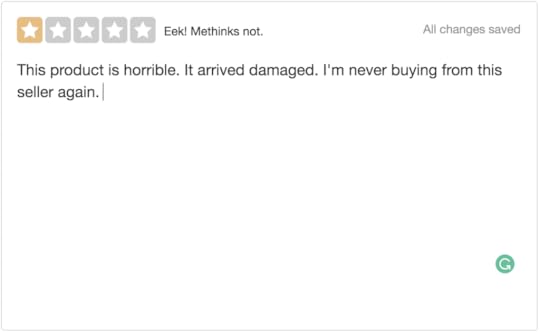
Overly Negative or Positive Reviews
Reviews impact sales performance on Amazon because shoppers trust products that have a lot of positive reviews. Your competition can use reviews against you by posting overly negative reviews on your product pages while posting overly positive reviews on their own product pages to boost their reputation.
Scam Reviews
Your competition also employs the sneaky trick of posting overtly fake positive reviews on your product listings. This fools Amazon’s algorithm into detecting the reviews as scam, resulting in the suspension of your account.
Fake Accounts
Some of your competitors rent or purchase accounts through which they purchase their own products and leave positive reviews. Both Amazon and shoppers will think the purchases and reviews are real, misconstruing your competition’s manipulative activity as product popularity.
Repurposed Listings
A competitor tricks Amazon’s algorithm by taking an old product listing with positive reviews and repurposing it with a different image and description. Amazon reads the positive reviews and then ranks the listing higher in search results.
Fake Purchases
To generate real tracking numbers that indicate purchases, your competition works with accomplices throughout the United States to make fake shipments. Your competitors ship either an empty box or a box containing a cheap reward, like a watch, to their accomplices’ addresses. Accomplices leave positive reviews after receiving their package to make the purchase seem authentic.

Fake Customers
Some competitors hire people with fake accounts who mimic the behavior of real customers by reviewing only eight products a month. To further portray real customer behavior, the fake customer only reviews 15 to 20 percent of the purchased products. This tricks Amazon’s algorithm into believing the activity isn’t fraudulent because the accounts aren’t suspiciously reviewing every single listing by the seller.
Incentives
Your competition also purchases from fraudulent companies a certain number of reviews for listings. Those companies obtain fake reviews by offering incentives to people in the form of cash or discounts. In return, those people leave positive reviews. Competitors may use this tactic to avoid using fake accounts and to get real Amazon shoppers to leave reviews, making it less likely that Amazon will detect the dishonesty.
“Most Helpful” Votes
To make your seller account look suspicious, competitors may hire people to vote as the most helpful any bad reviews left on your listings. They may also hire people who will buy your product, post safety complaints on your listing, and then vote those reviews as the most helpful. This suggests to Amazon’s algorithm that you deliver poor-quality products and services, hurting your rank on the platform.
To Defeat the Competition, Understand the Competition
Understanding your competition’s tactics helps you detect harmful fraudulent activity and quickly alert Amazon before the situation worsens. It is much better to detect foul play before more damage is done.
Selling on Amazon is a tricky business. But you don’t have to stoop to your competition’s level to get to the top. There are more ethical “tricks” for creating a successful Amazon sellers account. Which ones do you employ?
Written by Anna Hubbel, staff writer at AdvertiseMint, Facebook advertising company
The post The Sneaky Tricks Amazon Competitors Employ to Beat You appeared first on AdvertiseMint.
August 3, 2018
How Businesses Use Instagram Stories: 30 Case Studies (Infographic)
 August 3, 2018
Alexander Slichnyi
How Businesses Use #InstagramStories: 30 Case Studies (Infographic)
Click To Tweet
Want some ideas on how to use Instagram Stories? Here’s one: when creating Stories, make sure that they are short rather than long. Think elevator pitch rather than a long documentary.
If you don’t know what to feature in your stories, you could showcase your latest products. Featuring a product in Stories works well because it allows you to show how it works in a real-life situation.
Or, you can get a bit more creative and tell the story of how your product is made. Or even provide content that has nothing to do with selling your product. What about a makeup tutorial, for example? The key is creating content that is interesting and useful to your target market.
The infographic below shows how 30 of the bigger brands use Stories to boost their businesses. As you will see, there is no shortage of ideas when it comes to creating content that creates a buzz.

Alex Slichnyi, community manager at 99firms.com, is an avid learner of all things IT. A methodical mind who likes to probe, test, and improve, Alex is also a savvy SEO specialist whose driving core values are communication and learning.
The post How Businesses Use Instagram Stories: 30 Case Studies (Infographic) appeared first on AdvertiseMint.
August 2, 2018
Amazon Expands Sponsored Products to External Sites
 August 2, 2018
Anna Hubbel
Amazon Expands Sponsored Products to External Sites. #amazonads #amazon #ecommerce
Click To Tweet
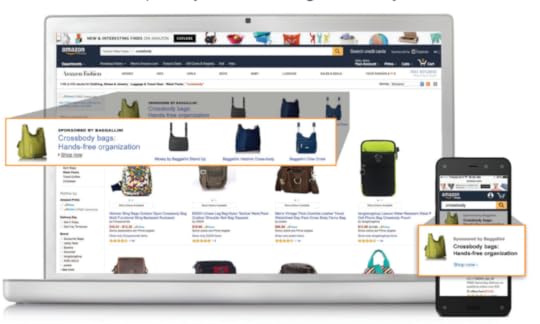
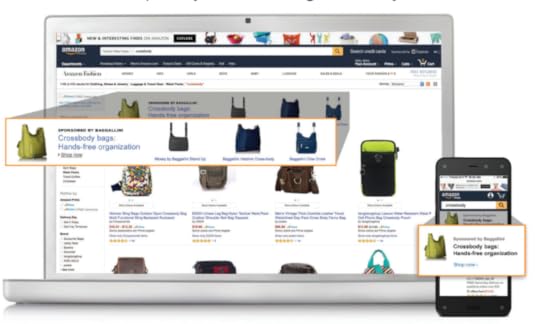
Soon Amazon sellers may be able to promote their products to other websites. Currently, Amazon is testing Sponsored Products placement to external sites. The company has been dedicating a new focus to advertising, and this latest test expands that focus beyond Amazon’s own properties.
According to Ad Age, Amazon is speaking with top agencies and brands about testing the placement of product ads on third-party websites, made possible by retargeting capabilities that use information about customers’ visits to Amazon. When customers click an ad from a third-party website, the ad will redirect them to the brand’s storefront on Amazon. The test has the potential to boost the reach of Amazon’s Sponsored Products ad.
What Is Sponsored Products?
On the Amazon site, Sponsored Products is an advertisement that appears at the top of the search results page when a shopper looks for a specific item. Advertisers pay for these ads to appear on top of the page. Amazon uses keyword targeting to promote these ads so they are given priority in search results. This format is one of the most popular on the Amazon platform.
With the new test, however, this format will extend to websites within Amazon’s advertising marketplace, according to Ad Age.
Look Out, Google
Google has a similar ad format to Amazon’s Sponsored Products when shoppers search for a specific item. However, when shoppers click on Google’s ads, they’re directed to the website that sells the product, not the Google store. With Amazon’s Sponsored Products taking on the rest of the Internet, they’ll give Google a run for its money because unlike Google ads, they’ll take shoppers back to Amazon to make the purchase.
According to Ad Age, Sponsored Products are responsible for 88 percent of the ad revenue Amazon generates from search-based advertising. Additionally, Amazon reported over $2 billion in ad revenue for its first quarter in 2018. Evidently, this format is already successful. Broadening its scope will only add to that success, making Amazon an even more formidable foe.
In the coming weeks, Sponsored Products will appear on sites outside of Amazon.
The post Amazon Expands Sponsored Products to External Sites appeared first on AdvertiseMint.
August 1, 2018
Facebook Blocks API Access for Inactive Apps Not Submitted for Review
 August 1, 2018
Anna Hubbel
Facebook Blocks API Access for Inactive Apps Not Submitted for Review. #facebookadvertising #apps #appdevelopers
Click To Tweet

Today is the deadline for existing apps to enter Facebook’s app review process, and apps that do not meet this deadline will face consequences. Facebook says it is “cutting off API access for hundreds of inactive apps” that haven’t submitted for the review process by the August 1 deadline.
Apps that are in use but have yet to be submitted for review are prompted to do so ASAP. To make sure no active app goes unreviewed, Facebook says it is queuing up all active apps for its review process and will give developers a limited time frame to respond with additional information the company may require to complete the process. If developers do not respond by the designated deadline, Facebook will remove their API access during the review process.
“Our goal with all these changes is to ensure that we better protect people’s Facebook information while also enabling developers to build great social experiences, like managing a group, planning a trip, or getting concert tickets for your favorite band,” Ime Archibong, VP of Product Partnerships, said in the Facebook update posted yesterday.
Facebook reopened its app review process back in May after applying stricter adherence to the Platform Policies.
The post Facebook Blocks API Access for Inactive Apps Not Submitted for Review appeared first on AdvertiseMint.
Google No Longer Allows Crypto-Mining Apps on Play Store
 August 1, 2018
Anna Hubbel
A recent update to Google’s developer policy says crypto-mining apps are not allowed on the Google Play Store. Currently, cryptocurrency mining extensions are banned from Chrome. Now Google is extending that ban to its other services.
Under the heading “Cryptocurrencies,” the policy states: “We don’t allow apps that mine cryptocurrency on devices. We permit apps that remotely manage the mining of cryptocurrency.”
The new ban follows the action taken by Apple, which also bans crypto-mining apps but still allows remote management cryptocurrency mining, such as through cloud services.
What Is Crypto-Mining?
Crypto-mining is the practice of using massive amounts of processing power to quickly acquire virtual currencies or “digital coins.” It tracks cryptocurrency transactions, and when it’s done on smartphone devices, it can overheat the device or use up extensive battery power.
Companies like Google are cautious about crypto-mining because it is often used by malware gangs. These gangs inject code into websites with poor malware protection to invade users’ computers for the purpose of generating cash.
Other Companies Also Banned Cryptocurrency
Google and Apple are not the only two companies making changes regarding cryptocurrency. Back in January, Facebook placed a ban on bitcoin, binary options, and initial coin offerings to protect users from scams and deceptive ads. Although the company lifted the ban on cryptocurrency in June, adding a new Cryptocurrency Products and Services policy so approved advertisers could continue promoting cryptocurrency, it left the ban intact for binary options and coin offerings. Twitter also banned cryptocurrency ads from its platform back in March.
What Else Did Google Ban Recently?
In its updated developer policy, Google also restricts apps promoting the sale of guns, ammunition, and explosives. Under the heading “Dangerous Products,” it reads:
“We don’t allow apps that facilitate the sale of explosives, firearms, ammunition, or certain firearms accessories.
Restricted accessories include those that enable a firearm to simulate automatic fire or convert a firearm to automatic fire (e.g. bump stocks, gatling triggers, drop-in auto sears, conversion kits), and magazines or belts carrying more than 30 rounds.
We don’t allow apps that provide instructions for the manufacture of explosives, firearms, ammunition, restricted firearm accessories, or other weapons. This includes instructions on how to convert a firearm to automatic, or simulated automatic, firing capabilities.”
Additionally, Google says it will begin removing copycat apps in the Play Store that offer nothing to distinguish them as unique.
The post Google No Longer Allows Crypto-Mining Apps on Play Store appeared first on AdvertiseMint.