
Harold Davis's Blog, page 173
September 15, 2014
New Harold Davis Photography Workshops Added
September 29, 2014: Converting to Black & White (new live webinar session, limited seating available)
October 4-5, 2014: Photographing Flowers for Transparency —I’ve added an evening shoot of San Francisco and the Golden Gate from Berkeley Pier on Saturday night at no additional charge. Space is still available.
February 20-22, 2015: Night Photography in San Francisco , new weekend workshop, click here for registration (early-bird pricing applies through October 15, 2014).
March 14-15, 2015: Creative Black & White Masterclass, new weekend workshop, click here for registration (early-bird pricing through October 15, 2014).
May 9-10, 2015: The Creative Portfolio Workshop , weekend workshop, click here for registration (early-bird pricing through October 15, 2014).
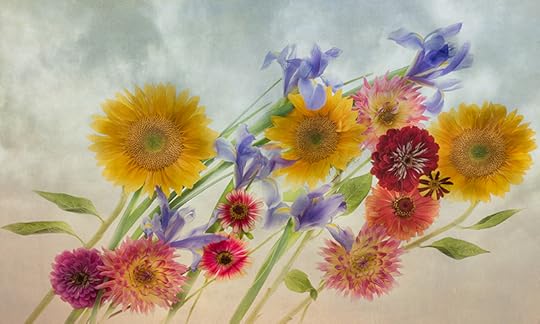
Windswept Florals © Harold Davis


September 14, 2014
Converting to Black & White Webinar
Converting to Black & White with Photoshop and Silver Efex Pro, webinar live session Saturday September 27 at 3PM
I’d be the first to admit that my series of webinar recordings are home-grown. These are not highly polished, and they show the actual techniques I use in real time. The advantage of attending a live session (seats are very limited) is that if anything puzzles you, you can ask questions. Note that the cost of the live session also includes unlimited access to the webinar recording at no additional cost.
Please consider joining me for this exciting, new live webinar offering that will help you create great high-tonal range digital black and white images.
 Saturday, September 27, 2014 at 3PM PT: Converting to Black & White (the cost is only $29.95, and includes unlimited access to the post-session recording)
While we see the world in color, black and white is important to the history of photography, and immediately recognized as distinctive and artistic. In this webinar Harold Davis, the author of several books on digital black and white technique, and the creator of widely exhibited black & white prints, explains his techniques and how he gets his extraordinary results.
He’ll show some of his images in the context of why he chooses to render them in black and white, then move on to the specifics of his unique and poswerful techniques for creating rich monochromatic images with extraordinary depth using Photoshop adjustments, Nik Silver Efex Pro and a workflow the takes advantage of the power inherent in Photoshop layers and masking!
The Converting to Black & White with Harold Davis webinar covers:
Learning to see in black & white
Pre-visualizing black & white imagery
Black & white in a (digital) color world
Why black & white
Black & white workflow
Using black & white adjustments
Using Nik Silver Efex Pro 2
Enhancing color for great black & white
The black & white conversion layer stack
When (and how) to extend the dynamic range of black and white images
Want to move your photographic imagery from the mundane to the artistic? Then maybe black and white—and this webinar—is for you! Learn to hone your monochromatic skills in this extraordinary presentation from Harold Davis, one of the living masters of digital monochrome.
What one participant in past webinars has said: “Watching Harold work on his imagery, as he would in ‘real-life’, has helped me lock-in techniques that I had read about, but were only theoretical to me. It’s great to have multiple delivery channels for Harold’s information, and I now feel confident I can succeed.”
Each live webinar session has ample time for questions and is limited to twenty participants, so seating is very limited. The $29.95 fee includes unlimited access to the recording of the session.
Check out our webinar recordings ($19.95 each for unlimited access):
Painting in Transparency Using a High-Key Layer Stack Webinar Recording
Using Backgrounds and Textures Webinar recording
Selective Sharpening with LAB Color with Harold Davis
Photoshop Layers 101 Webinar Recording
Creative Use of LAB Color Webinar Recording
Click here for more info about Harold Davis webinar recordings.

Nautilus © Harold Davis

September 12, 2014
Painterly Peony Panos
I shot this image of peonies on a light box in two panels, which were later stitched together in post-production to make a peony panorama. Each panel was photographed with a Nikon D800 and the Zeiss Otus 55mm f/1.4 on a tripod. There were eight exposures in each panel, with the aperture at f/11 and ISO set to 100. Shutter speeds on each ranged from 1/40 of a second to 2.5 seconds. With the two panels stitched together, then cropped for composition, the resulting file is quite large, 10,321 pixels by 4,712 pixels at 300ppi. This means I can make a 34″ wide print with no enlargement of the file, and it would be easy with no sweat to enlarge this two or three times with no noticeable loss of quality.

Peony Pano on White © Harold Davis
Want to learn more about the techniques I used to create this image? Check out my FAQ Photographing Flowers for Transparency and other FAQs on my site.

Painterly Peony Pano © Harold Davis
Other resources: I also have an upcoming workshop on Photographing Flowers for Transparency, and webinar recordings are available on Painting in Transparency Using a High-Key Layer Stack and Using Backgrounds and Textures.

September 10, 2014
Sunflower Sunrise
I love sunflowers! They are truly a wonderful flower. Of course, sunflowers are often depicted in art. For example, it is probably hard for me to say “sunflower” without thinking of Vincent van Gogh’s famous sunflower paintings. My version is Go van Gogh!
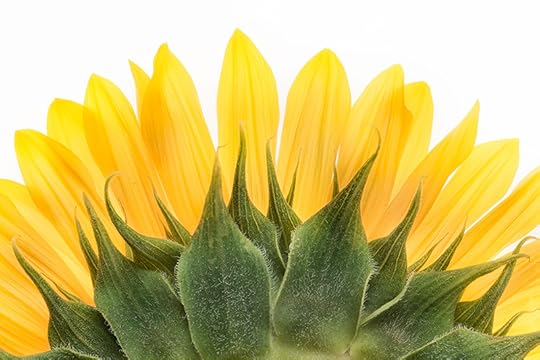
Sunflower Sunrise © Harold Davis
But did you know that the sunflower is also visually interesting from behind? Shot this way, from the back on a light box, with my D810 and a Zeiss 100mm f/2 macro lens, the sunflower reminds me of a landscape, or perhaps the sunrise itself!
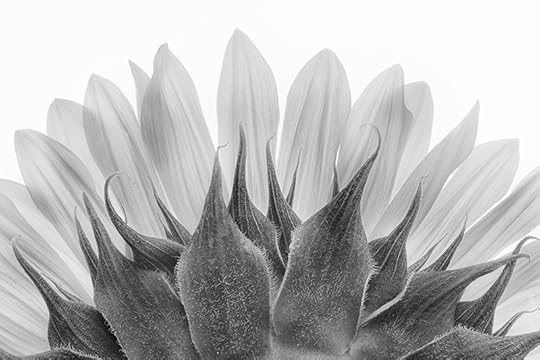
Sunflower Sunrise (black & white) © Harold Davis

September 9, 2014
Enrich your photography with Photoshop Skills – Saturday Sept 13
Registration and information for the Creative Photoshop Day with Harold Davis (Saturday, September 13, 2014)
Please also keep in mind a new session of Photographing Flowers for Transparency (Weekend workshop, October 4-5, 2014)
Photographer extradorinaire, Photoshop guru, and gifted teacher Harold Davis says, “I often get asked about my Photoshop techniques in the course of a workshop. In a general workshop that involves photography there just isn’t enough time to cover the vast multitude of creative Photoshop techniques that you can use in depth. This workshop will provide a one-time opportunity to do that exploration of Photoshop: both as a creative medium, and as an artistic partner with digital photography.”
Don’t miss this opportunity to hone your Photoshop skills in relationship to photography in a small group setting, under the tutelage of a contemporary master. What could be more fun than using Photoshop to its best advantage as a creative tool with your photography?
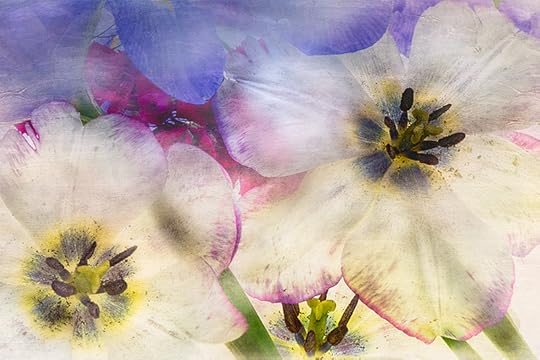
High-Key Tulips © Harold Davis
In this workshop, Harold will work with each participant to develop their personal Photoshop style and to process one or more of their own images using the techniques demonstrated in this workshop.
The focus will be on creating an individual Photoshop workflow that is fun and that energizes. We’ll work with layers, masking, textures, backgrounds, selections, filters, LAB color, and more. There will be time for image review, and for helping participants with individual creative projects. Take your Photoshop creativity to the next level!
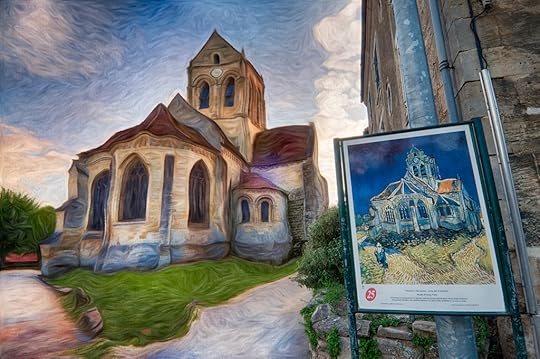
Van Gogh’s church at Auvers-sur-Oise © Harold Davis
Registration: http://www.meetup.com/Harold-Davis/events/186153022/
Prerequisites: Please contact us with any questions about whether you have the appropriate background for this workshop.
 Suggested advance reading/viewing: The Way of the Digital Photographer and the Harold Davis Photoshop webinar recordings.
What to bring: Please bring a laptop with Photoshop installed and some of your images that you would like to work on. The following software is also suggested (but not required): the Nik Collection, Topaz Adjust and Topaz Simplify.
When: Saturday, September 13, 2014 from 9AM to 6PM, with an hour break for lunch.
Where: The workshop is hosted in Berkeley, California, in a convenient location near the upscale Fourth Street shopping district and close to the University Avenue exit from I80.
Tuition: $295 per person. Workshop size is strictly limited so everyone can have the best learning experience possible.

Flowering Quince by Moon © Harold Davis
Click here for current workshop offerings!
Here are some comments from folks who have attended Harold’s Photographing Flowers for Transparency workshop in the past:
“Loved the pace, in-depth instruction and generous sharing.”
“EXCELLENT PRESENTATION AND COVERAGE OF MATERIAL. MR. DAVIS WAS PATIENT TO ANSWER ALL QUESTIONS.”
“Harold, thank you for the time, expense and effort it took to put on a great workshop….You are a wealth of information and share it so graciously.”
“Outstanding workshop!”
“A very packed workshop! Harold is very clear and organized; an outstanding photographer who is also an outstanding teacher.”

September 8, 2014
Windswept Florals
I photographed this floral arrangement on a light box with my Nikon D810 and the Zeiss Otus 55mm f/1.4. My idea was to try to create a composition where it looked like the flowers were in motion, as they might be if they were wind-driven. After combining the high-key layer stack, I added a background and a textured overlay to create the final effect.

Windswept Florals © Harold Davis
Interested in my techniques for creating this image? Please check out my webinars, and please consider the weekend Photographing Flowers for Transparency workshop, October 4-5, 2014.
Related FAQ: Photographing Flowers for Transparency.

September 7, 2014
Succulent
This succulent lives in a little pot on our front porch. For my first shot with my new Nikon D810, I brought it inside, wrapped the plant in its pot in black velvet, and photographed it using controlled sunlight. The lens I used was the Zeiss 100mm f/2 macro. I set the ISO to the native ISO sensitivity on the D810, ISO 64. Using manual exposure, the other settings were mirror lockup on, shutter speed at 4/5 of a second, and aperture at f/22 for maximum depth-of-field (full speed ahead and dang the diffraction, which is minimal with Zeiss lenses anyhow). Of course, I used a tripod.

Succulent (Black & White) © Harold Davis
My first impression of the Nikon D810 it that it is a really good camera, but the changes compared to the D800 and D800E are essentially incremental, not revolutionary. It’s notable that the processor is much faster, and also high ISO handling has been improved even above the great high-ISO abilities of its predecessors. One nice feature I had not been expecting is that the shutter is much, much quieter, and there seems to be very little vibration from the shutter. I don’t know the technology behind this change, but it is an obvious and audible change for the better.
I am thinking that we are getting so good that significant changes in this style of camera may be hitting the law of diminishing returns. After all, who really needs more than 36MP captures? Unless you are doing big prints as I do, you don’t even really need nearly that much.
One improvement I would like to see generally is an internal sensor cleaner that actually works. This is a complaint I hear frequently at my workshops. Nikon (and the other DSLR manufacturers), are you listening?
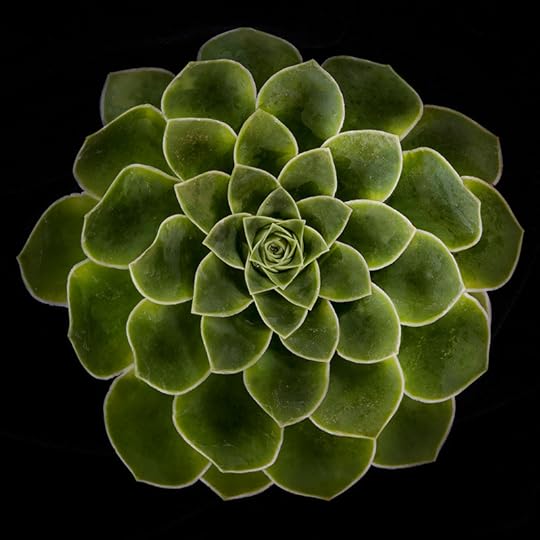
Succulent (Color) © Harold Davis

September 6, 2014
Creative Photoshop Workshop Saturday September 13
Registration and information for the Creative Photoshop Day with Harold Davis (Saturday, September 13, 2014)
Photographer extradorinaire, Photoshop guru, and gifted teacher Harold Davis says, “I often get asked about my Photoshop techniques in the course of a workshop. In a general workshop that involves photography there just isn’t enough time to cover the vast multitude of creative Photoshop techniques that you can use in depth. This workshop will provide a one-time opportunity to do that exploration of Photoshop: both as a creative medium, and as an artistic partner with digital photography.”
Don’t miss this opportunity to hone your Photoshop skills in relationship to photography in a small group setting, under the tutelage of a contemporary master. What could be more fun than using Photoshop to its best advantage as a creative tool with your photography?
High-Key Tulips © Harold Davis
In this workshop, Harold will work with each participant to develop their personal Photoshop style and to process one or more of their own images using the techniques demonstrated in this workshop.
The focus will be on creating an individual Photoshop workflow that is fun and that energizes. We’ll work with layers, masking, textures, backgrounds, selections, filters, LAB color, and more. There will be time for image review, and for helping participants with individual creative projects. Take your Photoshop creativity to the next level!
Van Gogh’s church at Auvers-sur-Oise © Harold Davis
Registration: http://www.meetup.com/Harold-Davis/events/186153022/
Prerequisites: Please contact us with any questions about whether you have the appropriate background for this workshop.
Suggested advance reading/viewing: The Way of the Digital Photographer and the Harold Davis Photoshop webinar recordings.
What to bring: Please bring a laptop with Photoshop installed and some of your images that you would like to work on. The following software is also suggested (but not required): the Nik Collection, Topaz Adjust and Topaz Simplify.
When: Saturday, September 13, 2014 from 9AM to 6PM, with an hour break for lunch.
Where: The workshop is hosted in Berkeley, California, in a convenient location near the upscale Fourth Street shopping district and close to the University Avenue exit from I80.
Tuition: $295 per person. Workshop size is strictly limited so everyone can have the best learning experience possible.
Flowering Quince by Moon © Harold Davis
Click here for current workshop offerings!

September 4, 2014
Cockeyed Cathedral
Bourges Cathedral is a World Heritage Site. Construction began around the year 1200, at about the same time as the cathedral at Chartres. It is unclear when (or if) construction was completed, but it took at least two centuries. What an immense undertaking! As you can see in the photo, portions of the interior need work to this day, and indeed a massive restoration project is underway.
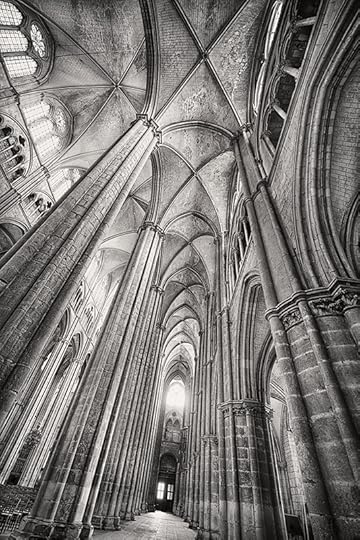
Inside the Cathedral at Bourges © Harold Davis
It’s impossible to convey the immensity of this interior space. But I wanted to create an image that tried. So I got my tripod low to the ground, and used the inimitable Zeiss 15mm f/2.8 extreme wide-angle lens to give this cockeyed view of the soaring spaces of the interior of the Cathedral at Bourges. Related story: Window in Bourges.

September 2, 2014
Saint-Cirq-Lapopie
Saint-Cirq-Lapopie is an ancient village perched high on the cliffs high above the Lot River about thirty miles from Cahors. In France, Saint-Cirq-Lapopie is widely regarded as one of the most beautiful—if not the most beautiful—preserved medieval villages, partly due to its picturesque and highly defensible setting on top of a bunch of rocks overlooking the gorgeous Lot valley.
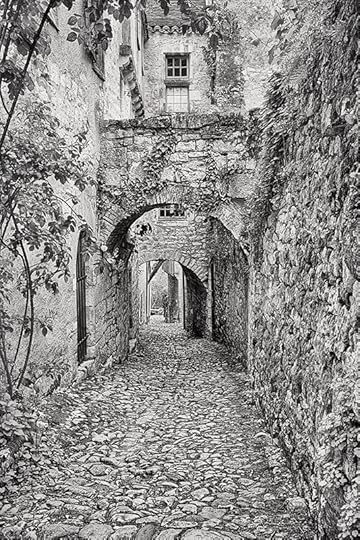
Saint-Cirq-Lapopie © Harold Davis
Of course, as one of the most beautiful preserved medieval villages Saint-Cirq-Lapopie is overrun with tourists. You can’t drive into the village, and must park in a nearby lot, and there are plenty of souvenir stands, and attractions like donkey rides for the kids. But its more the French analog to a scene like an American going to a state fair and getting a corn dog on a stick than it is to the parade of non-French speaking tourists you find in a place like the Left Bank of Paris.
On the weekend I visited in the late spring, the tourists were in fact all French, and I was the only foreigner staying in the Auberge du Sombral, where I had booked a room. This establishment is one of my favorite kinds of places to stay in France, essentially a restaurant with a few rooms attached, and I had a good meal and a thoroughly fun time.
It was great to be able to photograph in Saint-Cirq-Lapopie at night after the visitors had gone home. In the morning I explored more, and found this alley right behind the Auberge. Hard to say how old, but it has probably been like this for seven or eight hundred years without many changes.
Related Story: Chateau des Nazelles.


