Janice Schwarz's Blog, page 3
January 28, 2019
Search Engine Optimization (SEO) Services
All websites created by GeekArtist Web Solutions have HTML already optimized for search engines.
But properly structured HTML, page names, keyword rich content, and internal linking isn’t quite enough. Gone are the days of swapping links, links exchanges, and link farms. Google doesn’t like those and you will get dinged if you attempt them.
More than anything, what will help you are
getting quality links from high ranking websites (such as Facebook or the Better Business Bureau)quality, well-written content crafted for both search engines AND your site visitorslots of content on the subject or subjects related to your business or organizationkeeping your content updated and fresh.
We can also take other steps to drive traffic to your site, such as assistance with social networking.
SEO pricing depends entirely upon your needs and budget. Any website created by GeekArtist Web Solutions is already created with HTML optimized for search engines.
SEO Website Design and Development
All websites made by GeekArtist get:
Search Engine and Directory SubmissionSitemaps submitted to Google, Bing, Yahoo, & AskCustomized Error (404) pages to slow customer bouncesOn-site SearchSubmission to Google & Yahoo Local BusinessSubmission to InsiderPages.com, Yelp.com, Local.com, & any other relevant directories and review sitesKeyword research and submission to any relevant sites to improve ranking for those keywordsRecommendations to improve keywords on your siteSite pages renamed to improve SEO (for example, instead of services.html it would be web_design_services.html)Redirects to from old page names to new ones to prevent page errors that result in customers leaving the site.
The post Search Engine Optimization (SEO) Services appeared first on GeekArtist Web Design & Marketing.


PSD to HTML
Just Need Your Website Designed?
Are you a developer who wants a nice-looking site but design isn’t your thing?
Are you a non-profit or business that has a developer on-hand to code but need someone to create the look?
Then PSD to HTML services are for you!
After consulting with you and learning your needs, goals, all about your target demographic, and so on, we create mockups in Photoshop for you. When we find a design and layout you like, we send you the PSD file for your developer to use to create a new site with, or redesign your existing site. (Yes, we label all Photoshop layers so you don’t have to hunt for images and what-goes-where.)
Or, we can slice it up for you and then the developer just saves the separate files.
We make with the pretty and they make with the code!
The post PSD to HTML appeared first on GeekArtist Web Design & Marketing.
Logo Design
$999 (3 concepts, up to 3 changes once 1 concept is chosen, price increases if more concepts/iterations are requested)
The post Logo Design appeared first on GeekArtist Web Design & Marketing.
Graphic Design
Need a logo? Letterhead? A PowerPoint presentation?
Annual Report?
Banners for online advertising?
Need a custom background for your Twitter page?
We can do that.
Custom graphics and icons are created for your site too.
At GeekArtist, logo design and other graphic design services aren’t treated like fine art. This isn’t about our vision as an artist. Logo design is about creating a look that you are happy with.
We both want a look that reflects you and your organization and is memorable and attractive to your target audience.
The post Graphic Design appeared first on GeekArtist Web Design & Marketing.
Email Newsletter Management
Designed, Written, Sent!
Confused trying to figure out how to design an email newsletter? Or can you figure it out but lack the time to manage it? Not so sure about email marketing or design best practices?
Need a hand writing the content? How about managing your mailing lists and getting email newsletters sent?
We understand email marketing best practices, from design, to writing email copy, to managing mailing lists and sending emails. Let us make your email campaigns more effective. Let us take one more task off your plate so you are free to focus on other aspects of day-to-day work.
We work with your current mailing list and can set up pages on your site so new list members may join your email list. We adhere to no-spam practices to ensure your emails’ likelihood of hitting your customers’ inboxes. We also have experience working with web-based email marketing and management sites such as Constant Contact, Mail Chimp, and Vertical response.
The post Email Newsletter Management appeared first on GeekArtist Web Design & Marketing.
July 6, 2015
Get Free Stuff! Free Stuff for You and Your Website!
Have you bought Janice's book yet? Website Wonders Made Easy: Websites Unwoven: A Guide to Creating a PROFESSIONAL Website, in Plain English
Get your copy today and get the most of out of your website! http://www.geekartist.com/product/boo...
I need Amazon, Barnes & Noble, and Smashwords reviews for my new e-book!
Remember: customers all got free copies. (If you did not, let me know and I’ll send you a link to the PDF.)
I’ll give you 1 year of free web hosting OR 1 hour of free website work. Your choice!
And remember: I can do a LOT in an hour!
NOTE: If you are not a current customer, I will happily give you a FREE PDF copy of the book so you can read it and make a review.
Reviews
Amazon: http://www.amazon.com/dp/B00R34LAHS
Smashwords: https://www.smashwords.com/books/view/515561
When you make a review, let me know and point me to your review. (Email me at janice@geekartist.com.) We’ll credit your account with whichever option you select. Just let me know!
Thank you all for being such wonderful customers! You’re the best!
Remember: refer customer to us and you get an hour of free website work! Yet another gift that gives year-round.
As always:
Holler with any questions!
The post Get Free Stuff! Free Stuff for You and Your Website! appeared first on GeekArtist Web Solutions, LLC.
March 25, 2015
Major Website Myth-Busting Round Up
Have you bought Janice's book yet? Website Wonders Made Easy: Websites Unwoven: A Guide to Creating a PROFESSIONAL Website, in Plain English
Get your copy today and get the most of out of your website! http://www.geekartist.com/product/boo...
Every industry needs a good bit of myth busting. This month, the Carnies are tackling the myths and misunderstandings of our particular fields. Let’s pull back the curtain, you might just learn something!
I’ve written a number of posts about a variety of myths, and put them in my e-book as well. Let’s round up a bunch and address several right here.
Images
My first blog post ever for this this site, was: The Myth of Hollywood’s “Enhance!”. TV and movies give my customers the unrealistic expectation that they can hand me a small or horrible image, and I can magically “enhance” it or zoom in and see lots of detail. This is simply not true. The technology does not exist at this time, to my knowledge. If you enlarge a small image, you just get a grainy image and see individual pixels in the image. If you give me an ugly image, you get an ugly image. We can’t take a black and white logo from a fax and make it look good for a website, with the push of a few buttons. However, for many hours of work (and lots of money), we can recreate the logo.
I’ve also addressed myths about online email marketing, including this post: B2B Email Newsletter Marketing Don’ts and the CAN-SPAM Act. In a nutshell: you can’t email other businesses without a prior relationship, if you do not want to be a spammer. As I say in that post:
The Bureau of Consumer Protections says, “The law makes no exception for business-to-business email”. In other words: whether your emails are going to businesses or consumers, you must be in compliance. Also, your ISP, web host, and email marketing company (such MailChimp, Constant Contact, and Vertical Response) all tend to include any unsolicited email as spam. At the very least, they are often inclined to view it that way. I would check with those organizations before beginning email campaigns to other businesses you have had no prior relationship with. Odds are good that what you are planning will be counted as spam by them and you risk getting your services shut down and blacklisted.
SEO
In yet another post, To The Top of Google in a Day/Week/Month, I point out that this is rare. People make promises about that that are usually lies. If it sounds too good to be true, just like offline, it applies to the online world as well. That said, that post tells you what to look for in an SEO service.
The Realities of Making Money on the Web
I have a previous post by that name, and address it in my e-book too. In a nutshell:
1. The Internet is Not a Magic Money Machine
2. Have a Plan
3. SEO and SEM are Not Magic Either
4. Promoting Your Site Takes Time
5. Everyone is Doing It (you have competition)
6. Incoming Links Are Your Friend
7. Give People a Reason to Link to You
8. The Words are the Key (if you want a word on your site to show in a search engine, it must be on a page on your site)
9. Don’t Try and Game the System
10. Get Reviewed
11. Online Marketing (and SEO) Isn’t Always Free
12. Stand Out From the Crowd
You can read the post The Realities of Making Money on the Web for more details on those 12 items.
Logo Use on Your Site: It’s Not Free Advertising
Just because you work with a vendor, don’t assume they are OK with their logo on your site. Or any business is OK. Or, they may be fine with it but ONLY if you abide by specific rules regareding use of their logo. Always ask first before putting logos on your site, or content from ANY website. Learn more reading my post It’s Not Free Advertising.
But Won’t My Stuff Get Stolen?
No. Or, maybe. But not likely. And if that does happen, there are ways to fix that. My post But Won’t My Stuff Get Stolen?, addresses these issues, the likelihood of it happening. The post also addresses all the things people try and do to their sites to prevent theft, which only annoys their site visitors. Plus: there are easy ways to get around any of those tricks.
What Websites Track and Can See You Do
In my post, Commentary: Nothing Sinister Here, I cover that very issue, and was commenting on something that hit the news at the time that made people that didn’t understand the web have a fit about it. That posts covers what websites actually track and do not track. It’s a very short list.
Wanna Kill Your Business? Buy An Email List
Another topic I address in a blog post with that name, and in my e-book. The short version is:
Reason 1: You can’t guarantee those addresses are all opt-in addresses
because of that:
Reason 2: You’ll be a spammer.
Reason 3: You’ll get your site and/or email shut down if you are reported as a spammer.
Accessibility Myths
I wrote a post called Accessibility Myths. I am a big advocate of making sites that work for visitors with all types of handicaps: blind, colorblind, deaf, and so on. I wrote a blog post specifically about Accessibility first. Basically to explain: “Accessibility in web design is just like accessibility for the building you work in: your website must provide access to all, regardless of ability or disability.”
Then I wrote about the myths surrounding making an accessible website when I wrote Accessibility Myths.
The myths include:
Myth #1: Accessibility will cost more
Myth #2: But I don’t want a second website!
Myth #3: Accessible sites are ugly
Myth #4: Accessibility is just about the blind
Myth #5: We need to control the user experience
Myth #6: People that need an accessible website don’t come to my site
Read the full post for more details on the subject.
I could go on for much longer. I do in much more detail in my ebook, Website Wonders Made Easy: Websites Unwoven – A Guide to Creating a PROFESSIONAL Website, in Plain English. You can buy the book on sale here as a PDF, or look to the right sidebar and you’ll see links to Kindle and Nook.
There are MANY myths when it comes to the web, email, and just the Internet in general. These are just the tip of the iceberg!
The more you know, the better informed you’ll be regarding business decisions for your website.
Not sure if something you found online is a myth? Just ask me!
The post Major Website Myth-Busting Round Up appeared first on GeekArtist Web Solutions, LLC.
February 23, 2015
What To Do When You’re Bored With Your Niche, & How I Became a Web Designer
Have you bought Janice's book yet? Website Wonders Made Easy: Websites Unwoven: A Guide to Creating a PROFESSIONAL Website, in Plain English
Get your copy today and get the most of out of your website! http://www.geekartist.com/product/boo...
This month’s Word Carnivals topic: “Every once in a while, you look around you and nothing seems to be in its place. That’s when it’s time to burn everything down and start from scratch. This month’s Word Carnival topic covers the sticky business of getting bored with your niche and what to do with yourself once that happens.”
I have plenty of advice on that. I’ll begin, by telling you the story of how I became a web designer.
My first introduction to the Internet, was an old boyfriend in the ’90s, using a computer to talk to people on BBS boards about the actor Bruce Campbell. As much as I LOVE Bruce, I didn’t get the point of talking to random strangers about him. Otherwise, I had no clue what the Internet was.
Now, I always wanted to go to college. But we didn’t have the money for it (and the government said my parents made too much money…holy crap were we broke…I bought my own stuff…so that was hilarious in a sad sort of way). We did not know that I was supposed to apply to colleges before my senior year, or if my parents were turned down for financial assistance, I could do it on my own. I had the grades; I was an honor student. But I was one of hundreds of honor students at large high school, so no one noticed that one of them hadn’t been admitted to a college yet.
So after high school, I purposefully worked my way from fast food, to retail, to bank teller, to temp, until I was hired as a secretary (because my mother had supported the family tolerably well as a secretary most of my childhood). Meanwhile, I went to school when I could. In fact, after high school, I went to Austin Community College for 3 semesters and bought an old Volvo with the money I’d saved up through childhood to teen.
Then, from around ’96 to ’98, I finally got a job as a secretary for several art departments at a well-known publishing company that makes school textbooks. One of the 3 art departments was the Multimedia department. They were making the early foray into educational CDs, and websites.
My boss encouraged me to sit in on all meetings and learn. Which, I would have done anyway. I’m that kind of person. I learn everything about what the people I work for do, and how to do it, and my job, and everyone else’s job, until I get bored and have nowhere to go, in which case I move on to a new job to learn new things.
At first, it was all gobbledygook. In time, it began to make sense. I read the department trade magazines. And over time, I slowly learned web design theory. In fact, since my job would help pay for college, I took the VERY FIRST Multimedia class ever offered at Austin Community College, so I could better understand the people I worked with. And: I was developing an interest in it.
In time, I felt I’d learned all I could learn, and there wasn’t anything else I could do at the company without a college degree. So I moved on to a new job as a Research Admin at another company, generating leads for a sales team, using primarily the Internet.
I went from a Mac environment (where I learned everything about Macs that I could) to my first Windows 95 environment. I dove into that computer too. In time, I became the unofficial office tech support. One day, I realized I knew more than the ACTUAL support guy.
When I had a chance to move to Kerrville, TX to be with family, I moved. (The company shot down my telecommuting proposal; there was never any need for me to be in the office but one manager liked it so much, she asked to keep it).
Once there, I eventually got a job at the local telecom, doing telephone tech support. Apparently I learned in one day what most learn in 3. I did that for a year and a half. Since it was small town, sometimes I went to people’s homes to fix their Internet problems.
I also started my own business: fixing computers. And started doing rather well. I also began teaching basic computing at the local senior center, and the Kerr County Independent School District hired me to teach adult education for computers.
After a while, again, I got bored. I realized I was not liking fixing computers. It was a pain and although I was good, didn’t really enjoy it.
So I thought about everything I had learned as a secretary about websites, bought a few books on HTML and an awesome book, Web Pages that Suck: Learn Good Design by Looking at Bad Design. The book is old, but still relevant.
Also, I learned about another User Experience and Usability expert, Jacob Neilson, and have been on his email list ever since 1999, when I decided to make my first website.
In a weekend, I had my first site. It was ugly, but it was a website.
By 2000, I had my first paying customer.
Then, I moved back to Austin, and was hired by a local business to make websites, do occasional computer troubleshooting, and teach adult education classes at The University of Texas. I subcontracted for them, and ran my own business on the side (no non-compete, we were cool). And there I was: professionally making websites, continuing to learn everything I could about doing business online and ALL elements of what makes a great site. In time, I learned other important subjects such as website security and marketing.
So that’s my story. And that’s what you do when you are bored with your current job: find a way to slide sideways into something similar. Or, go out and learn something new or even go to college.
Oh, and I finally fulfilled my promise to get my college degree before age 35. And then a few months later, I was pregnant…with twins! Which is what happens to women, the longer they wait to have kids. It’s not just fertility drugs making multiples, but so many women waiting until later in life to have kids. 35 is the starting point and the odds of multiples go up every year of a woman’s life.
Of course, that’s when we found out it ran on both sides of my family a generation or so back, I’d just never met any of them, and my husband’s side had them too.
And my parents, who by that point had been divorced for around 15 years (but on good terms) each said in a separate phone call to me: “Wow! You really DON’T do anything halfway, do you?!”.
The post What To Do When You’re Bored With Your Niche, & How I Became a Web Designer appeared first on GeekArtist Web Solutions, LLC.
February 22, 2015
Interview: WeaselPants Productions, LLC aka Skippy aka Janice’s Husband
Have you bought Janice's book yet? Website Wonders Made Easy: Websites Unwoven: A Guide to Creating a PROFESSIONAL Website, in Plain English
Get your copy today and get the most of out of your website! http://www.geekartist.com/product/boo...
I’ve decided to do lots more interviews of my customers, other people in various (related) parts of my industry, and more.
You may have seen the interview with Cyndi Premzon of Tempest Mystic Products, a customer we made an e-commerce site for fairly recently.
Today, we’ll talk to my oldest customer, dearest to my heart: my husband. (A running joke is our house is: “get in the kitchen and make me a website, woman”.)
Some people may know him from Skippy’s List fame: The 213 things Skippy is no longer allowed to do in the U.S. Army.
Others know him from his company, WeaselPants Productions, LLC that made the run-away indie tabletop game, Redshirts.
He’s been making games his whole life, and during our marriage, even went to college to learn to make video games and spent time in the video game industry.
Currently, he’s working on a Kickstarter campaign for second and third editions of Redshirts.
Here is Jonathan Schwarz, aka Skippy’s story.
Tell me about your gaming background. From childhood to professional.
Well, when I was in first grade we had this big board game about monkeys on boats. It was horrible, so I started making new rules to fix it. As I got older I discovered D&D and console games. (Note from Janice: D&D means Dungeons and Dragons, a fantasy role-playing game that is great for the imagination, or even learning to act.) I constantly made up my own mechanics for table-top games. This progressed gradually until I realized that one game I owned had so many house rules that I had essentially made a new game out of it.
When I was looking for colleges when I was leaving the Army, I found one that had a game art program. That’s the point that it hit me that games were something I could do for a living. Since formal video game training was very new at that point, I hopped schools a few times until I found a program that worked: the SMU Guildhall. After graduating I managed to get into the video game field for a few years. The hours and pay were bad, but on the other hand I really enjoyed the work. Eventually the company I was working for went spectacularly out of business. Since I had been working on table top games in my spare time, I was able to use some of that to scare up an investor and go into publishing.
How well do most table top games do, and how well did your first game do in comparison?
The average game sells about three to four hundred units over its lifetime. But that average includes the fact that most table top games tank.
A successful game sells one to two thousand units over its lifetime.
My very first table top game was a card game called Please Don’t Wake Dagon. It was licensed off of a web comic and the publisher made a small test run, that sold out quickly. Just in time for the publisher to lose the license. So that one sold maybe a few hundred copies, if that.
My second game, Redshirts, which is the first one that I published myself has sold around 10,000 copies, and is currently being printed for the third time. So we’re doing pretty good with that one.
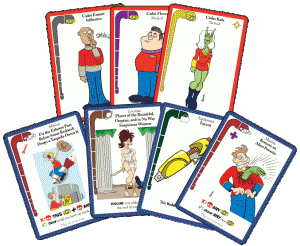
Click to enlarge
What project is happening right now?
Right now my company is running a Kickstarter campaign to print two expansions for Redshirts. Combined, these will nearly double the size of the game. So far we have reached our funding goal, and we are not even halfway through the campaign.
Redshirts is a rather warped game where the goal is to be the first starship captain to get your own crew killed. You do that by sending them on missions they are not trained for, take away vital equipment at the last second, and occasionally just shoot them in the back and shove them out an airlock. (Note from Janice: if you are not familiar with Star Trek, especially the original series in the 60’s, the enlisted guys in red shirts always died in episodes. It’s a running joke among sci-fi fans. This game has no relation to Star Trek, nor is it endorsed by the parent company. The game Redshirts makes jokes about all sci-fi and fantasy franchises).
What advice to you have for newbie indie tabletop game companies/individuals?
Do your homework. The Internet has opened up an entire universe of useful information in this field. Join GAMA, and go to trade shows. Join online game design communities. Test your products until you hate them, and then test some more. Don’t skimp on art or production values. Learn graphic design and technical writing.
How useful has social media been for you in the Kickstarter endeavor?
Very. Facebook is the number three source for backers to my campaign. Previous customers from Kickstarter are the number one. If I could be bothered to figure out Twitter enough to build a following, that would probably be a big source of backers as well.
Do you have any major Do’s and Don’ts for people who want to make games?
Practice. Just design constantly, and try out new games whenever you can. Remember that theme and art will make people buy your game more than mechanics, but mechanics will make them keep playing it and get their friends to buy it.
Don’t hoard your ideas. Don’t worry that somebody will “take your really cool idea and steal it”. I guarantee anyone else in the industry already has more ideas than they can use.
And grow a thick skin, because some of your ideas won’t work out well, and even if it’s the best idea on the planet somebody is going to hate it.
What do you tell people when they come to you with a game idea?
“Lalalalala I can’t hear you!”
Seriously, I have gigabytes of games in various states of design, and a production backlog that could take years to clear. I am not unique in this respect.
Basically: game ideas have no value. Everybody already has more than they can use. If you have an idea that you want to see made into a game, ain’t nobody gonna make that game but you. Or just wait three years. Someone else probably had the same idea and is already making the prototype.
Any last thoughts on your industry, background, or the projects in progress?
If you are reading this, please go to our Kickstarter page and give us all of your money.
Anything your fans should be looking forward to?

Click to enlarge
Well, once we ship the Redshirts expansions, we’re going to start prepping our next title. It’s called Rocky Road Warriors. It’s a game about cute and fluffy cartoon animals having a post-apocalyptic highway duel over the last ice cream truck in the wasteland. It’ll be a good family game.
Janice: Thank you Skippy. Everyone: pitch in and keep the $$ coming for Kickstarter, because that means you get MORE goodies in the expansion and it gives him that much more he needs to get Rocky Road Warriors moving!
The post Interview: WeaselPants Productions, LLC aka Skippy aka Janice’s Husband appeared first on GeekArtist Web Solutions, LLC.
February 13, 2015
For a Limited Time: 3 FREE e-books on Kindle
Have you bought Janice's book yet? Website Wonders Made Easy: Websites Unwoven: A Guide to Creating a PROFESSIONAL Website, in Plain English
Get your copy today and get the most of out of your website! http://www.geekartist.com/product/boo...
Three books, written by a woman who REALLY knows her stuff! Get them while you can for free!
I’m grabbing all 3 too! Get ‘em now before she puts them back up at regular price!
You can read more by Tea Silvestre Godfrey at Story Bistro.
The post For a Limited Time: 3 FREE e-books on Kindle appeared first on GeekArtist Web Solutions, LLC.