
 Sign in with Facebook

Goodreads Now Available on the New Kindle Paperwhite
Picture it: You're curled up on the couch, lost in a fantastic story on your new Kindle Paperwhite, when you come across the most amazing passage. It sends shivers down your spine... or it makes you laugh... or it captures something important to you. And you can't wait to see if your friends feel the same way. Now there's no need to put down your new Kindle Paperwhite to jump on Goodreads and share it with your friends...
Starting today, Goodreads is inside your books on the new Kindle Paperwhite. Reading and discussing books are no longer separated—your reading experience is all on one device!
It's long been a dream of ours to bring Goodreads inside your Kindle and into the book with you. The team has been working long and hard to make this possible and we can't wait to show you the results today.
Let's take a tour!


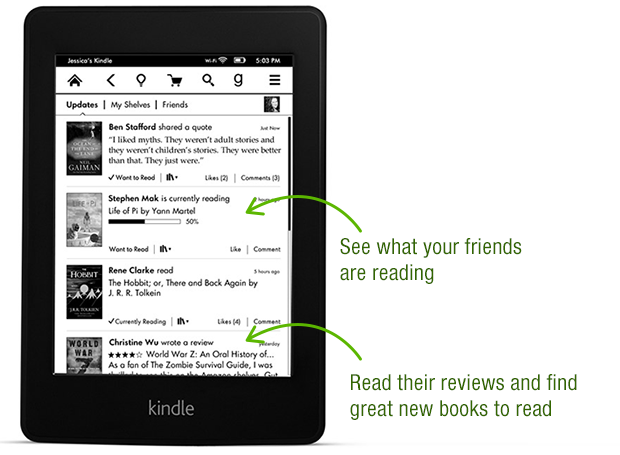


Thanks again to the Goodreads team who built this—they put in a lot of late nights and ate a lot of giant burritos! After a well-earned rest, they'll be back at work building a new wave of features both on Kindle and on Goodreads.com.

Goodreads is available in a free, over-the-air software update delivered automatically to new Kindle Paperwhites in the US, Canada and Australia in the coming weeks. Can't wait for the update? You can also go here to download it. We do not have details to share about other Kindle e-readers but know that Amazon has a long history of bringing new features to previous devices.
Which feature in Goodreads on the new Kindle Paperwhite appeals to you the most?
Starting today, Goodreads is inside your books on the new Kindle Paperwhite. Reading and discussing books are no longer separated—your reading experience is all on one device!
It's long been a dream of ours to bring Goodreads inside your Kindle and into the book with you. The team has been working long and hard to make this possible and we can't wait to show you the results today.
Let's take a tour!
Thanks again to the Goodreads team who built this—they put in a lot of late nights and ate a lot of giant burritos! After a well-earned rest, they'll be back at work building a new wave of features both on Kindle and on Goodreads.com.
Goodreads is available in a free, over-the-air software update delivered automatically to new Kindle Paperwhites in the US, Canada and Australia in the coming weeks. Can't wait for the update? You can also go here to download it. We do not have details to share about other Kindle e-readers but know that Amazon has a long history of bringing new features to previous devices.
Which feature in Goodreads on the new Kindle Paperwhite appeals to you the most?
Comments Showing 301-350 of 386 (386 new)

 That is great! I really wanted this feature on my Kindle. Thank you for the great job!
 I can't remove them from the Kindle because they don't appear on the Kindle list, only on Goodreads.
 Rochelle wrote: "I can't remove them from the Kindle because they don't appear on the Kindle list, only on Goodreads."
This is what I complained about in another topic - even books you have deleted from your account still show up on your list of Amazon purchased books on Goodreads. There is no way to delete them, you just have to be careful not to accidentally add them to your shelves.
 Rochelle - What list are you seeing them in?
I am a bit confused. You don't see these books on the website, but only in Goodreads on the Kindle but not in your kindle cloud or device list?
 glad to see this feature was brought to the 1st gen paperwhite.
I have an "old Kindle" which serves me very well and I love it!! why should I upgrade?? and what would I do with my current kindle!
Felicity wrote: "I have an "old Kindle" which serves me very well and I love it!! why should I upgrade?? and what would I do with my current kindle!"
glad to see this feature was brought to the 1st gen paperwhite.
I have an "old Kindle" which serves me very well and I love it!! why should I upgrade?? and what would I do with my current kindle!
Felicity wrote: "I have an "old Kindle" which serves me very well and I love it!! why should I upgrade?? and what would I do with my current kindle!"You don't have to upgrade if you don't want to. I don't know which model you have but the newer Kindles are likely smaller, lighter weight, and the Kindle Paperwhite has a touch screen with built in front lighting (not the same at a back lit tablet at all). The screen resolution is probably better, making the text sharper and clearer, and the screen contrast might be higher, making the white of the screen whiter and the text blacker. The new ones are also faster so there's faster page turns and such. Those are the main hardware upgrades, there will also be software upgrades, such as the Goodreads integration, and other features like in-line footnotes, ability to browse the book without leaving your current reading location, x-ray, Wikipedia, etc. You can look on Amazon's website for all the info: http://www.amazon.com/dp/B00AWH595M/r...
 Jenni wrote: "I'm looking forward to being able to keep track of my Goodreads shelves on the Kindle and post my ratings directly from it to the site. Curious to see if it'll be able to update progress within a ..."
Did you ever find out? I'm currently trying to discover the same thing.

 I love it ..
Was so surprised when I opened my Paperwhite & Amazon had added Goodreads & lots of other free things to it
Now my Paperwhite seems better than a Kindle fire would be :)
Bianca ,I hope other countries get it
Soon , maybe
I was going to buy a Kindle fire & now glad I didn't
 Delaine wrote: "Bianca ,
I hope other countries get it
Soon , maybe
I was going to buy a Kindle fire & now glad I didn't"
(I don't know how this reply thing works D: ) I have a kindle paperwhite and I saw this article and got my kindle to see the goodreads thingy and when I didn't find it I scrolled down a little bit and just then saw that it was only available in the US, Canada and Australia haha
Bianca wrote: "Delaine wrote: "Bianca ,I hope other countries get it
Soon , maybe
I was going to buy a Kindle fire & now glad I didn't"
(I don't know how this reply thing works D: ) I have a kindle paperwhite..."
Também sou brasileiro, Bianca. Acabei deixando meu Kindle com a conta da Amazon americana, pra não perder o Goodreads e mais algumas coisas que estão bloqueadas no resto do mundo. A desvantagem é que a maioria dos livros em português não estão disponíveis na loja americana da Amazon. Mas recomendo pra quem se dispõe a ler em inglês. (É uma ótima ferramenta de aprendizado, inclusive, já que tu pode consultar qualquer palavra desconhecida no dicionário.)
 Wish I could update my reading progress, aside from that. It's wonderful.
Fernando wrote: "Am I being obtuse or is there NO WAY to update current reading progress percentage from the Kindle itself? I can add books to my currently reading shelf, but no progress update... I'd say that's th..."
Wish I could update my reading progress, aside from that. It's wonderful.
Fernando wrote: "Am I being obtuse or is there NO WAY to update current reading progress percentage from the Kindle itself? I can add books to my currently reading shelf, but no progress update... I'd say that's th..."Agree 310%.
Hi Fernando & Bianca I didn't do anything to upgrade
Amazon had done it without my knowledge & I was greatly surprised to find Goodreads on my Paperwhite when I went to read
i LOVEd how it was just "there "
But , maybe its just Canada & USA ?
 How do I delete duplicates from Goodreads in MY Shelves on my Kindle?
Robert wrote: "How do I delete duplicates from Goodreads in MY Shelves on my Kindle?"
How do I delete duplicates from Goodreads in MY Shelves on my Kindle?
Robert wrote: "How do I delete duplicates from Goodreads in MY Shelves on my Kindle?"Good question, I was wondering that too. Thanks.
To delete a duplicate listing of a book, I had to access the list of my books on the Goodreads website, click on the icon for the duplicate, click on the edit review link in the page for my book, scroll down to the bottom of the page and click on "remove from my books" link. Seems like too much work for such a simple task -why can't we simply remove duplicates by doing so from our Kindle?
 I agree with other kindle users - it would be great to have this available on all devices. Although I'm intrigued by the paperwhite, I am, really, perfectly content with my Kindle touch. It would be wonderful to be able to have this capability on my existing device.
 Not really a fan of having goodreads on my PW.
 The update was automatic and wish I could revert my PW back to the way it was.
First, I used to rate a book on facebook and twitter after I read it. Now the ratings are tied into goodreads. Granted, goodreads is synced with my social networks, however, after you rate it (4/5 stars for example), there is no 'share', 'post', 'enter', etc button! You can see it in the screenshot on the fourth picture down. I can't even rate it on goodreads from the paperwhite! Maybe, they forgot to program the share button because they were distracted by the giant burritos!
Second, I signed up for goodreads not knowing what it is about (basically because the update was forced on me). They wanted me to follow other random readers recommended by them. I have a couple of facebook friends that are signed up (but really don't use it). I'm really not interested in what someone, who I don't know is posting about a book I'm not interested in.
Maybe someone can explain to me how this is supposed to work, maybe I'm doing something wrong. So far I'm unhappy that it is on my Paperwhite.
I contacted Amazon about the social network linking for ratings and they claim it is a known issue with the software. There has been no update to fix. Still waiting.
I got my Kindle Paperwhite last night and had goodread.. for some stupid reason i reset my kindle and now goodread is gone.. ANy idea whats wrong and how i can get it back?
Your best bet Anders is to E Mail Kindle Support .They have been so very good helping me get my Paperwhite issues settled immediately
You just mail support & either deal with them via E Mail or a phone call
Good Luck
I would suspect when you reset the device it uninstalled the updates.
Thanks, i'll try to contact them and see if they can help :)
 Hello.... I would like to know when goodreads is going to be available in UK; my kindle paperwhite is registered in UK and I wish to keep it in that way
Thanks!!
I have the Kindle Paperwhite and it works great. My question is, do you know a place to download e-books to my Kindle other than Amazon?
Hi Rick.I've a Paperwhite too & contacted Amazon months ago asking them , just this 7 the answer was "NO".
If your Kindle is registered you can forget downloading any free books or even paying from any other "link" or " site"
A shame as so many free books are out & only Amazon WON'T let you do this
Have a good Weekend
D :)
 I can download library books onto my kindle paper white. I was also given a free eBook from an author. I called Amazon and they instructed me how to email it to my kindle email with CONVERT in the subject line.
Hi Lynn,
I can download library books onto my kindle paper white. I was also given a free eBook from an author. I called Amazon and they instructed me how to email it to my kindle email with CONVERT in the subject line.
Hi Lynn,I cant use my Local Library on my Kindle .They only allow " Kobo E Readers".
Also my mail here from Amazon told me I CAN NOT down load any E Books on a registered Kindle & get any books from anywhere else,'
I still have the mail from Amazon
'Happy Reading
D :)
The Kindle Paperwhite is a device for consuming Amazon products. The Fire line has easier options for reading outside content.There are other options to reading outside books on the ereaders, head over to the Amazon Kindle forums and you will find suggestions.
Yes, I'm lucky that my library has ebooks with a Kindle option. I do know I've heard others talk of downloading books from other places to their kindles. I will have to check into it more. I am using the Kindle Unlimited program attempting to cut my cost. Spending $50 to $100 a month is just to much.
HI LYNNI SO AGREE WITH THE COST!
I AM SPENDING WAY TOO MUCH ON MY KINDLE BOOKS & THE PRICES SEEM TO BE RISING.
IS IT SOME WAY POSSIBLE TO GIVE YOU MY E MAIL
{PRIVATE} & MAYBE YOU CAN LET ME KNBOW HOW YOU DID IT THRU THE UNLIMITED PROGRAM?
{SORRY FONT SO LG..NOT YELLING , ALLERGY EYES~ lol}
THANKS SO MUCH
D :)
The Kindle Unlimited program through Amazon allows access to 600,000 books for $9.99 a month. They have a 30 day free trial. You can download up to 10 books at a time. Not all books are available jut I've been finding enough to keep me busy and I average 3 to 4 books per week.
Lynn, Thank you so much .
I will look in to that now .
I am new to Goodreads & everyone has been so kind & helpful
Happy Eve from my Island home in , BC Canada :)
EDIT: HI LYNN .I JUST WROTE AMAZON ABOUT THIS & I WILL LET YOU KNOW,,THANKS AGAIN :)
I have a person or two who has a Kindle version I can download and I have found that version on E-Bay.(it can be tricky)
Delaine wrote: "Hi Rick.I've a Paperwhite too & contacted Amazon months ago asking them , just this 7 the answer was "NO".
If your Kindle is registered you can forget downloading any free books or even paying fro..."
This is simply not true. Smashwords, Project Gutenberg, and many other sites support Kindle format. Even NetGalley supports Kindle. In fact, when it comes to side-loading ebooks, Kindle is the best because you can store your side-loaded books in the cloud and access them from any of your devices and sync across devices, just like a Kindle book.
It's true you can't buy Nook Books or Kobo books to read on your Kindle, if that's what asked Amazon about... but those certainly aren't the only ebook sites out there.
Any DRM-free ebook can be converted to Kindle format and read on your Kindle.
You got bad info from Amazon In my experience, though they try hard, they don't always know what they're talking about. They've given me bad info more than once too.
Hi RobinTHANK YOU!
I am really new to my Kindle & learning & this info will help me .
I don't know "Smashwords, Project Gutenberg or NetGalley".
Not even sure what a " DRM-free ebook " is ?
Can you send a link to them as I also am still learning computers .lol
Having this extra book sites would be so great!
Oh , one thing Amazon has told me a few times is because I live in Canada , I am not able to access things .
Happy Weekend
D :)
https://www.smashwords.com/ - this is a site where lots of indie books are available.http://www.gutenberg.org/ - this is a site where you can find books in the public domain (expired copyright) for free.
https://www.netgalley.com/ - here you can get free copies of upcoming releases in exchange for your review/feedback to the publisher.
There's also http://manybooks.net/ which is like Project Gutenberg.
DRM stands for Digital Rights Management. It's what prevents people from being able to copy and distribute ebooks illegally, and also what prevents the book from being used on other devices. So an ebook without DRM can be converted, copied, and used on any device.
Robin,Thank you so much !
I will get on this soon & very happy :)
Best to you from Thanksgiving Day , Canada ~ lol
D :)
Someone posted in a group I'm in that Bookbub.com is a good find. I haven't checked it out yet, but good luck.
Bookbub isn't an ebook store, they just provide notifications/browsing of books on sale/free at popular ebook stores including Kindle, iBooks, Nook/B&N, Google Play, Smashwords, and Kobo. Out of those stores, only Kindle and Smashwords provide ebooks that can be used on a Kindle device/app. Of course, keep in mind that tablets and smartphones will typically provide apps for all of these stores. So if you have a tablet, you can use any of these stores with their respective app.
 Is this available on 1st generation UK Kindles?
 It is not available in Spain. Why the features depend on the country?

You can't delete books from the list of Kindle books that Goodreads brings up. You can delete books you bought from your Kindle or from your account. To delete from the Kindle, just press and hold your finger on the book title/cover and a pop up box should come up with an option that says "Remove title from Kindle" or something like that. To remove a book completely from your account (so if you ever wanted it again, you'd have to buy it again), you have to do it from Amazon's website, you can't do it on your Kindle. Go to Manage Your Kindle and you should have the option to delete books there.