
 Sign in with Facebook

Goodreads Now Available on the New Kindle Paperwhite
Picture it: You're curled up on the couch, lost in a fantastic story on your new Kindle Paperwhite, when you come across the most amazing passage. It sends shivers down your spine... or it makes you laugh... or it captures something important to you. And you can't wait to see if your friends feel the same way. Now there's no need to put down your new Kindle Paperwhite to jump on Goodreads and share it with your friends...
Starting today, Goodreads is inside your books on the new Kindle Paperwhite. Reading and discussing books are no longer separated—your reading experience is all on one device!
It's long been a dream of ours to bring Goodreads inside your Kindle and into the book with you. The team has been working long and hard to make this possible and we can't wait to show you the results today.
Let's take a tour!


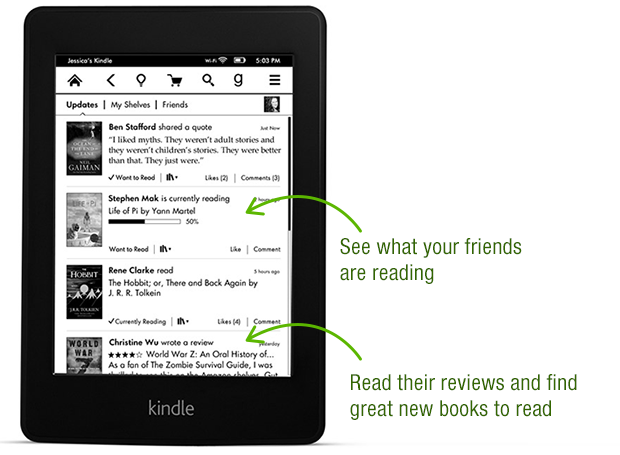


Thanks again to the Goodreads team who built this—they put in a lot of late nights and ate a lot of giant burritos! After a well-earned rest, they'll be back at work building a new wave of features both on Kindle and on Goodreads.com.

Goodreads is available in a free, over-the-air software update delivered automatically to new Kindle Paperwhites in the US, Canada and Australia in the coming weeks. Can't wait for the update? You can also go here to download it. We do not have details to share about other Kindle e-readers but know that Amazon has a long history of bringing new features to previous devices.
Which feature in Goodreads on the new Kindle Paperwhite appeals to you the most?
Starting today, Goodreads is inside your books on the new Kindle Paperwhite. Reading and discussing books are no longer separated—your reading experience is all on one device!
It's long been a dream of ours to bring Goodreads inside your Kindle and into the book with you. The team has been working long and hard to make this possible and we can't wait to show you the results today.
Let's take a tour!
Thanks again to the Goodreads team who built this—they put in a lot of late nights and ate a lot of giant burritos! After a well-earned rest, they'll be back at work building a new wave of features both on Kindle and on Goodreads.com.
Goodreads is available in a free, over-the-air software update delivered automatically to new Kindle Paperwhites in the US, Canada and Australia in the coming weeks. Can't wait for the update? You can also go here to download it. We do not have details to share about other Kindle e-readers but know that Amazon has a long history of bringing new features to previous devices.
Which feature in Goodreads on the new Kindle Paperwhite appeals to you the most?
Comments Showing 251-300 of 386 (386 new)

 I got my Kindle paperwhite one mounth agoin Spain and I can not see the g. How can I get it?
 I miss the option on my new Paperwhite to share on Twitter or Facebook when I finish a book. It also included a link to the book on Amazon. I have the first generation Paperwhite as well and I am able to share from that device.
 Angela wrote: "I got my Kindle paperwhite one mounth agoin Spain and I can not see the g. How can I get it?"
You may need to do a firmware update, they can be found in the help section on the Amazon website.
Angela wrote: "go to settings"I have Twitter linked in Settings, but the pre-typed text stating that I've finished the book, along with Title, Author's name and Amazon link no longer show up
 Thanks so much for the update link! I now have goodreads on my 1st gen paperwhite!
 Any news on availability outside US/Canada? I'm in Spain. I downloaded the update manually, rebooted twice, and no G icon.
Mario wrote: "Any news on availability outside US/Canada? I'm in Spain. I downloaded the update manually, rebooted twice, and no G icon."
Any news on availability outside US/Canada? I'm in Spain. I downloaded the update manually, rebooted twice, and no G icon.
Mario wrote: "Any news on availability outside US/Canada? I'm in Spain. I downloaded the update manually, rebooted twice, and no G icon."Did you click on "Update Your Kindle" in the settings? A simple reboot won't activate the update. If the option is greyed out, either the update won't work on your device/model or the file didn't get successfully loaded onto your Kindle when you moved it over from the computer.
Yes, I clicked the update, the Kindle updated, and then I rebooted again since that seemed to help other posters in this thread. My Kindle shows it's running 5.4.3. In the Settings I've entered my Facebook and Twitter account but have found no mention of GoodReads anywhere.
Mario wrote: "Yes, I clicked the update, the Kindle updated, and then I rebooted again since that seemed to help other posters in this thread. My Kindle shows it's running 5.4.3. In the Settings I've entered my ..."If you have the PW2 and it's running 5.4.3 (PW1 needs 5.4.4) then GR should be on there, it's the G symbol in the top menu bar:
 According to the Amazon help page:
Goodreads on Kindle is currently available to customers in the United States, Canada, Australia, and to international customers registered to an Amazon.com account.
Just bought the Kindle a couple of days ago, so it should be a PW2 :) That's why I was asking when it would be available in Spain... my account is in amazon.es
Well, I transferred my account to Amazon.com and the g icon now appears... but I would still like to know if there's any news on when it might be available in amazon.es.
 Piotr wrote: " from Kindle I can't update % reading progress and still have to pull smartphone..."
Yup we are hoping to add this soon. Stay tuned!
 I would really like page recording (by day) for my daughter's school Reading Log. That would probably prompt an immediate upgrade from her keyboard Kindle to a Paperwhite.
 Dear people, the comments section is not the place for you to vent about your Kindle not having this option.
I'm pretty sure the comments sections is for any comments relating to the topic, in this case relating to the topic of goodreads on kindle.
Dear people, the comments section is not the place for you to vent about your Kindle not having this option.
I'm pretty sure the comments sections is for any comments relating to the topic, in this case relating to the topic of goodreads on kindle.
 So the first generation Paperwhites are getting this but since I'm in the UK it's not accessible as far as I can tell. Why is there 'region locking' for this feature?
Nicky wrote: "So the first generation Paperwhites are getting this but since I'm in the UK it's not accessible as far as I can tell. Why is there 'region locking' for this feature?"
So the first generation Paperwhites are getting this but since I'm in the UK it's not accessible as far as I can tell. Why is there 'region locking' for this feature?
Nicky wrote: "So the first generation Paperwhites are getting this but since I'm in the UK it's not accessible as far as I can tell. Why is there 'region locking' for this feature?"Perhaps because it's new, they might be testing it out on Americans and perfecting it before rolling it out internationally.
 Chris wrote: "I would really like page recording (by day) for my daughter's school Reading Log. That would probably prompt an immediate upgrade from her keyboard Kindle to a Paperwhite."
They have this option on the update as well, it tracks their reading and they have their own account in case they share the kindle with the parent. It even has a parent hub where you can track their update as well. awesome deal. It even has reading goals. super super cool!!
Amanda,Are you saying Paperwhites (both versions) can now automatically track page numbers to Goodreads? That would be great.
Is there any indication of progress by day, or just current location (not useful for school Reading Log)?
It doesn't track them to Goodreads, just on a reading log for children. I havent messed with it too much though.
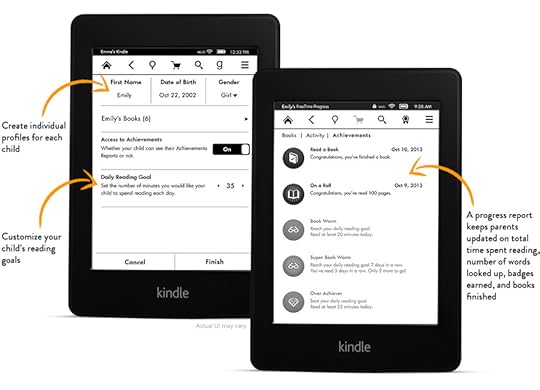
I think Amanda is talking about FreeTime, which is totally separate from GR. I've never used it but it doesn't actually say it tracks number of pages read, just how long they spent reading and what books:Kindle FreeTime
NEW—Encourage kids to read even more with FreeTime for Kindle Paperwhite. FreeTime lets you create personalized profiles for kids, and give them access to titles from your collection of books. Kids are rewarded with achievement badges when they reach their goals. A progress report keeps parents updated on total time spent reading, number of words looked up, badges earned, and books read.
 That is what I was talking about, thanks for posting a link!!
Nicky wrote: "So the first generation Paperwhites are getting this but since I'm in the UK it's not accessible as far as I can tell. Why is there 'region locking' for this feature?"
That is what I was talking about, thanks for posting a link!!
Nicky wrote: "So the first generation Paperwhites are getting this but since I'm in the UK it's not accessible as far as I can tell. Why is there 'region locking' for this feature?"There are a lot of reasons, all of them technical. If it were easy, we would have rolled it out everywhere. We are prioritizing and working as fast as we can!
 Thanks for your answer Otis, I didn't know they were technical reasons preventing world-wide deployment, it's a bit sad. I love your service and hope to have it soon integrated on my Kindle (despite being in France, in don't mind reading English only).
 Amanda wrote: "You can now get an update on the 1st generation paperwhite to get goodreads, it does not install automatically. I called today and they sent me a link to install on it. works wonderfully!!"
In case it is useful - here is the download link:
http://www.amazon.co.uk/gp/help/custo...
 Randy wrote: "Come on Kindle Keyboard! Yeah, I know I'm dreaming."
Me, too?!
 Priscilla wrote: "I have last year's Paperwhite and not ready to get the new one…I hope this will be available as a software update to other Kindles!"
Update is now available for the original paperwhite.
Sean wrote: "Update is now available for the original pape..."Latest update looking good - here's hoping the tech wizards crack whatever the obstacle is that limits availability to the US, Canada and Australia and for us in the UK to be able to play with Goodreads integration on the 1st gen Paperwhite :-)
 Sean wrote: "Priscilla wrote: "I have last year's Paperwhite and not ready to get the new one…I hope this will be available as a software update to other Kindles!"
Update is now available for the original pape..."
The update works on first gen paperwhite and has goodreads integrated.
 Chris wrote: "It looks like this is 2nd generation Paperwhites only. :("
Yes, after reading this blog post from Goodreads, I got so excited, opened my kindle paperwhite and BOO no update with a G. Technology can do so many things, especially "updates"....why can't they up date our kindles to have this feature. feel cheated.
you have to plug your paperwhite into the computer and manually download it, it does not automatically download this.
Eventually, all updates are delivered wirelessly. It can vary as to when someone will receive the update as they don't flood the system with pushing it to everyone at the same time. It can take many weeks. I assume it depends on how often you are using device with WiFi on as well, but I don't know. I have had some of my kindles receive the update quickly and others take a really long time.This update automatically downloads and installs on your Kindle Paperwhite when connected wirelessly; however, you can also manually download the software and transfer the update to your device via USB cable.
Do you have the:
1st Generation Paperwhite manual download page.
or the
2nd Generation Paperwhite manual download page.
 I just found out that my 1st gen paperwhite w/3g has never received an update. (shaking head) The problem? I never use WiFi. The reason I purchased w/3g was because I don't have WiFi easily available. Now according to Kindle support, the only way to update my Kindle is by USB. Also not available...there is always something.
Lynn wrote: "I just found out that my 1st gen paperwhite w/3g has never received an update. (shaking head) The problem? I never use WiFi. The reason I purchased w/3g was because I don't have WiFi easily availab..."
I just found out that my 1st gen paperwhite w/3g has never received an update. (shaking head) The problem? I never use WiFi. The reason I purchased w/3g was because I don't have WiFi easily available. Now according to Kindle support, the only way to update my Kindle is by USB. Also not available...there is always something.
Lynn wrote: "I just found out that my 1st gen paperwhite w/3g has never received an update. (shaking head) The problem? I never use WiFi. The reason I purchased w/3g was because I don't have WiFi easily availab..."The update probably requires a lot of data gets downloaded, which will cost Amazon a lot of money to spend over 3G. Why is USB not available for you? Your Kindle should have come with a USB cable, just plug it into your computer - unless you have a computer from maybe 10+ years ago, it should have a USB port. Unless you don't have a computer at all and are perhaps using a tablet to participate on GR?
Anyway, lots of public places have free wifi these days. Just go to McDonalds or someplace and connect your Kindle to their wifi. You might need to put the screen saver on and let it sit for a while to do it's thing though. I think it waits until you're not using it to install the updates.
 I agree with Bookworm: Too bad you are tying the use of this feature to the Amazon account.
 All three of us have our own kindles and we can't acces our own GoodReads accounts so the feature is only useful to one of us...
This would be a great update to the link :)
 I would like to use G with all the books I have on my Kindle, not just purchased on Amazon.
 Would love a software update to my current Kindle Paperwhite to include Goodreads!! Come on Amazon!!!
 Does anyone know if it's possible to not only rate a book but also write a comment? I can only give 1 - 5 stars, great, but there is keyboard on PPW so why didn't they let us write a comment?
Jarosław wrote: "Does anyone know if it's possible to not only rate a book but also write a comment? I can only give 1 - 5 stars, great, but there is keyboard on PPW so why didn't they let us write a comment?"
Does anyone know if it's possible to not only rate a book but also write a comment? I can only give 1 - 5 stars, great, but there is keyboard on PPW so why didn't they let us write a comment?
Jarosław wrote: "Does anyone know if it's possible to not only rate a book but also write a comment? I can only give 1 - 5 stars, great, but there is keyboard on PPW so why didn't they let us write a comment?"I wouldn't actually write a review on my Kindle PW though - it may have a keyboard but it's not easy to use and therefore not ideal for typing more than a short sentence or two and I don't normally write reviews that short.
Still, the whole thing is disappointingly limited - we can't even add a status update with it or change a shelf that a book is on. IIRC, literally all you can do with it is bring up a list of Kindle books you've purchased but not added to GR yet and rate them. This is useless since I have already added all the Kindle books I want displayed on GR to my shelves - and if I'm adding a new one, it's probably because I haven't read it yet and want to add it to my to-read shelf, NOT rate it. I explored the app once when I first got the update but have never actually used it after that because it does nothing useful for me at all.
 I love my paperwhite...it makes reading easier everywhere I go with it. please create a software upgrade so that my 6 month old Kindle can access goodreads...what an asset that would be!
 I'm in the UK with the first paper white, when will you be updating out kindles with the new software,
 Randy wrote: "Come on Kindle Keyboard! Yeah, I know I'm dreaming."
I have a Kindle Keyboard too. I can't even remember how long I have had it for but it is still going strong.
 .co.uk is obviously not important enough to get this!
*sigh*
Any idea when we will be privileged to gain access?
 Chris wrote: "It looks like this is 2nd generation Paperwhites only. :("
No, I have a first generation Paperwhite. I went to the Amazon website, manually downloaded the software update, and had to link my kindle up to computer with usb. It downloaded the software and restarted. It took me awhile, but the instructions are on Amazon Kinkle software update drop-down.
Karen wrote: "Chris wrote: "It looks like this is 2nd generation Paperwhites only. :("No, I have a first generation Paperwhite. I went to the Amazon website, manually downloaded the software update, and had t..."
Initially, it was only available on the 2nd generation so if Chris posted this a while ago, it was probably true. It was made available for the 1st generation only a couple months ago or so.
I'm finding books on my Kindle Goodreads that have never (thank heavens) appeared on the list I see when I enter the Goodreads website. Help! I want to delete them from the Kindle (paperwhite 2).

Only Kindle.