
 Sign in with Facebook

Goodreads Now Available on the New Kindle Paperwhite
Picture it: You're curled up on the couch, lost in a fantastic story on your new Kindle Paperwhite, when you come across the most amazing passage. It sends shivers down your spine... or it makes you laugh... or it captures something important to you. And you can't wait to see if your friends feel the same way. Now there's no need to put down your new Kindle Paperwhite to jump on Goodreads and share it with your friends...
Starting today, Goodreads is inside your books on the new Kindle Paperwhite. Reading and discussing books are no longer separated—your reading experience is all on one device!
It's long been a dream of ours to bring Goodreads inside your Kindle and into the book with you. The team has been working long and hard to make this possible and we can't wait to show you the results today.
Let's take a tour!


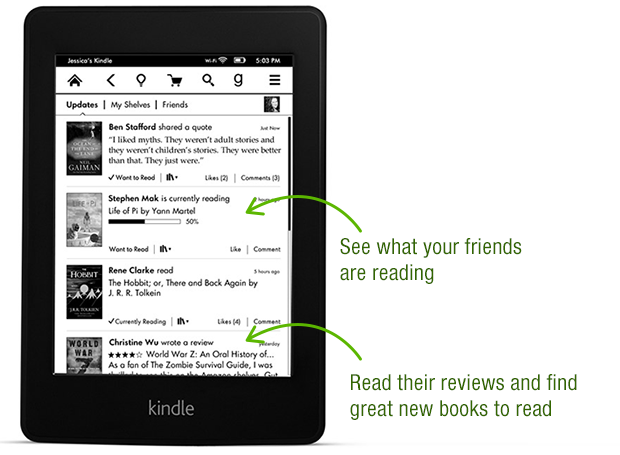


Thanks again to the Goodreads team who built this—they put in a lot of late nights and ate a lot of giant burritos! After a well-earned rest, they'll be back at work building a new wave of features both on Kindle and on Goodreads.com.

Goodreads is available in a free, over-the-air software update delivered automatically to new Kindle Paperwhites in the US, Canada and Australia in the coming weeks. Can't wait for the update? You can also go here to download it. We do not have details to share about other Kindle e-readers but know that Amazon has a long history of bringing new features to previous devices.
Which feature in Goodreads on the new Kindle Paperwhite appeals to you the most?
Starting today, Goodreads is inside your books on the new Kindle Paperwhite. Reading and discussing books are no longer separated—your reading experience is all on one device!
It's long been a dream of ours to bring Goodreads inside your Kindle and into the book with you. The team has been working long and hard to make this possible and we can't wait to show you the results today.
Let's take a tour!
Thanks again to the Goodreads team who built this—they put in a lot of late nights and ate a lot of giant burritos! After a well-earned rest, they'll be back at work building a new wave of features both on Kindle and on Goodreads.com.
Goodreads is available in a free, over-the-air software update delivered automatically to new Kindle Paperwhites in the US, Canada and Australia in the coming weeks. Can't wait for the update? You can also go here to download it. We do not have details to share about other Kindle e-readers but know that Amazon has a long history of bringing new features to previous devices.
Which feature in Goodreads on the new Kindle Paperwhite appeals to you the most?
Comments Showing 151-200 of 386 (386 new)

message 151:
by
Tiffany
(new)
Dec 07, 2013 08:39AM
 I love the goodreads integration, but I'd like to see it add "date read" when I finish a book and mark it read.
flag
Ted wrote: "I've updated but it doesn't seem to be showing up for me. I'm in the UK...
On Amazon it says:
Goodreads on Kindle is currently available to customers in the United States, Canada, Australia, and ..."
It's only for the 2nd generation :(
On Amazon it says:
Goodreads on Kindle is currently available to customers in the United States, Canada, Australia, and ..."
It's only for the 2nd generation :(
 Guilherme wrote: "Ted wrote: "I've updated but it doesn't seem to be showing up for me. I'm in the UK...
On Amazon it says:
Goodreads on Kindle is currently available to customers in the United States, Canada, Aus..."
I think I read that they are going to add it to the 1st generation soon.
 Guilherme wrote: "Ted wrote: "I've updated but it doesn't seem to be showing up for me. I'm in the UK...
On Amazon it says:
Goodreads on Kindle is currently available to customers in the United States, Canada, Aus..."
I've got a 2nd generation, I just don't think they're rolling it out to the UK yet :/
 I'm hoping Amazon will provide an update for the 1st generation paperwhite. Not able to justify purchasing a new one just for the Goodreads even though I love my Kindle.
 I have the same wish - I love my Kindle Touch. Thanks.
Angela wrote: "I'm not yet ready to upgrade my kindle so it would be wonderful if the software on the kindle touch could be updated to include Goodreads . I frequently go back & forth between my kindle and my Go..."
 I got my Paperwhite as a reward for giving blood. It took a year to get the points to purchase my Kindle. It was the only way I could afford it. Why are the 1st gen purchasers always the ones out of luck on the upgrades. Is that planned obsolescence like other products?
 There is no technical reason why Goodreads integration could not happen on the 1st gen Paperwhite. Making it exclusive the 2nd gen model is just the method that Amazon is using to promote a version that lacks enough genuine improvements to encourage existing Kindle users to go out and buy a new one. The only hardware change Amazon can boast about is a slightly improved backlight and--they claim--faster page-turns, which translates into a slightly improved screen or processor for which they provide no specs. Since Amazon recently bought Goodreads, my guess is that their long-term desire to get more Goodreads users will overcome this short-term desire to sell more 2nd gen Paperwhites, and they will release a firmware update that gives Goodreads integration to 1st gen Paperwhites and maybe even previous Kindle units as well.
 "Snatched Defeat From the Jaws of Victory"
Eileen wrote: I agree! I was so looking forward to this feature, but with my husband, son...
Bookworm R wrote: Too bad you are tying the use of this feature to the Amazon account...
Brian wrote: Agreed. Pretty useless until they get the concept of profiles. Each member of the household...
Jessica wrote: Any chance that per-device linkups (rather than per Amazon account) might be on offer in future releases?...
Katie wrote: The only plus to the Paperwhite for me was Goodreads integration, but if it requires me to link my accounts to use it, then I'm not really interested...
Agree. My wife and I have our own Goodreads accounts but it make zero sense to have two Amazon accounts. The possibility of us each managing our Goodreads lists from our Kindles seemed so cool. As it stands, we have the two readers but only one of us gets to enjoy the Goodreads functionality.
Soooooooo close...
 I already have the new Kindle Paperwhite. Do you know when the Goodreads integration is coming to Spain?
 I wasn't ready to update my first-gen Paperwhite until I saw the Goodreads integration in this new 2nd-gen, and now I'm giving my first-gen to my mom for Christmas and keeping the 2nd-gen for myself! I'm a little disappointed that the "update progress" stuff isn't immediately on here, but I'm seeing from other comments here that it will be available in a near future update so YAY that's literally all I do with Goodreads anyways haha.
 I like being able to rate my books and add them as I buy them. That is very handy as I don't have to go to my laptop or phone to be able to keep track of them, as I often forget. This is very handy.
 I have the new paperwhite 3g but the goodreads icon has not shown up on it. Why ?
 Becky -
Does it have the latest update yet? 5.4.2
If so have you rebooted the device?
Bookworm R wrote: "Becky -Does it have the latest update yet? 5.4.2
If so have you rebooted the device?"
It took my kindle a few minutes to show the Goodreads icon
 Today I upgraded to the Paperwhite 2 from the basic kindle 4 and I am so so so so so EXCITED about this Goodreads/Amazon team effort! As for the features I honestly only expected to be able to rate books, but I am very pleased to learn that I can also add books to my main shelves as well as view them. Thank you all so much and I can't wait to get reading tonight :-)
**UPDATE1** If you manually install the update you have to reboot the kindle after the install and first reboot is finished.
****UPDATE2**** Ok so I was wondering how the in app purchases would work... Would Amazon get the sale or Goodreads or who? Well to my "surprise" Amazon purchased goodreads... Why can't we ever have a good thing for more than a few years. People always have to sell out... Anyways I'll enjoy Goodreads until the day it no longer resembles itself which I expect won't take long. Thanks Amazon

 When will it be available for other countries? I live in Brazil, my software update does not have it... :(
 While I love that Goodreads is now in my KP 2, I am disappointed that the Progress Update isn't included. It is cool to have my highlights shown on my goodreads now instead of just amazon kindle website or twitter, but I do want the progress update too. It could be cool for that option while reading. Look forward for an update on the goodreads feature.
 When will this feature be internationally available?
Eilla wrote: "While I love that Goodreads is now in my KP 2, I am disappointed that the Progress Update isn't included. It is cool to have my highlights shown on my goodreads now instead of just amazon kindle we..."
When will this feature be internationally available?
Eilla wrote: "While I love that Goodreads is now in my KP 2, I am disappointed that the Progress Update isn't included. It is cool to have my highlights shown on my goodreads now instead of just amazon kindle we..."I know. It seems like an obvious feature.
Will wrote: "Eilla wrote: "While I love that Goodreads is now in my KP 2, I am disappointed that the Progress Update isn't included. It is cool to have my highlights shown on my goodreads now instead of just am..."What is really annoying is when I have the aero plane mode one and when I first the book, the goodreads box will pop out to ask to rate the book and such. While I update this forgetting about the no connection, it will not update the rate and shelf after I turn it back on. That's another dumb thing I don't get.
 I just bought the second generation paperwhite after my Kindle 4 broke. I've had it less than a month. I can't find goodreads tho. I got a notice a couple days after it arrived saying it was updated and that the update included goodreads, but I'm missing the "G" in the toolbar and it's not under social networks or in settings :(
Sapphire wrote: "I just bought the second generation paperwhite after my Kindle 4 broke. I've had it less than a month. I can't find goodreads tho. I got a notice a couple days after it arrived saying it was update..."
I just bought the second generation paperwhite after my Kindle 4 broke. I've had it less than a month. I can't find goodreads tho. I got a notice a couple days after it arrived saying it was updated and that the update included goodreads, but I'm missing the "G" in the toolbar and it's not under social networks or in settings :(
Sapphire wrote: "I just bought the second generation paperwhite after my Kindle 4 broke. I've had it less than a month. I can't find goodreads tho. I got a notice a couple days after it arrived saying it was update..."oops, restarting fixed it. once I thought about it as a computer it was obvious. lol
I have a paperwhite but there is no g in my navigation bar, do only certain paper whites have this or do I just need an update?
Justin wrote: "I have a paperwhite but there is no g in my navigation bar, do only certain paper whites have this or do I just need an update?"At this time an update has only been released for the second generation of Paperwhites released (late 2013). If you have the newest it will require and update and a reboot for the G to show up.
It has been implied that an update will be made available in the future for the first generations Paperwhites.
Thanks, I got mine in May so I'm guessing it is the first paperwhite. Im going to see if I can figure out on Amazon which it is.
Justin wrote: "Thanks, I got mine in May so I'm guessing it is the first paperwhite. Im going to see if I can figure out on Amazon which it is."Yes, that would be a first generation. The second generation went pre-order in September and shipped starting in October for the Wi-Fi versions. The 3G versions shipped later.
Here's hoping for that 1st gen update ... fixed income doesn't allow the luxury of a 2nd gen.
 I use my google account for goodreads and cant log in that way on my Kindle. Is there a workaround for it?
Thanks!
Pablo wrote: "I use my google account for goodreads and cant log in that way on my Kindle. Is there a workaround for it?Thanks!"
Go to Edit Profile>Apps. Scroll down to Unlink your Google account.
Justin wrote: "Thanks, I got mine in May so I'm guessing it is the first paperwhite. Im going to see if I can figure out on Amazon which it is."The second one wasn't released until this October, so yes, you have the first one.
 i would like to know if it is available on reg kindle as well
 Excited... then bummed. My Kindle Paperwhite is 1st generation. I'd love to get this.
 ok OT but... why is Nook left out of this?? the nook is so much better than a kindle when it comes to operating system.
Mrsinserra wrote: "ok OT but... why is Nook left out of this?? the nook is so much better than a kindle when it comes to operating system."
ok OT but... why is Nook left out of this?? the nook is so much better than a kindle when it comes to operating system.
Mrsinserra wrote: "ok OT but... why is Nook left out of this?? the nook is so much better than a kindle when it comes to operating system."Goodreads was bought by Amazon, so they're naturally favoring the Kindle family.
 kinda disappointed that you can only add or update kindle books that you bought from their store. I still have to go out to the goodreads site if i want to add one of my own books that i have stored on my kindle. really wish it would like auto update percentage read too
 The only thing I wish this had that it doesn't is being able to update your progress on books on the kindle. I was hoping maybe seeing the directions would tell you how to, but it seems that isn't a feature yet. Hopefully it'll come in future updates.
 Can you work to make it possible for kindle touch too? pleeeeease...
 What does prevent to have goodreads on original Paperwhite ? I hope Amazon won't let down such a good device as it would be a shame they only support firmware upgrades for just a few months ...
 When this was first added to Kindle, the Goodreads icon appeared on my Paperwhite, but now it's disappeared. How do I get it back?
Janice wrote: "When this was first added to Kindle, the Goodreads icon appeared on my Paperwhite, but now it's disappeared. How do I get it back?"
When this was first added to Kindle, the Goodreads icon appeared on my Paperwhite, but now it's disappeared. How do I get it back?
Janice wrote: "When this was first added to Kindle, the Goodreads icon appeared on my Paperwhite, but now it's disappeared. How do I get it back?"Sometimes it only works on certain menus, home, reading a book, etc. It won't work while on the settings menu.
Janice wrote: "When this was first added to Kindle, the Goodreads icon appeared on my Paperwhite, but now it's disappeared. How do I get it back?"Have you tried rebooting your device?
 I was delighted to receive a Kindle Paperwhite for my Christmas this year and was excited to read that I would be able to access Goodreads directly from it (as I currently use the app via my iPhone all the time). It's really disappointing to see that it is only available to the USA, Australia & Canada though - when will it be available to all us Goodread fans in the UK? And will it be available via an automated update rather than having to purchase another Kindle (hopefully that will be the case as I won't be buying another Kindle!!)
Randy wrote: "Come on Kindle Keyboard! Yeah, I know I'm dreaming."
I was delighted to receive a Kindle Paperwhite for my Christmas this year and was excited to read that I would be able to access Goodreads directly from it (as I currently use the app via my iPhone all the time). It's really disappointing to see that it is only available to the USA, Australia & Canada though - when will it be available to all us Goodread fans in the UK? And will it be available via an automated update rather than having to purchase another Kindle (hopefully that will be the case as I won't be buying another Kindle!!)
Randy wrote: "Come on Kindle Keyboard! Yeah, I know I'm dreaming."Yeah...me too!
 I would love this for my Kindle, I have the regular version which is back-lit, so I can read it in the night - I live in chronic pain and reading when I cannot sleep and everyone else is asleep keeps me sane. Not ready to update my Kindle for ages as only had 1 year, and love it for reason above. PLEASE bring to the UK for the regular version of the Kindle......????
 I'd love to have it on my 1st generation Kindle Paperwhite
I just got the Kindle Whitepaper 3G (2013, 2nd generation) model. It's great to be able to connect to the Goodreads account, but I found that it only works with wifi connection.
I'd love to have it on my 1st generation Kindle Paperwhite
I just got the Kindle Whitepaper 3G (2013, 2nd generation) model. It's great to be able to connect to the Goodreads account, but I found that it only works with wifi connection. Is Amazon and Goodreads working together to enable access to our Goodreads account over the 3G?
