
 Sign in with Facebook

Goodreads Now Available on the New Kindle Paperwhite
Picture it: You're curled up on the couch, lost in a fantastic story on your new Kindle Paperwhite, when you come across the most amazing passage. It sends shivers down your spine... or it makes you laugh... or it captures something important to you. And you can't wait to see if your friends feel the same way. Now there's no need to put down your new Kindle Paperwhite to jump on Goodreads and share it with your friends...
Starting today, Goodreads is inside your books on the new Kindle Paperwhite. Reading and discussing books are no longer separated—your reading experience is all on one device!
It's long been a dream of ours to bring Goodreads inside your Kindle and into the book with you. The team has been working long and hard to make this possible and we can't wait to show you the results today.
Let's take a tour!


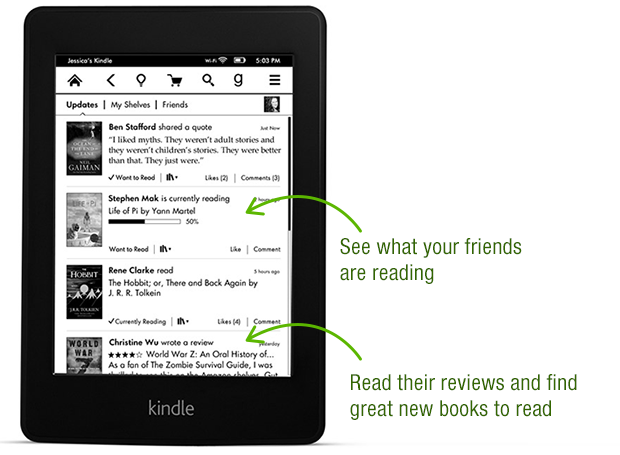


Thanks again to the Goodreads team who built this—they put in a lot of late nights and ate a lot of giant burritos! After a well-earned rest, they'll be back at work building a new wave of features both on Kindle and on Goodreads.com.

Goodreads is available in a free, over-the-air software update delivered automatically to new Kindle Paperwhites in the US, Canada and Australia in the coming weeks. Can't wait for the update? You can also go here to download it. We do not have details to share about other Kindle e-readers but know that Amazon has a long history of bringing new features to previous devices.
Which feature in Goodreads on the new Kindle Paperwhite appeals to you the most?
Starting today, Goodreads is inside your books on the new Kindle Paperwhite. Reading and discussing books are no longer separated—your reading experience is all on one device!
It's long been a dream of ours to bring Goodreads inside your Kindle and into the book with you. The team has been working long and hard to make this possible and we can't wait to show you the results today.
Let's take a tour!
Thanks again to the Goodreads team who built this—they put in a lot of late nights and ate a lot of giant burritos! After a well-earned rest, they'll be back at work building a new wave of features both on Kindle and on Goodreads.com.
Goodreads is available in a free, over-the-air software update delivered automatically to new Kindle Paperwhites in the US, Canada and Australia in the coming weeks. Can't wait for the update? You can also go here to download it. We do not have details to share about other Kindle e-readers but know that Amazon has a long history of bringing new features to previous devices.
Which feature in Goodreads on the new Kindle Paperwhite appeals to you the most?
Comments Showing 101-150 of 386 (386 new)

 Unable to update reading progress. Come on Amazon. I can't update that I'm 70% finished with the book?
You can do better.
 Emily wrote: "If you're in the UK, Goodreads on Kindle won't show up just yet. The update is only available for the US, Canada, and Australia right now. We're planning to roll out to other countries soon, so stay tuned!"
Thanks - really nice when people stop by to answer questions. I'll be eagerly awaiting this in the UK then.
Will there be another blog post when more countries are added?
 I suppose as Amazon owns Goodreads, there's no chance of this ever coming to the Kobo or Nook?
 I don't think anyone is expecting a lot of upgrades from paperwhite '12 to paperwhite '13 because of this. I doubt it's a conspiracy.
The fact is that the '13 has a faster processor, and some features simply aren't worth adding to 'older' technology if it leads to a poor user experience.
Has anyone actually tried the web browser on the Touch, for instance? Painfully slow, which is probably why it stays 'experimental.'
 I always write reviews for the books I read on Goodreads. Will I be able to write a review on Goodreads and it will automatically put it on Amazon too?
 Bryan wrote: "Is this available on a regular Kindle?"
Not at this time. It's not even available on the 1st gen Paperwhite, just the newer model that came out a few months ago.
 Pretty disappointed to see that you can only update from kindle books, so if you read publishers who don't go through Amazon, you still have to post from the website.
 Two months ago I was thrilled that this was coming. But now I can't trust GoodReads not to delete my data, so there's no value for me in using it from my Kindle.
Is the goodreads integration geolocation blocked?
Two months ago I was thrilled that this was coming. But now I can't trust GoodReads not to delete my data, so there's no value for me in using it from my Kindle.
Is the goodreads integration geolocation blocked?I have a 2nd Gen Paperwhite purchased in the US, linked to my US account, but I am physically sitting in the Netherlands right now and I don't have the "g" after the update to 5.4.2 (and a manual reboot).
Does this mean it will only work while I am physically in the US and not traveling?
EDIT - and as if by magic goodreads appeared...
 I'm so confused. Aside from the fact that Goodreads really doesn't handle book series' well (another topic for another day), I thought a key point of goodreads was for it to make recommendations to me based on what I've read. The recommendations section of the website does this. But the iPad app I think doesn't do this (so what's the point?), and on the new Paperwhite Goodreads UI I can't find any recommendations either. I feel really stupid right now. I don't understand ... I must be missing something.
 Bookworm R wrote: "Too bad you are tying the use of this feature to the Amazon account.
 For instance I have multiple kindles on my account, each of these people have their own Goodreads account. ..."
I agree! I was so looking forward to this feature, but with my husband, son, daughter-in-law, and daughter all on the same Amazon Kindle account with me (three of them with their own Goodreads accounts), tying the GR account to the Amazon acct rather than to the Kindle doesn't work for us. :(
 Do hard reset (hold start button for about 20 seconds), if after update you can't see the Goodreads icon. It worked for me.
Ps. I am from Poland and for me everything (goodreads integration, kindle freetime) works fine.
 MUST bring Goodreads to first generation "original supporters" of this amazing little device!
Larry wrote: "I'm so confused. Aside from the fact that Goodreads really doesn't handle book series' well (another topic for another day), I thought a key point of goodreads was for it to make recommendations to..."
MUST bring Goodreads to first generation "original supporters" of this amazing little device!
Larry wrote: "I'm so confused. Aside from the fact that Goodreads really doesn't handle book series' well (another topic for another day), I thought a key point of goodreads was for it to make recommendations to..."I find GR recommendations to be terrible, so any lack In this area with the integration doesn't bother me.
 That's really awesome! Any ideas on whether this will be a feature on other Kindles? I have the Kindle Fire, and would LOVE this feature on it!
 not going to upgrade my paperwhite unless this one breaks beyond repair. would be nice to just be able to add the app to existing paperwhites instead of making us drop another $150.
 ThimGrim wrote: "Do hard reset (hold start button for about 20 seconds), if after update you can't see the Goodreads icon. It worked for me.
Ps. I am from Poland and for me everything (goodreads integration, kindl..."
Is your account from US?
 Randy wrote: "Come on Kindle Keyboard! Yeah, I know I'm dreaming."
I'm dreaming with you then!
 Until this is available on the 1st generation paperwhites I'm just going to be angry.
 Chris wrote: "It looks like this is 2nd generation Paperwhites only. :("
Sadly, yes >.<
 I am also hoping this feature will be a software updates to the first Kindle Paperwhite, and all Kindles for that matter.
 Otis wrote: "Does this mean that all highlighted passages are AUTOMATICALLY shared when you finish (rate??) a book? Will there be options to share specific quotes to Goodreads *while* you read, like with the "s..."
Otis, can't you add a share button at the end of the book at "before you go" and allow readers to decide if they want their rating to go to facebook and twitter as well by checking or unchecking a box? I saw that share option at other places and was disappointed it wasn't there.
 Bryan wrote: "Is this available on a regular Kindle?"
Only the 2nd generation Kindle Paperwhite.
Otis wrote: "Vicky wrote: "Randy wrote: "Come on Kindle Keyboard! Yeah, I know I'm dreaming."If we had the ability to "like" comments, I'd click it for that comment :)
Jane wrote: "Too bad it's not going to ..."
Because they usually update older devices, I'm guessing there was a hardware limitation... the same reason Apple didn't add Siri the the iPhone 4.
Ahsan wrote: "Why can't 1st generation Kindle Paperwhites have this feature? This seems like a blatant attempt to force users who want to this feature to upgrade their kindles."Because they usually update older devices, I'm guessing there was a hardware limitation... the same reason Apple didn't add Siri the the iPhone 4.
 This "integration" is generally awful. Why can't we select books in our Kindle library -- purchased through Amazon or not -- and add them to a shelf? Like, I just downloaded the new Dave Eggers and started reading it, but I can't add it to my currently reading right from the book; I have to open the goodreads app, search for the book, and mark it. It's just faster to do it on my laptop! It seems like such an obvious feature, and yet it's absent here. Maybe I'm missing something?
 When will we be able to share highlighted passages on goodreads? I'm sure better integration is in the works...when?
 Nice feature but point blank honesty here: if amazon doesn't add this to previous generation kindles in the next few months, I'm moving my library over to the iPad mini retinas and book purchase to the iTunes bookstore . Was already wary about the amazon goodreads purchase. The only thing holding me back from buying a retina iPad is the possibility of goodreads on all kindles. If not, I'm done with goodreads and done with amazon.
 Eileen wrote: "Bookworm R wrote: "Too bad you are tying the use of this feature to the Amazon account.
 For instance I have multiple kindles on my account, each of these people have their own Goodreads account. ..."
Agreed. Pretty useless until they get the concept of profiles. Each member of the household would have their own goodreads "friends" and reviews and reading history. It doesn't make any sense to share that (even though it does make sense to share an Amazon account for purchasing content and shipping to the same address).
 Always makes you wonder who they have develop and beta test, single hermits I guess.
It would seem that if Amazon looked (I suspect) the majority of accounts have multiple kindle devices versus single device. Which indicates multiple users, thus don't tie the use of good reads integration to the amazon account. Sure these multiple devices are on my account, but each reader is different person, different taste, etc.
I upgraded 1 Fire and 1 Paperwhite on my account to checkout the new features before I decide if worth upgrading if features don't come in software updates.
Goodreads integration is not one that I will be considering at this point. I do LOVE the inline footnotes feature with the new software. I read a ton of classics with footnotes. But the other readers not as much. As for the Fires the Prime video download feature would be nice on all.
Dan wrote: "Nice feature but point blank honesty here: if amazon doesn't add this to previous generation kindles in the next few months, I'm moving my library over to the iPad mini retinas and book purchase to..."I don't think the hardware on the new kindles can support an "app" like Goodreads. The same reason why Apple didn't add Siri to the iPhone 4, and Amazon didn't update the kindle 3 or kindle 4(keyboard) to kindle os 5.
Will wrote: "Dan wrote: "Nice feature but point blank honesty here: if amazon doesn't add this to previous generation kindles in the next few months, I'm moving my library over to the iPad mini retinas and boo..."First, assume you mean that hardware on the old kindles can't support goodreads app.
I've looked at the hardware specs between paperwhite 1 and 2. As a software developer, I don't see any good reason why paperwhite 1 can't support. Hardware nearly identical.
Even if there was a inconsistancy there's no reason why paperwhite 1 can't support some basic goodreads integration a la they what they do Facebook and Twitter.
If amazon claims that good reads can't go to paperwhite 1 seems to me the only reason is that they want to drive upgrades.
My problem is that they are milking their hard core user base - folks who use goodreads and kindle are pretty hard core readers. They probably buy Tons of books from amazon (I know I do). If that's the business amazon want to be in - bilking hard core user base, I don't want to be their customer.
Apple gives free upgrades and supports nearly every feature. They only ones they don't support are hardware dependent (fingerprint scanner, gps chip, Siri). I'll eat my hat if someone can prove that good reads app is hardware dependent.
Dan wrote: "Will wrote: "Dan wrote: "Nice feature but point blank honesty here: if amazon doesn't add this to previous generation kindles in the next few months, I'm moving my library over to the iPad mini re..."I don't know much about the processor of the new Kindle, I just assumed it had to do with the "25% faster processor" that was mentioned in the advertisements. And that Amazon has usually updated older Kindles. I used to have a Kindle Touch, and was able to upgrade it to the Paperwhite software (version 5.0) last year.
 Pretty disappointing. For one, "Add Amazon Books to Goodreads" shows me all books that I have bough or wishlisted via Amazon; most (but not all) of which I already added to Goodreads long time ago. So if I add these books now to Goodreads, they end up creating duplicate entries; and there are LOTS of them. I can appreciate that this might be a hard problem to solve technically, but nonetheless, it's more pain than convenience.
Second, the only reason I bought the new Kindle was because of Goodreads integration. It take many weeks to see this feature! And still, sounds like there are many missing must-haves (ability to mark a Kindle book you are reading as "read" in Goodreads; reconciling Kindle Collections and Goodreads Lists for example).
Very disappointed.
 I have updated my Paperwhite via USB to get v5.4.2. Still no 'G" integration. Could you please let me know when it will work in the U.K? What would happen if I downloaded the U.S update?
Many thanks,
Danni.
 I tweeted at Goodreads and was told the Goodreads feature would be available in an update to 1st gen. Paperwhites within a few months. WOOHOO
Otis wrote: "Vicky wrote: "Randy wrote: "Come on Kindle Keyboard! Yeah, I know I'm dreaming."
I tweeted at Goodreads and was told the Goodreads feature would be available in an update to 1st gen. Paperwhites within a few months. WOOHOO
Otis wrote: "Vicky wrote: "Randy wrote: "Come on Kindle Keyboard! Yeah, I know I'm dreaming."If we had the ability to "like" comments, I'd click it for that comment :)
Jane wrote: "Too bad it's not going to ..."
Bryan wrote: "Is this available on a regular Kindle?"
I tweeted at Goodreads and they said yes, within a few months.
Jamie wrote: "I tweeted at Goodreads and was told the Goodreads feature would be available in an update to 1st gen. Paperwhites within a few months. WOOHOO"Great stuff. I'm quite happy to continue to rock the 'old' keyboard version! :D
 Danni wrote: "I have updated my Paperwhite via USB to get v5.4.2. Still no 'G" integration. Could you please let me know when it will work in the U.K? What would happen if I downloaded the U.S update?
Many t..."
You have to manually restart it. After I did that, the "g" appeared. You'll also have to connect to Wifi. Had to read up on Amazon because I was in the same boat as you.
 I hope this come to the first-gen paperwhite. It wasn't enough change to buy a new device, but it is a nice feature.
Following up on saad's comment above, I'm disappointed in the integration so far. Either it's not ready for prime time or doesn't do what I would want. Maybe it will get better with updates.
I hope this come to the first-gen paperwhite. It wasn't enough change to buy a new device, but it is a nice feature.
Following up on saad's comment above, I'm disappointed in the integration so far. Either it's not ready for prime time or doesn't do what I would want. Maybe it will get better with updates. You can rate a book on the Kindle when you finish and it goes to Goodreads (ok) and Amazon (don't really want that). But that's all it seems to do. I finished a book, gave it a star rating and went to Goodreads to check it out. It had changed it from "to read" to "read" and added my rating. It did not include the date I finished which I went to add manually. When I clicked on "edit review" to do that in Goodreads, that screen then showed it as still "to read" with no rating. So I changed it all manually on Goodreads anyway and added the date I finished.
So either I'm missing nuances of this or they are not there yet (I haven't read the User's Guide, I admit) but so far it doesn't seem to do what I would want. And I was afraid to add my Amazon purchases for fear of duplication and that sounds like what happened from the post from Saad.
Edit: I forgot to mention in my post that in my opinion these issues don't take away from all the hard work done by the developers. And I do think/hope it will improve.
Victoria wrote: "..You can rate a book on the Kindle when you finish and it goes to Goodreads (ok) and Amazon (don't really want that). ..."I saw in the help the following, it says Fire but maybe it also functions this way on Paperwhite Gen 2: (I can't confirm as I don't like the linking of a goodreads account to the amazon account - multiple users issue)
How do I post a review to only Goodreads on Goodreads on Kindle?
On Kindle Fire:
At the moment, it’s only possible to write text reviews for books you already own on the device. Here's how to post a review for those books only to Goodreads (and not to Amazon):
1) Open the ebook you’d like to review.
2) Navigate to the last page of the book.
3) Swipe to the left as if you’re swiping to the next page.
4) You should see a black “Before You Go…” page. Tap “Review this book” at the top.
5) Below the review box, tap “Options”.
6) Uncheck “Amazon” and tap “Save”.
7) Enter your rating and/or review on the following page and tap “Submit” to post.
How do I post a review to only Amazon on Goodreads on Kindle?
On Kindle Fire:
At the moment, it’s only possible to post text reviews for books you already own on the device. Here's how to post reviews for those books only to Amazon (and not to Goodreads):
1) Open the ebook you’d like to review.
2) Navigate to the last page of the book.
3) Swipe to the left as if you’re swiping to the next page.
4) You should see a black “Before You Go…” page. Tap “Review this book” at the top.
5) Below the review box, tap “Options”.
6) Uncheck “Goodreads” and tap “Save”.
7) Enter your rating and/or review on the following page and tap “Submit” to post.
If Goodreads can't tell me whether a book I am about to mark as to- read/read/want-to-read is already in my Goodreads bookshelves, then this feature (Add Amazon Books) is pretty much useless (and as I said earlier, more pain than fun; imagine I ended up with more than 50% of the books my shelves as duplicates because of that, and that too with different status -- as an example, let's say I mark Book A as "read" in Goodreads; the same book shows up in Add Amazon Books list, and I mark it as "want-to-read" not remembering I already had this book in Goodreads)Also, from Victoria's post above, if I have to add date (and in many cases rating, status, etc.) manually or twice, what good is this integration?
There are many other nuances than those I listed above; but these two will just give u a gist of how no ready Goodreads integration is.
Everyone just calm down about not having it for other Kindles yet. Since it was late coming to the device it was made for that tells me it was just finished and getting it on the brand new device was a priority. Now that it's done they can bug hunt and prepare it for older devices like Amazon always does. Obviously their main goal is to put their services into as many peoples hands as they can. They are the company that started selling hardware at cost just to get their services to you.
yeah, i'm disappointed that i've had my kindle for less than a year, but it's already too old for goodreads. bummer!
 Why isn't it available in the UK yet? When can we get it?
I finished book rated it, and had this message "Update on Amazon (as ThimGrim) and Goodreads". So I checked Goodreads and Amazon and my ratings did't show up (the book I had read didn't even disappear from "Currently reading"). Any clues? Of course this is book from amazon store.
Why isn't it available in the UK yet? When can we get it?
I finished book rated it, and had this message "Update on Amazon (as ThimGrim) and Goodreads". So I checked Goodreads and Amazon and my ratings did't show up (the book I had read didn't even disappear from "Currently reading"). Any clues? Of course this is book from amazon store.edit: Ok, I see this has probably something to do with availability in countries other than US, Canada etc. So here in Poland I have Goodreads update but I can't fully use it, great...
 Hi Guys,
any plans to bring the Goodreads integration also to Germany within the next months?
As a Goodreads-user I waited until the new Kindle Paperwhite 2nd generation came out...

+1 from me Tiffany - I also bought the 1st gen Paperwhite in the UK a couple of months before Amazon announced the 2nd gen device *sigh*