
 Sign in with Facebook

Goodreads Now Available on the New Kindle Paperwhite
Picture it: You're curled up on the couch, lost in a fantastic story on your new Kindle Paperwhite, when you come across the most amazing passage. It sends shivers down your spine... or it makes you laugh... or it captures something important to you. And you can't wait to see if your friends feel the same way. Now there's no need to put down your new Kindle Paperwhite to jump on Goodreads and share it with your friends...
Starting today, Goodreads is inside your books on the new Kindle Paperwhite. Reading and discussing books are no longer separated—your reading experience is all on one device!
It's long been a dream of ours to bring Goodreads inside your Kindle and into the book with you. The team has been working long and hard to make this possible and we can't wait to show you the results today.
Let's take a tour!


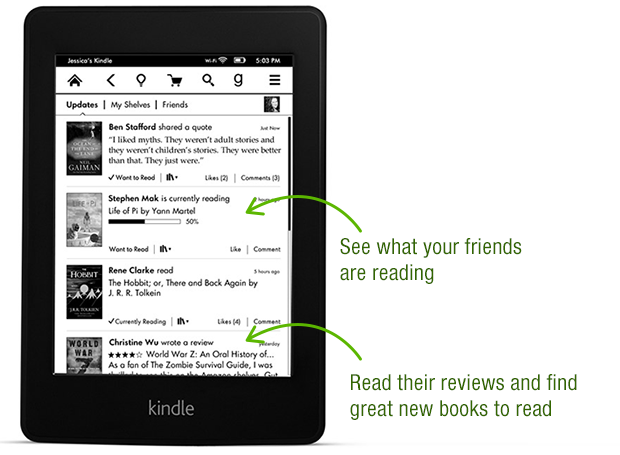


Thanks again to the Goodreads team who built this—they put in a lot of late nights and ate a lot of giant burritos! After a well-earned rest, they'll be back at work building a new wave of features both on Kindle and on Goodreads.com.

Goodreads is available in a free, over-the-air software update delivered automatically to new Kindle Paperwhites in the US, Canada and Australia in the coming weeks. Can't wait for the update? You can also go here to download it. We do not have details to share about other Kindle e-readers but know that Amazon has a long history of bringing new features to previous devices.
Which feature in Goodreads on the new Kindle Paperwhite appeals to you the most?
Starting today, Goodreads is inside your books on the new Kindle Paperwhite. Reading and discussing books are no longer separated—your reading experience is all on one device!
It's long been a dream of ours to bring Goodreads inside your Kindle and into the book with you. The team has been working long and hard to make this possible and we can't wait to show you the results today.
Let's take a tour!
Thanks again to the Goodreads team who built this—they put in a lot of late nights and ate a lot of giant burritos! After a well-earned rest, they'll be back at work building a new wave of features both on Kindle and on Goodreads.com.
Goodreads is available in a free, over-the-air software update delivered automatically to new Kindle Paperwhites in the US, Canada and Australia in the coming weeks. Can't wait for the update? You can also go here to download it. We do not have details to share about other Kindle e-readers but know that Amazon has a long history of bringing new features to previous devices.
Which feature in Goodreads on the new Kindle Paperwhite appeals to you the most?
Comments Showing 51-100 of 386 (386 new)

message 51:
by
Kevin
(new)
Nov 19, 2013 11:07AM
 First gen Paperwhite also please.
flag
 Can't wait for the reading progress and custom shelves integration - that's what will make this app worthwhile for me.
 One question though:
"Capture and share favorite passages with friends without leaving the book. Once you've finished reading, your quotes will appear on the Goodreads updates feed on the Kindle and you can see your friends' comments."
Does this mean that all highlighted passages are AUTOMATICALLY shared when you finish (rate??) a book? Will there be options to share specific quotes to Goodreads *while* you read, like with the "share" options for Twitter and Facebook?

 Does this mean that all highlighted passages are AUTOMATICALLY shared when you finish (rate??) a book? Will there be options to share specific quotes to Goodreads *while* you read, like with the "share" options for Twitter and Facebook?
Only the explicit "share" option while you are reading shares a highlight to Goodreads (or Facebook or Twitter). As a general policy we never want to automatically share content without your explicit opt-in or consent. If people would like the option to opt-in to have all highlights shared or available on Goodreads in some manner, we'd love to hear it.
Otis wrote: "Only the explicit "share" option while you are reading shares a highlight to Goodreads (or Facebook or Twitter). As a general policy we never want to automatically share content without your explicit opt-in or consent."Thank you! I had thought this was the case, but was a little unsure based on the wording in the infographic. Glad to hear it.
 The first Paperwhite was released 1 year and 1 month ago an won't be updated. This is so sad.
 That's great, I've been waiting for something like this for ages!
 I mean Whhat? I've got the older Paperwhite...can I justify an upgrade? I want GR on my kindle....If anyone knew how excited I was about this I think they would be sorry for me =)
 Otis and Emily has commented on here multiple times that the plan is to update the other devices, so hang in people. It just barely rolled out to the new devices with partial functionality to select countries.
Emily message 39
Otis message 46
 I bought a Paperwhite last year when it was the "new" paperwhite! I'm not buying another one, so please Amazon, make this feature available as an update for the "old" ones!
 Hey guys do you know if the goodreads integration will work in germany too?
 i updated my paper white and it does not work? i do not see the 'g'
 Kristen wrote: "i updated my paper white and it does not work? i do not see the 'g'"
Kristen: if you haven't already, try restarting your Kindle again. That worked for me and at least one other person on here who had the same issue.
 I absolutely hate the fact that it's not available on a year-old Paperwhite model. It's absolutely not like Amazon to do so. I hope it shows up later.
 Any plans for it be available in the UK? Just upgraded to a Paperwhite so this would be pretty sweet.
 I bought a Kindle paperwhite a week ago, how can I know if its the 2nd gen? I didnt see any information about it on the box, although the seller told me its the new one.
 Gustavo wrote: "I bought a Kindle paperwhite a week ago, how can I know if its the 2nd gen? I didnt see any information about it on the box, although the seller told me its the new one."
If it says "AMAZON" on the back, it's the new one. If it says "Kindle", it's the old one. Pretty much the only physical way to tell them apart.
 Will this automatically load onto my Kindle Paperwhite (I have the new generation one)? I tried restarting it but I was wondering if I need to download the app anywhere? Thanks :)
 Is there a way to add a book in Personal docs section to a GR shelf?
 It doesn't make sense that you have to come to the web to do it...
 So is this solely on paperwhite? I have the original kindle with keyboard that came out and can't afford to buy a new one. I use goodreads a great deal so it'd be nice if it was available on it too.
 Angela wrote: "I'm not yet ready to upgrade my kindle so it would be wonderful if the software on the kindle touch could be updated to include Goodreads . I frequently go back & forth between my kindle and my Go..."
Yes, I agree!!! Kindle touch was sold for only a year (right?). I have one and love it but I would certainly enjoy it even more if it had access to Goodreads!
 So, my new Kindle Fire HDX just restarted because of an update. Nothing to do with the GR app, though. Which is kind of disappointing. I was looking forward to using that feature, but I guess it's only available on the new Paperwhite. :/
 I literally just thought, I wish Goodreads integrated with Kindle,then came to the site to find this. Nice, I hope they update previous generation Kindle Paperwhite.
Holly wrote: "So, my new Kindle Fire HDX just restarted because of an update. Nothing to do with the GR app, though. Which is kind of disappointing. I was looking forward to using that feature, but I guess it's ..."
I literally just thought, I wish Goodreads integrated with Kindle,then came to the site to find this. Nice, I hope they update previous generation Kindle Paperwhite.
Holly wrote: "So, my new Kindle Fire HDX just restarted because of an update. Nothing to do with the GR app, though. Which is kind of disappointing. I was looking forward to using that feature, but I guess it's ..."Holly - Yesterday's Blog announcement said the new Fire's have this update.
OK, so we have a new app with extremely limited functionality, essentially available in only 3 countries, and only available to customers who purchased within the last month? Well done? That's...uh...impressive?
Bookworm R wrote: "Otis and Emily has commented on here multiple times that the plan is to update the other devices, so hang in people. It just barely rolled out to the new devices with partial functionality to sele..."
That's really the problem. If they had either waited until they could release a fully-functional app as widely as possible or left this as a low-key trial and released the wider version with lots of publicity it would have been greeted with almost universal positivity. As it is, it just feels like an annoyance. This has been handled badly.
That's really the problem. If they had either waited until they could release a fully-functional app as widely as possible or left this as a low-key trial and released the wider version with lots of publicity it would have been greeted with almost universal positivity. As it is, it just feels like an annoyance. This has been handled badly.
I have bigger things to worry about in life than if a software update for Goodreads integration rolls out today, next month or never or my various Kindles. I also don't think I will be using the feature since it appears it ties the Goodreads account and Amazon account together to use the feature. As much as I use both sites I do not like linking websites together.
Bookworm R wrote: "I have bigger things to worry about in life than if a software update for Goodreads integration rolls out today, next month or never or my various Kindles.
I also don't think I will be using the..."
You seem invested enough in this thread.
I also don't think I will be using the..."
You seem invested enough in this thread.
 Not sure why everyone is freaking out about it only being available through the 2nd gen Paperwhite. They've all but said it's a feature that's likely going to be coming to previous models in the future.
It's hardly a poor decision on Goodreads or Amazon's part to roll this out early on Amazon's newest device. It may not be enough of a selling point to make any of those people who already have a previous kindle want to upgrade to a new Paperwhite, but that's not it's intention. It is a selling point for new owners, and a nice incentive for those who wish to upgrade, that Amazon can easily advertise. Seems like a fine idea to me, and with the holidays rolling around I would use every bit of advertising power I had to make my brand new device look shiny for consumers.
While it is kind of disappointing they haven't gotten Goodreads integration on older devices yet, or to an extent, delayed it on their newest one until they do (Although being upset that your old device can't do something a new one can is rather silly), you have to remember Amazon's in this to make money. And anything that might help sell a new device that they just released right before the holidays is a win on their part.
Jessica wrote: "Not sure why everyone is freaking out about it only being available through the 2nd gen Paperwhite. They've all but said it's a feature that's likely going to be coming to previous models in the fu..."
I don't see anyone "freaking out" or getting "upset". I think mild annoyance is perfectly reasonable in the circumstances though and I'm really not sure that a device bought within the last 3 months can be described as an "old device".
I don't see anyone "freaking out" or getting "upset". I think mild annoyance is perfectly reasonable in the circumstances though and I'm really not sure that a device bought within the last 3 months can be described as an "old device".
 Haven't tried it out yet, but I'm pleased to know that there's integration with the Paperwhite, as I recently acquired one. It might reveal itself to be lackluster, but, if that is the case, hopefully an updated version will be available with time. Kudos nevertheless! :)
 Karo wrote: "Dave wrote: "I've upgraded my new gen Kindle Paperwhite and I'm not seeing the "g" in the the menu bar at all."
Even after manually downloading the software update and transferring it to my Kindle..."
Worth a shot contacting amazon customer service.
 Karo wrote: "I'm hoping someone on the dev team could address a question about the new FreeTime integration on the 2nd gen Kindle Paperwhites. I have a number of personal files that I would like to add to my so..."
I have Free Time on my son's Kindle Fire and it does not allow you to add personal documents at all. It's a very annoying "feature". I assume Free Time is the same across the board on kindles.

 What about integration with software clients like iOS/OS X,especially when things like automated reading progress will work . (I understood that it's possible to use Goodreads app on iOS and on OS X I can use full browser but integration inside Kindle app itself will be very nice)?
 I have the requisite 2nd-gen Paperwhite, but this new integration will go unused by me for the time being because there's no way to get my GR account linked to my Kindle and also allow my husband to link up his, since both devices are attached to the same Amazon account. We're a lot alike, but not the same person! Any chance that per-device linkups (rather than per Amazon account) might be on offer in future releases?
Also, tip to anyone that wants to de-link - you need to do it through the GR site under "Apps" in your profile/account. No obvious way to do so from the Kindle itself.
Jessica wrote: "...since both devices are attached to the same Amazon account. We're a lot alike, but not the same person! Any chance that per-device linkups (rather than per Amazon account) might be on offer in future releases?..."I was shaking my head when I saw that.
 So, let me get this straight - the integration requires linking one's Amazon account with their Goodreads account, and reviews posted to one will automatically be posted to the other? If that's the case, my decision in replacing my ailing Kindle has likely just been swayed away from the Paperwhite to the more budget-friendly basic model like I already have. The only plus to the Paperwhite for me was Goodreads integration, but if it requires me to link my accounts to use it, then I'm not really interested - unless there's an option to opt out of posting my reviews to Amazon (I've had nothing but bad experiences posting reviews there, and frankly it's a morass of stupidity I'm just not willing to wade in anymore). Even with such an option, I'm still not real thrilled with the idea of linking my accounts.
Katie wrote: "So, let me get this straight - the integration requires linking one's Amazon account with their Goodreads account, and reviews posted to one will automatically be posted to the other? If that's the..."
So, let me get this straight - the integration requires linking one's Amazon account with their Goodreads account, and reviews posted to one will automatically be posted to the other? If that's the case, my decision in replacing my ailing Kindle has likely just been swayed away from the Paperwhite to the more budget-friendly basic model like I already have. The only plus to the Paperwhite for me was Goodreads integration, but if it requires me to link my accounts to use it, then I'm not really interested - unless there's an option to opt out of posting my reviews to Amazon (I've had nothing but bad experiences posting reviews there, and frankly it's a morass of stupidity I'm just not willing to wade in anymore). Even with such an option, I'm still not real thrilled with the idea of linking my accounts.
Katie wrote: "So, let me get this straight - the integration requires linking one's Amazon account with their Goodreads account, and reviews posted to one will automatically be posted to the other? If that's the..."The Amazon help page has:
Important: To use Goodreads on Kindle, your Kindle Paperwhite or Kindle Paperwhite 3G must be registered to your Amazon account and connected to Wi-Fi. Make sure your Kindle is registered to the Amazon account you would like to link to Goodreads.
My 2nd edition Paperwhite hasn't updated so I can't verify 100% but based on the above statement and then if you look at the images from the blog post above it has "Rate this book", under the stars it says Post to Amazon as (xxx) and Goodreads.
So it would appear to me that if you rate the book using the integration feature it will post the stars at least to both sites.
I caught that in one of the illustrations in the post - which is what made me curious if there's a way to opt out of posting to Amazon. Guess I'll have to wait and see as more people get it and test it out!
 Are there any plans of bringing this integration to Kindle apps as well? I use Kindle for Android, and read almost wholly on that - would love to not keep going to a separate Goodreads app to update my reading, get recommendations and rate books.
 Randy wrote: "Come on Kindle Keyboard! Yeah, I know I'm dreaming."
I am with you :)

 Loise wrote: "Software update, please :("
Follow the link to download on computer. Plug your Paperwhite into your computer. Drag the download to the Kindle. And you can update.
 Idiot question incoming, how do you know if you have a 1st generation kindle white vs 2nd generation kindle white?
Bookpanda wrote: "A better Android app please?"
Idiot question incoming, how do you know if you have a 1st generation kindle white vs 2nd generation kindle white?
Bookpanda wrote: "A better Android app please?"Yes!!!
 Pretty disappointed that this feature hasn't been released for the first-gen Paperwhite. Mine is only 5 months old...
 I can't wait for this to be available in the UK and on the original Paperwhite!! Great work!!
Bookworm R wrote: "Holly wrote: "So, my new Kindle Fire HDX just restarted because of an update. Nothing to do with the GR app, though. Which is kind of disappointing. I was looking forward to using that feature, but..."
I can't wait for this to be available in the UK and on the original Paperwhite!! Great work!!
Bookworm R wrote: "Holly wrote: "So, my new Kindle Fire HDX just restarted because of an update. Nothing to do with the GR app, though. Which is kind of disappointing. I was looking forward to using that feature, but..."I couldn´t agree more. I just found out that my kindle is 2nd gen but my amazon account isnt´t from US. So it doesn´t work. I guess this new integration is made for just a few people.
 I'd love to get it on my 2012 generation kindle paperwhite. I'm not ready to upgrade it yet.
