
 Sign in with Facebook

Goodreads Now Available on the New Kindle Paperwhite
Picture it: You're curled up on the couch, lost in a fantastic story on your new Kindle Paperwhite, when you come across the most amazing passage. It sends shivers down your spine... or it makes you laugh... or it captures something important to you. And you can't wait to see if your friends feel the same way. Now there's no need to put down your new Kindle Paperwhite to jump on Goodreads and share it with your friends...
Starting today, Goodreads is inside your books on the new Kindle Paperwhite. Reading and discussing books are no longer separated—your reading experience is all on one device!
It's long been a dream of ours to bring Goodreads inside your Kindle and into the book with you. The team has been working long and hard to make this possible and we can't wait to show you the results today.
Let's take a tour!


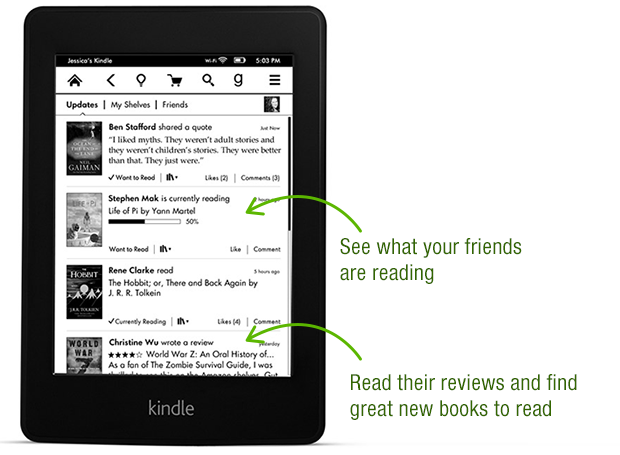


Thanks again to the Goodreads team who built this—they put in a lot of late nights and ate a lot of giant burritos! After a well-earned rest, they'll be back at work building a new wave of features both on Kindle and on Goodreads.com.

Goodreads is available in a free, over-the-air software update delivered automatically to new Kindle Paperwhites in the US, Canada and Australia in the coming weeks. Can't wait for the update? You can also go here to download it. We do not have details to share about other Kindle e-readers but know that Amazon has a long history of bringing new features to previous devices.
Which feature in Goodreads on the new Kindle Paperwhite appeals to you the most?
Starting today, Goodreads is inside your books on the new Kindle Paperwhite. Reading and discussing books are no longer separated—your reading experience is all on one device!
It's long been a dream of ours to bring Goodreads inside your Kindle and into the book with you. The team has been working long and hard to make this possible and we can't wait to show you the results today.
Let's take a tour!
Thanks again to the Goodreads team who built this—they put in a lot of late nights and ate a lot of giant burritos! After a well-earned rest, they'll be back at work building a new wave of features both on Kindle and on Goodreads.com.
Goodreads is available in a free, over-the-air software update delivered automatically to new Kindle Paperwhites in the US, Canada and Australia in the coming weeks. Can't wait for the update? You can also go here to download it. We do not have details to share about other Kindle e-readers but know that Amazon has a long history of bringing new features to previous devices.
Which feature in Goodreads on the new Kindle Paperwhite appeals to you the most?
Comments Showing 1-50 of 386 (386 new)


 It looks like this is 2nd generation Paperwhites only. :(
 I have last year's Paperwhite and not ready to get the new one…I hope this will be available as a software update to other Kindles!
 I have last year's Paperwhite as well and now I finally see a reason to upgrade!
 I have the new kindle paperwhite, but there is nothing like a goodreads-connection. Is it USA-only?
Tharayn wrote: "I have the new kindle paperwhite, but there is nothing like a goodreads-connection. Is it USA-only?"
I have the new kindle paperwhite, but there is nothing like a goodreads-connection. Is it USA-only?
Tharayn wrote: "I have the new kindle paperwhite, but there is nothing like a goodreads-connection. Is it USA-only?"The article says USA, Canada, and Australia in the coming weeks (over-air), but there is also a link above for it.
Priscilla wrote: "Tharayn wrote: "I have the new kindle paperwhite, but there is nothing like a goodreads-connection. Is it USA-only?"The article says USA, Canada, and Australia in the coming weeks (over-air), but..."
*lol* Sorry, that happens if you put big pictures in the end - you don't read what's under it. Thank you!
Tharayn wrote: "Priscilla wrote: "Tharayn wrote: "I have the new kindle paperwhite, but there is nothing like a goodreads-connection. Is it USA-only?"The article says USA, Canada, and Australia in the coming wee..."
Haha! No worries!
 Why not available in the UK? Will it be available eventually?
 Come on Kindle Keyboard! Yeah, I know I'm dreaming.
 This is great! I can't wait to add all my purchases to goodreads! Thanks!
 I've only had my paperwhite for less than a year, so not ready to upgrade to a new kindle. Hope this feature comes to the first generation paperwhite.
 That's great! I just purchased the new paperwhite!
 I'd love to get goodreads integration on 2012 Paperwhite.
 I'm looking forward to being able to keep track of my Goodreads shelves on the Kindle and post my ratings directly from it to the site. Curious to see if it'll be able to update progress within a book from the Kindle, or if I'll still need to use the app/website to do that?
 Just had an early christmas present of a Kindle Paperwhite but so sign of a G on there yet.
Ann wrote: "Just had an early christmas present of a Kindle Paperwhite but so sign of a G on there yet."
Just had an early christmas present of a Kindle Paperwhite but so sign of a G on there yet.
Ann wrote: "Just had an early christmas present of a Kindle Paperwhite but so sign of a G on there yet."It's coming in a few weeks but you can click the link above to download it now.
 This is really great, I can' t wait to get a Paperwhite now!
 I have the 1st generation of the kindle paperwhite, and the update doesn't work for it :( Hope goodreads will be available for it soon...
 Not available on 1st generation Paperwhite (((
 Yeah, I'm not buying a new Paperwhite for this. It's not a real selling point either. If you want more people to use your service, wouldn't putting it in all Kindle devices be the smartest thing to do?
This makes absolutely no sense.
 I've updated but it doesn't seem to be showing up for me. I'm in the UK...
On Amazon it says:
Goodreads on Kindle is currently available to customers in the United States, Canada, Australia, and to international customers registered to an Amazon.com account. To learn more about Goodreads, go to http://www.goodreads.com
Does that mean 'amazon.co.uk' do not get this?
 I just updated my 2nd gen Paperwhite. I am not in the US, Canada nor Australia but I am an 'international customer (Philippines) registered to an Amazon.com account'. I don't see the Goodreads icon on my toolbar.
 Sounds great. Not ready for an upgrade and mine is working fine but this is a great idea.
 Nifty! The Goodreads integration was one of the swaying factors in my buying my Paperwhite to begin with. I'd already fallen in love with it after handling one at Best Buy (A big thing for me as I was a staunch 'paper only' girl) and being able to access Goodreads straight from the device is icing on the cake. Gonna go update that bad boy now!
 It seems like a really bad idea to not roll this out to as many Kindle products as possible - why limit it to the newest products? It's only going to make people feel like this is a craven attempt to force an upgrade.

 I've upgraded my new gen Kindle Paperwhite and I'm not seeing the "g" in the the menu bar at all.
 Dave wrote: "I've upgraded my new gen Kindle Paperwhite and I'm not seeing the "g" in the the menu bar at all."
Even after manually downloading the software update and transferring it to my Kindle via USB, I still had to restart my Kindle by holding down the power button until it restarted in order to see the Goodreads integration. Weird, because I could see other parts of the update, like Freetime, immediately.
I'm hoping someone on the dev team could address a question about the new FreeTime integration on the 2nd gen Kindle Paperwhites. I have a number of personal files that I would like to add to my son's new FreeTime profile, but I am only seeing the ability to add amazon purchases. This is disappointing -- any plans to change this limitation?
Karo wrote: "Dave wrote: "I've upgraded my new gen Kindle Paperwhite and I'm not seeing the "g" in the the menu bar at all."Even after manually downloading the software update and transferring it to my Kindle..."
Cool - thanks I'll try that!
 don't forget about the original paperwhite owners. i'm not upgrading to the new paperwhite just to get goodreads, that's too expensive.
 Too bad you are tying the use of this feature to the Amazon account.
 For instance I have multiple kindles on my account, each of these people have their own Goodreads account. The star ratings post to Amazon and Goodreads. I don't need (want) the other users posting ratings under my user name on Amazon as I'm the account holder.
Oh well, I will continue my use of the full website and keep the accounts apart.
It will be a wait and see if it appears on the other kindle versions for those that want to use the features. At this point it won't matter since we won't be using the feature as it stands, but we have a keyboard, touch, 1st gen paperwhite and 2nd gen paperwhite plus numerous fires.
Why can't 1st generation Kindle Paperwhites have this feature? This seems like a blatant attempt to force users who want to this feature to upgrade their kindles.
 I also had to restart my Kindle again (i.e. after it automatically restarted after the update) to get the Goodreads feature to appear. Seems to be working fine now though, at least so far.
 I hope this comes to the first-gen Paperwhite. As compelling as Goodreads integration is, it isn't enough to convince me I should upgrade to the new model. I played with a friend's new Paperwhite, and it just isn't improved enough to justify replacing the first-gen model.
 Jenni wrote: "I'm looking forward to being able to keep track of my Goodreads shelves on the Kindle and post my ratings directly from it to the site. Curious to see if it'll be able to update progress within a ..."
This isn't included in the first version, but will be coming in future updates!
Ted wrote: "I've updated but it doesn't seem to be showing up for me. I'm in the UK..."
Dave wrote: "I've upgraded my new gen Kindle Paperwhite and I'm not seeing the "g" in the the menu bar at all."
If you're in the UK, Goodreads on Kindle won't show up just yet. The update is only available for the US, Canada, and Australia right now. We're planning to roll out to other countries soon, so stay tuned!
Karo wrote: "I'm hoping someone on the dev team could address a question about the new FreeTime integration on the 2nd gen Kindle Paperwhites. I have a number of personal files that I would like to add to my so..."
Karo, I'd suggest contacting Amazon support here if you have any questions about Kindle FreeTime. We can help with any questions about Goodreads on Kindle, though :)
It looks like only the default shelves for All, Read, Currently Reading, and To Read are accessible via the Kindle. Will access to custom shelves be added later?
 John wrote: "It looks like only the default shelves for All, Read, Currently Reading, and To Read are accessible via the Kindle. Will access to custom shelves be added later?"
Yes, other custom shelves will be coming later. It was hard to not get everything we wanted in this release!
Otis wrote: "Yes, other custom shelves will be coming later. It was hard to not get everything we wanted in this release!"Thanks, that's good to know.
 I'd be more excited if it were an integration available on all devices. As it is... I don't care one bit, it makes me just more mad ag GrAmazon and more inclined not to buy a Kindle.
 Randy wrote: "Come on Kindle Keyboard! Yeah, I know I'm dreaming."
I wish it would, mate. I'd literally celebrate if it did happen.
 Too bad it's not going to work on first gen paperwhite. Many people can't afford to upgrade at the drop of a hat, e.g., retirees such as I. Oh well, still love my paperwhite, and still enjoy goodreads.
Vicky wrote: "Randy wrote: "Come on Kindle Keyboard! Yeah, I know I'm dreaming."
Too bad it's not going to work on first gen paperwhite. Many people can't afford to upgrade at the drop of a hat, e.g., retirees such as I. Oh well, still love my paperwhite, and still enjoy goodreads.
Vicky wrote: "Randy wrote: "Come on Kindle Keyboard! Yeah, I know I'm dreaming."If we had the ability to "like" comments, I'd click it for that comment :)
Jane wrote: "Too bad it's not going to work on first gen paperwhite. Many people can't afford to upgrade at the drop of a hat, e.g., retirees such as I. Oh well, still love my paperwhite, and still enjoy goodre..."
Again - while we have nothing to announce on that subject, Amazon has a long history of bringing new features to older devices.
 Such a shame that it is not available on all Kindle devices. Should be able to update your Kindle software and it would appear but apparently not!
 Am I being obtuse or is there NO WAY to update current reading progress percentage from the Kindle itself? I can add books to my currently reading shelf, but no progress update... I'd say that's the most logical use of a Kindle/Goodreads integration, I'm really disappointed that it's apparently not there.
 I have a question. When you rate a book after finishing it, will it automatically move it from the currently reading shelf to the read shelf?

 If this software update is only for the 2nd generation Paperwhite, and will not be issued to users of the 1st generation Paperwhite bought just last year, then it is a sign that Amazon wants to become a hardware manufacturer after all. Many people have noted that Amazon sells their devices at near cost, because they want people to use their services. They make money on the services (buying books, newspapers, magazines, etc.), not on the devices, or so they say. This seems to speak otherwise. If Amazon truly cared about the greatest number of people using their services, they would roll this update out to everyone with a Kindle. Surely there is nothing in the Goodreads integration, FreeTime, and Cloud Collections that technically prevents the 1st gen from using them. Instead, it seems they made it exclusively available on the new 2nd gen Paperwhite. They want to sell the new device, not the services that the device offers, causing even current Kindle users to have to upgrade to a new device to use the new features. Apple does this, but they are openly a hardware manufacturer. Maybe Amazon has become one too.

Thanks