How to Clone Myself: 4 Easy Steps to Creating a Digital Twin
Picture this: You’re lying in a hospital bed, wondering if your business will survive while you recover. That was my reality in January of 2025.
But what if I told you that during my darkest health crisis, I discovered a technology so powerful it literally saved my business? And gave me my life back?
Learning how to clone myself using AI wasn’t just a cool tech experiment. It became my lifeline. While I was fighting for my health, my digital twin was creating content, engaging my audience, and growing my business.
The crazy part? Some of my cloned videos actually performed better than my original content.
Today, I’m pulling back the curtain on exactly how to clone myself using HeyGen. By the end of this guide, you’ll have your own digital clone ready to revolutionize your content creation strategy.
Trust me, once you see what’s possible, there’s no going back.
How to Clone Myself: What Are AI Avatars and Digital Clones?When people ask me “How do you clone yourself?” I tell them we’re not talking science fiction here. AI avatars and digital clones are basically super smart AI-powered replicas that capture your look, voice, and speaking style.
And I mean with scary-good accuracy.
Think of your digital clone as your most productive employee. One who never gets tired, never calls in sick, and can create unlimited content that sounds exactly like you.
These AI avatars use fancy computer vision technology to analyze your facial expressions. They use natural language processing to understand how you talk. And they use deep learning algorithms to recreate videos so authentic they’ll blow your mind.
The technology has gotten so good that viewers genuinely can’t tell the difference between your clone and the real you.
Here’s proof:
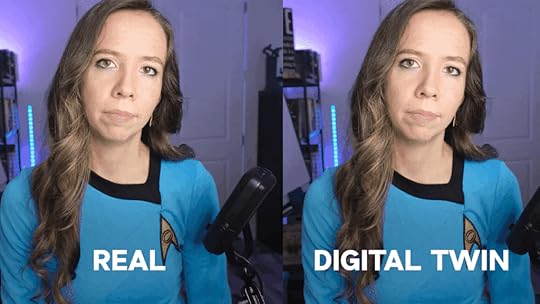
When I first shared cloned content with my audience, the engagement rates actually went up.
People were more engaged, not less. Why? Because the content quality was so consistent and polished.
Your digital clone becomes an extension of your brand. It delivers your message with the same authenticity and personality that you’d bring to every video.
The only difference? Your clone can work 24/7 while you focus on strategy, relationships, and the high-level thinking that only you can provide.
The Benefits of AI Avatars and Digital ClonesLearning how to clone myself transformed every single aspect of my content creation process. Let me break down why this technology is a total game-changer for any serious content creator or business owner.
The scalability factor alone will blow your mind. Before cloning, I could maybe produce one high-quality video per week if I was really pushing myself.
Now? I can generate six videos in three days without even sitting in my studio. That’s a 400% increase in content output with 90% less time investment.
Consistency became my secret weapon. Every video my clone creates maintains the same energy level, speaking pace, and professional quality.
No more worrying about having a bad day affecting my content quality. No more dealing with poor lighting ruining an entire shoot. My clone delivers perfect performance every single time.
The cost savings are honestly incredible. Traditional video production used to cost my so much time and money.
Now I’m paying $24 per month for unlimited content creation potential. Most businesses break even within their first two or three cloned videos.
But here’s what really matters: freedom. Freedom to rest when I need to without my business suffering.
Freedom to take real vacations without worrying about content schedules. Freedom to focus on strategy and relationship building while my clone handles the routine stuff.
The quality surprised everyone, including me. We’re not talking about cheap, obviously fake content here. This is professional-grade material that rivals anything I could produce in my studio.
In fact, my cloned content often outperforms my traditional videos in engagement metrics.
My Journey: Why I Started Learning How to Clone MyselfLet me be completely real with you about why I desperately needed to learn how to clone myself. In January, my world came crashing down.
Multiple hospital visits, misdiagnoses, and months of uncertainty made it painfully clear that my “go-go-go” lifestyle wasn’t sustainable. I was literally running my body into the ground.
As an entrepreneur, the thought of stopping content creation terrified me. My audience depended on consistent value, my business needed constant momentum, and my competitors weren’t taking sick days.
But I physically couldn’t maintain my previous pace without risking my health even more.
That’s when I discovered HeyGen and the possibility of creating a digital version of myself. Initially, I was skeptical.
Would it look fake? Would my audience accept it? Would it damage my brand authenticity?
The results shocked everyone. My first cloned video looked incredibly realistic.
And so did all the others.
Just take a look at this (this is not me, it’s my digital twin!):
My business actually grew during my recovery period. Why? Because I could maintain consistent content output without sacrificing my health.
The transformation was so dramatic that I realized every content creator and business owner needs to understand how to clone themselves. This isn’t about replacing human creativity.
It’s about creating space for it to flourish while technology handles the heavy lifting.
How to Clone Yourself in 4 Simple Steps: A Tutorial Anyone Can FollowReady to create your digital twin? Here’s exactly how to clone yourself using HeyGen, broken down into steps that anyone can follow.
Step 1: Prepare Your Training VideosThe foundation of learning how to clone myself successfully starts with high-quality training footage. Your clone will only be as good as the data you provide.
So this step is absolutely crucial.
You’ll need three to five videos, each lasting two to five minutes. Record in 1080p resolution minimum, though 4K is better if you’ve got it.
Set up professional lighting – a simple ring light works perfectly. Make sure your recording space is quiet with minimal background noise.
Position your camera at eye level and maintain direct eye contact with the lens throughout each video. This creates the natural connection your clone will replicate in every piece of content.
Speak clearly at your normal pace. Don’t rush or go overly slow.
Choose three to five different professional outfits for variety. Avoid busy patterns or big logos, and stick to colors that photograph well under your lighting setup.
Here’s a behind-the-scenes look at my videos on HeyGen:
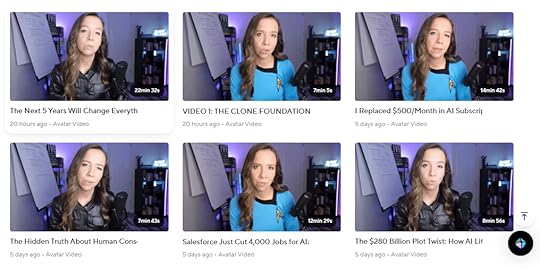
Notice how my outfits are clean, professional, and attractive?
Remember, your appearance in these training videos becomes your clone’s permanent wardrobe options.
Include natural hand gestures and facial expressions, but avoid repetitive movements that might appear randomly in your cloned content.
Show different emotions and energy levels to give your clone a full range of expressions to work with.
Step 2: Set Up Your HeyGen AccountCreating your HeyGen account is pretty straightforward. But choosing the right plan matters for professional results.
The free plan includes watermarks and limited features, so I recommend starting with the Creator Plan at $24 per month minimum.
Consider this an investment in your business infrastructure, not just a software subscription.
Visit HeyGen.com and complete the signup process. You’ll need to verify your email address and may go through a brief onboarding questionnaire.
The platform is user-friendly, but take time to explore the interface before diving into avatar creation.
Step 3: Create Your Digital AvatarNow for the exciting part – actually bringing your digital clone to life. Navigate to the “Avatars” section in your HeyGen dashboard and select “Create new.”
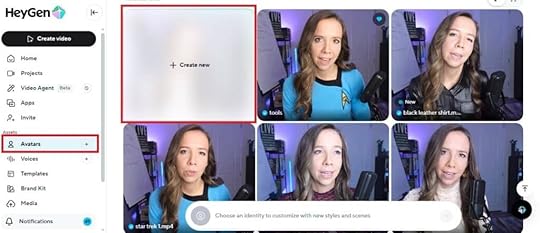
Upload your prepared training videos one by one. HeyGen will analyze each video for quality, lighting, and clarity.
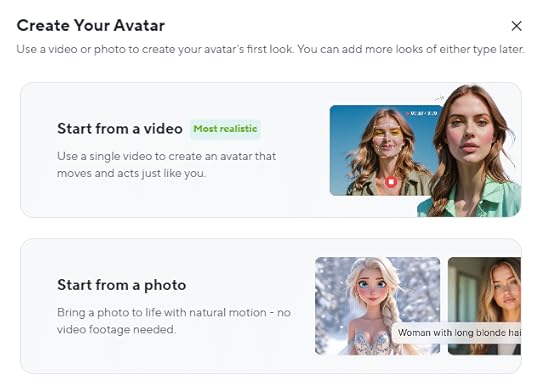
Don’t worry if the platform suggests improvements – you can always refine your clone later with additional training footage.
Follow the steps to creating your digital clone.
Step 4: Generate Your First Cloned VideoOnce your avatar is ready, it’s time to test your new digital twin. Click “Create Video” in the dashboard, then select “Avatars.”
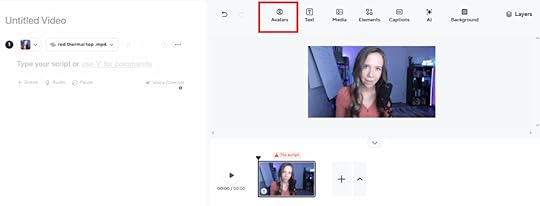
Start with a short test script of thirty to sixty seconds. Write in natural, conversational language exactly as you would speak.
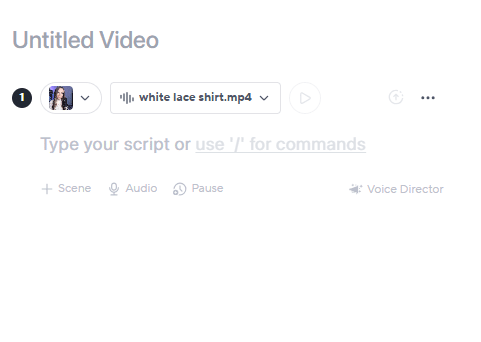
Include your name and some personal details to test how authentically your clone represents you.
Write numbers as words rather than digits – “twenty-five percent” instead of “25%.” Use paragraph breaks to create natural pauses in your clone’s delivery.
Avoid special characters or complex punctuation that might confuse the speech synthesis.
Click “Generate” and wait two to five minutes for processing. Download the result and review it carefully.
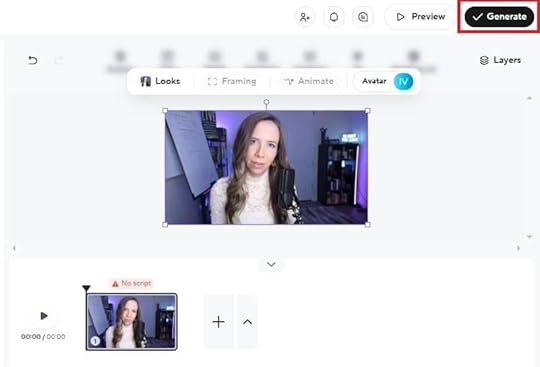
Check for natural lip-sync accuracy, realistic facial expressions, smooth body movements, and overall authenticity.
If something looks off, don’t sweat it. You can refine your approach by adjusting your script writing style.
Or create additional training videos to improve your clone’s performance.
Voila!
You’re ready to hand over 90% of the hard work to your digital twin.
How to Clone Myself: Frequently Asked QuestionsCan I really clone myself with AI?Absolutely! Modern AI technology has advanced to the point where you can create incredibly realistic digital versions of yourself.
Using platforms like HeyGen, your digital clone can replicate your appearance, voice, and speaking style so accurately that viewers often can’t tell the difference. It’s honestly mind-blowing.
How much does it cost to clone myself?HeyGen’s pricing starts at $24 per month for the Creator plan, which includes avatar creation and basic features.
How long does it take to create my digital clone?The entire process takes about two to three hours from start to finish. You’ll spend thirty to sixty minutes recording your training videos.
Ten to thirty minutes uploading and setting up your account. Another thirty to ninety minutes for HeyGen to process your avatar.
Once created, generating new videos takes just minutes.
What equipment do I need to clone myself?You need surprisingly little equipment. A smartphone or camera capable of 1080p recording, good lighting like a ring light or natural window light, a quiet recording space, and a tripod for stable footage.
The most important factor is consistent, professional lighting rather than expensive equipment.
Is it legal to clone myself with AI?Yes, creating a digital clone of yourself is completely legal since you own your likeness and are giving explicit consent. However, cloning someone else without permission could raise serious legal issues.
Always ensure you have proper authorization and follow platform terms of service.
Can people tell my videos are made by a digital clone?When done properly with high-quality training data, digital clones are extremely realistic. Many of my viewers couldn’t tell when I switched to cloned content.
However, I recommend being transparent with your audience about AI-generated content. It maintains trust and authenticity in your brand relationships.
Can I use my clone for different types of content?Your digital clone works perfectly for educational content, product demonstrations, company updates, marketing videos, and most forms of business communication. The key is writing scripts in your natural speaking voice.
How realistic will my clone look?The realism depends entirely on the quality of your training videos. With professional lighting, clear 1080p or 4K footage, and natural delivery, your clone can be virtually indistinguishable from traditional video content.
Poor lighting or rushed training footage will result in a less convincing clone.
Can I improve my clone after it’s created?Yes! You can always upload additional training videos to refine your clone’s appearance and behavior.
HeyGen allows you to create multiple “looks” with different outfits or settings. You can continuously improve your avatar’s performance based on the results you’re seeing.
What languages can my clone speak?HeyGen offers multi-language support, allowing your clone to deliver content in various languages. However, the most natural and authentic results come from using the same language as your original training videos.
The system learns your specific speech patterns and accent best this way.
Ready to Clone Yourself? Your Digital Twin AwaitsLearning how to clone myself completely transformed my approach to content creation and business growth. What started as a desperate solution during a health crisis became the most powerful tool in my entrepreneurial toolkit.
Your digital clone isn’t just about creating more content. It’s about reclaiming your time, scaling your expertise, and building a sustainable business that doesn’t depend on your physical presence every single day.
While your competitors are still trading hours for content, you’ll be leveraging technology to amplify your impact exponentially.
Ready to meet your digital twin? Head over to HeyGen, follow this step-by-step tutorial, and prepare to revolutionize your content strategy.
Your future self will thank you for making this decision today.
Transform Your Business with AI IntegrationCreating your digital clone is just the beginning. At First Movers R&D AI Labs, we help small businesses integrate cutting-edge AI technologies into every aspect of their operations.
From content creation and customer service to workflow automation and predictive analytics, our expert team guides you through implementing AI solutions that drive real results.
Whether you’re ready to scale your content like I did or explore other AI opportunities for your business, our First Movers R&D AI Labs community provides the frameworks, tools, and support you need to stay ahead of the curve. Join thousands of forward-thinking entrepreneurs who are building AI-enhanced businesses that thrive in the modern marketplace.