Heather Weidner's Blog, page 95
September 2, 2017
Pens, Paws, and Claws
Our new blog, Pens, Paws, and Claws launches today, and I'm really excited to be blogging with a group of amazing writers: Kristin Kisska, Mollie Cox Bryan, Rosemary Stevens, Maggie King, Jeanne Adams, Judy Penz Sheluk, Sheri Levy, Barb Goffman, and Teresa Inge.
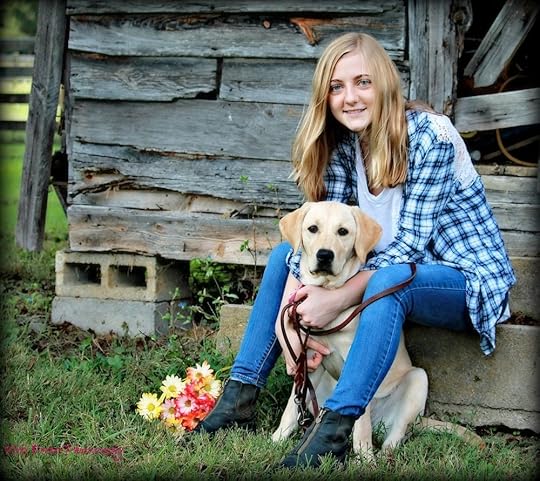
My first post appears today. Please stop by for a visit. I interview Lauren, a teen puppy trainer for Guiding Eyes for the Blind.




September 1, 2017
Collaborating on a Mystery Party Script
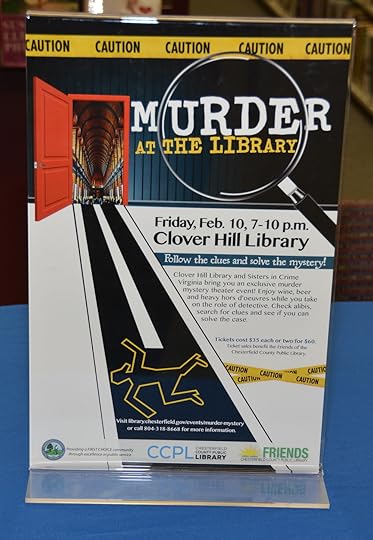
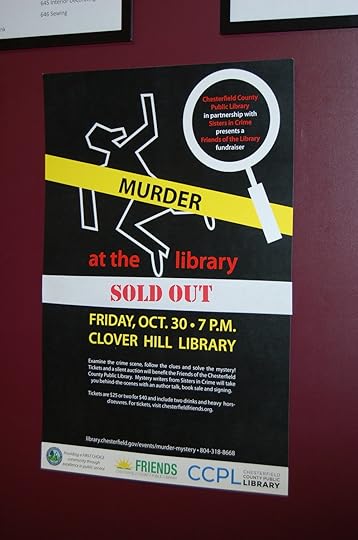
For the past few years, my Sisters in Crime chapter volunteers have been asked to write a script for our library's fundraiser. We write the script, and the very talented librarians and staff bring the play to life. On the night of the event, the guests are divided into two groups. One views the mystery clues, and the other attends an author panel. They switch. Then there's time for the guests to interview the actors and look for clues. Afterwards, there is the big "who dunnit" reveal and a book signing.
The first two years, we killed off the head librarian and the children's librarian. The next event has even more surprises. I met with Mary Miley and Rosemary Shomaker yesterday to create the characters and plot the murder. The collaboration was a lot of fun. Writing is usually a solitary sport, and it was neat to bounce ideas and motives off each other. I just hope the folks in the next booth didn't think we were plotting a real murder.
This event has sold out in the previous years. And it is such a thrill for me to see something we created brought to life. The actors do such a good job of filling out the characters and making the scenario seem realistic. Each guest gets a handout with a list of all the characters and room to make notes. At the end, they vote on who they think the guilty person is.
Here are some things we do to prepare the script.
Work with the library's planning team to get an idea of themes and interests for the event.Come up with the crime (usually a murder) and build clues around it. It needs to be something that can be done either on or off stage. (The first year, the guests were invited to an event, and they arrived to find the police investigating the head librarian's murder. The next year, the guests were attending a concert by a popular children's musician, and there was a murder.)Create an interesting/zany cast of characters. Each character needs to have some distinguishing characteristic that the actors can exploit.Name the characters so that there's not confusion about who did what. You don't want a Kevin, Kyle, and Kurt. Think of characteristics or props that the actors can use. The planning team seeds the library with clues and red herrings. Make sure that every character has some combination of means, motive, or opportunity. The guilty one should have all three. Ensure that there are ways for the audience to get the clues they need (e.g. through action, dialogue, or questioning the suspects).I'm looking forward to the next murder mystery evening. I can't wait to see what the actors do with our latest script.

August 26, 2017
20 Word Tips for Authors
Microsoft Word has thousands of features that I never use. I was poking around this week and found some neat tips that could help authors. I tried these in Word 2010 and Office 365.
1. If you don't like the little squiggly lines under words you know are correct, then right-click onthe word. You can choose to ignore it in the current document, or you can add it to your dictionary, so it won't be marked again in any document. (Just make sure it's spelled correctly before you add it to your dictionary.)
2. If you want to number the rows in your table, create a table (Insert; Table; Insert Table). Put the cursor in the first cell of the column you want to number. Highlight several cells in the column. Go to the Home tab and click the down arrow next to the numbering icon. Select the style you want. As you add rows, they will number automatically. If you delete a row, the numbers will adjust.
3. To total the numbers in a column of your table, create your table and fill in your numbers. Put your cursor in the empty cell at the bottom. Click the Layout tab under Table Tools. Click the formula icon. When the box appears with =SUM (ABOVE), click Okay. Note: If you change the numbers in the column, you will have to repeat these steps to get a new total.
4. To convert a table to text (without the table formatting), go to your table and highlight it. On the Layout tab under Table Tools, click Convert to Text.
If you select the tabs option, your columns will be tabbed with out the rows, columns, and grids.
If you select paragraph marks, it will put the contents of each row in a new paragraph.
If you select commas, it separates the values of each column with commas.
5. To remove a hyperlink or email address, highlight the text and right-click. Select Remove Hyperlink (or Remove Link in Office 365).
6. To create a hyperlink, select the word or phrase in your document. Right-click and select Hyperlink (or Link in Office 365). In the address field, paste or type the URL/link. Click Okay.
7. Sometimes, when you submit to contests or anthologies, you're asked to remove all personal content from your document. Save your document. Click the File tab. Click Check Info (in the pane to the far left). Click the Check Issues button. Click Inspect Document. When the Document Inspector appears, select what you want to check. Click Inspect. The results window will appear. Click Remove All to correct any issues and save your document.
8. If you want to create a new page in your document, hold down Ctrl and Enter.
9. Sometimes, you need to add a break to your document. Put the cursor where you want the break. Click the Page Layout tab (Layout tab in Office 365). Click the Breaks icon (on the Page Setup section. Select the type of break you want.
10. To add a watermark (faint text in the background) such as "draft," put the cursor on your page. Click the Page Layout tab (Design tab in Office 365). Click Watermark and choose your design. Remember that the Remove Watermark is here in case you want to take it off of a document later.
11. If you want to add a page border to your document, click the Page Layout tab (Design tab in Office 365). Click Page Borders and select your choice. Click Okay.
12. To change the background color of your page, click the Page Layout tab (Design tab in Office 365). Click Page Color and select your choice. Click Okay.
13. Click Shift and F5 to move your cursor to the last location from your last save. This is a quick way to move to where you left off. (Office 365 has a pop-up bubble when you open your document to do the same thing.)
14. If you continue to press Shift and F5, your cursor will move to each place you have edited recently.
15. Sometimes, you need filler text for a layout (like a flyer or poster). Microsoft Word will create it for you. Move the cursor to the place in your document where you need filler content. Type =lorem (p,l). Enter a number in place of the "p" and "l". "P" is the number of paragraphs, and "l" is the number of lines you need (e.g. =lorem (5, 50).
16. To quickly research a term, highlight the word/phrase and right-click. Click Lookup (Smart Lookup in Office 365). Choose your option, and your information will appear in the pane on the right.
17. To delete an entire word, hold down Ctrl when you press Backspace.
18. Normally, if you click and drag the cursor to highlight an area, it highlights sentence by sentence. To change the shape of your selection (to select in a rectangular area on your screen), insert your cursor and hold down Alt as you drag.
19. If you hold down Ctrl as you click, it will highlight the entire sentence where the word you selected is located.
20. You can use Word to view two documents at the same time. Click the View tab. Arrange All lets you see more than one document. Arrange All stacks them on top of one another. If you click the View Side by Side button, they're arranged horizontally. You can use the Arrange All with more than two documents. The View Side by Side button allows you to choose only two documents to see at a time.
What else would you add to the list?

August 18, 2017
Plan B - Computer Tips for Writers

I work in IT, and we're always preparing for outages and how to recover from disasters. We have a plan B or a work-around for lots of scenarios, so that our users can continue working if there is a disruption of service.
As a writer, your computer and other tools are part of your business, and your writings are valuable. You need a back up plan if something goes wrong. If you've ever lost a file or had a computer die on you, you know that sinking feeling. Here are some tips that can help.
You need to backup your files regularly (on an external harddrive or to the cloud). Find the way that works best for you. Make sure that backups are part of your routine. Your work is too important to lose.Check with your website/blog provider to ensure that backups are part of your plan. It's a lot of work to recreate your site if something catastrophic happens. Keep up with emails from your website/blog provider and other software services. If your subscription runs out, your access is revoked. Make sure to keep copies of all of your receipts.Make sure that you have anti-virus software on your computer. There are a lot of services out there, and you need to find the one that works best for your. Attacks, viruses, and malware unfortunately are a part of daily life.If you signup for software services, often there is an auto-renewal feature. If you leave it on, make sure you know when it's time to renew and that you want to continue the service. If you turn it off, make sure that you renew at the proper time. See #3. Be aware that it could expire and you lose access.Keep all of your passwords in a safe place (not in a spreadsheet or Word document on your computer). I use KeePass. It's a password locker, and it's free. You just have to remember the one password to access the application. You may want to back up your contacts. You can export a list and save it outside of your email software. This list is hard to recreate if it's damaged or inaccessible.
August 11, 2017
33 Seconds or Less - What I Learned from the Shoot/Don't Shoot Simulator
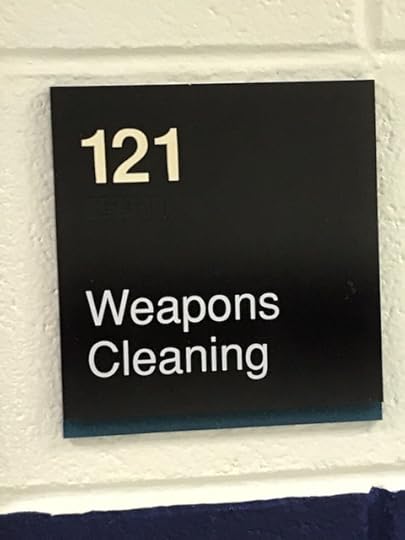
My Sisters in Crime Central Virginia chapter visited the Richmond Police Training Academy recently and triedthe "Shoot/Don't Shoot" simulator. Growing up as a cop's kid paid off. Many thanks to Captain Harvey Powers for all the simulations, background information, and law enforcement lessons.
I know it was a simulator -- but my adrenaline was pumping and my knees were shaky when it was over. I had an epiphany while watching the simulations. All that response and nerves and shoot/don't shoot decisions happened in a span of less than 33 seconds. And police officers have to face that moment multiple times a day.
Here's what I learned from my two simulations and watching the others in my group. (My first simulation was a speeding car/traffic stop, and the car didn't have license plates. The driver pulled a gun. My second simulation was an active shooter in a middle school.)
The ability to diffuse a situation with verbal skills is a key skill set for law enforcement. And it may be difficult to find folks with those skills in the texting generation.You have to be in relatively close proximity for pepper spray to be effective (about ten feet). There can easily be blow back, and you don't want to spray it in an inhabited area. Every Richmond PD cadet gets sprayed with pepper gas in training. And it takes about an average of 30 minutes to wear off.Pepper spray works on animals. It is basically odorless. It has less of an impact of people who eat really spicy food regularly.A taser (is not a phaser), and it has two sets of charges. It shoots two parallel lines that have what looks like flattened fishhooks on the end. When the trigger is pulled, a red laser dot appears, and it takes about five seconds to discharge.Lethal force is used to protect the lives of others and the officer.Real police do not fire warning shots in the air (bullets come back down), shoot guns out of the bad guys' hands, or shoot out tires.Officers are trained to aim for center mass (not kneecaps).Police officers are trained to Ask, Tell, and Make when they give commands."Cop" comes from Conservator of the Peace.Be smart. Have and use your verbal skills to diffuse tense situations before they escalate.Know the fear and overcome it.I think everyone needs to experience the "Shoot/Don't Shoot" simulator at least once. It gave me a new perspective on what police officers have to deal with every day. Growing up, I knew my dad faced danger, but I didn't realize how often a call can turn dangerous.

August 4, 2017
Website Tips for Authors

I finished creating a website and blog with WordPress recently. I've also used Squarespace and Wix. All have their benefits and a few challenges. I like all three platforms, and they are fairly easy to use. All have good online tutorials, learning videos, and customer support.
Here are thirteen things writers need to consider when building a site or know about their website if someone else creates/maintains it for you.
Decide up front if you want to maintain all or parts of your website and how comfortable you are with the web-building tools. I needed a website that I could easily update when events, books, and photos changed. I like to keep my content fresh, so I'm updating something at least weekly.If you're going to blog, the blog should be on your website. This drives blog traffic to your website.You are your brand. Your website, blog, and social media sites should have the same branding (look and feel).Your website should provide you with a way to see your statistics/analytics. You need to be able to see how many visits you receive daily, monthly, and yearly. I like that I can compare my totals to previous points in time. This helps me to see if my marketing/social media campaigns are working.Whether you or someone else creates your site, you need to do a quality check on it. Make sure all links work. Click every button and link. Check all forms and contact information.Make sure you have your own URL. You are your brand, and it should be your name. Make sure the colors you choose for your website match the tone that you're trying to set with your books. Lighter genres should have brighter colors. Horror, thrillers, suspenseusually have darker palettes of blacks, grays, and red.Don't go crazy with fonts. Sans serif fonts are easier to read online. (Sans serif letters do not have the tiny tick marks at the letter's endpoints.)Your website should adapt to mobile devices (not just shrink down the page for a small screen). It should be mobile friendly. Check your website on a tablet and a phone to ensure it looks right on all devices.If you're not sure what you want on your website, visit other author, agent, and editor sites to get a feel for what to include. Keep your content and pictures fresh. Nobody returns to an outdated site. And don't have a 10-year old author picture.Have a place on your site where folks (reporters, reviewers, bloggers, event hosts, etc.) can get your picture and biography. A short and long biography are ideal.Make sure you have a way for people to contact you (email or contact form).What else would you add to the list? Best wishes with your website.

July 28, 2017
15 Quotes for Writers
I like the motivation hashtags on Twitter. They gave me the idea to pull together some of my favorite quotes for writers (published and pre-published) on books and writing. Writing is hard work, and it is often solitary. Here are #motivations to get or keep you going. I also found some interesting reviews from Rotten Reviews (edited by Bill Henderson). If you are a writer, you're not alone...
Writing
"The role of a writer is not to say what we all can say, but what we are unable to say." —Anaïs Nin
"I try to leave out the parts that people skip." —Elmore Leonard
"The act of putting pen to paper encourages pause for thought, this in turn makes us think more deeply about life, which helps us regain our equilibrium." —Norbet
"I'm not a very good writer, but I'm an excellent rewriter. " —James Michener
"Don't tell me the moon is shining; show me the glint of light on broken glass." —Anton Chekhov
"I love writing. I love the swirl and swing of words as they tangle with human emotions." —James Michener
"The pen sometimes builds a more enduring monument than can the hammer or chisel." —James Lendall Basford (1845–1915), Sparks from the Philosopher's Stone, 1882
Books and Reading“The dearest ones of time, the strongest friends of the soul—BOOKS.” —Emily Dickinson
“Easy reading is damn hard writing.” —Nathaniel Hawthorne
“A mind needs books as a sword needs a whetstone, if it is to keep its edge.” —George R. R. Martin
“One sure window into a person’s soul is his reading list.” —Mary B. W. Tabor
“Books are the treasured wealth of the world and the fit inheritance of generations and nations.” —Henry David Thoreau
Rotten ReviewsWuthering Heights - Emily Bronte: "...wild, confused, disjointed, and improbable...the people who make up the drama, which is tragic enough in its consequences, are savages ruder than those who lived before the days of Homer." (The Examiner)
Alice in Wonderland - Lewis Carol: "We fancy that any real child might be more puzzled than enchanted by this stiff, overwrought story." (Children's Books)
The Great Gatsby - F. Scott Fitzgerald: "A little slack, a little soft, more than a little artificial, The Great Gatsby falls into the class of negligible novels." (The Springfield Republican)

July 21, 2017
11 Things I Learned at Active Shooter Preparedness Training
This week, I attended a lot of training. I had a two-day refresher on the COBIT 5.0 business/IT framework, and I had active shooter preparedness training yesterday by Virginia Capitol Police. Here's what I learned from the latter:
Your response should be Run, Hide, or Fight (in that order).Look around your office and make a quick evacuation plan in case you had to flee. It's a good idea to do this when you go to new places. If you are hiding, cover windows, turn out lights, and mute your cell phone. A phone on vibrate could give away your location.Look around your office and see what you could use as a weapon if you had to. When fleeing or evacuating, stay calm. Put your hands up and spread out your fingers. The first responders may not know who the shooters are, and if you're carrying a bag or jacket, you don't want to be mistaken for a shooter.Most active shooter incidents are over in ten to fifteen minutes, but it does take law enforcement quite a while to clear a building after an event. If you're hiding, stay put until you're cleared by law enforcement.If you are hiding, lock your door or find something to block it. The first police on scene for an active shooting are there to neutralize the shooter(s). They are not there initially to aid victims. If you call 911 to report a shooting, be able to provide as much information as you can (e.g. number of shooters, location, number of victim, types of guns, etc.)Always follow all law enforcement instructions. It's a tense situation, and everyone is stressed. Don't make sudden moves. Stay calm.If you're in danger, find cover that will protect you from bullets (e.g. cement walls, heavy desks, etc.). Cars are not good cover unless you can get behind the engine block.It was a good session. I tend to look for escape routes when I'm in new places (or on trains or planes). I'm a CK (cop's kid), and that was drummed in my head my whole life. Always have a plan. Also, I think it's important to know what you have in your office in case you do have to fight. (There's a heavy duty fire extinguisher outside my office.)
I hope you never have to experience a horrific event. But it is a good idea to be prepared. Make a plan.
July 13, 2017
5 Tools to Help You with Your Social Media

I am often overjoyed and overwhelmed with all the social media platforms that are now part of my everyday life. I want my posts to be strategic, but I also want to be well, social -- to share information and to promote other authors. It can take up a lot of time, and it can get out of control if not managed.
Here are some tools I've found that can help. Some are free, and others are subscription-based.
1. I use Tweepi (a paid subscription) to manage Twitter followers. I've found there are lots of accounts that follow you, and then unfollow you as you reciprocate. I use Tweepi to clean up there and to remove inactive accounts. To me, it's well worth the subscription to keep my followers organized.
2. I downloaded the Followers+ app for my phone. It has a paid upgrade, but right now, I'm using the free version. I use this to clean up Instagram followers. When I post pictures, I pick up quite a few followers, but many disappear after a few days. This app lets you see those who don't follow you and allows you to unfollow them.
3. I love Canva. There are many free options to create graphics for your social media posts and web graphics. Social media posts with graphics/visuals get more attention. I've used it to create logos too. You can purchase backgrounds and specialty items, but the free version usually works for me.
4. I use the free version of Tweetdeck to schedule tweets throughout the week (during work hours and in the wee hours of the morning). With the free version, I can't do a bulk load of tweets, but that's okay. I try not to schedule hundreds for the week. I look at my metrics on Twitter and try to target the times that my readers tend to be active.
5. Bitly is a great tool for reducing URLs. (On Twitter, every character counts.) I can choose my own URL or use a random one they provide. I use this for posts to all my social media sites. If I save the shortened URL, I can see how many clicks its received on the Bitly dashboard.
What other tools would you recommend?

July 7, 2017
9 Things I Learned about Hosting a Twitter Party

My author pal, Kristin Kisska, was my partner in crime when we organized and planned a Twitter party for our mystery anthology, 50 Shades of Cabernet. She provided great ideas and insights. I had never attended one before. Here's what I learned...
Agree on a hashtag for your event and include it in all your marketing. Ours was #50SoC. Participants searched for that hashtag and followed along with all our tweets and contests.You may want to search your hashtag choice to see what others are using it for. Will it fit your brand? Chances are, you won't get a hashtag that's yours alone, but you could get lucky.For contests, assign everyone who's hosting the party a number. When they ask a question for their give-away, they need to preface their tweet with Q and their number. (Example: If I am number 1, my question tweet would be Q1: What is your favorite....) Anyone who wants to participate in the give-away, tweets A and the correct number. This helps the hosts easily identify the participants.Choose a couple of hours for your party. Long timespans are hard unless you have lots of folks hosting and tweeting. Make sure to keep time zones in mind when scheduling. We had multiple authors sign up for 30-minute hosting timeslots. It made it easier. And some hung around for the entire event.Make sure that you have some topics planned for discussion. You'll want to keep the conversation going, and you'll want to have material to fill in the lulls. We were promoting our mystery anthology that was wine-themed. We talked about mysteries, sleuths, wines, and our stories.Start publicizing your event early. Include the time, time zone, and hashtag. Make sure you market it on multiple social media sites (multiple times).Be social. Make sure to include as many folks as possible in the conversation.If you're doing give-aways, decide on the rules up front (e.g. who picks the winner? how do you pick a winner?) We let each author who gave away a gift decide how he/she wanted to choose the lucky person.If you're doing give-aways, choose prizes that are easy (and inexpensive) to mail. I get a lot of my give-away on Etsy. I've found cute bookish wine charms, stickers, and buttons there.When you see an interesting Twitter party, stop in and visit. The conversation is good, and you may even win a prize. Happy Tweeting!