Julia McCoy's Blog, page 3
October 6, 2025
The 5 Fatal AI Business Strategy Mistakes That Are Killing Your Transformation (And How to Fix Them)
Every boardroom I know is buzzing about AI right now.
CEOs are signing off on massive AI budgets. CTOs are building innovation labs. Marketing teams are racing to integrate ChatGPT into everything.
But here’s the uncomfortable truth: most of these AI initiatives are failing to deliver real ROI or getting stuck in endless pilot phases.
And it’s rarely the technology’s fault.
The real culprit? Strategic blindness. Organizational dysfunction. A fundamental misunderstanding of what AI transformation actually requires.
I’ve watched countless companies make the same AI business strategy mistakes over and over. These aren’t small missteps—they’re transformation killers that waste millions and leave teams burned out and cynical.
Let’s break down the five most dangerous AI business strategy mistakes companies make, and more importantly, how to avoid them.
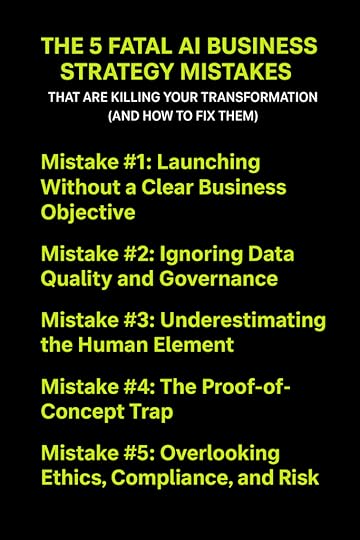 Mistake #1: Launching Without a Clear Business Objective (The Strategy Gap)
This is the number one killer of AI projects.
Companies fall in love with the technology before they’ve identified the business problem it should solve.
The “Shiny Object” SyndromeI call it AI-for-AI’s-sake syndrome.
It looks like this: A company hears about GPT-5’s capabilities, gets excited, and immediately starts building something with it. They invest months and millions into development. Then someone finally asks: “What business problem are we actually solving?”
Crickets.
The fix is brutally simple: Start with the business problem, not the technology.
Don’t say “We need to build a large language model.” Say “We need to reduce customer churn by 15% in the next quarter.”
The technology becomes the solution, not the starting point.
The KPI DesertEven worse than having no objective? Having an objective but no way to measure if you’ve achieved it.
I’ve seen teams launch AI projects without defining a single KPI upfront. They build impressive models that do… something. But no one can say if it’s actually moving the needle on revenue, cost savings, or customer satisfaction.
Before you write a single line of code, answer these questions:
What specific business metric will this improve?By how much?In what timeframe?How will we measure it?If you can’t answer all four, you’re not ready to start.
Mistake #2: Ignoring Data Quality and Governance (Garbage In, Garbage Out)Here’s a truth that’ll save you millions: AI models are only as good as the data you feed them.
Yet somehow, this is still one of the most common AI business strategy mistakes.
Treating Data as an AfterthoughtCompanies rush to model development like it’s a race.
They skip the unglamorous work of cleaning, normalizing, and structuring their foundational data. They pull from fragmented databases. They ignore inconsistencies. They overlook missing fields.
Then they wonder why their AI produces garbage results.
Real talk: If your data is messy, your AI will be messier.
The fix? Invest in data readiness before you invest in the algorithm. It’s not sexy, but it’s essential. Clean your data. Standardize your formats. Break down your data silos. This groundwork determines whether your AI succeeds or fails.
The Bias Blind SpotThere’s another landmine here: data bias.
If your training data contains systemic biases (and it probably does), your AI will amplify them. You’ll end up with models that discriminate, make inaccurate predictions for certain groups, or produce outcomes that damage your reputation and expose you to legal risk.
Audit your training data. Question your assumptions. Test for bias across different demographic groups and scenarios.
Your AI will reflect whatever patterns exist in your data—good and bad.
Mistake #3: Underestimating the Human Element (Change Management Failure)Implementing AI isn’t a technical deployment.
It’s a cultural earthquake.
And most companies completely underestimate the human challenges that come with it.
The Fear FactorEmployees hear “AI implementation” and think “job elimination.”
When companies fail to communicate how AI will augment (not replace) existing roles, resistance builds. Sometimes it’s passive—people just don’t adopt the new tools. Sometimes it’s active—they actively work against the initiative.
I’ve seen AI projects sabotaged by teams who felt threatened and left in the dark.
The fix? Overcommunicate. Be transparent about what AI will and won’t do. Show people how it makes their jobs easier, not obsolete. Train them. Involve them in the process.
The AI Literacy GapHere’s another bottleneck: Most of your workforce doesn’t understand AI.
Your sales team doesn’t know how to interpret the model’s recommendations. Your operations managers don’t trust predictions they can’t explain. Your customer service reps don’t know when to override the AI’s suggestions.
This literacy gap creates friction at every level.
Create mandatory AI literacy programs. Not technical deep dives—practical education on how to work alongside AI tools effectively.
Siloed ExpertiseData science teams building AI models in isolation is a recipe for failure.
Your data scientists might be brilliant, but they don’t understand the nuances of your sales process, the quirks of your manufacturing line, or the real pain points your customer service team faces daily.
When you develop AI purely in a lab without integrating domain expertise from the actual business units using it, you build solutions that look impressive but don’t work in reality.
Break down these silos. Create cross-functional teams. Put your data scientists in regular contact with the people who will actually use what they’re building.
Mistake #4: The Proof-of-Concept Trap (The Scaling Bottleneck)Many AI initiatives die right here.
The pilot works beautifully. Leadership celebrates. Everyone’s excited about scaling it across the organization.
Then… nothing happens.
The PoC never makes it to production because companies neglect the industrialization stage—one of the most overlooked AI business strategy mistakes.
Lack of MLOps and Infrastructure PlanningThat impressive model you built in the lab? It was designed to handle a small, clean dataset under controlled conditions.
Now try running it on real-world data volume. With production latency requirements. Integrating with your legacy systems that were built in 2005.
Suddenly, it falls apart.
Companies fail to plan for the cost and complexity of actually deploying AI at scale. They don’t think about continuous integration, automated testing, version control, or the infrastructure needed to keep models running smoothly.
MLOps (Machine Learning Operations) isn’t optional. It’s how you move from “this works in the lab” to “this works for our business.”
Treating AI as a Project, Not a ProductHere’s the thing about AI models: They decay.
The world changes. Customer behavior shifts. Market conditions evolve. That model you trained on 2023 data? By mid-2024, it’s already losing accuracy.
This is called model drift, and it kills AI initiatives that were never designed for ongoing maintenance.
Too many companies treat AI like a one-time project with a beginning and an end. Build it, deploy it, move on.
But AI requires continuous monitoring, maintenance, and retraining. It’s a product that needs ongoing investment and attention.
If you’re not planning for the long-term care and feeding of your AI systems, you’re setting yourself up for failure.
Mistake #5: Overlooking Ethics, Compliance, and Risk (The Governance Failure)This is the mistake that can halt your AI strategy overnight—or worse, expose you to massive legal and reputational damage.
Ignoring Regulatory HeadwindsPrivacy laws like GDPR and CCPA aren’t suggestions. Industry-specific regulations like HIPAA in healthcare or compliance requirements in finance aren’t optional.
Yet companies rush into AI implementation without considering how they’ll comply with these requirements when handling sensitive data.
I’ve watched AI projects get killed after months of development because someone finally asked, “Wait, are we even allowed to use customer data this way?”
Build compliance into your AI strategy from day one, not as an afterthought.
The Black Box ProblemUsing AI models you can’t explain in critical decision-making processes is playing with fire.
When your AI denies someone a loan, flags a transaction as fraudulent, or makes a hiring recommendation, can you explain why it made that decision?
If the answer is no, you have a problem.
“Black box” models without explainability create legal liability. They erode trust. They make it impossible to identify and fix errors or biases.
Establish a Responsible AI framework and governance board from the start. Define clear principles for how AI will be used ethically in your organization. Build in explainability and audit trails.
Your future self will thank you when the regulators come knocking—or when a critical decision needs to be defended in court.
Turning Mistakes into MomentumHere’s the bottom line: The difference between a costly AI experiment and a successful transformation isn’t the technology.
It’s strategy.
Avoiding these five fundamental AI business strategy mistakes is what separates companies that thrive with AI from those that waste millions chasing hype.
Successful AI starts with:
Business goals first, technology secondClean, unbiased data as your foundationCultural change and AI literacy across your organizationInfrastructure and processes that support scalingEthics and compliance baked in from day oneThe companies getting AI right aren’t the ones with the biggest budgets or the fanciest models.
They’re the ones who approach it strategically, avoiding these common pitfalls and building sustainable, scalable AI capabilities that actually deliver business value.
Take a hard look at your current AI roadmap. How many of these mistakes are you making right now?
Fix them today, before they become transformation killers.
FAQs About AI Business Strategy MistakesQ: What’s the most common reason AI projects fail?
Launching without a clear business objective. Companies invest in AI technology before identifying the specific business problem it should solve, leading to impressive demos that deliver no real ROI.
Q: How much should I invest in data preparation before building AI models?
Most experts recommend spending 60-80% of your AI project timeline on data preparation, cleaning, and governance. If your data isn’t ready, your AI won’t work—no matter how sophisticated the model.
Q: How do I know if my company is ready for AI implementation?
Ask yourself: Do we have clean, accessible data? Do we have clear business objectives with measurable KPIs? Do we have leadership buy-in and a plan for change management? If you can’t answer yes to all three, you’re not ready yet.Retry
JM
please change the FAQs, don’t make them negative to AI change and implementation
The 5 Fatal AI Business Strategy Mistakes That Are Killing Your Transformation (And How to Fix Them)Every boardroom I know is buzzing about AI right now.
CEOs are signing off on massive AI budgets. CTOs are building innovation labs. Marketing teams are racing to integrate ChatGPT into everything.
But here’s the uncomfortable truth: most of these AI initiatives are failing to deliver real ROI or getting stuck in endless pilot phases.
And it’s rarely the technology’s fault.
The real culprit? Strategic blindness. Organizational dysfunction. A fundamental misunderstanding of what AI transformation actually requires.
I’ve watched countless companies make the same AI business strategy mistakes over and over. These aren’t small missteps—they’re transformation killers that waste millions and leave teams burned out and cynical.
Let’s break down the five most dangerous AI business strategy mistakes companies make, and more importantly, how to avoid them.
Mistake #1: Launching Without a Clear Business Objective (The Strategy Gap)This is the number one killer of AI projects.
Companies fall in love with the technology before they’ve identified the business problem it should solve.
The “Shiny Object” SyndromeI call it AI-for-AI’s-sake syndrome.
It looks like this: A company hears about GPT-4’s capabilities, gets excited, and immediately starts building something with it. They invest months and millions into development. Then someone finally asks: “What business problem are we actually solving?”
Crickets.
The fix is brutally simple: Start with the business problem, not the technology.
Don’t say “We need to build a large language model.” Say “We need to reduce customer churn by 15% in the next quarter.”
The technology becomes the solution, not the starting point.
The KPI DesertEven worse than having no objective? Having an objective but no way to measure if you’ve achieved it.
I’ve seen teams launch AI projects without defining a single KPI upfront. They build impressive models that do… something. But no one can say if it’s actually moving the needle on revenue, cost savings, or customer satisfaction.
Before you write a single line of code, answer these questions:
What specific business metric will this improve?By how much?In what timeframe?How will we measure it?If you can’t answer all four, you’re not ready to start.
Mistake #2: Ignoring Data Quality and Governance (Garbage In, Garbage Out)Here’s a truth that’ll save you millions: AI models are only as good as the data you feed them.
Yet somehow, this is still one of the most common AI business strategy mistakes.
Treating Data as an AfterthoughtCompanies rush to model development like it’s a race.
They skip the unglamorous work of cleaning, normalizing, and structuring their foundational data. They pull from fragmented databases. They ignore inconsistencies. They overlook missing fields.
Then they wonder why their AI produces garbage results.
Real talk: If your data is messy, your AI will be messier.
The fix? Invest in data readiness before you invest in the algorithm. It’s not sexy, but it’s essential. Clean your data. Standardize your formats. Break down your data silos. This groundwork determines whether your AI succeeds or fails.
The Bias Blind SpotThere’s another landmine here: data bias.
If your training data contains systemic biases (and it probably does), your AI will amplify them. You’ll end up with models that discriminate, make inaccurate predictions for certain groups, or produce outcomes that damage your reputation and expose you to legal risk.
Audit your training data. Question your assumptions. Test for bias across different demographic groups and scenarios.
Your AI will reflect whatever patterns exist in your data—good and bad.
Mistake #3: Underestimating the Human Element (Change Management Failure)Implementing AI isn’t a technical deployment.
It’s a cultural earthquake.
And most companies completely underestimate the human challenges that come with it.
The Fear FactorEmployees hear “AI implementation” and think “job elimination.”
When companies fail to communicate how AI will augment (not replace) existing roles, resistance builds. Sometimes it’s passive—people just don’t adopt the new tools. Sometimes it’s active—they actively work against the initiative.
I’ve seen AI projects sabotaged by teams who felt threatened and left in the dark.
The fix? Overcommunicate. Be transparent about what AI will and won’t do. Show people how it makes their jobs easier, not obsolete. Train them. Involve them in the process.
The AI Literacy GapHere’s another bottleneck: Most of your workforce doesn’t understand AI.
Your sales team doesn’t know how to interpret the model’s recommendations. Your operations managers don’t trust predictions they can’t explain. Your customer service reps don’t know when to override the AI’s suggestions.
This literacy gap creates friction at every level.
Create mandatory AI literacy programs. Not technical deep dives—practical education on how to work alongside AI tools effectively.
Siloed ExpertiseData science teams building AI models in isolation is a recipe for failure.
Your data scientists might be brilliant, but they don’t understand the nuances of your sales process, the quirks of your manufacturing line, or the real pain points your customer service team faces daily.
When you develop AI purely in a lab without integrating domain expertise from the actual business units using it, you build solutions that look impressive but don’t work in reality.
Break down these silos. Create cross-functional teams. Put your data scientists in regular contact with the people who will actually use what they’re building.
Mistake #4: The Proof-of-Concept Trap (The Scaling Bottleneck)Many AI initiatives die right here.
The pilot works beautifully. Leadership celebrates. Everyone’s excited about scaling it across the organization.
Then… nothing happens.
The PoC never makes it to production because companies neglect the industrialization stage—one of the most overlooked AI business strategy mistakes.
Lack of MLOps and Infrastructure PlanningThat impressive model you built in the lab? It was designed to handle a small, clean dataset under controlled conditions.
Now try running it on real-world data volume. With production latency requirements. Integrating with your legacy systems that were built in 2005.
Suddenly, it falls apart.
Companies fail to plan for the cost and complexity of actually deploying AI at scale. They don’t think about continuous integration, automated testing, version control, or the infrastructure needed to keep models running smoothly.
MLOps (Machine Learning Operations) isn’t optional. It’s how you move from “this works in the lab” to “this works for our business.”
Treating AI as a Project, Not a ProductHere’s the thing about AI models: They decay.
The world changes. Customer behavior shifts. Market conditions evolve. That model you trained on 2023 data? By mid-2024, it’s already losing accuracy.
This is called model drift, and it kills AI initiatives that were never designed for ongoing maintenance.
Too many companies treat AI like a one-time project with a beginning and an end. Build it, deploy it, move on.
But AI requires continuous monitoring, maintenance, and retraining. It’s a product that needs ongoing investment and attention.
If you’re not planning for the long-term care and feeding of your AI systems, you’re setting yourself up for failure.
Mistake #5: Overlooking Ethics, Compliance, and Risk (The Governance Failure)This is the mistake that can halt your AI strategy overnight—or worse, expose you to massive legal and reputational damage.
Ignoring Regulatory HeadwindsPrivacy laws like GDPR and CCPA aren’t suggestions. Industry-specific regulations like HIPAA in healthcare or compliance requirements in finance aren’t optional.
Yet companies rush into AI implementation without considering how they’ll comply with these requirements when handling sensitive data.
I’ve watched AI projects get killed after months of development because someone finally asked, “Wait, are we even allowed to use customer data this way?”
Build compliance into your AI strategy from day one, not as an afterthought.
The Black Box ProblemUsing AI models you can’t explain in critical decision-making processes is playing with fire.
When your AI denies someone a loan, flags a transaction as fraudulent, or makes a hiring recommendation, can you explain why it made that decision?
If the answer is no, you have a problem.
“Black box” models without explainability create legal liability. They erode trust. They make it impossible to identify and fix errors or biases.
Establish a Responsible AI framework and governance board from the start. Define clear principles for how AI will be used ethically in your organization. Build in explainability and audit trails.
Your future self will thank you when the regulators come knocking—or when a critical decision needs to be defended in court.
Turning Mistakes into MomentumHere’s the bottom line: The difference between a costly AI experiment and a successful transformation isn’t the technology.
It’s strategy.
Avoiding these five fundamental AI business strategy mistakes is what separates companies that thrive with AI from those that waste millions chasing hype.
Successful AI starts with:
Business goals first, technology secondClean, unbiased data as your foundationCultural change and AI literacy across your organizationInfrastructure and processes that support scalingEthics and compliance baked in from day oneThe companies getting AI right aren’t the ones with the biggest budgets or the fanciest models.
They’re the ones who approach it strategically, avoiding these common pitfalls and building sustainable, scalable AI capabilities that actually deliver business value.
Take a hard look at your current AI roadmap. How many of these mistakes are you making right now?
Fix them today, before they become transformation killers.
FAQs About AI Business Strategy MistakesQ: What’s the first step to building a successful AI strategy?
Start by identifying a specific business problem with measurable outcomes. The most successful AI implementations begin with clear objectives like “reduce customer service response time by 40%” or “increase sales forecast accuracy by 25%,” then select the right AI tools to achieve those goals.
Q: How can we accelerate our AI implementation while maintaining quality?
Focus 60-80% of your initial effort on data preparation and governance. Companies that invest upfront in clean, well-structured data can deploy AI models faster and more successfully than those who rush to implementation with messy data.
Q: What makes the difference between AI pilots that scale and those that don’t?
Planning for production from day one. Successful companies build their pilots with MLOps infrastructure, cross-functional teams, and long-term maintenance plans already in place, treating AI as an evolving product rather than a one-time project.Retry
JM
please take out the percentages
The 5 Fatal AI Business Strategy Mistakes That Are Killing Your Transformation (And How to Fix Them)Every boardroom I know is buzzing about AI right now.
CEOs are signing off on massive AI budgets. CTOs are building innovation labs. Marketing teams are racing to integrate ChatGPT into everything.
But here’s the uncomfortable truth: most of these AI initiatives are failing to deliver real ROI or getting stuck in endless pilot phases.
And it’s rarely the technology’s fault.
The real culprit? Strategic blindness. Organizational dysfunction. A fundamental misunderstanding of what AI transformation actually requires.
I’ve watched countless companies make the same AI business strategy mistakes over and over. These aren’t small missteps—they’re transformation killers that waste millions and leave teams burned out and cynical.
Let’s break down the five most dangerous AI business strategy mistakes companies make, and more importantly, how to avoid them.
Mistake #1: Launching Without a Clear Business Objective (The Strategy Gap)This is the number one killer of AI projects.
Companies fall in love with the technology before they’ve identified the business problem it should solve.
The “Shiny Object” SyndromeI call it AI-for-AI’s-sake syndrome.
It looks like this: A company hears about GPT-4’s capabilities, gets excited, and immediately starts building something with it. They invest months and millions into development. Then someone finally asks: “What business problem are we actually solving?”
Crickets.
The fix is brutally simple: Start with the business problem, not the technology.
Don’t say “We need to build a large language model.” Say “We need to reduce customer churn in the next quarter.”
The technology becomes the solution, not the starting point.
The KPI DesertEven worse than having no objective? Having an objective but no way to measure if you’ve achieved it.
I’ve seen teams launch AI projects without defining a single KPI upfront. They build impressive models that do… something. But no one can say if it’s actually moving the needle on revenue, cost savings, or customer satisfaction.
Before you write a single line of code, answer these questions:
What specific business metric will this improve?By how much?In what timeframe?How will we measure it?If you can’t answer all four, you’re not ready to start.
Mistake #2: Ignoring Data Quality and Governance (Garbage In, Garbage Out)Here’s a truth that’ll save you millions: AI models are only as good as the data you feed them.
Yet somehow, this is still one of the most common AI business strategy mistakes.
Treating Data as an AfterthoughtCompanies rush to model development like it’s a race.
They skip the unglamorous work of cleaning, normalizing, and structuring their foundational data. They pull from fragmented databases. They ignore inconsistencies. They overlook missing fields.
Then they wonder why their AI produces garbage results.
Real talk: If your data is messy, your AI will be messier.
The fix? Invest in data readiness before you invest in the algorithm. It’s not sexy, but it’s essential. Clean your data. Standardize your formats. Break down your data silos. This groundwork determines whether your AI succeeds or fails.
The Bias Blind SpotThere’s another landmine here: data bias.
If your training data contains systemic biases (and it probably does), your AI will amplify them. You’ll end up with models that discriminate, make inaccurate predictions for certain groups, or produce outcomes that damage your reputation and expose you to legal risk.
Audit your training data. Question your assumptions. Test for bias across different demographic groups and scenarios.
Your AI will reflect whatever patterns exist in your data—good and bad.
Mistake #3: Underestimating the Human Element (Change Management Failure)Implementing AI isn’t a technical deployment.
It’s a cultural earthquake.
And most companies completely underestimate the human challenges that come with it.
The Fear FactorEmployees hear “AI implementation” and think “job elimination.”
When companies fail to communicate how AI will augment (not replace) existing roles, resistance builds. Sometimes it’s passive—people just don’t adopt the new tools. Sometimes it’s active—they actively work against the initiative.
I’ve seen AI projects sabotaged by teams who felt threatened and left in the dark.
The fix? Overcommunicate. Be transparent about what AI will and won’t do. Show people how it makes their jobs easier, not obsolete. Train them. Involve them in the process.
The AI Literacy GapHere’s another bottleneck: Most of your workforce doesn’t understand AI.
Your sales team doesn’t know how to interpret the model’s recommendations. Your operations managers don’t trust predictions they can’t explain. Your customer service reps don’t know when to override the AI’s suggestions.
This literacy gap creates friction at every level.
Create mandatory AI literacy programs. Not technical deep dives—practical education on how to work alongside AI tools effectively.
Siloed ExpertiseData science teams building AI models in isolation is a recipe for failure.
Your data scientists might be brilliant, but they don’t understand the nuances of your sales process, the quirks of your manufacturing line, or the real pain points your customer service team faces daily.
When you develop AI purely in a lab without integrating domain expertise from the actual business units using it, you build solutions that look impressive but don’t work in reality.
Break down these silos. Create cross-functional teams. Put your data scientists in regular contact with the people who will actually use what they’re building.
Mistake #4: The Proof-of-Concept Trap (The Scaling Bottleneck)Many AI initiatives die right here.
The pilot works beautifully. Leadership celebrates. Everyone’s excited about scaling it across the organization.
Then… nothing happens.
The PoC never makes it to production because companies neglect the industrialization stage—one of the most overlooked AI business strategy mistakes.
Lack of MLOps and Infrastructure PlanningThat impressive model you built in the lab? It was designed to handle a small, clean dataset under controlled conditions.
Now try running it on real-world data volume. With production latency requirements. Integrating with your legacy systems that were built in 2005.
Suddenly, it falls apart.
Companies fail to plan for the cost and complexity of actually deploying AI at scale. They don’t think about continuous integration, automated testing, version control, or the infrastructure needed to keep models running smoothly.
MLOps (Machine Learning Operations) isn’t optional. It’s how you move from “this works in the lab” to “this works for our business.”
Treating AI as a Project, Not a ProductHere’s the thing about AI models: They decay.
The world changes. Customer behavior shifts. Market conditions evolve. That model you trained on 2023 data? By mid-2024, it’s already losing accuracy.
This is called model drift, and it kills AI initiatives that were never designed for ongoing maintenance.
Too many companies treat AI like a one-time project with a beginning and an end. Build it, deploy it, move on.
But AI requires continuous monitoring, maintenance, and retraining. It’s a product that needs ongoing investment and attention.
If you’re not planning for the long-term care and feeding of your AI systems, you’re setting yourself up for failure.
Mistake #5: Overlooking Ethics, Compliance, and Risk (The Governance Failure)This is the mistake that can halt your AI strategy overnight—or worse, expose you to massive legal and reputational damage.
Ignoring Regulatory HeadwindsPrivacy laws like GDPR and CCPA aren’t suggestions. Industry-specific regulations like HIPAA in healthcare or compliance requirements in finance aren’t optional.
Yet companies rush into AI implementation without considering how they’ll comply with these requirements when handling sensitive data.
I’ve watched AI projects get killed after months of development because someone finally asked, “Wait, are we even allowed to use customer data this way?”
Build compliance into your AI strategy from day one, not as an afterthought.
The Black Box ProblemUsing AI models you can’t explain in critical decision-making processes is playing with fire.
When your AI denies someone a loan, flags a transaction as fraudulent, or makes a hiring recommendation, can you explain why it made that decision?
If the answer is no, you have a problem.
“Black box” models without explainability create legal liability. They erode trust. They make it impossible to identify and fix errors or biases.
Establish a Responsible AI framework and governance board from the start. Define clear principles for how AI will be used ethically in your organization. Build in explainability and audit trails.
Your future self will thank you when the regulators come knocking—or when a critical decision needs to be defended in court.
Turning Mistakes into MomentumHere’s the bottom line: The difference between a costly AI experiment and a successful transformation isn’t the technology.
It’s strategy.
Avoiding these five fundamental AI business strategy mistakes is what separates companies that thrive with AI from those that waste millions chasing hype.
Successful AI starts with:
Business goals first, technology secondClean, unbiased data as your foundationCultural change and AI literacy across your organizationInfrastructure and processes that support scalingEthics and compliance baked in from day oneThe companies getting AI right aren’t the ones with the biggest budgets or the fanciest models.
They’re the ones who approach it strategically, avoiding these common pitfalls and building sustainable, scalable AI capabilities that actually deliver business value.
Take a hard look at your current AI roadmap. How many of these mistakes are you making right now?
Fix them today, before they become transformation killers.
FAQs About AI Business Strategy MistakesQ: What’s the first step to building a successful AI strategy?
Start by identifying a specific business problem with measurable outcomes. The most successful AI implementations begin with clear objectives like “reduce customer service response time” or “increase sales forecast accuracy,” then select the right AI tools to achieve those goals.
Q: How can we accelerate our AI implementation while maintaining quality?
Focus most of your initial effort on data preparation and governance. Companies that invest upfront in clean, well-structured data can deploy AI models faster and more successfully than those who rush to implementation with messy data.
Q: What makes the difference between AI pilots that scale and those that don’t?
Planning for production from day one. Successful companies build their pilots with MLOps infrastructure, cross-functional teams, and long-term maintenance plans already in place, treating AI as an evolving product rather than a one-time project.
AI Business Strategy Mistakes: How to Avoid Them for GoodNo, you don’t want to jump into AI simply to lose yourself in mistakes.
You want to start and hit the ground running, avoiding these mistakes and flying over your competitors’ heads.
That’s what we’re here for.
At First Movers R&D AI Labs, we guide you through all the hurdles of AI adaptation.
We provide customized consultation, courses, guides, blueprints…
…everything you need to land you need to avoid every AI mistake every made.


October 3, 2025
AI Image Designers: 4 Game-Changing Tools That Create Stunning Visuals in Minutes
The visual content revolution is here, and it’s powered by artificial intelligence.
Picture this: You’re staring at a blank canvas in Photoshop, cursor blinking mockingly at you. Three hours later, you’ve got a mediocre social media post that looks like it was designed by someone who learned Photoshop from YouTube tutorials in 2015.
Sound familiar? You’re not alone.
While traditional graphic design requires years of training and expensive software, today’s AI image designers put professional-quality visuals in anyone’s hands. You don’t need a design degree or a massive budget. You just need the right AI tools and five minutes of your time.
The numbers don’t lie. Visual content gets 94% more views than text-only posts. But hiring professional designers costs thousands, and learning complex software takes months. That’s where AI-powered image designers change everything.
These platforms eliminate the learning curve, slash the costs, and deliver results that would make traditional designers jealous. From social media graphics to presentation slides, AI handles the heavy lifting while you focus on your message.
What Makes a Great AI Design Tool?Not all image designers are created equal. The best ones share three critical features that separate professionals from pretenders.
Smart template recognition means the AI understands what you’re trying to create before you even finish describing it. Tell it you need a LinkedIn post, and it knows the dimensions, style, and layout that works.
Brand consistency automation ensures every design matches your visual identity without manual adjustments. Upload your logo and colors once, and the AI applies them across every creation.
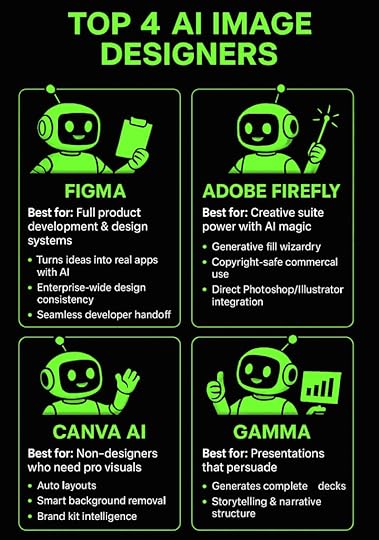
Top 4 AI Image Designers: There’s a Tool for Everything 1. Figma: Complete Product Development Platform
Figma feels like having a crystal ball that shows you the future of design. This isn’t your grandmother’s design tool—it’s a complete product development powerhouse that makes traditional workflows look ancient.
Watch this: You describe an app idea in plain English, and Figma’s AI-powered Make feature turns it into a functional application. Not a mockup. Not a prototype. An actual working app with databases, user authentication, and all the complex stuff that usually requires a development team.
The platform’s design systems work at enterprise scale, meaning your brand stays consistent across thousands of assets. Create once, use everywhere, update instantly across your entire organization. It’s like having a design police force that never sleeps.
What makes Figma absolutely essential:
The collaborative workspace lets entire teams work simultaneously on the same project. Real-time comments, version control, and approval workflows happen automatically. No more endless email chains about font choices.
Seamless developer handoff eliminates the traditional friction between designers and programmers. Developers get exact specifications, code snippets, and assets without endless back-and-forth meetings.
The visual orchestration approach means you literally see your entire design system in real-time, making it simple to identify bottlenecks and optimize processes.
Perfect for: Teams building apps, websites, or any digital product that needs design consistency and developer collaboration.
2. Adobe Firefly: Creative Suite Power
Adobe Firefly brings AI magic directly into the workflow that millions of creatives already know and love. This image design tool doesn’t replace your existing process—it gives it superpowers.
The generative fill feature feels like actual wizardry. Select any part of an image and describe what you want there instead. Need to remove a person from a photo and fill in the background? Done. Want to add a mountain range to a landscape? Just type it.
What makes Adobe Firefly game-changing:
Copyright-safe training data means you can use generated images commercially without legal nightmares. Adobe trained Firefly on their Stock imagery and openly licensed content, so you’re covered.
Creative Suite integration eliminates workflow disruption. Generate assets directly in Photoshop, Illustrator, and other Adobe apps without switching platforms or learning new interfaces.
Professional-grade output quality matches what you’d expect from Adobe’s legendary reputation. These aren’t toy-quality images—they’re production-ready visuals.
Perfect for: Professional designers, marketing teams, and content creators already invested in Adobe’s ecosystem.
3. Canva AI: Design for Everyone
Canva AI is what happens when you take professional design and make it accessible to literally anyone. The Magic Design feature analyzes your content and brand requirements to generate multiple layout options instantly.
Here’s the kicker: The platform understands design principles that most people never learn. Visual hierarchy, color theory, typography rules—Canva AI applies them automatically while you focus on your message.
What makes Canva AI brilliant for non-designers:
Smart background removal works with professional quality on any uploaded photo. Complex selections that would take hours in Photoshop happen in seconds with scary accuracy.
Brand kit intelligence learns your style preferences and suggests colors, fonts, and layouts that match your identity. Every design maintains consistency without you thinking about it.
Template adaptation takes any design and reformats it for different platforms. Social posts become presentations, flyers transform into web banners, all while preserving design integrity.
Perfect for: Small businesses, solopreneurs, and anyone who needs professional visuals without design training or big budgets.
4. Gamma: Presentations That Persuade
Gamma eliminates the most soul-crushing part of presentation creation—starting with a blank slide and staring at it until your eyes bleed.
This design tool understands narrative structure and creates complete presentations that actually tell compelling stories. Describe your topic or paste in an outline, and Gamma generates slides with professional design, logical flow, and compelling visuals.
The AI doesn’t just fill templates—it understands storytelling. It knows when to use comparison slides, when to highlight key points, and how to build toward a conclusion that actually lands.
What sets Gamma apart from everything else:
Intelligent narrative structure means presentations feel thoughtfully planned rather than randomly assembled. The AI acts as both designer and communication strategist.
Complex information breakdown turns dense technical content into digestible slides with appropriate visuals and clear explanations. Your audience actually understands what you’re saying.
Real-time collaboration features let teams work together while the AI continuously optimizes design and content organization. Changes happen instantly across all team members.
Perfect for: Business professionals, consultants, educators, and anyone who needs presentations that actually persuade and inform.
 AI Image Designers FAQ: Your Questions Answered
What’s the difference between AI image designers and traditional graphic design software?
Traditional software is like learning to drive a Formula 1 car when you just need to get to the grocery store. You manually create every element, understand complex design principles, and spend hours on each project. AI image designers generate professional results from simple descriptions, applying design expertise automatically while cutting creation time from hours to minutes.
Can these image design tools create content that looks professional enough for business use?
Absolutely. Modern AI image designers produce quality that makes expensive agencies nervous. Adobe Firefly integrates with Creative Suite for enterprise-grade output, while Canva AI and Gamma create business presentations used by Fortune 500 companies. The technology has crossed the “good enough” threshold and landed in “better than most professionals” territory.
Do I need design skills to use these image designers platforms effectively?
That’s the entire point—you don’t. These tools are built for people who can barely center text in Word but need professional results. The AI handles design principles, color theory, and layout optimization automatically. You focus on your message while the technology handles making it look incredible.
How do AI image designers handle brand consistency across multiple projects?
Smart brand kit features learn your visual identity from uploaded logos, colors, and style preferences. The AI applies these consistently across all designs, suggesting appropriate fonts, layouts, and color schemes that match your brand guidelines automatically. It’s like having a brand manager who never forgets the guidelines.
Are there any limitations to what these image designers tools can create?
While incredibly powerful, AI image designers work best with standard formats like social media graphics, presentations, and marketing materials. Highly specialized design work like complex infographics or custom illustrations might still require human expertise, though that gap is closing faster than a Tesla on autopilot.
Master AI Image Designers for Your BusinessThe image design landscape has fundamentally shifted. Professional-quality visuals are no longer locked behind expensive software and years of training.
AI democratized design, putting enterprise-level capabilities in anyone’s hands. These four platforms—Figma for product development, Adobe Firefly for creative professionals, Canva AI for accessible design, and Gamma for compelling presentations—represent the current leaders in AI-powered visual creation.
The entrepreneurs and businesses leveraging these image designers tools right now will dominate their markets tomorrow. While competitors struggle with traditional design workflows, you’ll create stunning visuals in minutes instead of hours.
But having the right tools is only half the battle. Success comes from knowing how to use them strategically, avoiding costly mistakes, and staying ahead of rapid technological evolution.
The AI revolution waits for no one. Your competition is already moving.
Ready to transform your visual content strategy with AI? Join First Movers R&D AI Labs and get direct access to proven workflows, expert guidance, and a community of entrepreneurs successfully scaling with artificial intelligence. We test the latest image design tools so you don’t waste time on what doesn’t work, and we share exactly what’s driving results right now.
No more second thoughts. No more questioning whether you’re using the right tools or following the best strategies. Just results, community, and the confidence that comes from having Dr. McCoy and the entire First Movers network in your corner.
Join First Movers R&D AI Labs today and turn AI image designers into your unfair competitive advantage.
October 1, 2025
AI Clip Maker: 6 Best Tools for Video & Audio Editing in 2025
The AI clip maker market is absolutely exploding right now. Content creators are drowning in hours of footage, and they need smart tools to fish out the golden moments fast.
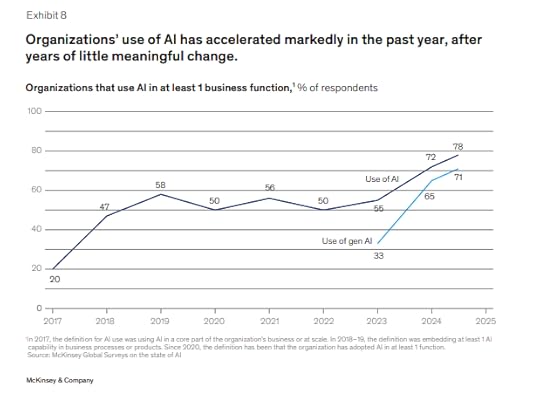
Here’s the thing: 78% of organizations are now using Gen AI according to McKinsey’s latest data. The shift is real, and if you’re still manually scrubbing through video timelines, you’re getting left behind.
This guide covers the 6 best AI clip maker and audio tools that actually work. Here’s what you need to know to turn your long-form content into viral clips without losing your mind.
AI Clip Maker Features: What Makes a Good Tool?Before we dive into the tools, let’s talk about what separates the winners from the wannabes. A solid AI clip maker should handle three things flawlessly:
Smart Content Detection: The AI needs to understand your content, not just randomly chop it up. The best tools understand visual, audio and sentiment cues throughout videos.
Platform Optimization: Your clips need to fit where they’re going. TikTok vertical, YouTube horizontal, Instagram square – good tools handle this automatically.
Audio Quality: Bad audio kills good content. The best AI clip maker tools include audio enhancement that actually works.
AI Clip Maker Tools: Top 6 Picks for 20251. HeyGen – The Digital Avatar Powerhouse
HeyGen feels like the future of video production. Create professional videos with realistic AI avatars speaking in dozens of languages without filming anything. I personally uses HeyGen to create my digital avatar, and the results are genuinely impressive.
Check this out:

What makes it special:
Create custom avatars from your own footageMultilingual speaking capabilities while maintaining facial expressionsProfessional video creation without filmingPerfect for training videos and marketing campaignsThe custom avatar feature is where things get really interesting. Upload videos of yourself, and HeyGen creates an AI version that can speak in any language while maintaining your facial expressions and mannerisms. Companies are using this for multilingual marketing campaigns and training videos.
Best for: Content creators and businesses needing professional video content at scale
2. ElevenLabs – The Voice Cloning Champion
ElevenLabs creates voices so realistic they’re actually a little unsettling. The voice cloning technology can replicate anyone’s voice from just a few minutes of audio samples. For my own work, I pair this with HeyGen to create super realistic videos you can’t tell apart from real footage.
What makes it special:
Voice cloning from minimal audio samplesEmotional range that adjusts based on contextReal-time voice conversion capabilitiesCommercial voice licensing optionsThe emotional range is what sets ElevenLabs apart from other voice tools. The AI doesn’t just read text—it understands context and adjusts tone accordingly. Sad scenes sound genuinely emotional, exciting moments have energy, and conversational content feels natural.
Watch this video and check out how authentic my digital twin’s voice is:
Best for: Audiobook creation, podcast production, YouTube videos, and any content needing consistent narration
3. Opus Clip – The Viral Content Generator
Opus Clip is the lazy content creator’s dream come true. Take one long video and watch it magically transform into dozens of short, viral-ready clips. Hour-long podcasts become 30 different TikTok videos in minutes, each with its own compelling hook and perfect pacing.
What makes it special:
Viral score predictions for each clipAutomatic caption generation with 97% accuracySmart storytelling understandingPlatform-specific optimizationThe viral score feature is genuinely helpful—it predicts which clips have the best chance of taking off on social media. The AI analyzes factors like engagement patterns, hook strength, and content structure to give each clip a score.
Best for: Podcasters, content creators, and anyone repurposing long-form content
4. Descript – The Text-Based Video Editor
Descript changed everything by making video editing as simple as editing a Word document. Delete words from the transcript, and they disappear from the audio or video. It sounds too simple to work well, but it completely changes how you approach content editing.
What makes it special:
Edit video by editing text transcriptsOverdub feature generates missing words in your voiceScreen recording integrationAI handles filler word removal and background noiseThe Overdub feature borders on magical. Record yourself saying something wrong, and Descript can generate the correct words in your own voice. Need to add a sentence you forgot? Type it, and Overdub speaks it in your voice.
Best for: Tutorial creators, podcasters, and anyone who values efficiency in editing
Here’s a quick summary of the 4 best video tools out there: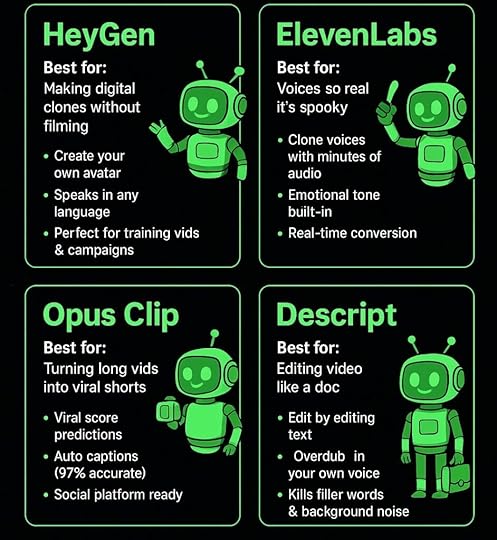 5. Suno – The AI Music Revolution

Want to add music to your video clips?
Suno makes it possible for anyone to generate full songs with vocals and instrumentation from simple text prompts. The platform raised $125 million in 2024, serving millions of users who create everything from viral social media tracks to professional-grade compositions.
What makes it special:
Generate 4-minute complete songs instantlyProfessional production tools in Version 4.5+Commercial usage rights for paid usersGrammy-winning producer Timbaland as strategic advisorThe recent v4 update brings game-changing features including “Remaster” for enhancing older tracks and significantly improved vocal quality that makes AI-generated songs increasingly difficult to distinguish from human performances.
Best for: Content creators needing original music, marketers, and musicians exploring AI composition
6. Udio – The Music Production Democratizer
Udio democratizes music production in ways that seemed impossible just a few years ago. Describe the mood, genre, or style you want, and Udio creates original songs complete with lyrics, melody, and instrumentation.
What makes it special:
Sophisticated lyric generation that makes senseMultiple genre capabilities from hip-hop to orchestralCommercial usage rights includedNatural rhyme schemes and song structureThe lyric generation feature is surprisingly sophisticated. Tell Udio you need a song about overcoming challenges for a motivational video, and it writes lyrics that actually make sense and flow naturally with the melody.
Best for: Content creators needing background music, video producers, and creative professionals
AI Clip Maker Selection: How to Choose the Right ToolStart with your content type: Need talking head videos? Opus Clip excels here. Want custom avatars? HeyGen dominates. Audio-focused content? Descript wins.
Consider your workflow: Do you edit primarily by text? Descript is perfect. Need multilingual content? HeyGen and ElevenLabs are your tools.
Budget matters: Most tools offer free tiers, but professional features usually start around $25/month. Calculate time saved versus cost.
Platform requirements: If you’re heavy on TikTok and Instagram, make sure your AI clip maker handles vertical video optimization well.
AI Clip Maker FAQ: Common Questions AnsweredWhat’s the difference between an AI clip maker and regular video editing?AI clip makers automatically identify interesting moments in your content and create finished clips with minimal input. Regular editing requires you to manually scrub through footage, make cuts, and format everything yourself. The AI approach saves hours but gives you less granular control over every detail.
Can AI clip makers handle different types of content?Most AI clip makers work best with talking-head content like podcasts and interviews. However, tools like Opus Clip are expanding to handle vlogs, gaming content, sports footage, and other video types. The key is matching the tool to your specific content format.
How accurate are AI-generated voices and captions?The technology has gotten scary accurate. ElevenLabs can clone voices from just minutes of audio, while Opus Clip claims over 97% accuracy on captions. You’ll still want to review the output, but the heavy lifting is done automatically.
Do I need technical skills to use these AI clip maker tools?Not at all. That’s the whole point. Most AI clip makers are designed for creators, not video professionals. Upload your content, pick a style, and let the AI handle the technical work. You can always fine-tune the results if needed.
AI CLip Makers: The Bottom LineThe AI clip maker space is moving fast, and these 6 tools represent the current leaders. HeyGen dominates avatar creation, ElevenLabs owns voice cloning, and Opus Clip leads content repurposing.
The key is matching the tool to your workflow. Try the free tiers, see what clicks with how you work, and don’t get stuck manually editing when AI can handle the grunt work.
Content creation is already time-consuming enough. Let AI handle the tedious parts so you can focus on what actually matters – creating stuff people want to watch.
Ready to dive deeper into AI tools that actually move the needle?
Want to know how to integrate them into your business?
Join First Movers R&D AI Labs and get early access to the tools and strategies that are reshaping content creation. We test everything so you don’t have to, and we share what’s working right now.
No fluff, no hype – just real insights from creators who are using AI to build their audiences and businesses.
Join First Movers R&D AI Labs →
Because the future belongs to the creators who adapt first.
September 29, 2025
Business Automation with AI: The Complete Guide to Scaling Your Operations Without Losing Your Sanity
Picture this: You’re working 60-hour weeks, drowning in repetitive tasks. Your competitors seem to effortlessly scale their operations.
The secret isn’t bigger teams or unlimited budgets. They’ve discovered business automation with AI.
The most successful entrepreneurs aren’t working harder—they’re working smarter. They let artificial intelligence handle the routine while they focus on strategy, relationships, and growth.
Why Business Automation with AI Matters More Than EverThe business landscape has fundamentally shifted. Organizations that embrace business automation with AI are scaling faster and reducing costs more dramatically.
Recent McKinsey research reveals that 78% of organizations now use AI in at least one business operation.
The businesses thriving in this new economy aren’t adopting AI tools randomly. They’re systematically automating their operations to create sustainable competitive advantages.
When you implement business automation with AI correctly, you’re not just connecting apps or scheduling posts. You’re creating an intelligent business ecosystem that learns from every interaction.
The difference between successful and struggling businesses increasingly comes down to operational efficiency. While your competitors burn out managing repetitive tasks, you’ll be orchestrating intelligent workflows.
Modern AI automation goes far beyond simple trigger-action sequences. These platforms understand context, handle exceptions, and make sophisticated decisions based on real-time data.
Understanding the Benefits of Business Automation with AIImplementing business automation with AI transforms every aspect of your operations. The benefits create compounding value that grows more valuable over time.
The most immediate impact comes from speed. Automated systems respond to leads, process orders, and handle customer inquiries in seconds rather than hours.
Time savings represent the most obvious benefit, but the deeper value lies in consistency. Human teams have good days and bad days, but AI automation delivers perfect performance every single time.
The financial impact extends beyond labor savings. Automated systems dramatically reduce errors that cost businesses thousands in refunds and corrections.
Business automation with AI also creates scalability that was previously impossible for small businesses. A single automated workflow can handle ten customers or ten thousand customers with identical precision.
Here’s how AI can dramatically help small businesses scale and boost revenue:
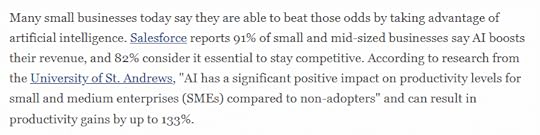
Perhaps most importantly, automation frees your team to focus on high-value activities. Instead of spending hours on data entry, your sales team can build relationships.
Identifying Where Business Automation with AI Fits Your OperationsSuccessfully implementing business automation with AI starts with understanding your current operational ecosystem. You need to identify the highest-impact opportunities for intelligent automation.
Your business operates through two distinct but interconnected environments. Front-of-house tools directly interact with customers, while back-office systems manage data and workflows.
Front-of-house tools include your CRM, email platforms, social media accounts, and website chat systems. These platforms contain valuable data about customer behavior that can trigger automated responses.
Back-office systems encompass your automation platforms, databases, analytics tools, and accounting software. These tools process information and execute workflows behind the scenes.
The magic happens when business automation with AI bridges these environments. A new lead captured on your website can automatically trigger personalized email sequences and update your CRM.
Start by mapping your customer journey from initial contact through purchase. Identify every touchpoint where manual processes create delays or inconsistencies.
Creating Your Business Automation with AI StrategyEffective business automation with AI requires systematic planning rather than random tool adoption. The most successful implementations begin with documented standard operating procedures.
Use AI tools like ChatGPT to help draft comprehensive SOPs for your most time-consuming repetitive tasks. These documents become the blueprint for your automated workflows.
Your SOP should detail every action, decision point, and exception in your current manual process. Include trigger events, required data, communication templates, and follow-up actions.
Once you have clear SOPs, translate them into visual workflow maps using automation platforms. Each step in your documented process becomes a node in your automated workflow.
Business automation with AI works best when you start small and scale systematically. Choose one repetitive task that annoys your team daily, automate it completely, then measure the results.
Consider the technical complexity required for each automation opportunity. Simple data transfers between existing applications require minimal setup, while custom AI decision-making needs more advanced configuration.
Essential Tools for Business Automation with AIThe automation tool landscape offers powerful platforms designed for different business needs and technical capabilities. Here are the most effective tools for implementing business automation with AI:
Make . Visual workflow builder with sophisticated conditional logic serving over 350,000 customers with 2,500+ app integrations.BuildShip. Transforms complex backend automation into manageable visual workflows using natural language prompts for over 100,000 builders worldwide.Zapier. Gold standard for reliable business automation, connecting over 5,000 applications through simple trigger-action workflows with AI-powered suggestions.Microsoft Copilot. Enterprise-grade automation embedded directly into Word, Excel, PowerPoint, Outlook, and Teams with security-first implementation.n8n. Open-source platform offering enterprise-level capabilities with visual workflow builder and unlimited customization for complete infrastructure control.Abacus.AI. Comprehensive AI super assistant offering automation that performs actual tasks and makes decisions beyond simple app connections.Implementing Your First Business Automation with AI WorkflowBegin your automation journey by selecting one high-frequency, low-creativity task. Lead follow-up, email management, or data entry typically offer the best return on initial investment.
Create a detailed map of your chosen process in your automation platform. Each step from your SOP becomes a node in your automated workflow.
Start with simple trigger events like new form submissions or email receipts. These clear starting points make it easy to test your workflow and verify if each step functions correctly.
Test your workflow thoroughly with real data rather than hypothetical scenarios. Run multiple test cases that represent different customer types and potential exceptions.
Business automation with AI works best when it includes human oversight at critical decision points. Build review steps where team members can approve significant actions or handle exceptions.
Monitor your automated workflows closely during the first weeks of operation. Track completion rates, error frequencies, and the quality of automated actions.
Document your successful automation workflows thoroughly. This documentation makes it easier to train new staff and expand automation to additional processes.
Measuring Success and Scaling Your Business Automation with AISuccessful business automation with AI requires ongoing measurement and optimization. Track time savings, error reduction, and cost savings to demonstrate clear ROI.
Calculate the total time your automated workflows save weekly. Compare manual process duration against automated completion time, then multiply by hourly labor costs.
Monitor the quality and consistency of automated outputs compared to manual work. Well-designed automation typically produces more consistent results with fewer errors than manual processes.
Analyze customer satisfaction metrics for processes you’ve automated. Faster response times and consistent communication typically improve customer experience significantly.
As your team becomes comfortable with initial automation workflows, gradually expand to more complex processes. The confidence gained from simple automation success makes it easier to tackle sophisticated workflows.
Scale your business automation with AI systematically by identifying processes that share similar patterns. Workflows with similar structures can often be templated and quickly adapted for different use cases.
6 Steps to Business Automation with AIHere’s a summary of everything we’ve talked about in this blog:
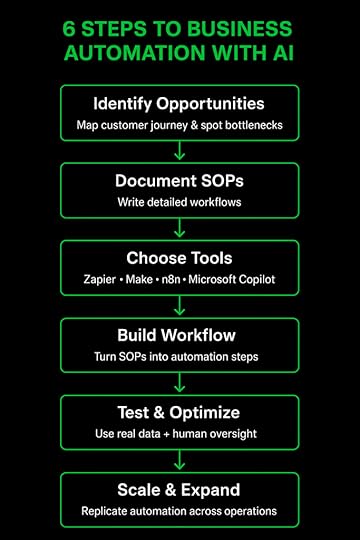 Transform Your Business Operations Starting Today
Business automation with AI isn’t just about efficiency—it’s about creating the operational foundation for sustainable growth. While competitors struggle with manual processes, you’ll have intelligent systems working continuously.
The businesses that implement smart automation strategies today will dominate their markets tomorrow. They’ll deliver superior customer experiences and operate with dramatically lower costs.
Choose one repetitive process that frustrates your team weekly. Commit to automating it completely within the next thirty days.
Focus on proving the concept with measurable results before expanding. Your automated business future starts with a single workflow.
The time you invest learning business automation with AI will compound into thousands of hours saved. The question isn’t whether you can afford to automate—it’s whether you can afford not to.
Frequently Asked QuestionsHow much does it cost to implement business automation with AI in my company?
The costs vary significantly depending on your business size and automation complexity. Simple automation platforms are affordable and perfect for small businesses automating tasks like scheduling or customer follow-ups, typically starting at $20-100 per month. More sophisticated platforms range from $24-200+ monthly. Most businesses see ROI within 30-60 days through time savings alone. Factor in potential training costs and integration setup, but remember that automation can reduce costs by saving employee time spent on repetitive tasks and since AI can operate 24/7, business processes can run continuously without overtime costs.
Will AI automation replace my employees or make jobs obsolete?
Rather than replacing humans entirely, AI automation frees up employees to focus on more strategic work that drives business growth and success. AI takes over repetitive tasks such as data entry, scheduling, and compliance tracking, while humans focus on creative problem-solving, relationship building, and strategic decision-making that requires emotional intelligence and complex reasoning. The future workplace will see humans and AI working together, with automation handling routine tasks and people managing higher-value activities.
What types of business processes are best suited for AI automation?
Look for tasks that follow the same steps every time, like sending welcome emails to new hires or processing standard purchase orders. These are ideal because AI thrives on consistency. The best candidates are processes that are repetitive, happen frequently, take significant time, and involve clear data inputs and outputs. Many workers spend at least a quarter of their work week on manual, repetitive tasks like email, data collection, and data entry. Examples include customer service inquiries, lead qualification, invoice processing, appointment scheduling, and social media posting.
How do I know if my business is ready for AI automation implementation?
A process is ready if it’s repetitive, happens frequently, takes a lot of time, involves data, has clear goals, and works with your current tech systems. Start by identifying your most time-consuming manual processes and documenting them thoroughly. Your business is ready when you have clear standard operating procedures, existing digital tools that can integrate with automation platforms, and team buy-in for change. Start with high-impact, low-effort processes for the best results. You don’t need technical expertise to begin – focus on one repetitive task that annoys your team daily and automate that completely before expanding to more complex workflows.
Ready to Master Business Automation with AI? Join First Movers R&D AI LabsImplementing business automation with AI successfully requires more than just access to tools—it demands strategic guidance, proven frameworks, and a community of entrepreneurs who’ve already transformed their operations.
That’s where First Movers R&D AI Labs becomes your competitive advantage. This isn’t another online course filled with theory—it’s your direct path to automation mastery.
Get personalized guidance from Dr. McCoy (my digital twin) on choosing the right processes to automate first. Access battle-tested automation workflows and templates that members are already using to save 20+ hours per week.
Connect with successful business owners who’ve scaled their operations through intelligent automation. Learn implementation strategies that work while avoiding costly mistakes that derail automation projects.
The entrepreneurs joining First Movers today are building the automated businesses of tomorrow. While others struggle with manual processes and wonder where to start, you’ll have proven systems and expert support accelerating your growth.
Your automated future starts with the right guidance and community. Join First Movers R&D AI Labs and turn business automation with AI into your operational superpower.
September 26, 2025
How to Clone Myself: 4 Easy Steps to Creating a Digital Twin
Picture this: You’re lying in a hospital bed, wondering if your business will survive while you recover. That was my reality in January of 2025.
But what if I told you that during my darkest health crisis, I discovered a technology so powerful it literally saved my business? And gave me my life back?
Learning how to clone myself using AI wasn’t just a cool tech experiment. It became my lifeline. While I was fighting for my health, my digital twin was creating content, engaging my audience, and growing my business.
The crazy part? Some of my cloned videos actually performed better than my original content.
Today, I’m pulling back the curtain on exactly how to clone myself using HeyGen. By the end of this guide, you’ll have your own digital clone ready to revolutionize your content creation strategy.
Trust me, once you see what’s possible, there’s no going back.
How to Clone Myself: What Are AI Avatars and Digital Clones?When people ask me “How do you clone yourself?” I tell them we’re not talking science fiction here. AI avatars and digital clones are basically super smart AI-powered replicas that capture your look, voice, and speaking style.
And I mean with scary-good accuracy.
Think of your digital clone as your most productive employee. One who never gets tired, never calls in sick, and can create unlimited content that sounds exactly like you.
These AI avatars use fancy computer vision technology to analyze your facial expressions. They use natural language processing to understand how you talk. And they use deep learning algorithms to recreate videos so authentic they’ll blow your mind.
The technology has gotten so good that viewers genuinely can’t tell the difference between your clone and the real you.
Here’s proof:

When I first shared cloned content with my audience, the engagement rates actually went up.
People were more engaged, not less. Why? Because the content quality was so consistent and polished.
Your digital clone becomes an extension of your brand. It delivers your message with the same authenticity and personality that you’d bring to every video.
The only difference? Your clone can work 24/7 while you focus on strategy, relationships, and the high-level thinking that only you can provide.
The Benefits of AI Avatars and Digital ClonesLearning how to clone myself transformed every single aspect of my content creation process. Let me break down why this technology is a total game-changer for any serious content creator or business owner.
The scalability factor alone will blow your mind. Before cloning, I could maybe produce one high-quality video per week if I was really pushing myself.
Now? I can generate six videos in three days without even sitting in my studio. That’s a 400% increase in content output with 90% less time investment.
Consistency became my secret weapon. Every video my clone creates maintains the same energy level, speaking pace, and professional quality.
No more worrying about having a bad day affecting my content quality. No more dealing with poor lighting ruining an entire shoot. My clone delivers perfect performance every single time.
The cost savings are honestly incredible. Traditional video production used to cost my so much time and money.
Now I’m paying $24 per month for unlimited content creation potential. Most businesses break even within their first two or three cloned videos.
But here’s what really matters: freedom. Freedom to rest when I need to without my business suffering.
Freedom to take real vacations without worrying about content schedules. Freedom to focus on strategy and relationship building while my clone handles the routine stuff.
The quality surprised everyone, including me. We’re not talking about cheap, obviously fake content here. This is professional-grade material that rivals anything I could produce in my studio.
In fact, my cloned content often outperforms my traditional videos in engagement metrics.
My Journey: Why I Started Learning How to Clone MyselfLet me be completely real with you about why I desperately needed to learn how to clone myself. In January, my world came crashing down.
Multiple hospital visits, misdiagnoses, and months of uncertainty made it painfully clear that my “go-go-go” lifestyle wasn’t sustainable. I was literally running my body into the ground.
As an entrepreneur, the thought of stopping content creation terrified me. My audience depended on consistent value, my business needed constant momentum, and my competitors weren’t taking sick days.
But I physically couldn’t maintain my previous pace without risking my health even more.
That’s when I discovered HeyGen and the possibility of creating a digital version of myself. Initially, I was skeptical.
Would it look fake? Would my audience accept it? Would it damage my brand authenticity?
The results shocked everyone. My first cloned video looked incredibly realistic.
And so did all the others.
Just take a look at this (this is not me, it’s my digital twin!):
My business actually grew during my recovery period. Why? Because I could maintain consistent content output without sacrificing my health.
The transformation was so dramatic that I realized every content creator and business owner needs to understand how to clone themselves. This isn’t about replacing human creativity.
It’s about creating space for it to flourish while technology handles the heavy lifting.
How to Clone Yourself in 4 Simple Steps: A Tutorial Anyone Can FollowReady to create your digital twin? Here’s exactly how to clone yourself using HeyGen, broken down into steps that anyone can follow.
Step 1: Prepare Your Training VideosThe foundation of learning how to clone myself successfully starts with high-quality training footage. Your clone will only be as good as the data you provide.
So this step is absolutely crucial.
You’ll need three to five videos, each lasting two to five minutes. Record in 1080p resolution minimum, though 4K is better if you’ve got it.
Set up professional lighting – a simple ring light works perfectly. Make sure your recording space is quiet with minimal background noise.
Position your camera at eye level and maintain direct eye contact with the lens throughout each video. This creates the natural connection your clone will replicate in every piece of content.
Speak clearly at your normal pace. Don’t rush or go overly slow.
Choose three to five different professional outfits for variety. Avoid busy patterns or big logos, and stick to colors that photograph well under your lighting setup.
Here’s a behind-the-scenes look at my videos on HeyGen:

Notice how my outfits are clean, professional, and attractive?
Remember, your appearance in these training videos becomes your clone’s permanent wardrobe options.
Include natural hand gestures and facial expressions, but avoid repetitive movements that might appear randomly in your cloned content.
Show different emotions and energy levels to give your clone a full range of expressions to work with.
Step 2: Set Up Your HeyGen AccountCreating your HeyGen account is pretty straightforward. But choosing the right plan matters for professional results.
The free plan includes watermarks and limited features, so I recommend starting with the Creator Plan at $24 per month minimum.
Consider this an investment in your business infrastructure, not just a software subscription.
Visit HeyGen.com and complete the signup process. You’ll need to verify your email address and may go through a brief onboarding questionnaire.
The platform is user-friendly, but take time to explore the interface before diving into avatar creation.
Step 3: Create Your Digital AvatarNow for the exciting part – actually bringing your digital clone to life. Navigate to the “Avatars” section in your HeyGen dashboard and select “Create new.”
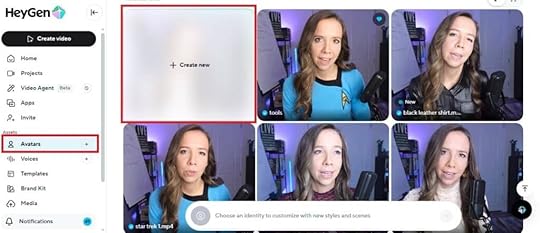
Upload your prepared training videos one by one. HeyGen will analyze each video for quality, lighting, and clarity.
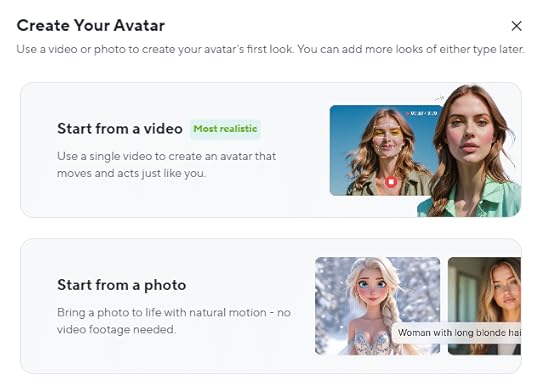
Don’t worry if the platform suggests improvements – you can always refine your clone later with additional training footage.
Follow the steps to creating your digital clone.
Step 4: Generate Your First Cloned VideoOnce your avatar is ready, it’s time to test your new digital twin. Click “Create Video” in the dashboard, then select “Avatars.”

Start with a short test script of thirty to sixty seconds. Write in natural, conversational language exactly as you would speak.

Include your name and some personal details to test how authentically your clone represents you.
Write numbers as words rather than digits – “twenty-five percent” instead of “25%.” Use paragraph breaks to create natural pauses in your clone’s delivery.
Avoid special characters or complex punctuation that might confuse the speech synthesis.
Click “Generate” and wait two to five minutes for processing. Download the result and review it carefully.

Check for natural lip-sync accuracy, realistic facial expressions, smooth body movements, and overall authenticity.
If something looks off, don’t sweat it. You can refine your approach by adjusting your script writing style.
Or create additional training videos to improve your clone’s performance.
Voila!
You’re ready to hand over 90% of the hard work to your digital twin.
How to Clone Myself: Frequently Asked QuestionsCan I really clone myself with AI?Absolutely! Modern AI technology has advanced to the point where you can create incredibly realistic digital versions of yourself.
Using platforms like HeyGen, your digital clone can replicate your appearance, voice, and speaking style so accurately that viewers often can’t tell the difference. It’s honestly mind-blowing.
How much does it cost to clone myself?HeyGen’s pricing starts at $24 per month for the Creator plan, which includes avatar creation and basic features.
How long does it take to create my digital clone?The entire process takes about two to three hours from start to finish. You’ll spend thirty to sixty minutes recording your training videos.
Ten to thirty minutes uploading and setting up your account. Another thirty to ninety minutes for HeyGen to process your avatar.
Once created, generating new videos takes just minutes.
What equipment do I need to clone myself?You need surprisingly little equipment. A smartphone or camera capable of 1080p recording, good lighting like a ring light or natural window light, a quiet recording space, and a tripod for stable footage.
The most important factor is consistent, professional lighting rather than expensive equipment.
Is it legal to clone myself with AI?Yes, creating a digital clone of yourself is completely legal since you own your likeness and are giving explicit consent. However, cloning someone else without permission could raise serious legal issues.
Always ensure you have proper authorization and follow platform terms of service.
Can people tell my videos are made by a digital clone?When done properly with high-quality training data, digital clones are extremely realistic. Many of my viewers couldn’t tell when I switched to cloned content.
However, I recommend being transparent with your audience about AI-generated content. It maintains trust and authenticity in your brand relationships.
Can I use my clone for different types of content?Your digital clone works perfectly for educational content, product demonstrations, company updates, marketing videos, and most forms of business communication. The key is writing scripts in your natural speaking voice.
How realistic will my clone look?The realism depends entirely on the quality of your training videos. With professional lighting, clear 1080p or 4K footage, and natural delivery, your clone can be virtually indistinguishable from traditional video content.
Poor lighting or rushed training footage will result in a less convincing clone.
Can I improve my clone after it’s created?Yes! You can always upload additional training videos to refine your clone’s appearance and behavior.
HeyGen allows you to create multiple “looks” with different outfits or settings. You can continuously improve your avatar’s performance based on the results you’re seeing.
What languages can my clone speak?HeyGen offers multi-language support, allowing your clone to deliver content in various languages. However, the most natural and authentic results come from using the same language as your original training videos.
The system learns your specific speech patterns and accent best this way.
Ready to Clone Yourself? Your Digital Twin AwaitsLearning how to clone myself completely transformed my approach to content creation and business growth. What started as a desperate solution during a health crisis became the most powerful tool in my entrepreneurial toolkit.
Your digital clone isn’t just about creating more content. It’s about reclaiming your time, scaling your expertise, and building a sustainable business that doesn’t depend on your physical presence every single day.
While your competitors are still trading hours for content, you’ll be leveraging technology to amplify your impact exponentially.
Ready to meet your digital twin? Head over to HeyGen, follow this step-by-step tutorial, and prepare to revolutionize your content strategy.
Your future self will thank you for making this decision today.
Transform Your Business with AI IntegrationCreating your digital clone is just the beginning. At First Movers R&D AI Labs, we help small businesses integrate cutting-edge AI technologies into every aspect of their operations.
From content creation and customer service to workflow automation and predictive analytics, our expert team guides you through implementing AI solutions that drive real results.
Whether you’re ready to scale your content like I did or explore other AI opportunities for your business, our First Movers R&D AI Labs community provides the frameworks, tools, and support you need to stay ahead of the curve. Join thousands of forward-thinking entrepreneurs who are building AI-enhanced businesses that thrive in the modern marketplace.
September 24, 2025
AI Tools for Automation: 6 Game-Changing Platforms That Work While You Sleep
AI tools for automation are fundamentally changing how businesses operate, turning time-consuming manual processes into intelligent workflows that run 24/7. The entrepreneurs who master these platforms today are building sustainable competitive advantages while their competitors burn out managing repetitive tasks.
The automation revolution isn’t just about saving time—it’s about scaling human intelligence. These platforms don’t just follow pre-programmed rules; they adapt, learn, and make decisions based on real-time data and context. A single person equipped with the right AI tools for automation can orchestrate operations that previously required entire teams.
What separates today’s automation tools from yesterday’s simple schedulers is their ability to understand nuance, handle exceptions, and integrate seamlessly across multiple platforms. They’re not just connecting apps—they’re creating intelligent business ecosystems that grow smarter with every interaction.
The AI tools for automation we’re covering represent the cutting edge of business intelligence, each designed to eliminate different types of operational friction while amplifying your strategic capabilities.
AI Tools for Automation: How to Choose the Right Platform for Your BusinessThe automation tool market is flooded with options promising to revolutionize your workflow, but most business owners make the same costly error: they automate the wrong processes first. The result? Complex systems that create more problems than they solve and automation fatigue that kills momentum.
The most successful automation implementations start with a clear understanding of your operational pain points and growth bottlenecks, not feature comparisons or flashy demos.
Identify Your Highest-Impact Repetitive Tasks
Before exploring any AI tools for automation, conduct a brutal audit of where your team spends time on tasks a computer could handle better. Are you manually moving leads between systems, spending hours on data entry, or constantly checking multiple platforms for updates? These high-frequency, low-creativity tasks offer the best return on automation investment.
The businesses seeing 10x productivity improvements aren’t automating everything—they’re strategically targeting the 20% of tasks that consume 80% of their time. A sales team drowning in lead qualification will benefit more from intelligent lead scoring than complex email sequences. A content team buried in social media posting needs scheduling automation before advanced analytics.
Match Automation Complexity to Your Technical Comfort Zone
Not every business needs enterprise-grade automation workflows. If you’re running a solo operation or small team, prioritize platforms with visual builders and pre-made templates over those requiring technical configuration. Growing teams might need more sophisticated conditional logic and custom integrations.
Here’s a practical framework for choosing AI tools for automation:
Solopreneur/Small team: Focus on plug-and-play solutions like Zapier or Buffer that connect your existing apps without complex setup.Growing business: Consider platforms like Make or BuildShip that offer visual workflow builders with advanced logic capabilities.Enterprise operations: Evaluate comprehensive solutions like Microsoft Copilot or Abacus.AI that integrate across entire business ecosystems.Technical teams: Explore open-source options like n8n that provide maximum customization and self-hosting capabilities.Evaluate Integration Capabilities With Your Current Stack
The best AI tools for automation work seamlessly with the apps and platforms you already use daily. Before committing to any solution, verify it connects with your CRM, project management tools, communication platforms, and data sources. Automation that requires you to change successful workflows defeats the purpose.
Look for platforms offering native integrations rather than workarounds. A tool that connects directly to your email marketing platform will be more reliable than one requiring third-party bridges or manual data exports.
Consider Scalability and Total Cost of Ownership
Many automation platforms look affordable until you factor in the true cost of implementation and scaling. Evaluate pricing models carefully—some charge per automation, others per task execution, and many have hidden costs for advanced features or higher usage volumes.
Ask these critical questions:
What happens to costs as my business grows and automation usage increases?Are there setup fees, training costs, or consulting requirements?Can I export my workflows if I need to change platforms later?What level of ongoing maintenance and optimization will these systems require?Start Small and Scale Systematically
The most successful automation implementations begin with simple, high-impact workflows before expanding into complex multi-step processes. Choose one repetitive task that annoys your team daily, automate it completely, measure the results, then gradually add more sophisticated workflows.
This approach builds confidence, demonstrates ROI to stakeholders, and helps you understand each platform’s capabilities before making larger commitments. It also prevents the common mistake of creating overly complex systems that break frequently and require constant maintenance.
6 Essential AI Tools for Automation1. Make
Make revolutionizes business process automation through visual workflows that scale intelligently with your growing operations. With over 350,000 customers and 2,500+ app integrations, this platform transforms complex business processes into manageable visual maps you can understand at a glance.
The platform’s strength lies in its sophisticated conditional logic capabilities combined with an intuitive drag-and-drop interface. You can create automation workflows that handle multiple decision points, data transformations, and exception handling without writing code or managing servers.
What sets Make apart is its agentic automation approach—AI agents that adapt and make decisions based on real-time business conditions. Companies like GoJob have achieved 50% increases in yearly revenue by using Make’s automation platform to eliminate bottlenecks and streamline operations across their entire business ecosystem.
2. BuildShip
BuildShip transforms backend automation from a developer nightmare into a visual workflow that anyone can master. Over 100,000 builders worldwide use this platform to create sophisticated automation systems using natural language prompts that generate custom workflows in seconds.
The “Prompt Flow” system lets you combine any AI model, tool, or business logic into production-ready automation without technical expertise. BuildShip’s extensive library of pre-built nodes handles common automation tasks while their AI generates custom solutions for unique business requirements.
The platform includes everything needed for enterprise automation: built-in databases, unlimited cloud storage, secure API key management, and access to over 1 million NPM packages. This comprehensive approach eliminates the complexity of managing multiple services while providing unlimited scalability without surprise costs.
3. Zapier
Zapier remains the gold standard for business automation, connecting over 5,000 applications through simple trigger-action workflows called “Zaps.” The platform’s strength lies in its reliability and extensive integration ecosystem, making it the go-to choice for businesses that need automation to work consistently without technical oversight.
The AI-powered automation suggestions analyze your connected apps and recommend workflows that save significant time once implemented. These intelligent recommendations often reveal automation opportunities that business owners never considered, frequently identifying processes that consume hours of manual work weekly.
Zapier’s multi-step workflows handle complex business processes involving multiple applications and conditional logic. The platform’s filtering and formatting capabilities ensure data moves cleanly between systems, eliminating the data quality issues that plague many automation attempts.
4. Microsoft Copilot
Microsoft Copilot brings enterprise-grade automation directly into the productivity tools millions of businesses use daily. Instead of learning new platforms, you get intelligent automation capabilities embedded in Word, Excel, PowerPoint, Outlook, and Teams.
The AI understands business context and relationships across your entire Microsoft ecosystem. It can automatically summarize email threads, extract action items from meetings, generate reports from spreadsheet data, and suggest document improvements based on your organization’s communication patterns.
What makes Copilot particularly valuable for automation is its security-first approach. Your sensitive business data remains protected while you access cutting-edge AI capabilities that would have required specialized software and extensive security reviews in the past.
5. n8n
n8n appeals to businesses that want complete control over their automation infrastructure without vendor lock-in concerns. This open-source platform provides enterprise-level automation capabilities while allowing self-hosting and unlimited customization possibilities.
The visual workflow builder rivals expensive enterprise tools while offering advanced capabilities like conditional statements, loops, and complex data processing that goes beyond simple trigger-action automation. With over 200 built-in integrations and the ability to create custom nodes, n8n handles virtually any automation scenario.
The self-hosting option provides complete data control and eliminates ongoing subscription costs, making it attractive for businesses with strict security requirements or those wanting to avoid recurring automation expenses as they scale.
6. Abacus.AI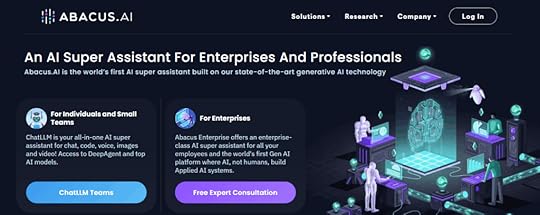
Abacus.AI positions itself as the world’s first AI super assistant, offering enterprise automation that goes far beyond connecting apps. Their “AI Engineer” feature creates custom AI solutions for specific business needs without human intervention, representing the next evolution of business automation.
The platform’s ChatLLM Operator performs actual tasks on computers rather than just processing data, enabling automation scenarios that were impossible with traditional tools. Real-time data visualization and response verification ensure accuracy in mission-critical business processes.
Enterprise features include custom knowledge base integration, complete AI workflow automation, and plug-and-play code snippets that connect multiple data sources seamlessly. For businesses serious about transforming operations through AI, Abacus.AI provides a complete automation operating system rather than just connectivity tools.
Can’t Figure Out How to Implement AI Tools for Automation in Your Business?Successful automation isn’t just about having access to powerful platforms—it’s about strategic implementation, avoiding costly mistakes, and building systems that actually improve your operations instead of creating new complications.
That’s where First Movers R&D AI Labs becomes your competitive advantage.
First Movers isn’t just another online community filled with generic advice. It’s your strategic partner in the automation revolution, specifically designed for business owners who want to implement AI tools for automation without the trial-and-error approach that wastes months and thousands of dollars.
Direct Access to Dr. McCoy – Get personalized guidance for your automation journey. No more guessing about implementation strategies or wondering if you’re automating the right processes first.
Battle-Tested Automation Workflows – Skip months of experimentation with proven automation templates, workflows, and integration strategies you can implement immediately. These aren’t theoretical concepts—they’re working systems already saving our members 20+ hours per week.
Business Owner Community – Connect with other entrepreneurs who are successfully scaling their operations through intelligent automation. Share implementation challenges, discover optimization strategies, and learn about new AI tools for automation before they hit the mainstream.
Strategic Implementation Guidance – Stay ahead of automation trends while avoiding the common mistakes that turn automation projects into expensive failures. We test new tools and strategies so you don’t waste resources on solutions that don’t deliver measurable results.
The business owners who join First Movers today will dominate their markets tomorrow. While competitors struggle with manual processes and automation implementation on their own, you’ll have proven systems, expert guidance, and a community of successful practitioners accelerating your growth.
Frequently Asked QuestionsWhich AI tools for automation should I implement first in my business?
Start with Zapier or Make if you need to connect existing apps and eliminate manual data transfer. Focus on automating one high-frequency, low-creativity task completely before expanding. Most businesses see immediate ROI by automating lead management, email follow-ups, or social media posting first.
How do I know if automation will actually save money for my business?
Calculate the total time your team spends on repetitive tasks weekly, multiply by hourly rates, then compare against automation tool costs. Most AI tools for automation pay for themselves within 30-60 days through time savings alone. Factor in reduced errors, improved consistency, and freed capacity for revenue-generating activities.
Can these automation tools handle complex business processes or just simple tasks?
Modern AI tools for automation excel at complex, multi-step processes involving conditional logic, data transformation, and exception handling. Platforms like Make and BuildShip can automate entire customer onboarding sequences, inventory management workflows, and financial reporting processes that span multiple departments and systems.
What’s the biggest mistake businesses make when implementing automation?
Trying to automate everything at once instead of focusing on high-impact processes first. This creates complex systems that break frequently and overwhelm teams. Start with simple, repetitive tasks that annoy your team daily, perfect those workflows, then gradually expand to more sophisticated automation.
Ready to Transform Your Business Operations?The automation revolution is accelerating, and businesses that implement AI tools for automation strategically will have insurmountable advantages over those stuck managing manual processes. These platforms represent just the beginning of what’s possible when artificial intelligence meets business operations.
Choose one or two tools that address your most pressing operational bottlenecks. Test them with real business processes rather than hypothetical scenarios. Most importantly, focus on mastering simple workflows before attempting complex automation projects.
The future belongs to business owners who can orchestrate intelligent automation while maintaining the strategic vision and customer relationships that drive growth. These tools amplify your operational capacity—they don’t replace your leadership.
Join First Movers R&D AI Labs today and turn AI tools for automation into your operational advantage.
Stop struggling with manual processes and wondering if you’re implementing automation correctly. Get access to proven strategies, expert guidance, and a community of successful business owners who’ve already transformed their operations through intelligent automation.
Your automated business future starts now.
September 22, 2025
AI Tools for Developers: 7 Essential Platforms That Code Faster Than You Think
The development landscape has shifted dramatically. While traditional coding still has its place, AI tools for developers are revolutionizing how we build applications, websites, and digital products. The question isn’t whether you should adopt these tools—it’s which ones will give you the biggest competitive advantage.
These platforms don’t just speed up development. They democratize it. Solo developers can now build what previously required entire teams. Complex backend systems get created with visual workflows. Full-stack applications emerge from simple text descriptions.
The AI tools for developers we’re covering today represent the cutting edge of this transformation. Each one approaches development automation differently, but they all share one goal: turning ideas into working software faster than ever before.
AI Tools for Developers: How to Pick the Best One for YouThe AI development tool landscape is exploding with options, but most developers make the same critical mistake: they choose based on features instead of fit. The result? Tool fatigue, abandoned projects, and the frustrating feeling that AI is overhyped.
Here’s the reality: the best AI development tool isn’t the one with the most impressive demo—it’s the one that amplifies your specific workflow and solves your actual problems.
Start With Your Biggest Time Drain
Before evaluating any AI tools for developers, audit where you spend the most time during development. Are you stuck in design mockup hell, constantly tweaking CSS until 2 AM? Look at visual-first platforms like V0 or 10Web. Do you spend weeks building authentication systems and database schemas for every new project? Lovable or Bubble will transform your productivity.
The developers seeing 10x improvements aren’t using every AI tool available—they’re using the right tool for their specific bottleneck. A backend developer who hates frontend work will get more value from a complete app builder than someone who loves crafting pixel-perfect interfaces.
Match Tool Complexity to Project Stakes
Not every project deserves the same tool. Building a weekend side project? Use something that gets you to market fast, even if the code isn’t perfect. Developing enterprise software that needs to scale to millions of users? You need platforms with robust infrastructure and professional deployment options.
Here’s a framework that actually works:
Proof of concept/MVP: Use natural language platforms like Lovable or V0 that prioritize speed over customizationClient projects: Choose tools with professional output and white-label options like Bubble or 10WebProduction systems: Focus on platforms with enterprise-grade infrastructure, version control, and team collaboration featuresLearning projects: Pick tools that let you examine and modify the generated code so you understand what’s happening under the hoodConsider Your Team’s Technical DNA
AI tools for developers work best when they align with your existing technical preferences and infrastructure. If your team lives in the Google ecosystem, AI tools that integrate seamlessly with Google Cloud and Workspace will have higher adoption rates than standalone platforms requiring new workflows.
Similarly, if you’re already invested in specific frameworks or deployment strategies, choose AI tools that complement rather than replace your existing setup. The goal is enhancement, not disruption of working systems.
Evaluate Long-Term Flexibility
The worst mistake you can make is choosing an AI development tool that locks you into a specific vendor or approach. Look for platforms that let you export code, maintain ownership of your applications, and migrate to different hosting providers if needed.
Ask these questions before committing:
Can I export the generated code if I want to customize it manually?Do I own the applications I build, or am I licensing them from the platform?What happens to my projects if the company shuts down or changes pricing dramatically?Can I integrate this tool’s output with my existing development and deployment workflows?Test With Real Projects, Not Tutorials
Every AI tool for developers looks impressive in carefully crafted demos. The true test comes when you use it for actual work under real constraints and deadlines.
Instead of following tutorials, use your evaluation period to build something you actually need. Try to recreate a project you’ve built before using traditional methods. This gives you direct comparison data on speed, quality, and overall experience.
Pay attention to edge cases and customization requirements. The AI might handle 80% of your needs perfectly, but if the remaining 20% requires painful workarounds, it’s not the right tool for you.
The sweet spot lies in finding AI tools for developers that match your technical comfort zone while pushing your capabilities forward. Start with the platform that solves your most pressing development bottleneck—whether that’s frontend design, backend logic, or deployment complexity.
7 Essential AI Tools for Developers1. Lovable
Lovable transforms development from a technical challenge into a creative conversation. Describe your application concept in everyday language, and watch as it constructs a fully functional web app complete with databases, user authentication, and sophisticated business logic.
This platform excels at understanding the nuances of what you’re trying to build. Tell it you need a project management system with role-based permissions, and it creates exactly that—not a generic template, but a custom solution tailored to your specifications. The AI handles the complex architectural decisions that typically require senior developer expertise.
What sets Lovable apart is how it manages technical complexity behind the scenes. Database schema design, security implementations, and responsive layouts happen automatically while you focus on defining functionality and user experience.
2. V0 by Vercel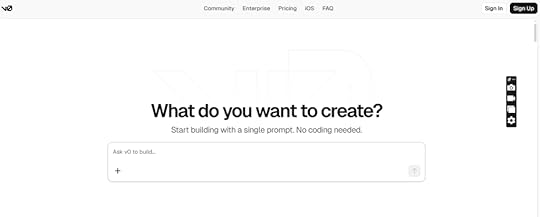
V0 represents the evolution of web development from v0.dev to v0.app, becoming a fully autonomous development agent that researches, plans, and builds complete applications. This isn’t just another code generator—it’s like having a senior developer who works at superhuman speed and never needs sleep.
The platform’s agentic intelligence sets it apart from traditional AI tools for developers. V0 can search the web for inspiration, analyze existing sites, automatically debug errors, and integrate external services without requiring constant prompting or manual intervention.
The one-click deployment to scalable infrastructure eliminates the traditional gap between having an idea and launching it live. V0 handles the technical overhead that usually requires dedicated DevOps resources, making enterprise-quality development accessible to individual creators.
3. Bolt.new
Bolt.new combines cutting-edge AI with browser-based development environments to create full-stack applications without leaving your web browser. The platform gives AI complete control over the entire development lifecycle, from initial code generation to final deployment.
The integration with StackBlitz’s WebContainers technology means generated code executes immediately with no waiting for cloud environments or complex setup procedures. This instant feedback loop accelerates the development process exponentially compared to traditional workflows.
What makes Bolt particularly powerful is its ability to handle batch operations and complex instructions in single prompts. Instead of iterating through multiple conversations, you can describe comprehensive features and watch them come to life in real-time.
4. Bubble
Bubble has evolved beyond simple no-code development to include sophisticated AI features alongside native mobile app capabilities. The platform serves over 3 million builders across 217 countries, proving its scalability and reliability for serious development projects.
The AI-powered development features translate natural language descriptions into working software features, workflows, and user interfaces automatically. This approach makes complex application logic accessible to developers regardless of their coding background.
Enterprise adoption validates Bubble’s production readiness. Companies like Unity have used the platform to create internal tools that reduced ticket resolution times by 40% and increased team productivity by 35%—all developed in just three weeks by small teams.
5. 10Web.io
10Web functions like having a professional development team that works at lightning speed. Describe your business requirements in a few sentences, and the platform generates a complete website with content, images, and functionality tailored to your industry.
The URL recreation feature demonstrates the platform’s sophisticated AI capabilities. Simply provide a website you admire, and 10Web reverse-engineers the design and functionality without copying code, creating an original implementation with similar aesthetics and user experience.
Running on Google Cloud infrastructure ensures fast loading times and robust security. The AI Co-Pilot feature enables conversational modifications—want to update content or restructure sections? Just describe the changes in natural language and watch them happen automatically.
6. Durable.co
Durable delivers on the “30-second website” promise by creating complete business websites with integrated CRM, invoicing, and content management systems. This comprehensive approach goes beyond simple site generation to provide complete business infrastructure.
The AI demonstrates impressive business intelligence by understanding industry-specific requirements. Specify that you’re a dentist, and it automatically includes appointment booking functionality. Identify as a consultant, and it builds in contact forms and service presentation pages.
The built-in business tools eliminate the need for multiple platforms and integrations. You can literally start taking payments the same day you launch, thanks to integrated invoicing and payment processing capabilities that would typically require weeks of setup across various services.
7. Base44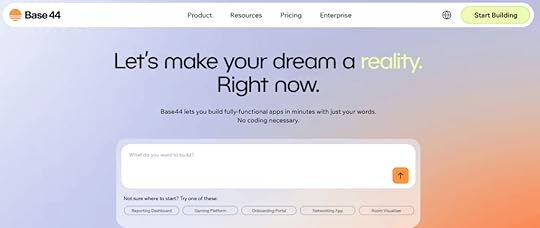
Base44 transforms complex app development into simple conversations with AI, backed by Wix’s massive $80 million acquisition and trusted by over 400,000 developers worldwide. This platform eliminates the traditional headaches of application development by handling authentication, databases, hosting, and deployment automatically in one integrated system.
The comprehensive approach means you go from concept to live application in minutes without configuring external services or managing complex integrations. Starting at just $20 monthly for paid plans, Base44 democratizes professional app creation for productivity tools, business automation systems, and rapid MVP development.
What makes Base44 particularly valuable is its complete ownership model—all applications and content belong entirely to you with no platform restrictions. The built-in integrations handle email, SMS, external APIs, and database queries right out of the box, eliminating setup requirements that typically consume days of development time.
Struggling to Integrate AI Tools for Developers Into Your Workflow?Building a successful development practice with AI isn’t just about having access to the right tools—it’s about knowing how to use them strategically, avoiding costly integration mistakes, and staying current with the rapidly evolving AI development landscape.
That’s where First Movers R&D AI Labs provides unmatched value.
First Movers isn’t another online community making empty promises. It’s your strategic advantage in the AI revolution, specifically designed for professionals who want to leverage AI tools for developers effectively.
Direct Access to Dr. McCoy – Get personalized guidance from Julia McCoy’s clone, available around the clock. No more uncertainty about implementation strategies or wondering if you’re following best practices.
Ready-to-Deploy AI Workflows – Skip months of trial and error with proven development workflows, prompts, and automation systems you can implement immediately. These aren’t theoretical frameworks—they’re battle-tested processes already generating results for our members.
Developer-Focused Community – Connect with other professionals who are successfully scaling their development capabilities with AI. Share implementation challenges, discover optimization techniques, and learn about new AI tools for developers before they hit the mainstream.
Cutting-Edge Strategy Updates – Stay ahead of AI development trends and tool releases. We test new platforms and techniques so you don’t waste time and resources on solutions that don’t deliver. When breakthrough AI development tools emerge, you’ll know about them first and exactly how to leverage them.
The developers who join First Movers today will dominate their markets tomorrow. While others struggle with AI tool integration on their own, you’ll have proven strategies, expert guidance, and a community of successful practitioners accelerating your success.
Frequently Asked QuestionsWhich AI tools for developers should I try first as a beginner?
Start with Lovable or V0 if you want to build complete applications quickly. Both platforms excel at turning ideas into working software without requiring deep coding knowledge. Focus on mastering one tool thoroughly before exploring others—this builds confidence and practical skills faster than jumping between multiple platforms.
Can these AI development tools handle complex, production-ready applications?
Absolutely. Platforms like Bubble power enterprise applications for major companies, while tools like Bolt generate production-grade code using modern frameworks. The key is understanding each tool’s strengths—some excel at rapid prototyping, while others focus on scalable, long-term solutions.
How do AI tools for developers compare to traditional coding in terms of quality?
AI-generated code quality has reached professional standards, especially for common application patterns and business logic. These tools excel at handling routine development tasks, security implementations, and responsive design automatically. For highly specialized or innovative features, traditional coding still offers more control and customization options.
What’s the learning curve like for implementing these AI development tools?
Most AI tools for developers are designed for immediate productivity. You can create functional applications within hours of starting, even without coding experience. The learning curve involves understanding each tool’s strengths and limitations rather than mastering complex syntax or frameworks.
Ready to Transform Your Development Process?The AI development revolution is happening now, and the developers who adapt quickly will have insurmountable advantages over those who hesitate. These AI tools for developers represent just the beginning of what’s possible when artificial intelligence meets software creation.
Start with one or two platforms that align with your immediate needs. Test them with real projects rather than hypothetical scenarios. Most importantly, focus on building practical experience rather than trying to master every available option.
The future belongs to developers who can leverage AI effectively while maintaining the creative vision and problem-solving skills that make great software. These tools amplify your capabilities—they don’t replace your expertise.
Join First Movers R&D AI Labs today and turn AI development tools into your competitive advantage.
Stop questioning whether you’re using the right approach or missing important opportunities. Get access to proven strategies, expert guidance, and a community of successful AI-powered developers who’ll accelerate your success.
Your AI-enhanced development future starts now.
September 17, 2025
AI Tools for Content Creation: 12 Game-Changing Platforms That Will Transform Your Content Strategy
You know that moment when you’re staring at a deadline with nothing but a blinking cursor mocking you?
I’ve been there. We’ve all been there.
But here’s what I’ve learned: The entrepreneurs crushing it in 2025 aren’t the ones grinding 16-hour days. They’re the ones who mastered AI tools for content creation strategically.
The AI content creation market isn’t just growing—it’s exploding. The businesses positioning themselves now will capture the lion’s share of that opportunity.
This isn’t about replacing human creativity. It’s about amplifying it with the right AI tools for content creation in ways that seemed impossible just 24 months ago.
Why Most Content Creators Are Using AI Tools for Content Creation WrongBefore we dive into the tools, let’s address the elephant in the room: most people are using AI tools for content creation like expensive typewriters.
They’re focused on output volume instead of strategic advantage. They’re creating more content but not better business results. They’re missing the real opportunity entirely.
The content creators dominating their industries right now understand something crucial: AI tools for content creation don’t just create content—they compress time, unlock insights, and eliminate the bottlenecks that keep most businesses stuck in reactive mode.
Here’s the shift that changes everything: Stop thinking about AI as a writing assistant. Start thinking about it as your strategic partner for building content systems that work while you sleep.
The 8 Core AI Tools for Content Creation Every Business Needs1. ChatGPT: The Strategic Content Partner
ChatGPT revolutionized how we approach content creation, but most people are using maybe 10% of its capabilities. This isn’t just a chatbot—it’s your research assistant, strategy consultant, and creative partner rolled into one.
What makes ChatGPT indispensable:
Web browsing integration means real-time research and current dataCustom GPT creation allows specialized assistants for specific content typesImage analysis capabilities help you reverse-engineer competitor strategiesCode generation features solve technical content challenges instantlyStrategic application: Upload competitor content and ask ChatGPT to analyze their messaging strategy. Use it to identify content gaps in your industry. Build custom GPTs trained on your brand voice for consistent content across team members.
The free version handles 80% of content needs, but ChatGPT Plus removes limits and unlocks advanced features that serious content creators depend on.
2. Claude: The Long-Form Content Specialist
While ChatGPT gets the headlines, Claude delivers when you need analytical depth and consistent quality across extensive projects. The 200,000 token context window means you can work on comprehensive content without losing context.
Claude’s competitive advantages:
Superior analytical thinking for complex content strategiesConsistent voice maintenance across long-form projectsEthical content guidelines that protect brand reputationDocument processing capabilities that handle extensive research materialsBest applications: Comprehensive guides, strategic content planning, brand voice development, and any project requiring sustained quality across thousands of words.
Claude excels at turning complex research into accessible content while maintaining the nuance that separates professional content from generic AI output.
3. Google Gemini: The Workspace Integration Champion
Gemini’s killer feature isn’t what it generates—it’s where it integrates. If your business runs on Google Workspace, Gemini transforms your existing workflow instead of forcing you to adopt new platforms.
Integration advantages:
Native Google Docs functionality maintains formatting automaticallyGmail intelligence that learns your communication patternsReal-time information access keeps content current and relevantCollaborative features that work across distributed teamsStrategic value: Teams already invested in Google’s ecosystem can implement AI without workflow disruption. The learning curve disappears when AI assistance appears within familiar interfaces.
4. Jasper AI: The Marketing Conversion Machine
Jasper built its reputation understanding one crucial truth: marketing content needs to convert, not just inform. Every template and feature focuses on psychological triggers and conversion optimization.
Marketing-specific strengths:
Brand voice training ensures consistent messaging across campaignsConversion psychology frameworks like AIDA and PAS built into templatesCampaign planning tools that coordinate messaging across multiple channelsSEO integration that balances optimization with persuasive copyImplementation strategy: Train Jasper on your highest-converting content, then use it to scale successful messaging patterns across new campaigns. The brand voice feature alone can eliminate months of brand guideline development.
5. Perplexity AI: The Research Intelligence System
Perplexity transforms content research from hours of tab-juggling into minutes of focused intelligence gathering. This isn’t just search with AI—it’s strategic research that cites authoritative sources.
Research advantages:
Source credibility prioritization builds trust and authorityCitation integration eliminates fact-checking bottlenecksFollow-up questioning explores topics comprehensivelyResearch thread continuity builds knowledge bases over timeContent application: Use Perplexity for industry trend analysis, competitive intelligence gathering, and building authority-based content that establishes thought leadership position.
6. NotebookLM: The Document Intelligence Platform
NotebookLM turns your existing research and documentation into conversational AI that understands your specific business context. This eliminates the generic responses that plague other AI tools.
Unique capabilities:
Document-grounded responses prevent hallucination and maintain accuracyPodcast generation features repurpose written content into audio formatsTeam knowledge bases ensure consistent understanding across organizationsContext preservation maintains relevance to your specific industry and audienceStrategic implementation: Upload industry reports, competitor analysis, and internal documentation to create an AI assistant that speaks your business language fluently.
7. Manus: The Autonomous Content Agent
Manus represents the next evolution: AI that thinks and plans independently rather than just responding to prompts. This autonomous approach handles complex, multi-step content projects without constant supervision.
Autonomous advantages:
Independent task planning breaks complex projects into executable stepsReal-time strategy adaptation adjusts approach based on resultsComplete development environment handles technical implementation alongside content creationMulti-step workflow execution manages entire content campaigns automaticallyFuture-focused application: Perfect for businesses ready to move beyond reactive content creation into proactive, systematic content operations.
8. GenSpark: The Content Research Revolution
GenSpark eliminates the most time-consuming part of content creation: comprehensive research. Instead of multiple browser tabs and scattered notes, you get synthesized intelligence ready for content development.
Research transformation:
Custom Sparkpages provide comprehensive topic briefings instantlyMulti-source synthesis combines authoritative information coherentlyBuilt-in AI copilot handles follow-up questions contextuallyContent marketing focus understands what information supports compelling contentWorkflow integration: Use GenSpark to build research foundations, then feed that intelligence into your content creation tools for faster, more informed content development.
Strategic AI Tools for Content Creation: Specialized Additions9. Copy.ai: The Social Media Conversion Specialist
Copy.ai understands platform psychology. LinkedIn content hits differently than Instagram because the tool recognizes audience context and platform-specific engagement patterns.
10. Grammarly: The Professional Quality Gatekeeper
Beyond grammar checking, Grammarly’s AI analyzes tone consistency and brand voice alignment. Essential for maintaining professional standards across AI-generated content.
11. Surfer SEO: The Search Optimization Intelligence
Surfer analyzes top-ranking content to identify the specific elements that drive search visibility. Data-driven optimization removes guesswork from SEO content strategy.
Canva AI: The Visual Content Accelerator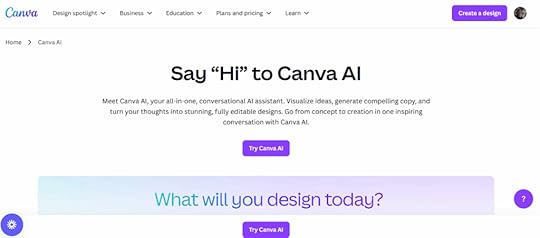
Magic Design features turn non-designers into visual content creators. Professional-quality graphics in minutes, not hours or outsourced projects.
The Strategic Implementation Framework for AI Tools for Content CreationMost businesses fail at AI implementation because they treat tools as isolated solutions instead of integrated systems. Success requires strategic orchestration.
Phase 1: Strategic Foundation: Before touching any AI tool, define your content objectives, audience intelligence, and competitive positioning. AI amplifies strategy—it doesn’t create it.
Phase 2: Tool Selection and Integration: Choose tools that solve your biggest bottlenecks first. Master one completely before adding complexity. Integration beats accumulation every time.
Phase 3: Systematic Content Operations: Build repeatable workflows that leverage each tool’s strengths. Document processes so success becomes scalable rather than dependent on individual expertise.
Phase 4: Continuous Optimization: Monitor performance metrics and adjust tool usage based on actual business results. The best AI content strategies evolve based on data, not assumptions.
The Biggest Mistakes Killing AI Content SuccessMistake #1: Volume Over Value. More content doesn’t equal better results. Focus on strategic content that moves business metrics, not vanity publishing schedules.
Mistake #2: Generic Implementation. Using AI tools without industry context produces generic results. Customize tools for your specific audience, industry, and competitive landscape.
Mistake #3: Set-and-Forget Mentality. AI tools improve with strategic input and feedback. The businesses seeing transformational results treat AI as collaborative partners, not automated solutions.
The Future of AI Content Creation: What’s Coming NextThe next wave isn’t about better individual tools—it’s about intelligent orchestration. AI systems that understand your business strategy and execute content campaigns autonomously while maintaining brand standards and audience connection.
Emerging trends reshaping content:
AI-to-AI optimization where content gets optimized for AI search resultsAutonomous content campaigns that run and optimize without human interventionPredictive content intelligence that identifies trending topics before they explodeReal-time personalization that adapts content based on individual user behaviorFrequently Asked Questions About AI Tools for Content CreationWhat AI tools should I start with as a beginner?Start with just three foundational tools rather than overwhelming yourself with options. ChatGPT handles most writing needs, Canva AI covers visual content creation, and Grammarly ensures professional quality. Master these three completely before adding specialized tools to your workflow.
How much do AI content creation tools actually cost?Many powerful AI tools offer free tiers that handle basic needs. ChatGPT’s free version is surprisingly capable, Canva provides solid design options without cost, and Google Gemini integrates free AI assistance into workspace tools you already use. Paid plans typically range from $10-50 monthly and become worthwhile when tools become essential to daily operations.
Can AI tools really replace human writers?AI tools don’t replace human creativity—they amplify it. The most successful content creators use AI to eliminate time-intensive research and drafting tasks, freeing up mental energy for strategic thinking and creative direction that only humans can provide.
Which AI content tools work best for SEO?Tools like Writesonic and Surfer SEO are specifically designed for search optimization, analyzing top-ranking content to identify elements that drive visibility. However, any AI tool becomes SEO-effective when combined with proper keyword research and strategic content planning.
How do I avoid AI-generated content that sounds robotic?The secret lies in strategic prompting and human editing. Provide AI tools with specific context about your audience, brand voice, and content objectives. Always review and refine AI output to add personality, unique insights, and human perspective that connects with readers.
Are there free AI tools that actually work for content creation?Absolutely. ChatGPT’s free tier, Canva’s design tools, Google Gemini, and Grammarly’s basic version provide genuine value for content creators. The key is understanding their limitations and upgrading strategically when free versions become workflow bottlenecks.
What’s the biggest mistake people make with AI content tools?Treating AI as a content vending machine instead of a collaborative partner. The businesses seeing transformational results spend time training AI tools on their specific needs, providing detailed context, and maintaining human oversight throughout the content creation process.
Ready to Master AI-Powered Content Creation? Join First Movers R&D AI LabsBuilding a successful AI-powered content marketing business isn’t just about having the right tools—it’s about knowing how to use them strategically, avoiding costly mistakes, and staying ahead of the rapidly evolving AI landscape.
First Movers R&D AI Labs isn’t just another online community. It’s your strategic advantage in the AI revolution.
Here’s what makes First Movers different:
Direct Access to Dr. Julia McCoy – Get personalized guidance from someone who’s been building AI-powered content businesses since before it was mainstream. No more second-guessing your strategy or wondering if you’re implementing tools correctly.
Ready-to-Deploy AI Systems – Skip months of trial and error with proven AI assistants, prompts, and workflows that you can implement immediately. These aren’t theoretical frameworks—they’re battle-tested systems generating real results for our members.
Community of AI-Forward Entrepreneurs – Connect with other business owners who are successfully scaling with AI. Share wins, troubleshoot challenges, and discover opportunities together. The collective intelligence in this community is invaluable.
Cutting-Edge Strategy Updates – Stay ahead of AI trends before they hit mainstream adoption. We test new tools and techniques so you don’t waste time and money on what doesn’t work. When breakthrough AI developments happen, you’ll know about them first and exactly how to leverage them.
Implementation Support That Gets Results – Stop wondering “what if” and start seeing measurable outcomes. Our community helps you turn AI knowledge into profitable action, eliminating analysis paralysis and tutorial overwhelm.
The entrepreneurs who join First Movers today will be the ones dominating their markets tomorrow. While others struggle to figure out AI implementation alone, you’ll have proven strategies, expert guidance, and a network of successful practitioners supporting your growth.
The AI revolution waits for no one. Your competition is already moving.
Join First Movers R&D AI Labs today and transform AI tools into your unfair competitive advantage.
No more second-guessing whether you’re using the right strategies. No more wondering if you’re maximizing these powerful tools. Just results, community support, and the confidence that comes from having Dr. McCoy and the entire First Movers network accelerating your success.
Your AI-powered future starts now.
The AI revolution in content creation is happening whether you participate or watch from the sidelines. The question isn’t whether AI will transform content creation—it’s whether you’ll be leading that transformation or struggling to catch up.
Start with the tool that solves your biggest content challenge. Master its strategic application. Then build from there.
Your competitors are either already building AI-powered content systems or they’re about to start. The businesses that move decisively now will establish advantages that become harder to replicate every month.
The future of content creation is intelligent, systematic, and strategic. Make sure you’re part of building it.
September 11, 2025
AI Tools: 32 Super Essential Tools for Content Marketing Automation in 2025
Welcome to the AI gold rush.
This isn’t a metaphor. We’re living through the most significant technological shift since the internet itself, and right now—today—you have the same opportunity that early affiliate marketers had in the early 2000s.
Think about it. Back then, people like Jeremy Schoemaker started in the early 2000s and built legendary systems that generated millions. Pat Flynn began affiliate marketing in 2008 after being laid off and built Smart Passive Income into a multi-million dollar empire. Some affiliates went from $20k to consistently hitting $150k+ per year because they got in early when the barriers were low and the competition was minimal.
Today, those same affiliate marketing opportunities exist but they’re incredibly hard to break into. Why? The market is saturated. Every niche is dominated by established players with massive budgets and teams. The technical barriers are higher. The competition is fierce.
But here’s the thing: AI is creating a brand new playing field.
The numbers don’t lie. The global AI market was valued at $279.22 billion in 2024. The market volume is forecasted to reach $1.91 trillion by 2030.
And here’s the kicker: Just 13% have no AI adoption plans, meaning nearly four out of five organizations are engaging with AI in some form. This is your moment.
The entrepreneurs who embrace AI tools right now—who learn to automate their content marketing, streamline their workflows, and scale their businesses with artificial intelligence—will be the millionaires of tomorrow.
You can create a thriving content marketing business by yourself. You can build websites in minutes instead of hiring expensive developers. You can write compelling blog posts in minutes instead of days. You can create stunning visuals without expensive photographers or designers.
The question isn’t whether AI will transform business. It’s whether you’ll be part of the transformation or watching from the sidelines.
What Are Content Marketing AI Tools?Content marketing AI tools are software applications that use artificial intelligence to automate, enhance, and scale your content creation and marketing processes.
These tools are revolutionizing how solo entrepreneurs and small teams operate. Instead of spending weeks building a website, you can have a professional site live in minutes. Instead of struggling with writer’s block for hours, you can generate high-quality blog posts, social media content, and marketing copy instantly.
Here’s what’s possible with the right AI tools:
Time Savings That Change Everything. Tasks that used to take days now take minutes. A website that would cost $5,000+ to have custom-built can be created in under 10 minutes. Blog posts that took 6-8 hours to research and write can be generated and refined in under an hour.
Professional Results Without the Professional Price Tag. You no longer need to hire specialists for every aspect of your business. AI tools can create professional-grade images, write compelling copy, build functional websites, and even handle customer service interactions.
Scale Like a Team, Work Like a Solo Entrepreneur. One person with the right AI toolkit can produce the same output as a traditional team of 5-10 people. This isn’t hyperbole—it’s happening right now for smart business owners who’ve embraced these technologies.
24/7 Business Operations. AI doesn’t sleep. Your chatbots can handle customer inquiries around the clock. Your content can be automatically optimized for search engines. Your workflows can run continuously without human intervention.
The barrier to entry has never been lower, and the potential for scale has never been higher.
Quick Navigation: 32 AI Tools by CategoryWebsite & Landing Page Builders
10Web.ioDurable.coLovableContent Creation & Writing
ChatGPTClaude ProGemini AdvancedJasper AIPerplexity AINotebookLMVideo & Audio Tools
Opus ClipHeyGenEleven LabsDescriptUdio Music Creation ToolDesign & Visual Creation
Adobe FireflyCanva AIGammaAutomation & Workflows
Zapiern8nGumLoopBusiness Operations
Microsoft CopilotGoogle AI StudioTidio AIDocuAskFathomCursorSEO & Content Optimization
Surfer SEORankMath AIOriginality AISocial Media & Marketing
Buffer AIBrand24Specialized Tools
ChatAidWebsite & Landing Page Builders1. 10Web.io
10Web is like having a professional web developer in your pocket, except this one works at lightning speed and never asks for coffee breaks. You literally just describe your business in a few words, and boom—you’ve got a fully functional site with content, images, and everything.
What blew my mind is how it recreates any website you admire. Just paste a URL and 10Web’s AI reverse-engineers the design without copying a single line of code. It’s like having a design team that can instantly clone any website aesthetic you love.
The platform runs on Google Cloud, which means your site loads fast and stays secure. Plus, the AI Co-Pilot feature lets you chat with the system to make changes. Want to swap out images or rewrite a section? Just ask the AI. It’s web development for the rest of us.
2. Durable.co
Durable takes the “30-second website” promise seriously, and they actually deliver. This isn’t some basic landing page generator—it builds complete business websites with CRM, invoicing, and even writes blog posts for you.
The AI is smart about business types. Tell it you’re a dentist, and it knows you need appointment booking. Say you’re a consultant, and it builds in contact forms and service pages. It’s like the AI actually understands how different businesses operate.
What’s clever is how it handles the business side too. Your website isn’t just pretty—it’s functional. Built-in invoicing means you can literally start taking payments the same day you launch. That’s the kind of integration that saves you months of setup time.
3. Lovable
Lovable feels like magic. You describe an app idea in plain English, and it builds a working web application. Not a prototype or mockup—an actual functioning app with databases, user authentication, and all the complex stuff that usually requires a development team.
People build custom inventory systems, client portals, and even mini-SaaS tools without writing a single line of code. The AI understands business logic in shocking ways. Tell it you need a customer management system with different user roles, and it builds exactly that.
The real game-changer is how it handles the technical complexity behind the scenes. Database design, security, responsive layouts—all automatically handled while you focus on what your app should do, not how to build it.
Content Creation & Writing4. ChatGPT
ChatGPT is the tool that started the AI revolution, and it’s still the Swiss Army knife of content creation. What makes ChatGPT special isn’t just its writing ability—it’s how it thinks through problems and maintains context across long conversations.
The web browsing feature changed everything for content creators. Now ChatGPT can research current events, find statistics, and create content based on the latest information. No more outdated facts or stale references in your content.
Here’s what makes ChatGPT indispensable for content marketers:
Custom GPTs for specialized tasks: Build your own AI assistants trained for specific purposes. I’ve created GPTs for writing content – and it’s great!
Image analysis capabilities: Upload screenshots of competitor content and ChatGPT analyzes their strategy, helping you create better content that stands out.
Code integration: Need to embed something technical in your content? ChatGPT writes the code and explains it in simple terms.
The free version is surprisingly powerful, but ChatGPT Plus removes usage limits and gives you access to the latest models. For heavy content creators, it’s worth every penny.
5. Claude Pro
Claude is the thoughtful, sophisticated cousin of ChatGPT. While other AI tools sometimes feel robotic, Claude writes with nuance and understanding that often surprises me. It’s particularly brilliant for long-form content where you need consistent quality throughout.
The 200,000 token context window is a game-changer for content creators. You can upload entire documents, provide extensive brand guidelines, or work on massive content projects without the AI forgetting what you discussed earlier. I’ve used it to write entire eBooks while maintaining voice consistency throughout.
Claude excels at analysis and critical thinking. Give it a content strategy document, and it won’t just summarize—it’ll identify gaps, suggest improvements, and even predict potential challenges. It’s like having a senior content strategist available 24/7.
The ethical training shows in Claude’s output. It naturally avoids problematic content and provides balanced perspectives on controversial topics, which is crucial for brand safety in content marketing.
6. Google Gemini
Gemini is Google’s answer to ChatGPT, and its killer feature is seamless integration with Google Workspace. If you live in Gmail, Docs, and Drive like most businesses do, Gemini feels like a natural extension of your existing workflow.
Watching Gemini work within Google Docs is impressive. It can analyze your existing content, suggest improvements, and even write new sections that match your established tone. The AI understands your document structure and maintains formatting automatically.
The Gmail integration is particularly clever. Gemini can draft responses that match your writing style by analyzing your previous emails. It even considers the context of email threads and suggests appropriate responses based on the conversation history.
For teams already invested in Google’s ecosystem, Gemini eliminates the friction of switching between tools. Everything happens within the apps you’re already using, making AI assistance feel invisible and natural.
7. Jasper AI
Jasper built its reputation as the AI specifically designed for marketers, and it shows in every feature. This isn’t just another writing tool—it’s a marketing content factory with built-in frameworks and templates that actually understand conversion psychology.
The brand voice feature is where Jasper shines. Train it on your existing content, and it learns your specific tone, style, and messaging. Then it applies this consistently across all content types, from social media posts to long-form sales pages.
Here’s what makes Jasper powerful for marketing teams:
Campaign planning tools: Jasper doesn’t just write individual pieces—it helps plan entire content campaigns with consistent messaging across multiple channels.
Conversion-focused templates: Built-in frameworks like AIDA, PAS, and other proven copywriting formulas ensure your content follows tested conversion patterns.
Team collaboration features: Multiple team members can work within the same brand voice parameters, ensuring consistency even with distributed teams.
The SEO integration helps optimize content for search engines while maintaining readability and conversion focus. It’s particularly valuable for content marketing teams that need to balance SEO requirements with persuasive copywriting.
8. Perplexity AI
Perplexity is what happens when you combine AI writing with real-time research capabilities. Instead of generic content, you get well-researched, fact-checked writing with actual citations. It’s like having a research assistant and writer rolled into one tool.
The follow-up question feature is brilliant for content development. Start with a basic query, and Perplexity suggests related questions that help you explore topics comprehensively. This natural progression often uncovers content angles I wouldn’t have thought of otherwise.
What sets Perplexity apart is source credibility. It doesn’t just pull information from anywhere—it prioritizes authoritative sources and provides clear citations. This is crucial for content that needs to establish trust and authority.
The research threads feature lets you build comprehensive knowledge bases on specific topics. Start researching a subject, and Perplexity maintains the conversation context, building deeper understanding as you ask more questions.
9. NotebookLM
NotebookLM is Google’s experimental tool that turns your documents into conversational AI assistants. Upload your research, brand guidelines, or existing content, and NotebookLM creates an AI that can discuss, analyze, and build upon that specific information.
The podcast generation feature is absolutely wild. Upload documents about your industry or company, and NotebookLM creates realistic podcast-style conversations discussing your content.
What makes NotebookLM special is how it stays grounded in your source material. Unlike general AI tools that might hallucinate facts, NotebookLM only works with the information you provide, ensuring accuracy and relevance to your specific needs.
The collaborative workspace feature is perfect for content teams working with extensive research materials. Everyone can interact with the same knowledge base, ensuring consistent understanding across team members.
Video & Audio AI Tools10. Opus Clip
Opus Clip is the lazy content creator’s dream come true. Take one long video and watch it magically transform into dozens of short, viral-ready clips. I’ve seen hour-long podcasts become 30 different TikTok videos in minutes, each with its own compelling hook and perfect pacing.
The viral score feature is genuinely helpful—it predicts which clips have the best chance of taking off on social media. The AI analyzes factors like engagement patterns, hook strength, and content structure to give each clip a score. It’s like having a social media expert review every piece of content before you post.
What impressed me most is how Opus Clip understands storytelling. It doesn’t just randomly chop up videos—it identifies complete thoughts, dramatic moments, and natural conversation breaks. The AI even adds animated captions and optimizes aspect ratios for different platforms automatically.
11. HeyGen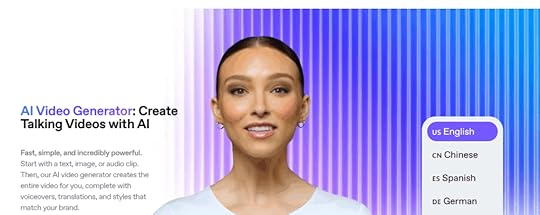
HeyGen feels like the future of video production. Create professional videos with realistic AI avatars speaking in dozens of languages without filming anything. I personally use HeyGen to create my digital avatar, and boy, I have no complaints at all!
Look how realistic “she” looks!

See her in action here:
The custom avatar feature is where things get really interesting. Upload videos of yourself, and HeyGen creates an AI version that can speak in any language while maintaining your facial expressions and mannerisms. Companies are using this for multilingual marketing campaigns and training videos. (I’m using it too, and I love it!)
The platform handles everything that usually requires a video production team. Script writing, avatar selection, voice generation, and even basic editing—all controlled through a simple interface. You can literally create a professional marketing video during your lunch break.
12. ElevenLabs
ElevenLabs creates voices so realistic they’re actually a little unsettling. The voice cloning technology can replicate anyone’s voice from just a few minutes of audio samples. I personally use this with HeyGen to create super realistic videos you can’t tell apart from real videos of me.
The emotional range is what sets ElevenLabs apart from other voice tools. The AI doesn’t just read text—it understands context and adjusts tone accordingly. Sad scenes sound genuinely emotional, exciting moments have energy, and conversational content feels natural.
Here’s what makes ElevenLabs powerful for content creators:
Real-time voice conversion: Change your voice during live streams or calls, opening up creative possibilities for character-based content.
Commercial voice licensing: Access professional voice actors’ voices for your projects without hiring talent.
Multi-language support: Maintain the same voice characteristics across different languages, perfect for global content strategies.
The platform is particularly valuable for audiobook creation, podcast production, YouTube videos, tutorials, courses, and any content that needs consistent, high-quality narration.
13. Descript
Descript revolutionized editing by making it as simple as editing a Word document. Delete words from the transcript, and they disappear from the audio or video. It sounds too simple to work well, but it completely changes how you approach content editing.
The Overdub feature borders on magical. Record yourself saying something wrong, and Descript can generate the correct words in your own voice. Need to add a sentence you forgot? Type it, and Overdub speaks it in your voice. It’s like having a voice actor who sounds exactly like you on standby.
Screen recording integration means you can create tutorial videos, edit them like text documents, and add professional touches without juggling multiple apps. The AI handles filler word removal, background noise reduction, and even automatic subtitle generation.
14. Udio
Udio democratizes music production in ways that seemed impossible just a few years ago. Describe the mood, genre, or style you want, and Udio creates original songs complete with lyrics, melody, and instrumentation. It can generate everything from hip-hop beats to orchestral pieces that sound professionally produced.
The lyric generation feature is surprisingly sophisticated. Tell Udio you need a song about overcoming challenges for a motivational video, and it writes lyrics that actually make sense and flow naturally with the melody. The AI understands rhyme schemes, verse structure, and chorus development.
What’s particularly useful for content creators is how Udio handles commercial usage rights. The music you generate is original and cleared for use in your projects, eliminating the licensing headaches that usually come with background music for videos and podcasts.
Design & Visual Creation15. Adobe Firefly
Adobe Firefly brings AI magic directly into the creative workflow that millions of designers already know and love. What makes Firefly special isn’t just that it generates images—it’s how seamlessly it integrates with Photoshop, Illustrator, and the entire Creative Suite. You’re working on a design and need a specific element? Generate it without leaving your project.
The generative fill feature is genuinely mind-blowing. Select any part of an image and describe what you want there instead. Need to remove a person from a photo and fill in the background? Done. Want to add a mountain range to a landscape? Just type it. The AI fills in the missing pieces so naturally you’ll forget they weren’t there originally.
What I appreciate about Firefly is Adobe’s approach to copyright. The AI is trained on Adobe Stock imagery and openly licensed content, which means you can use generated images commercially without legal worries. That’s peace of mind you can’t get from every AI image generator.
16. Canva AI
Canva AI is what happens when you combine the world’s most user-friendly design platform with seriously smart artificial intelligence. The Magic Design feature analyzes your content and brand requirements to instantly generate multiple professional layout options. It’s like having a graphic designer who works at superhuman speed.
The AI understands design principles that most people never learn. It knows about visual hierarchy, color theory, and typography rules, then applies them automatically. Upload your logo and brand colors once, and every design maintains consistency without you thinking about it.
Here’s what makes Canva AI powerful for non-designers:
Smart background removal: Upload any photo and Canva instantly separates the subject from the background with professional-quality results.
Brand kit intelligence: The AI learns your brand style and suggests colors, fonts, and layouts that match your identity across all designs.
Template adaptation: Take any template and Canva AI adapts it to different formats—social posts become presentations, flyers become web banners, all while maintaining design integrity.
The collaborative features mean entire teams can create on-brand content without needing design training or approval workflows.
17. Gamma
Gamma eliminates the most painful part of presentation creation—starting with a blank slide. Describe your topic or paste in an outline, and Gamma generates a complete presentation with professional design, logical flow, and compelling visuals. It’s like having a presentation designer who actually understands your content.
The AI doesn’t just fill templates—it understands narrative structure. It knows when to use comparison slides, when to highlight key points, and how to build toward a conclusion. The presentations feel thoughtfully planned rather than randomly assembled.
What impressed me most is how Gamma handles complex information. Give it dense technical content, and it breaks it down into digestible slides with appropriate visuals and clear explanations. The AI acts as both designer and communication strategist, making sure your message lands effectively.
The real-time collaboration features let teams work together while the AI continues optimizing design and content organization throughout the process.
Automation & Workflows18. Zapier
Zapier is the OG of automation tools, and for good reason—it just works. Connect over 5,000 apps and watch your repetitive tasks disappear into automated workflows called “Zaps.” I’ve seen businesses save dozens of hours per week by automating everything from lead management to social media posting.
The beauty of Zapier is its simplicity. You don’t need to understand APIs or write code. See a repetitive task? There’s probably a Zap for it. Moving leads from Facebook ads to your CRM, posting Instagram content to multiple platforms, or syncing calendar events with project management tools—Zapier handles it all.
The AI-powered automation suggestions are genuinely helpful. Zapier analyzes your connected apps and recommends workflows you probably didn’t know were possible. These suggestions often reveal automation opportunities that save significant time once implemented.
19. n8n
n8n is for people who want Zapier’s power but with complete control over their automation infrastructure. The open-source approach means you can customize everything, self-host your workflows, and avoid vendor lock-in entirely. It’s automation for the technically minded who value flexibility over convenience.
The visual workflow builder rivals enterprise automation tools while offering unlimited customization possibilities. With over 200 built-in integrations and the ability to create custom nodes, n8n can handle virtually any automation scenario you can imagine.
What makes n8n appealing for power users is its advanced capabilities. Create complex workflows with conditional statements, loops, and data processing that goes beyond simple trigger-action automation. Run it on your own servers for complete data control and unlimited automation without subscription costs. Build integrations with proprietary systems that aren’t available on other platforms.
20. GumLoop
GumLoop is the most underrated automation tool in the market right now. Founded by two Canadian prodigies, this platform combines the visual simplicity of Zapier with the intelligence of modern AI models. It’s like automation tools grew a brain and learned how to think.
What sets GumLoop apart is its AI-powered approach to workflow creation. Instead of just connecting apps, GumLoop can analyze data, make decisions, and adapt workflows based on context. The AI suggestions help identify automation opportunities within your existing processes that you might never have considered.
Teams at Webflow, Instacart, and Shopify are using GumLoop to automate complex workflows that would normally require development teams. The platform’s continuous AI agents can run workflows that monitor data sources and react to changes in real-time, making it perfect for sales automation, research tasks, and administrative workflows.
Business Operations21. Microsoft Copilot
Microsoft Copilot feels like the future arrived quietly and embedded itself into the apps you already use every day. Instead of learning another platform, you get AI superpowers directly in Word, Excel, PowerPoint, and Outlook. Watching it analyze spreadsheet data or generate presentation slides feels like having a genius assistant who never sleeps.
The AI understands business context in ways that genuinely surprise me. It summarizes long email threads, extracts action items from Teams meetings, and suggests document improvements based on your company’s writing style. This isn’t just fancy autocomplete—it’s AI that helps you think through problems.
What makes Copilot particularly valuable is how it maintains security while providing cutting-edge AI capabilities. Your organization’s data stays protected while you get access to tools that would have seemed like science fiction just a few years ago. It’s enterprise AI done right.
22. Google AI Studio
Google AI Studio opens up advanced AI capabilities for businesses that want to build custom solutions instead of being stuck with one-size-fits-all tools. You get access to Google’s language models and the development tools needed to create AI applications tailored to your specific business needs.
The platform bridges the gap between simple consumer AI tools and enterprise-level development. Whether you’re building chatbots, content generation systems, or data analysis applications, AI Studio provides the foundation without requiring a computer science degree.
The prompt engineering tools help fine-tune AI behavior for specific use cases, while API integration lets you embed powerful language models into existing business applications. It’s perfect for companies that need AI solutions but don’t want to build everything from scratch.
23. Tidio
Tidio creates chatbots that customers actually want to talk to instead of immediately demanding to speak with a human. The platform combines live chat with AI automation, so customers get instant answers for simple questions while human agents handle the complex stuff. No more frustrated customers stuck with unhelpful bots.
The AI learns from your business’s specific products, services, and customer interactions. Over time, it gets scary good at understanding what customers really want and providing accurate solutions. The visual chatbot builder lets non-technical people create sophisticated conversation flows without touching code.
Integration with e-commerce platforms and CRM systems means Tidio can access customer information, order history, and product details to provide personalized support. It’s customer service automation that actually improves the customer experience rather than making it worse.
24. DocuAsk
DocuAsk turns your document chaos into a conversational AI assistant that actually knows what it’s talking about. Upload contracts, manuals, research papers, or any text-based documents, and DocuAsk creates an AI that can answer questions about that specific content. It’s like having a research assistant who memorized every document in your business.
Natural language querying eliminates the soul-crushing process of manually searching through documents. Ask complex questions in plain English and get accurate, sourced answers with references to specific sections. Legal firms and consulting companies are using this to transform how they handle information.
The platform works with entire document libraries simultaneously, making it easy to find information across massive collections of files. The AI stays grounded in your source material, so you get accuracy and relevance rather than creative hallucinations.
25. Fathom
Fathom eliminates the most annoying part of meetings—frantically taking notes while trying to participate in the conversation. The AI automatically records, transcribes, and summarizes every meeting while extracting action items and key decisions. Finally, you can focus on the discussion instead of becoming the designated note-taker.
The AI identifies speakers, highlights important moments, and generates follow-up emails based on meeting content. Integration with CRM systems means client meetings get automatically logged with relevant details and next steps, keeping your sales pipeline organized without manual data entry.
What’s most impressive is how Fathom handles context and nuance. It doesn’t just transcribe everything—it understands when decisions are made, action items are assigned, and follow-up meetings are scheduled. The summaries capture actual outcomes rather than just word vomit.
26. Cursor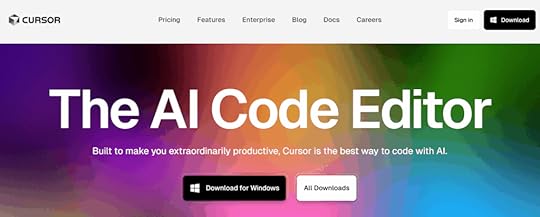
Cursor brings AI assistance directly into coding, making software development accessible to more people while dramatically boosting productivity for experienced developers. The AI understands context across your entire codebase and suggests complete functions, identifies bugs, and explains complex code in plain English.
The platform goes beyond simple code completion with intelligent refactoring suggestions, automated testing generation, and real-time optimization that improves performance. Cursor adapts to your specific project requirements and coding style, becoming more helpful the more you use it.
Even if you’re not a developer, Cursor helps with technical content creation. Need code examples in blog posts or technical documentation? Cursor writes the code and explains it in terms that non-technical audiences can understand.
SEO & Content Optimization27. Surfer AI
Surfer AI is like having a data scientist reverse-engineer Google’s ranking algorithm for your specific keyword. The platform analyzes top-performing pages and examines hundreds of ranking factors to create data-driven optimization recommendations that actually work.
The real-time feedback system shows exactly how your content compares to top-ranking competitors as you write. This eliminates the guesswork from SEO content creation and provides clear guidance for improvement. The visual editor makes optimization accessible even if you don’t speak SEO fluently.
Surfer’s strength lies in identifying the specific elements that search engines favor for particular keywords. Instead of following generic SEO advice that may or may not apply to your niche, you get precise recommendations based on what’s actually working in your market right now.
28. Rank Math Content AI
Rank Math Content AI is the secret weapon that WordPress content creators have been waiting for, and honestly, it’s criminally underrated. This isn’t just another AI writing tool—it’s 40+ AI-powered features built directly into your WordPress editor that turn SEO optimization from a tedious chore into something that happens automatically as you write.
The magic happens when you type “//” in any WordPress editor. Instantly, you get access to an AI assistant that doesn’t just write content—it writes SEO-optimized content based on real competitor analysis. The AI researches your target keywords, analyzes what’s ranking on page one, and tells you exactly what to include in your content to outrank the competition.
What sets Rank Math AI apart from standalone tools like Jasper or ChatGPT is its deep integration with actual SEO data. While other tools generate generic content, Rank Math AI generates content specifically designed to rank higher in search engines. It suggests related keywords, creates FAQ sections with proper schema markup, and even generates meta titles and descriptions that are optimized for click-through rates.
The bulk editing features are where this tool becomes absolutely essential for content teams. Need to write meta descriptions for 500 blog posts? Rank Math AI can do it in minutes. Want to optimize all your old content for new keywords? The AI analyzes each post and suggests improvements based on current search trends.
29. Originality AI
Originality AI serves as quality control for the AI content revolution, and honestly, it’s become essential as AI-generated text floods the internet. The platform helps maintain content authenticity and avoid potential search engine penalties that may target obviously artificial content. The detection capabilities update continuously to identify content from the latest AI models.
The detailed reports show which sections may have been AI-generated and offer suggestions for improvement. This makes it invaluable for content teams working with freelancers, agencies managing multiple writers, or businesses that want to ensure published content maintains human authenticity while leveraging AI for efficiency.
Beyond simple detection, Originality AI helps maintain editorial standards across large content operations. The plagiarism checking ensures originality while the AI detection helps balance automation with human creativity. It’s like having a quality assurance team built into your content workflow.
Social Media & Marketing30. Buffer AI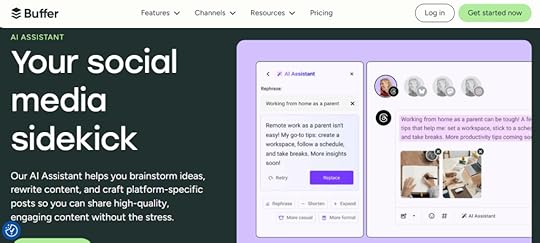
Buffer AI transforms social media management from a time-consuming chore into an intelligent, automated system. The AI analyzes your audience’s behavior patterns to recommend optimal posting times, suggest hashtags that actually drive engagement, and propose content formats that perform best for your specific followers.
The platform’s AI assistant can repurpose long-form content into social media posts automatically, creating variations optimized for different platforms. Blog posts become Twitter threads, YouTube videos transform into Instagram carousel posts, and podcasts turn into LinkedIn articles—all with platform-specific optimization.
Buffer’s analytics provide insights into which content types generate the most engagement, allowing you to refine your strategy based on actual performance data. The AI learns from your results and continuously improves its recommendations, making your social media strategy smarter over time.
31. Brand24
Brand24 uses AI to monitor mentions of your brand, competitors, or industry keywords across social media platforms, news sites, blogs, forums, and other online venues. It’s like having a digital listening post that never sleeps, applying sentiment analysis to determine whether mentions are positive, negative, or neutral.
The AI goes beyond simple keyword matching by understanding context and identifying relevant conversations even when your brand isn’t explicitly mentioned. This helps track industry discussions, competitor activities, and market trends that inform strategic decision-making and competitive positioning.
Brand24 identifies influencers and brand advocates within your industry, opening opportunities for partnerships and collaborations. The real-time monitoring capabilities help maintain brand reputation while discovering emerging trends and customer concerns before they become major issues.
Specialized Tools32. ChatAid
ChatAid specializes in creating AI chatbots that customers actually enjoy talking to instead of immediately demanding human agents. Unlike basic chatbots that rely on keyword matching, ChatAid’s AI understands context, remembers conversation history, and handles multi-step problem resolution like a human would.
The system learns from each customer interaction, continuously improving its ability to provide accurate and helpful responses. The visual chatbot builder lets non-technical people create sophisticated conversation flows that feel natural and helpful rather than robotic and frustrating.
Integration capabilities mean ChatAid can access your knowledge base, product information, and customer history to provide personalized support experiences. The platform supports multiple channels including website chat, social media messaging, and email support, creating consistent experiences across all touchpoints.
Your AI-Powered Future Starts NowThe AI revolution isn’t coming—it’s here.
While others hesitate and make excuses, you have the opportunity to join the new wave of AI-powered entrepreneurs. The ones who will look back in 10 years as the smart money that got in early.
Remember what we talked about at the beginning? The affiliate marketers who started in the early 2000s built legendary systems worth millions. Today’s AI market is growing annually and will reach $1 trillion by 2030. The opportunity is massive and it’s happening right now.
These 32 AI tools represent the foundation of modern content marketing automation. From website creation and content writing to social media management and customer service, artificial intelligence is transforming every aspect of how we build and scale businesses.
Ready to Master AI for Your Business?Building a successful AI-powered content marketing business isn’t just about having the right tools—it’s about knowing how to use them strategically, avoiding costly mistakes, and staying ahead of the rapidly evolving AI landscape.
That’s where First Movers R&D Labs comes in.
First Movers isn’t just another online community. It’s your strategic advantage in the AI revolution. Here’s what makes us different:
Direct Access to Dr. Julia McCoy – Get personalized guidance from someone who’s been building AI-powered content businesses since before it was trendy. No more second-guessing your strategy or wondering if you’re doing it right.
Ready-to-Deploy AI Bots – Skip months of trial and error. Get proven AI assistants, prompts, and workflows that you can implement immediately in your business. These aren’t theoretical frameworks—they’re battle-tested systems that are already generating results for our members.
Community of Like-Minded Entrepreneurs – Connect with other business owners who are successfully scaling with AI. Share wins, troubleshoot challenges, and discover new opportunities together. The collective knowledge in this community is worth more than any course you could buy.
Cutting-Edge Strategies – Stay ahead of AI trends and updates before they hit the mainstream. We test new tools and techniques so you don’t have to waste time and money on what doesn’t work. When a new AI breakthrough happens, you’ll know about it first and exactly how to leverage it.
Implementation Support – Stop wondering “what if” and start seeing results. Our community helps you turn AI knowledge into profitable action. No more analysis paralysis or getting stuck in tutorial hell.
The entrepreneurs who join First Movers today will be the ones dominating their markets tomorrow. While others struggle to figure out AI on their own, you’ll have a proven roadmap, expert guidance, and a community of successful practitioners supporting your success.
The AI revolution waits for no one. Your competition is already moving.
Join First Movers R&D AI Labs today and turn AI into your unfair advantage.
No more second thoughts. No more questioning whether you’re using the right tools or following the best strategies. Just results, community, and the confidence that comes from having Dr. McCoy and the entire First Movers network in your corner.
Your AI-powered future starts now.
AI Tools FAQsWhich AI Tools Should I Start With as a Beginner?Start with just three tools: ChatGPT for writing, Canva AI for design, and Zapier for automation. Don’t try to use 15 tools on day one—you’ll burn out fast.
ChatGPT handles 80% of your content needs, even the free version. Use it for brainstorming, social posts, and blog drafts. Add Canva AI for graphics and presentations using their Magic Design feature. Finally, Zapier connects your tools together—start by automating simple tasks like adding email subscribers to your CRM.
Master these three before adding specialized tools. Most beginners fail because they try everything at once instead of building competency gradually.
Are Free AI Tools Actually Good Enough for Business Use?Yes, but with limitations you need to understand. Free versions are perfect for testing workflows and proving value before investing money. ChatGPT’s free tier is legitimately powerful for content creation, but you’ll hit usage limits. Canva’s free plan creates solid designs but adds watermarks.
My strategy: start free, then upgrade the tools that become essential to daily operations. This way you make informed investment decisions rather than paying for unused features.
Free tools work great for limited use cases. If you only remove backgrounds from a few images monthly, Canva’s free version is perfect. But daily use justifies the upgrade.
How Do I Choose Between Similar AI Tools?Use my three-factor framework: workflow integration, specific features that matter to YOUR use case, and scalability.
Integration matters most. If you live in Google Workspace, Gemini beats ChatGPT despite minor feature differences. Switching between tools creates friction that outweighs advantages.
For features, focus on what you actually need. Perplexity’s citations make it better for research than ChatGPT. Claude’s 200K token limit beats ChatGPT for long documents.
Skip comparison charts—use free trials with real projects. Test your actual workflows to see which tool handles them better. That practical experience beats reading reviews.
September 4, 2025
How to Future-Proof Your AI Career: The No-BS Guide to Thriving (Not Just Surviving) in 2025
Let’s talk about your AI career.
You know that sinking feeling when you see another headline about AI “replacing jobs”?
I get it. But here’s what those clickbait articles won’t tell you: while AI is reshaping the job market, it’s creating incredible opportunities for those who know how to position themselves correctly.
The Brutal Truth About an AI Career?Stanford’s Digital Economy Lab just dropped some eye-opening data: employment for entry-level workers (ages 22-25) in AI-exposed roles has plummeted 13% since late 2022. Meanwhile, overall employment stayed steady. Translation: AI isn’t killing all jobs—it’s being incredibly selective about which ones disappear.
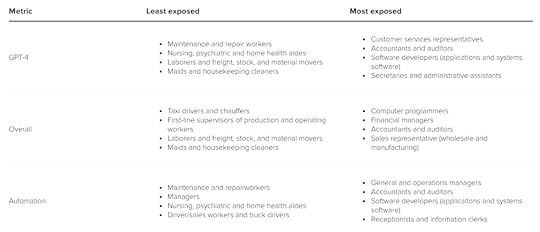
But here’s the plot twist that should get you excited: young professionals with AI skills are commanding salaries between $190K-$260K according to the Wall Street Journal. Entry-level AI roles saw a 12% salary bump from 2024 to 2025 alone.
The message is crystal clear: AI literacy has become career currency. The Washington Post reports that employers now actively hunt for “AI literacy” in both technical and non-technical roles. It’s not about having a computer science degree—it’s about adaptability, curiosity, and knowing how to leverage AI tools.
So here’s my question for you: Are you going to be part of the 13% watching from the sidelines, or the elite group cashing in on the AI boom?
The Great AI Career Divide: Which Side Are You On?Let’s cut through the noise and look at what’s actually happening in the job market.
The Reality Check: Some Jobs Are Disappearing FastStanford’s research isn’t just academic—it’s a warning shot. Entry-level positions that involve repetitive tasks, basic data processing, or simple customer service interactions are vanishing. But notice what’s NOT disappearing: jobs that require human judgment, creativity, and strategic thinking.
AI Literacy = Your New SuperpowerThe Times of India nailed it in their September 2025 headline: “AI literacy is the new career currency.” This isn’t about becoming a machine learning engineer (though that’s great if you want to). It’s about understanding how to use AI tools to amplify your existing skills.
Think about it: Would you rather be the marketing professional who manually creates content, or the one who uses AI to generate initial drafts, then applies human creativity to refine and strategize? The second person is 5x more productive and infinitely more valuable.
The Skills-Based Hiring RevolutionHere’s something that should excite everyone reading this: companies have stopped caring about your degree and started obsessing over what you can actually do. Your GitHub portfolio, case studies, and demonstrated problem-solving abilities now matter more than where you went to school.
This levels the playing field in ways we’ve never seen before.
The Four Pillars of an AI-Proof CareerPillar 1: Master AI Tools (But Stay Human-Centered)Start with the basics everyone can learn:
ChatGPT and Claude for writing, research, and problem-solvingMidjourney or DALL-E for visual contentNotion AI or Jasper for productivityGitHub Copilot for code assistance (even if you’re not a programmer)Then level up based on your field:
Marketers: Learn Canva AI, Copy.ai, or PersadoDesigners: Master Figma AI plugins or Adobe FireflyAnalysts: Explore AutoML platforms or Tableau AIThe goal isn’t to replace your skills—it’s to supercharge them.
Pillar 2: Double Down on Uniquely Human StrengthsThe World Economic Forum’s latest data shows something fascinating: while AI skill adoption on LinkedIn soared 177%, hiring managers still prioritize candidates who combine AI fluency with strong human skills.
Your human advantages:
Creative problem-solving: AI generates options; humans choose the right oneEmotional intelligence: Leading teams through AI transformation requires serious people skillsStrategic thinking: Understanding when and how to apply AI solutionsEthical judgment: Knowing when AI recommendations might be biased or inappropriatePillar 3: Become a Bridge BuilderThe most valuable professionals in 2025 are those who can translate between AI capabilities and business needs. This means:
Understanding your industry deeply AND knowing how AI can transform itBeing able to explain AI concepts to non-technical stakeholdersIdentifying opportunities where AI can solve real problems (not just cool demos)Managing AI implementation projects from concept to completionPillar 4: Build Your “Show, Don’t Tell” PortfolioSkills-based hiring means you need proof, not promises. Here’s how to build undeniable credibility:
For Everyone:
Document AI projects on LinkedIn (even small ones)Share before/after examples of AI-enhanced workWrite case studies about problems you’ve solvedCreate content that teaches others what you’ve learnedFor Technical Folks:
Maintain an active GitHub with clear README filesContribute to open-source AI projectsParticipate in Kaggle competitionsBuild and deploy actual applications people can useYour 90-Day AI Career SprintFeeling overwhelmed? Don’t be. Here’s how to start building your AI-proof career in the next three months:
Month 1: AI Literacy BootcampWeek 1: Master ChatGPT or Claude for your specific roleWeek 2: Learn one AI tool relevant to your industryWeek 3: Complete your first AI-assisted projectWeek 4: Share your results and lessons learned publiclyMonth 2: Skill BuildingWeek 5-6: Take a focused course (I recommend First Movers AI Comms Course, found inside First Movers R&D AI Labs) Week 7-8: Build a more complex project that showcases your growing skillsMonth 3: Network and ShowcaseWeek 9-10: Join AI communities and engage with other professionalsWeek 11-12: Create content about your AI journey and career insightsThe Mistakes That’ll Kill Your AI Career (Avoid These!)Mistake #1: Thinking AI is just for techies. Every role will be AI-enhanced within five years. Marketing, sales, HR, finance—if you work with information, you need AI literacy.
Mistake #2: Ignoring the human element. Pure technical skills aren’t enough. The professionals commanding those $200K+ salaries combine AI expertise with business acumen and leadership abilities.
Mistake #3: Waiting for permission. Your company might not have an AI strategy yet, but that doesn’t mean you can’t start learning. The professionals getting promoted are those who bring AI solutions to their current roles.
Mistake #4: Focusing only on tools. Tools change constantly. Focus on understanding AI principles, staying curious, and developing the ability to quickly learn new platforms.
The Bottom Line: Your AI Career Action PlanThe AI revolution isn’t slowing down. In fact, it’s accelerating. The question isn’t whether your career will be impacted—it’s whether you’ll be displaced or empowered.
Here’s what you need to do this week:
Pick one AI tool relevant to your current role and spend 30 minutes learning it.Identify one task you do regularly that could be enhanced with AI.Complete that task using AI assistance and document the process.Share your experience on LinkedIn with the hashtag #AICareer.Remember this: The professionals who thrive in the AI age aren’t necessarily the smartest or most technical. They’re the most adaptable, curious, and willing to learn.
The window of opportunity is wide open right now. In five years, AI literacy will be table stakes—everyone will have it. But today? Today, it’s your competitive advantage.
So, what are you waiting for? Your AI-proof career starts with the next decision you make.
Are you ready to future-proof your career, or are you going to let AI reshape it without you?
The choice is yours. But choose quickly—because while you’re thinking, someone else is already building their AI-powered future.
Need help?
We’ve built a whole community around AI literacy, skills, and implementation.
That’s First Movers R&D AI Labs.