
Darcy Pattison's Blog, page 3
April 4, 2018
Your Writing Career: How to Have a Long, Memorable One

-45%
Ready Player One: A Novel
Price: $8.79
Was: $16.00
Do you ever think about your writing career? This week, I finished listening to the novel, READY PLAYER ONE. I know, I’m slow. The movie was released last week, and I’m just reading it.
Let me just say, I’m not a gamer. Adults spending hours on gaming puzzles me. But this story was an interesting romp through the historical games that have claimed the hearts of so many. It moves along at a great pace. I did think the ending was ironic: Wade, the main character, realizes he needs to shut down the game and spend more time in real life.
Building a Writing Career
Among the comments I read about the movie, though, one stood out. A reviewer remarked that it was amazing the 71-year-old Steven Spielberg could still be putting out relevant movies. Any time I hear a comment like that it reminds me to look at my own career and see if there are lessons to learn.
. Wow!
How to Have a Long Writing Career
Longevity. In order to keep producing, Spielberg can’t rest on his laurels for any one film. There are always new films to work on. It’s the same for writers. We need to produce books. If you’re traditionally published, it’s harder because you must get editors/publishers on your side. As an indie published, I can put out books that I believe in whenever I want. My output has increased greatly the last five years, and I’m loving it. Because volume of work is important.

-43%
Art & Fear: Observations On the Perils (and Rewards) of Artmaking
Price: $7.36
Was: $12.95
One of my favorite books about the writing life is ART AND FEAR: Observations on the Perils (And Rewards) of ARTMAKING. Here’s what they say about producing a volume of work:
“The ceramics teacher announced on opening day that he was dividing the class into two groups. All those on the left side of the studio, he said, would be graded solely on the quantity of work they produced, all those on the right solely on its quality.
His procedure was simple: on the final day of class he would bring in his bathroom scales and weigh the work of the ‘quantity’ group: 50 pounds of pots rated an ‘A’, 40 pounds a ‘B’, and so on. Those being graded on “quality”, however, needed to produce only one pot — albeit a perfect one — to get an ‘A’.
Well, came grading time and a curious fact emerged: the works of highest quality were all produced by the group being graded for quantity.
It seems that while the ‘quantity’ group was busily churning out piles of work-and learning from their mistakes — the ‘quality’ group had sat theorizing about perfection, and in the end had little more to show for their efforts than grandiose theories and a pile of dead clay.”
― David Bayles and Ted Orland
Lesson: Write. A lot. Write even more. Yes, write even more. If you’re lucky enough to be an indie publisher also, publish with the same passion and work for a large output.
We don’t love every movie that Spielberg directed, produced or wrote. But he has enough volume that it’s likely you love at least one of his films.
How to Have a Memorable Career
Besides writing lots of books, a memorable career depends on those break-out novels or picture books. You know what? Those are the scary ones to write.
But doing back to the first point, volume makes it easier to take a risk.
Let’s say that your career will consist of only 5 books in your lifetime. Then your chances of breaking out, of hitting the audience with a powerful book–it all rests on five titles.
If, however, you write and publish 100 books, the pressure is off any particular book. What if you LOVE a topic and want to write about it, but when you publish that book, it flops? Well, it’s not the end of the world, because you have 99 other chances. Writing lots of stories encourages risk and creativity.
In the end, being memorable isn’t really up to you. It’s up to the readers. The best you can do is to tell your stories, your way. And to tell lots of stories. Along the way, there may be that one or two special stories that become classics.
Want a long, memorable writing career? Write! A lot!
The post Your Writing Career: How to Have a Long, Memorable One appeared first on Fiction Notes.


March 28, 2018
Writers Beware!
In the world of self-publishing, it’s writers beware!
Publishing a book is a business. That means money changes hands and whenever money is involved, there’s always a chance of fraud. The best defense for writers it to arm yourself with knowledge about what is and isn’t typical for a certain transaction.
Agents
Agents are hired by you to represent your manuscript to publishers, to help you negotiate a favorable contract, and often to help you plan and execute your career plans. It’s a crazy world when the employee chooses you, instead of the other way around, but that’s the story of supply and demand. Today, there are too few agents to go around and they get to choose which authors to work for. However, make no mistake: they work for you, not the other way around. Reputable agents are members of the Association of author Representatives and abide by their Canon of Ethics. Basically, they don’t get paid until they sell something for you. Never pay an agent to shop a manuscript to a publisher.
Publishers
Traditional publishers. A publisher pays you an agreed upon price to license your copyright for an agreed upon term to publish the book as agreed upon. That’s lots of “agreed upon” because contracts can vary widely. The big thing here is that a reputable publisher PAYS YOU.
Hybrid publishers. According to the Independent Book Publisher’s Assocation (IBPA), “hybrid publishers behave just like traditional publishers in all respects, except when it comes to business model. Hybrid publishers use an author-subsidized business model, as opposed to financing all costs themselves, and in exchange return a higher-than-industry-standard share of sales proceeds to the author. In other words, a hybrid publisher makes income from a combination of publishing services and book sales.” In February, the IBPA published a list of criteria to be considered a quality hybrid publisher.
Vanity publishers. However, in today’s world when self-publishing is common, there are some companies who will help you publish your book for an agreed upon fee. These companies come with a wide variety of skill-sets and the quality of the services will vary widely. I’ve seen some awful results and some acceptable results. If you choose this route, be careful about putting money on the line until you’ve seen their work. Ask for sample books, peruse their website and order a couple books. It will save you money in the long run.
Red flags. I would be worried if a publisher did any of these practices:
Requires you to buy books or services such as marketing as a condition of publishing.
Asks for no revisions on your story, in other words, does little or no editing.
Most of their revenue comes from author services.
Consult Writers Beware from SFWA
The Science Fiction and Fantasy Writers of America maintains a “Writer Beware” listing of agents and publishers who are not recommended. Before you make any publishing decision, check out their materials.
In general, keep in mind that money flows TO an author, not AWAY from the author. Your work is a valuable asset and you should treat it as that.
Sure, it’s frustrating to submit your story and have it rejected over and over. Part of that is the process of learning your craft. If you decide to self publish, as I have, then be sure you know the standards of quality in your field and meet or exceed them.
The saddest thing is for an author to give someone control of their story and to wind up with a sad, inferior quality book. Don’t let that happen to you! Beware!
The post Writers Beware! appeared first on Fiction Notes.
February 28, 2018
Finding Time to Write
NOW AVAILABLE!
a href="https://mimshouse.teachable.com/p/how...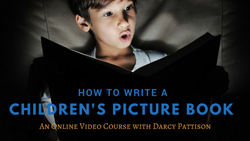
The post Finding Time to Write appeared first on Fiction Notes.
I have a young friend who at 16 has written two novels. Amazing.
She’s worked hard on them, writing non-stop.
Some days, I envied her because (well everyone envies a 16-year-olds’ health!) her life isn’t cluttered up with things. She could choose to write because there were few demands on her time.
Recently, though, she started a part-time job at a burger joint.
It’s her junior years, so school is getting busier and busier.
She asked me how I find time to write.
Finding Time to Write – Hitting a Moving Target
This is a question whose answer changes constantly. It think that’s important to remember, that as your life changes, you must find a new answer to this question.
When I first started writing, I had four children underfoot. To remind myself to write every day, I carried an ink pen in my jeans pocket. One day, that ink pen leaked and permanently stained the jeans. It’s a stain that reminded me on other days to write.
Now, my life is full of other problems. As a publishing company, there’s advertising, accounting, new book covers, and so many other tasks that consume my day. And in the midst of it, I need to find time to write.
Where? How?
Right now, it works better to schedule a block of days for projects. January/February were taken up by creating a video course about writing picture books (More about that in a future post). But March will be revising a fantasy novel. In the midst of everything else–because all the publishing tasks never stop–I work steadily on the project-of-the-month.
Someone once said: In the short run, I get less done than I expect; but in the long run, I get more done.
That’s my motto these days. Interruptions take me away from the writing. But by consistently coming back to it, I get lots done. Some friends say that I’m very prolific. I don’t think so. I just think that I’m consistent in reaching toward a goal.
OK. I’ll do accounting. But then, I’ll write for 30 minutes.
OK. I’ll proof that cover. But then, I’ll edit what I wrote for 10 minutes.
OK. I’ll create a couple ads. But then, I’ll brainstorm the next chapter for 15 minutes.
Those kids trained me to chunk a task into small sections and to concentrate on just that one segment next. When that’s done, the next segment is naturally apparent and I plan when I can do that one.
In the short run, it looks like I’m going nowhere fast.
In the long run, my writing gets done.
And so can yours.
The post Finding Time to Write appeared first on Fiction Notes.
NOW AVAILABLE!
a href="https://mimshouse.teachable.com/p/how...
February 12, 2018
Open with a Scene
NOW AVAILABLE!
The post Open with a Scene appeared first on Fiction Notes.
I’m judging a contest for a state award’s program and I’m struck again by stories that open with a scene. Reading through a dozen manuscripts at a time, you get an overview of what works and what doesn’t.
Start Your Novel: Six Winning Steps Toward a Compelling Opening Line, Scene and Chapter
Price: $9.99
I’ve written a lot about the opening of a story here (the most popular post on this blog) and here (links to many other articles). I’ve even written a book about starting your novel. This time, I think I’ll talk about how things go wrong.
How Story Openings Go Wrong
Ramble. The character is usually first person and just rambles along about something. I know that this is supposed to let me into the character’s mind, and sometimes, it does. But I’ve no compelling reason to care. Why is this important NOW?
I Am. These stories open with a list of character qualities, often apologizing for this or that, or going into long-winded details. Again, why should the reader care NOW?
Strange Voice and POV. Some stories try a sort of prologue where the opening chapter is omniscient or 3rd person. The next chapter settles into a first person. That opening chapter sets up a promise to the reader and the next chapter breaks it. Sometimes, the odd choice of POV is even a put off. For example, the story might read: “One might think that this happens often.” Instead, of philosophizing and talking to the reader, a great story starts with the story.
2nd Paragraph Flashback. This one is particularly frustrating. Often I read a great first paragraph that sets the scene, sets up a problem and grabs my interest. However, the next paragraph is a flashback that tries to explain everything. No. You lost me. Stay in the scene. If that information is crucial to the scene (and usually it isn’t) then weave it into the story in drips. Just give me the information I MUST have to understand the NOW of the story. Literary agent and story coach Donald Maass is famous for saying no flashbacks until after page 100. I agree.
Open with a Scene
-22%
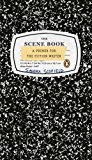
The Scene Book: A Primer for the Fiction Writer
Price: $13.25
Was: $17.00
Instead, open your story with a scene. A scene is a connected string of events where something happens. The character has a goal: they want something. Obstacles keep the character from getting that something. Usually there’s what Sandra Scofield calls a “pivot moment” where the dynamics of the scene change in some way. Finally, there’s a resolution. The character either gets what they want, or they don’t. Positive or negative, the resolution thrusts the character into the next scene.
Stories that open with a scene put the reader into the moment. You live and breathe as the character does. If the character longs for a quiet moment then the reader longs for that quiet moment. The emotional impact of a scene pulls the reader along.
Please, if you’re writing a novel, open with a scene.
The post Open with a Scene appeared first on Fiction Notes.
Releasing on July 11, 2017 - JUST 3 Weeks Away!
I'm looking for a few people to review my new middle grade, science fiction novel.
If you have interest and time, you can download a free copy here.
Download a Review Copy
February 6, 2018
How to Format Picture Books for Kindle and ePub3
NOW AVAILABLE!
The post How to Format Picture Books for Kindle and ePub3 appeared first on Fiction Notes.
As an indie publisher, I format picture books for Kindle (mobi) and ePub3 ebooks for Apple, Kobo, PublishDrive, Follett, Mackin and Permabound. I distribute directly to every market that I can.
Amazon’s Kindle is a major market, and I’m glad to have books there. But there’s a big problem: my profit is being eaten up with Amazon’s delivery fees.
In a recent month, I calculated about 20-25% of the gross receipts for my ebooks went to delivery fees, leaving me only 45-50% profit. Amazon, of course, took the other 30% .
20-25% in delivery fees! That’s outrageous! The culprit is the file size of a children’s full color illustrated picture book. Those color illustrations take extra file space. But surely there were ways to reduce the file size. I searched and found nothing.
I’ve always known this is a problem, but there were so many other things to worry about that I’ve put this off. With two new picture books coming out in the spring, though, I decided to look at the issue closely so I can maximize profits. This will be a detailed look at dealing with an children’s book indie publishing problem!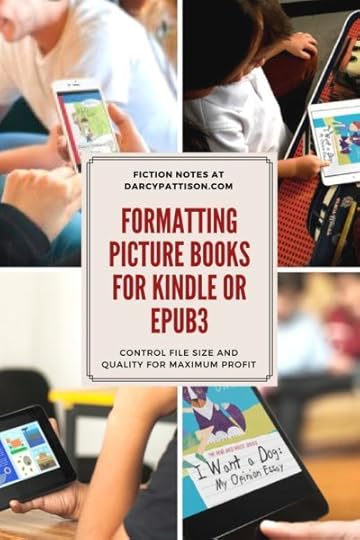
Biggest Problem: Amazon’s Download Fees
Amazon is the only ebook provider who charges download fees. For novels, it’s minimal because rarely does a novel file reach over 1 MB. But for full-color illustrated picture books, it’s a huge problem because it’s not unusual to have an 8MB file. Amazon gives you two choices of royalty profits, either 35% with no download fees, or 70% with download fees.
I want 70% royalties, of course, to maximize my profits. But that means I must control those download fees. Amazon will take 30%. How much goes back to Amazon in download fees? It depends on the file size, and varies by country. For now, I’ll concentrate on US fees of $0.15/MB. Here’s a table of what that means for different file sizes and at different price points.
File size
Delivery Cost@$0.15/MB
@2.99 Download fees
@3.99 Download fees
@4.99 Download fees
8MB
$1.20
40%
30%
24%
7MB
$1.05
35%
26%
21%
6MB
$0.90
30%
22.5%
18%
5MB
$0.75
25%
18.8%
15%
4MB
$0.60
20%
15%
12%
3MB
$0.45
15%
11.3%
9%
2MB
$0.30
10%
7.5%
6%
1MB
$0.15
5%
3.75%
3%
If your ebook file size is 8MB and you price at $2.99, Amazon gets 30%, download fees are 40%, and that leaves you with 30% profit. You should take the 35% royalty because you’ll make 5% more!
As the file size goes down, the percentage of profits rise, but the download fees are still hefty. What if I could reformat my 6-8MB files, and get them closer to 2MB?
For a 2MB ebook at $2.99, download fees are 10%, Amazon takes 30%, and that leaves 60% profit. That’s double the profit than for an 8MB ebook.
A second problem: Keeping the children’s picture book fixed format ebook high quality.
The reason the files are so big, presumably, is that you need a high-quality image. I took a deep dive into image quality in this process and hope I can explain some of it for you.
Kindle Guidelines for Images
The Amazon Kindle publishing Guidelines, version 2018.1 has recommendations for images:
1) Image resolution.
You should always use a 300dpi resolution.
However, dpi is dots per inch, a measurement for print only; ppi is pixels per inch, a measurement for screens only.
Pictures on Kindle: Self Publishing Your Kindle Book with Photos, Art, or Graphics, or Tips on Formatting Your Ebook's Images to Make Them Look Great (Kindle Publishing)
Price: Check on Amazon
Really? You should always use 300 dpi?
In his book, Pictures on Kindle, Aaron Shepard correctly point out,
“. . . the Kindle cares nothing about a picture’s resolution. The Kindle cares only about pixel dimension. (This is despite Amazon’s own confusing recommendation to make pictures 300 dpi to “future-proof” them. What Amazon meant to say was that a picture should have enough pixels to display at the desired size on a hypothetical future screen with a resolution of 300 ppi.)”
In other words, the dpi measurement is useless for online displays. Instead, you should care about the overall pixel size. In other words, if you have an image that is 100px x 100 px, it could stretch to 1000px x 1000px, but then the pixels would be large and stretched out. Those large pixels show up as you view it creating a blurry image.
Notice, pixels per inch (ppi) isn’t the same thing as file size. MB means a million bytes of information. MP (Megapixel) means how many millions of pixels are in the file. They measure different things!
A Kindle fire’s largest screen is 1600 x 2560 pixels or about 4MPixels. That’s the maximum size needed.
However, the Amazon guidelines also tell us how many MP are required for a full size image (after you take out the margins, page numbers and so on), which they say is 4″ x 6″. It should measure 1200px x 1800px for 2.16MPixels. You get that number by multiplying the width by the height, and it has nothing to do with 300 dpi!
My first hint on lowering file sizes is to ignore the dpi of your images and focus on the total MPixels.
Lest you get worried, their guidelines say, “Amazon strongly recommends images meet a minimum of 300 ppi. Any images below 72 ppi will cause the book to fail conversion.” In other words, the range of acceptable is 72-300ppi.
2) Photo Quality. A second variable to discuss is image quality.
When you export from Indesign, or use Photoshop to resize an image, you can usually choose a quality setting. Adobe software had four pre-set choices: low, med, high, max.
Low – quality score of 10Q
Med – quality score of 30Q
High – quality score of 60Q
Max – quality score of 100Q
Old KDP guidelines recommend a quality score of 40, so the presets didn’t fit, forcing you to choose between Medium and High quality. Fortunately, in Photoshop, you can set this manually (more later). The 2018 Kindle standards recommend a high quality score. What they are actually asking for is images that will display well on the newer high-definition screens.
What does the quality score mean?
The quality score means that an algorithm is used to sample adjacent pixels to decide what color to show in any given pixel. When it samples fewer pixels, the quality score goes down. When it samples more pixels, the quality score goes up. Low quality images will often show pixelation, which means you’ll see the square pixels and the image is fuzzy.
Quality changes drastically affect file sizes.
If I have an original file at 300 dpi that is 6.4MB at Max Quality, then what happens to file size as the quality score changes? (Remember, this is file size, not MP. I’m worried about this because Amazon charges download fees based on file size.)
High – 2MB
Med – 652 KB
Low – 196 KB
This means there are two variables that can help us get to the right size image: pixel dimensions and quality score. By using these two, we can reduce the file sizes drastically, while keeping an eye on quality.
Kindle Software – KindleGen Rules
There’s a final variable, that I didn’t consider at first. I’ve used R.Scot John’s amazing ebook tutorials for a long time to format ebooks. eBooks that I’ve hand-coded with his methods work well for ibook, Nook and generic ebooks to be used anywhere. If you’re one of those people who want to know everything the behind-the-scenes, then his tutorials are fantastic and will give you a deep look at the structure of ebooks. I highly recommend them. Please go read them because you’ll learn so much about creating an ebook.
However, when I created a Kindle ebook using his methods, the files didn’t look quite right. (It’s probably my fault, not Scot’s!) The real problem is getting the landscape ebooks with double-page spreads to display correctly. I couldn’t get it right.
I turned to Amazon’s Kindle Kids Book Creator (KKBC) program. It’s a free download and is designed to easily create Kindle compliant ebooks in the landscape double-page spread format. I’ve used it for several years, but some of my biggest file size ebooks came out of KKBC. I didn’t think I’d use it in this search for small file size/high quality ebooks.
But I’m game. I tried everything from hand-coding with Scot’s templates to the KKBC.
Remember when I said that KindleGen always resizes images. The KKBC incorporates the KindleGen processor to turn the files into Kindles. The KKBC output files include the raw files, which I had ignored up to now. However, I decided to look inside and see what the KindleGen was doing when it resized my images. Inside the HTML folder, I was surprised to see a Scaled-Images folder had been added. Each image was reprocessed as a “thumb” image. When I looked at those images, they were all 1000 px wide, at 72 dpi.
I believe the scaled images are what Kindle actually delivers to a Kindle to display. Amazon wants the source files, though, at high quality so it can reformat ebooks to a higher quality when needed in the future. They are future-proofing their ebook business by requiring larger files.
But I can’t afford to help them future proof the business when they charge $0.15/MB download fees! If I was right and the scaled images were all that was needed, could I match the sizes of those images and thus control my file size?
That meant that instead of 1280 px wide, I might as well format my own images at 1000px wide (because KindleGen rules: it WILL process the images whether I like it or not – nothing gets on the Kindle store unless it’s gone through a KindleGen processing), and control the quality at the same time.
This combination works amazingly well. I exported from Indesign at 300 dpi/Max quality because Indesign’s controls don’t let you do it with any better control. Then, in Photoshop, I converted the images to 1000px high at 40Quality. The file sizes were tiny. To reduce them even further, I used ImageOptim, which strips out any extra metadata stored in the image and results in about 10-20% reduction in file size.
What would happen when I used those images in the KKBC program?
The KindleGen still generated the scaled “thumb” images, but they were exactly the size of my images. I had gotten it right.
My 34-page picture book (why is it 34 pages?) with correctly sized images came in at 3.6MB, far less than the 7.8MB of previous versions of this title.
Tip: Check the file size of the folder that holds your ebook images. Your ebook will be about that size because the images are the largest files in the ebook. Compared to them, the rest is nothing!
It seems that Kindle keeps the larger images as source images in the files, along with the smaller images that are actually delivered to the Kindle. By matching what the KindleGen would do anyway, it meant those duplicate files didn’t need to be included in the final ebook. That file reduction would save me lots of money!
But I made one more attempt at even smaller file sizes. My 34-pages were laid out as double page spreads. The KKBC uses CSS (Cascading Style Sheets) to force a Kindle to display the book with side-by-side images in landscape orientation. What if I created the landscape images by pre-combining the two images? Then, there would only be 17 images, instead of 34. I’d still process them for 1000px high, and a 40 Quality.
I went back to Indesign, regenerated the images as spreads instead of pages, and processed them in Photoshop.
The resulting ebook is only 1.46MB. At $0.15 download fees, delivery fees dropped from $1.18/book to only $0.36/book (about 12% of overall cost at $2.99), a savings of $0.82/book sold (28% increase in profits). That money would go to me, instead of Amazon!
In other words, I disagree with Amazon’s suggestion to always provide the highest quality images. The KindleGen will reformat to standards that they need, but it will keep the originals at the expense of file size. It’s costing me too much money to do that! Instead, I’ll keep an eye on the new Kindles when they become available. When higher definition screens become available, I’ll consider reformatting at a higher pixel size. But until then, I’ll format exactly the same as the KindleGen and save file size – and make more money!
Objections:
1) Quality. Some people don’t like the 40Q because it appears pixelated. I find that it varies widely. If your image quality is poor, process the individual files at a higher level until you find the quality that you’re comfortable with. (Always start reprocessing with the original file!) Be aware that the quality shown on the display in KKBC is NOT what you’ll get on the final Kindle version. The KKBC display isn’t an accurate depiction of quality.
2) Jpgs. Some people format their books with png because they want transparencies and don’t want to flatten to a jpg format. Unfortunately, KindleGen rules. It will convert your files to jpgs whether you like it or not. You might as well do the conversion yourself so you have control over it. Even if you export as an ePub3, and then run the file through KindleGen, it will still convert the files to jpegs; but it might have problems doing it. You can’t avoid the jpgs. So control them.
3) Preview. To preview what a Kindle ebook looks like, KDP recommends using their free program, Kindle Previewer. However, some people like to side-load the ebook onto their ipad and check it there. Unfortunately, that’s an iffy thing to rely on because Kindle doesn’t keep its Mac-app updated. A side-loaded K8 file (the file type exported by KKBC) will not display correctly. The best way to make sure your files are compatible is to upload it to Kindle and then check the book’s description page. The image below shows which devices of my eBook is compatible with. I Want a Dog.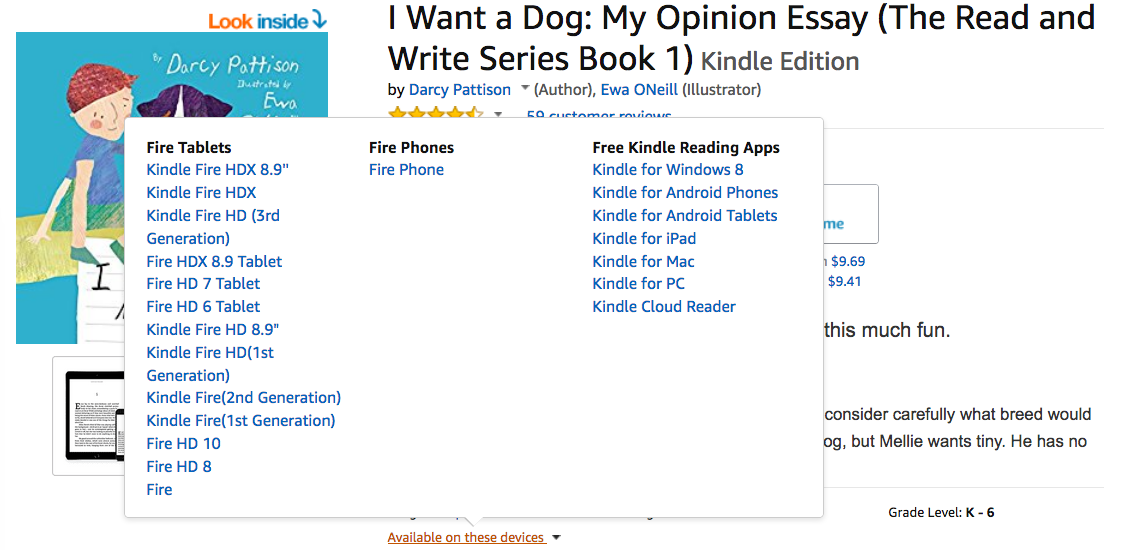
Format Picture Books for Kindle: Fixed Format
Complicated? Figuring it out was complicated, yes. But the workflow is pretty simple.
WARNING: I’ll be talking about using professional software, including Adobe Indesign for layout of books, and Adobe Photoshop for processing images. I do not use Word, online programs such as Canva, or other programs because they do not let you control the images. If you hire someone to do your layout/design and ebook conversion, you might want to refer them to this post to make sure you get the most professional ebooks at the lowest file size.
I format my books in Adobe Indesign, and they are generally meant for an 8.5” x 8.5” print book. Printers require pdf files; ebooks require jpgs.
1) Click on File/Export. At the bottom of the screen, use the dropdown menu to choose Jpegs. I will convert the files in Photoshop for better control, so I export at Maximum Quality, but I take out the color profile because it just adds to the size. You can either export at 300 dpi and change it to 72 dpi in Photoshop, or do it now. It doesn’t matter which you choose. You’ll need to create a folder for the images. I just name it the book title (rowdy) and it numbers the pages in order as it exports.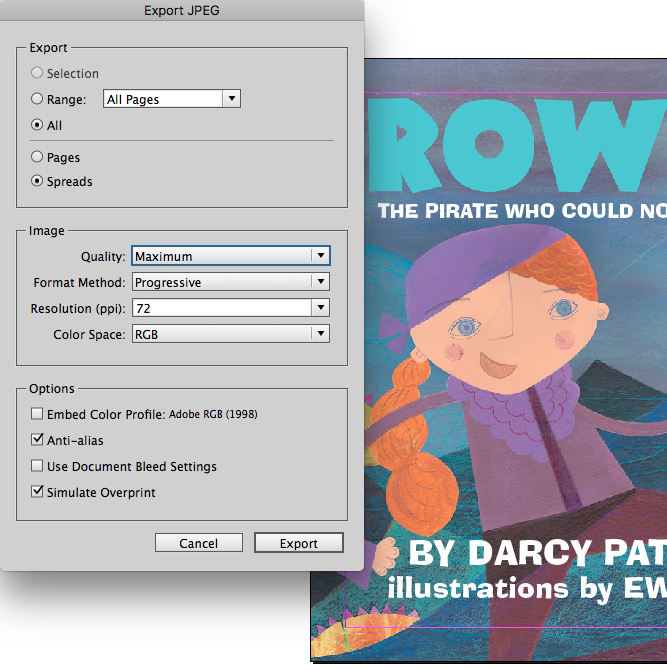
2) Convert the images in Photoshop Elements. Choose File/Process Mulitple files.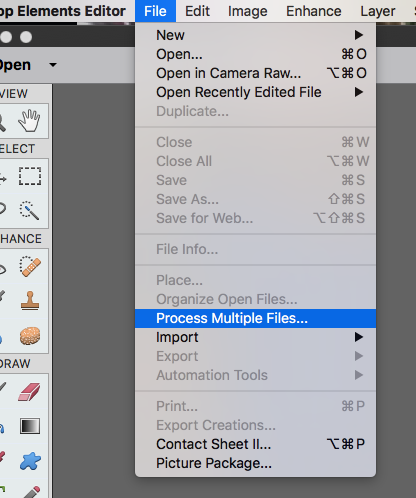
Here’s the settings I use. I overwrite the files (I can always generate them later if needed) so I leave the source file and destination files the same.
At the bottom, I choose resize images to 1000 px wide and 72 dpi with a JPEG MediumQuality. If you process individual files, you can choose exact quality; the process multiple files only lets you choose the standard settings of Low, Medium, High, Maximum.
3) Use the ImageOptim program to further optimize the images.
4) Open the Kindle Kids Creator Program and create the ebook using the processed images. If you want, add the text popups. Generate the Kindle Files to upload!
That’s it. We controlled the image size and quality to create fixed format picture books. They will likely be under 2MB in file size, or at least much smaller than you started with.
Format Picture Books for ePub3: Fixed Format eBook Kobo, Apple, GooglePlay and Other Distributors
The problem, of course, is that Kindle is a proprietary format and you can’t upload Kindle files to other platforms such as Kobo, Apple, or Googleplay. For that, you need an ePub3.
Up until early 2018, I was generating these by using the processed images and following R.Scot John’s amazing ebook tutorials that I mentioned earlier. It works well. However, it means you’ve got to look inside the ebook and be careful about the coding. When I created epubs this way, I would always pay for a month on ebookflightdeck to validate files. The program will identify any validation problems and tell you exactly which file-name/line-number has a problem. By specifying the exact location, it allows me to correct errors in 5-10 minutes.
However, in early 2018, I discovered CircularFlow, a program that is an add-on to Adobe’s Indesign. CircularFlo is the dream program that I’ve always wanted to create ebooks. The only problem with it is that they charge $100 per book produced. There’s currently a 50% discount, which makes it $50 for now. I’ll be using it, though, because it will save me lots of time, and time is money.
1) Download the Circular Flo program. It will generate only a 10-page watermarked ebook until you pay for a book credit. Play around with it for a while until you’re sure it’s for you.
2) Open your Indesign file for your ebook. SAVEAS a new file. The Circular Flo program WILL change your file and it’s not reversible. If you neglect this step, you’ll be sorry.
3) Create Spreads. From the top navigation, choose Tools/Document Tools. Remember, that our file sizes were smaller when we used spreads? Choose “Convert DPS (Double Page spreads) to single page.” This cannot be undone! Be sure you’re using a copy of the original file.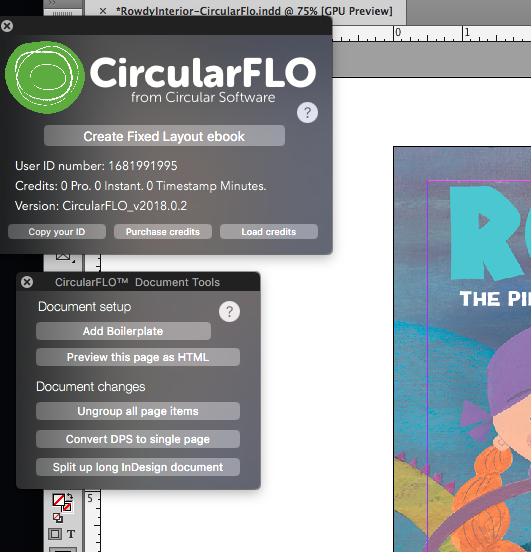
3) Control the Output. Now, click “Add a Boilerplate.” This is where you can really control the epub! Be careful to ONLY DO THIS to a copy of the original file.

Here’s what you can do with the BoilerPlate. For some of this, I’ll refer you to CircularFlo’s UserGuide.
Choose the type of files to be created, including Kindle (Amazon KF8), lock orientation (force the book to be in landscape), and where it finds the cover.
Choose the Zoom method.
Add metadata. Add any metadata you want to be included in the book. Here’s a list of possibile metadata terms.
JPEG Export Options. These are the controls we want to manage the file size! Choose Medium Quality (or High Quality, if you prefer). You must actually erase the options and type in medium. (Be sure you’ve chosen the Indesign Text Tool so you can change this.) Next, remember when we said the maximum MPixel size needed was 2.16 MP. Change the MPixels per page to 2.16MP
I leave everything else, as is, but change what you like.
4) On the main tool, Click “Create Fixed Layout ebook.” It will think for a while, and then ask how to create the cover. You can choose to add a jpeg file, or use the first page. It will continue to generate and you’ve got a fully validated ePub3 file.
Note: CircularFlo creates ePub3 files, which means you can also add audio and sync it, so the words are highlighted as the audio progresses. These books cost more to produce, but it’s a powerful tool should you need it.
When I first created epub3 files with CircularFlo, I took the files to ebookflightdeck.com and validated them there. Everything validated fine! I now skip that step and use their built in validator. The files are slightly larger than if I had hand-coded the ebooks. For example, one picture book eBook started at 8MB. The CircularFlo ebook (ePUb) was 6 MB, and I could probably get close to 2MB by hand-coding, but it would take more time. Amazon is the only distributor who charges ebook download fees, so this will be fine for others. I like to use the smaller files when possible because in the international market, file size might matter. But in the end, I have to limit the time spent on ebook production. And you’ll have to find the work flow that makes sense for you.
Since creating new Kindle and ePub files by controlling image size and quality, my profits have increased because I’m not giving up 20-25% of my income for download fees. When I view the files on Kindle and ebook reader devices, they look great. I’ve not sacrificed quality and I’ve saved by reducing expenses.
The post How to Format Picture Books for Kindle and ePub3 appeared first on Fiction Notes.
Releasing on July 11, 2017 - JUST 3 Weeks Away!
I'm looking for a few people to review my new middle grade, science fiction novel.
If you have interest and time, you can download a free copy here.
Download a Review Copy
January 24, 2018
eBook Distribution: Wide or Exclusive for Children’s and YA authors?
NOW AVAILABLE!
The post eBook Distribution: Wide or Exclusive for Children’s and YA authors? appeared first on Fiction Notes.
In the indie book world, the debate still rages over ebook distribution: should I go wide or go exclusive with KU? KU is the Kindle Select program from Amazon which allows access to certain marketing tools in return for exclusivity.
Should Children/YA Authors Go Wide or Exclusive with KU?
I’ve been studying the issue and David Gaughran has interesting things to say. In his post, A Tale of Two Marketing Systems, he emphasizes that the two approaches are equally valid, but take different marketing systems. His 3rd edition of his classic book, Let’s Get Digital comes out later this month.
Let's Get Digital: How To Self-Publish, And Why You Should (Third Edition) (Let's Get Publishing Book 1)
Price: Check on Amazon
In brief, Gaughran argues that the most important thing Amazon has done is create a new business model. They make sure that they display the books that are most likely to be bought. In traditional bookstores, publishers would pay for shelf space and they were guaranteed the prime spots in a store: front of the store, end caps, and so on. The price to enter such an advertising system was too high for most indie authors. But Amazon, Gaughran says, is neutral toward publishers; they don’t care if a book is self-published or from a traditional publisher. What Amazon prioritizes is a sale. It doesn’t have to be a big sale, because a $0.99 sale is fine.
In that neutral environment, then, smart and nimble self-publishers have thrived because they’ve figured out how to play within Amazon’s algorithms.
Going wide versus going exclusive is more about marketing. Wide means a slower growth with fewer spikes; it means developing your mailing list and reaching out wide. Going KU/exclusive means learning Amazon’s marketing engine and playing it to the hilt.
What business model? B2B or B2C
In the context of thinking about all of this, I’ve also had a shift of understanding. What people say about self-publishing is that authors can finally take their books direct to the readers.
Not exactly.
B2B means a business is selling to another business. B2C means that a business is selling straight to customers.
Self-publishers are actually B2B, although some authors have a strong B2C component. Most authors are NOT selling directly to their customers. They don’t sell in person or even through their websites. Instead, their books are available at Amazon and possibly other online bookstores. These authors must play by the retailer’s rules, and Amazon has strict rules!
Some authors, for sure, develop mailing lists that send sales to the retailers. I’ve heard of authors with 50,000+ people on a mailing list. When they send out a message, they can generate huge sales. Despite this strong B2C component, they are still a B2B business because they aren’t selling directly to the reader, but are instead, sending readers to the retailers.
Why does that matter? Because the two business strategies are different. A B2B business typically develops close ties with key personnel at the other company. Do you have a Kindle rep? Most of us don’t, and most of us will never generate enough sales to get one.
If you’re a B2C business, then you concentrate on pleasing the customer. You know who your customers are (or you should!). When authors drag their feet about setting up a mailing list, they are failing at B2C-101. They aren’t serious about going “direct to readers.” If you want to sell directly to customers, then you should set up a website to sell books. At the very least, you need a strong mailing list strategy.
Success in going wide seems to come with that strong B2C component. Those authors are willing to put to develop strategies for finding readers, getting them on a newsletter list, and then working that connect with frequent, fun communications.
Success in going exclusive depends on a detailed analysis of Amazon’s business practices, then aligning your launch and marketing strategies closely with Amazon’s policies.
What about Education Distributors?
For children’s and YA/teen authors, however, there’s another option and that’s educational distributors like Follett and Mackin (Get a list of four educational distributors, with full contact info). These companies focus on meeting the needs of schools and libraries. Where will school libraries buy your book? Not from Amazon, but from the educational distributors. If you approach these distributors, you will definitely be using a B2B model.
For several years, I’ve had my books listed with the educational distributors and sales dribbled in. This year, with in my 2018 Mims House catalog, I decided to take a closer look at working with them.
All of the above discussion has helped me understand that this is a B2B relationship. After a couple years with no specific rep, I asked for one and will work closer with him on making sure my books are noticed and sold. Like the traditional bookstore models, the educational distributors merchandise books. That means they select which books to feature and where they’ll be featured.
Advertising with educational distributors is a new venture for me this year. The entry bar is expensive, but I’m at a level where it makes sense to try. Ask me this time next year if it’s been profitable!
One thing this also means is that KU is off the table for me. If I’m all in with educational distributors–I also upload ebooks and audio books (where possible) into their systems–then going exclusive with KU doesn’t make sense. I’m hoping that I’m giving up short term profit for long term profit and a presence in the school library market.
Gaughran is helpful here, too, because I can clearly say that I’m not going to go exclusive with KU. One takeaway for me has been to commit. At the end of this discussion , you must either commit TO THE READERS OF KU, or commit TO THE WIDE READERS. The worst thing to do is to try to flip back and forth, because you’ll lose traction in both markets.
I’m firmly committed as wide. I’m looking more closely at the wide marketing strategies Gaughran suggests in his article: steady drip marketing; courting readers in other countries; first-in-series free ; focus on mailing list and segmenting the mailing list; advertising such as AMS (Amazon) and Bookbub, getting followers on Bookbub (FOLLOW ME ON BOOKBUB!), getting followers on Amazon (FOLLOW ME ON AMAZON!) and so on.
The discussion of wide v. exclusive has been helpful for me. I understand Amazon’s policies better, I’ve a clearer idea of where I want to focus time/energy, and I’ve added the spin that children/YA author’s need of educational distributors. I’m happy to be wide!
The post eBook Distribution: Wide or Exclusive for Children’s and YA authors? appeared first on Fiction Notes.
Releasing on July 11, 2017 - JUST 3 Weeks Away!
I'm looking for a few people to review my new middle grade, science fiction novel.
If you have interest and time, you can download a free copy here.
Download a Review Copy
January 15, 2018
Plotting: The Messy Doorway to Story
NOW AVAILABLE!
The post Plotting: The Messy Doorway to Story appeared first on Fiction Notes.
I’m plotting a new trilogy of novels, and as usual, it’s hard. I keep thinking that someday I’ll figure out THE way to plot “correctly.”
So far, that hasn’t happened.
Every time I start again, the process is unclear, messy, frustrating, and likely to fail at any moment. Yet, somehow, I muddle through to a story that pleases me.
This time is no different. Here are some things I’ve been doing that are slightly different, though.
Plot: Updated Scrivener Allows Better Visualization
I’ve been using Scrivener as my main writing software for novels for several years. The 2017 iOS update has some interesting features that affect the possibilities for plotting. You can read about many upgrades on their blog, but I’m particularly interested in changed to the Project Notes. This allows me to directly link chapters in a notes. So I could have a text file for the Main Character and in the project notes embed those chapters written in his POV.
Here’s a screen shot. On the left is the binder with the organization structure. You can see that I’m currently on the MENTOR folder. On the right are listed the chapters where the Mentor will have an important role. I can click on those to reveal them in the lower right. It allows me to track things across the novel, which is especially helpful in this planning stage.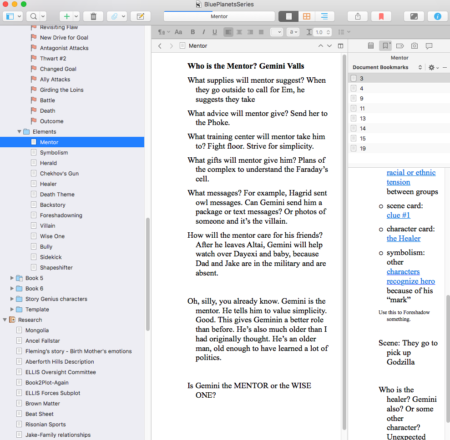
 Scrivener for Mac – affiliate linkScrivener for Windows – affiliate link
Plot: Master Novel Outline
I’m also fascinated by The Better Novel Project website, which proposes a master outline for writing a novel. Her long series of posts and free outlines are fascinating because they explain what sorts of things will happen in any stage of the character’s journey.
Some people might rigidly follow a master outline and that would be wrong. Instead, it’s a general guideline and I find it to be a good check on my plot. For example, I might think: Oops, I forgot that typically a mentor enters the picture in Act 1. Could a mentor work in this story? What role might s/he play and how would that change this story for the better? It’s a prompt that jogs my memory because a novel is such a complex thing to hold in your mind all at once.
Plot: Story Genius Inspired Back Story
A final new thing I’m thinking about this time around is the character’s backstory. A popular book last year was Story Genius.
-32%
Story Genius: How to Use Brain Science to Go Beyond Outlining and Write a Riveting Novel (Before You Waste Three Years Writing 327 Pages That Go Nowhere)
Price: $10.87
Was: $15.99
It was a hit because it discussed story plotting and structure from the POV of the character growth. I especially like the way it pulls the character’s backstory into the current story. It asks you to identify turning points in their life. In other words, why are they they person they are? What happened to them to create the paranoia, the joy, or the hang-ups. When I’ve worked with the idea, I’ve keyed in on finding an “origin story,” which is the scene that pinpoints the origin of the false belief that is running the story.
For example, in my novel PILGRIMS
Pilgrims (The Blue Planets World) (Volume 3)
Price: $9.99
, Utz Seehafer and his father have problems relating. Utz falsely believes that his father doesn’t love him. Where did that start? When Utz’s twin brother was killed in an underground accident. I wrote that scene quickly and intuitively and it worked. Where do you put flashbacks? As I’ve written about before, where it will have the most emotional weight.
However, as important as these scenes have been in developing stories, it adds another layer of complexity to my plotting. Sigh. I’m gaining something in a deeper story, but it’s a messier project to plot.
How is your plotting going this year? Any new tools or ideas?
The post Plotting: The Messy Doorway to Story appeared first on Fiction Notes.
Releasing on July 11, 2017 - JUST 3 Weeks Away!
I'm looking for a few people to review my new middle grade, science fiction novel.
If you have interest and time, you can download a free copy here.
Download a Review Copy
January 9, 2018
Catalogs: A Marketing Tool for Indie Publishers
NOW AVAILABLE!
The post Catalogs: A Marketing Tool for Indie Publishers appeared first on Fiction Notes.
I’ve just finalized my 2018 Mims House catalog. Catalogs are great marketing tools for indie publishers. You may think that only big publishers need these. But I’ve found them great tools to spread the word about my books.
Download Mims House 2018 Catalog
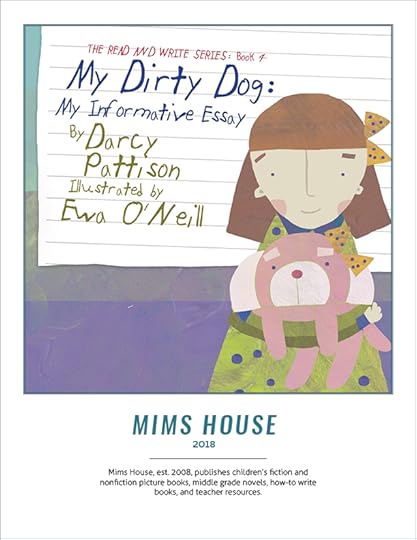
Click/Right SAVEAS to download the 2018 catalog.
Download ONLY the 2018 Mims House Ordering Form.
Even if you only have a couple books, I’d urge you to create your own catalog because they are so useful for marketing. Here’s examples:
Note: I don’t print multiple copies to mail out. Instead, I print these when needed. I have two versions, one which is high quality for printing, and one lower quality with a smaller file size that makes it perfect for mailing. If I ever need it, I can print high quality glossy catalogs at a local printer.
Conferences. I print the entire catalog and carry it to conferences to hand out. I may be speaking about one particular book, but I want the audience to know that I’ve got a range of books. Particularly helpful is the ordering form. Librarians and teachers grab them up.
Educational distributors. My books are distributed through Follett School Solutions, Mackin, Permabound, Child’s Plus, and other educational distributors. It’s essential to let those partners know what books are coming out. That means a catalog.
Website links. ON the Librarians page of my website, I offer the full catalog and the ordering form as downloads. They are a popular download.
For myself. The catalog is also useful for myself! When I need a quick memory jog of the pricing of a particular book, I pull out the catalog. I also keep a metadata Excel sheet, but this is quicker and more visual. I don’t link to the old catalogs online, but for myself, it’s also a milestone every year to compare the previous year’s catalogs and see progress.
Creating a Catalog
So, how do you create a catalog. First, you can scope out catalogs from your favorite publishers and get ideas to copy. Look at the type of copy they use, what metadata information is included, special offers, and so on. When you have ideas of how you want to approach it, then you’re faced with layout and design.
I make it simple for myself by going over to the Envato Market place, especially GraphicRiver.net and search for catalog or brochure templates. For under $20, you can usually find a great looking template that fits your needs. Here’s the template for my current catalog. You sorta need an imagination to see your books in the catalog instead of fashion.
I’ve also used their templates for teacher’s guides, flyers and other marketing material. You can subscribe monthly, but I usually just buy credits when I need them.
Just like your books, be sure to proofread your catalog!
Do you create a yearly or seasonal catalog? How do you use it?
The post Catalogs: A Marketing Tool for Indie Publishers appeared first on Fiction Notes.
Releasing on July 11, 2017 - JUST 3 Weeks Away!
I'm looking for a few people to review my new middle grade, science fiction novel.
If you have interest and time, you can download a free copy here.
Download a Review Copy
January 8, 2018
eBooks: The backbone of self-publishing
NOW AVAILABLE!
The post eBooks: The backbone of self-publishing appeared first on Fiction Notes.
The digital revolution and the rise of self-publishing or indie publishing has been fueled by two things: ebooks and print-on-demand (POD) books. eBooks are inexpensive and easy to distribute. POD books remove the need for expensive up-front costs of printing thousands of books and then warehousing them. Instead, a book is only printed when there’s an order.
Today, I’ll give a very brief look at ebooks, especially the ebook distributors and software programs for formatting ebooks. If you have questions about POD printing, leave a comment and I’ll address it in a future post.
Where to Distribute eBooks
The problem with publishing an ebook is that there are so many stores, often with proprietary requirements. The Kindle format is a closed system, and files you create for Kindle can’t be used anywhere else. The other formats are more interchangeable: Apple iBooks, Kobo, and Nook. Aggregators are distributors who send your ebooks to many different places; they are popular because you upload one place and the aggregator then sends the book everywhere else for you. It gives you a one-stop work flow and an aggregate dashboard to monitor sales. Of course, the aggregator takes a fee for this service, but some people find it worth it. Aggregators also take on the task of making sure your files are compliant for each store. Popular aggregators include Draft2Digital, PublishDrive, Smashwords, and StreetLib.
Personally, I upload direct to Kindle, Nook, iBooks, Kobo, and use PublishDrive as my main aggregator for other bookstores including GooglePlay (Android. Closed to new author-publishers, so the only way in is through an aggregator.) There are many pros and cons for going direct, choosing an aggregator, and which combination is right for your business. If there’s interest, I can do a post on that–leave a comment. But for now, just know that you’ll want to investigate the range of possibilities. Also, nothing is set in stone. You can try one set of distributors for a time period and change it next month if you like.
Formatting
Formatting ebooks is quite simple with the new tools available. The easiest is Vellum, a program that has a WYSIWYG (What you see is what you get) interface. You’re not staring at coding, but at the book the way it will appear on most ereaders. Vellum offers a variety of style sheets to choose from. One of the most exciting things about Vellum is that it exports to as many store formats as possible.
You can tell Vellum which stores you’ll distribute to, and it will generate separate folders with the necessary files for that store; it makes uploading to distributors simple. One marketing trick is to place links in the back of your book to your other books or to a newsletter signup. eBook stores will reject your book, though, if you have links to other stores. For example, Kindle only allows Kindle links and links to your website. Vellum automates this for you and when they generate the store-specific files, it will include only allowed links for that store.
Vellum works wonderfully for novels. However, if you publish picture books or even short chapter books with lots of images, it won’t work. The program can handle images, but once you get past a couple, it’s harder to work with.
For short chapter books, I’ve used Jutoh because it allows more control. It gives you access to the coding, so if you like to look under the hood, this is a good program for you. The Help Menu is great. Yesterday, I updated a short chapter book, and when I generated the epub files, there were 13 errors. Jutoh’s help, though, told me what to do for each problem, and I solved all of them in under ten minutes. There was often a link that took me directly to the problem and told me how to solve it. Great in-program help! Jutoh is great for novels, and short chapter books with limited images.
For picture books, come back tomorrow for a post about that.
I need to mention one more program and that’s eBookFlightDeck.com. If you’re formatting anywhere except Vellum, you’ll need to make sure the files are compliant with ebook standards before you upload them anywhere. eBookFlightDeck costs $15/month for 5 ebook files and will tell you exactly where and what is wrong with any files. I love this program! However, I only subscribe a couple times a year for one month only. Most of my books are clumped into spring or fall seasons, so when I’m getting a season’s files ready, I’ll batch the ebook process and spend a month making sure all the files are right.
Marketing eBooks
The biggest question on marketing ebooks is where will you upload and sell your books. Kindle offers the KDP Select program which comes with certain marketing advantages, but requires exclusive distribution. The big debate in self-publishing circles is should you go wide or exclusive. That is, should you put your ebooks into Kindle Select exclusively, or should you distribute everywhere you can. David Gaughran wisely sums up the argument in his article, A Tale of Two Marketing Systems. Go read it and make sure to follow the links to in-depth information on the Kindle Select options.
Once you decide on where you’ll distribute, you’ll also want to think about advertising. These days, it’s hard for books to be “discovered.” Discoverability is an industry-wide concern. Like most businesses, the solution is to advertise. There are many options for that including Facebook ads, Bookbub ads, Amazon Marketing Service ads, and a host of smaller platforms that promote books to their audiences. Each platform could take a separate post, so again, ask questions if you want to know more.
This is a very brief overview of how indie publishers write, format, distribute and sell their books. Tomorrow, I’ll deal with a specific problem: formatting picture books. I’m happy to go into any of these in-depth–leave a comment with questions.
The post eBooks: The backbone of self-publishing appeared first on Fiction Notes.
Releasing on July 11, 2017 - JUST 3 Weeks Away!
I'm looking for a few people to review my new middle grade, science fiction novel.
If you have interest and time, you can download a free copy here.
Download a Review Copy
July 31, 2017
4 Years of Indie Publishing – And a Sabbatical
NOW AVAILABLE!
The post 4 Years of Indie Publishing – And a Sabbatical appeared first on Fiction Notes.
It’s been four years since I started along the exciting path of indie publishing my books. And lots has changed. Here’s the post I did 18 months in.
The first 18 months were spent in learning the technology to actually produce print or ebooks, getting distribution, and starting the marketing journey. Since then, I’ve produced more books; in fact, my publishing company Mims House, now has 35 books in its catalog. We’ve been recognized for excellence several times.
Starred Review in Publisher’s Weekly: Wisdom, the Midway Albatross
2015 NSTA Outstanding Science Trade Book: Abayomi, the Brazilian Puma
2017 NSTA Outstanding Science Trade Book: Nefertiti, the Spidernaut
2017 Fall Junior Library Guild selection: The Nantucket Sea Monster: A Fake News Story
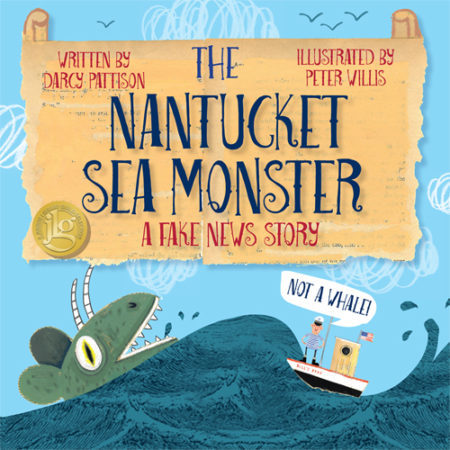
2017 Fall Junior Library Guild selection
As I’ve worked on books, Fiction Notes has fallen by the wayside.. And I think it’s time to move on.
Changing With the Times: Good-bye Fiction Notes
Fiction Notes has been a big part of my life for 8 years. It started slowly and innocently. A friend said, “Just write anything. Just try a blog.”
As I wrote fiction, I posted about my struggles and ways to overcome the writing problems. And it found – you – the audience who reads this blog. It’s been incredible to be a part of YOUR writing process. Thanks for all the emails over the years that a certain post resonated with you that day. It kept me writing.
But I think it’s time to stop writing for Fiction Notes for a while. I’ve done fewer posts this year than ever before, because I was distracted. But also because I feel like I’ve said most of the things I want to about writing. It began to feel very repetitive. I know that the early readers of the blog haven’t read everything; but for me, it was different, like I was writing to get traffic, instead of writing things that I was passionate about. Oh, I’m STILL passionate about my writing! And about teaching!
After 8 years, it’s time to change focus. All the content will remain up.
Who knows? Maybe I just need a short sabbatical and can come back with enthusiasm!
Where to Find Darcy Online
I’ll still be on Twitter @FictionNotes.
Find Darcy on Pinterest.
Mims House
You can buy my books at MimsHouse.com
Or keep up with my books on the Facebook page for Mims House
If you’d like to receive the Mims House newsletter, with behind the scenes info on forthcoming books, fill out the simple form here.
Thanks!
I hope you’ll come along with me on this adventure of putting great books into the hands of readers. But if you’re off on your own journey and need to focus elsewhere — well, it’s been fun!
As always, send me your good news!
The post 4 Years of Indie Publishing – And a Sabbatical appeared first on Fiction Notes.
Releasing on July 11, 2017 - JUST 3 Weeks Away!
I'm looking for a few people to review my new middle grade, science fiction novel.
If you have interest and time, you can download a free copy here.
Download a Review Copy


